User Profile

AUSTXCHICK
Brass Contributor
Joined Jul 30, 2019


User Widgets
Recent Discussions
Conditional formatting for entire row based on data in one cell
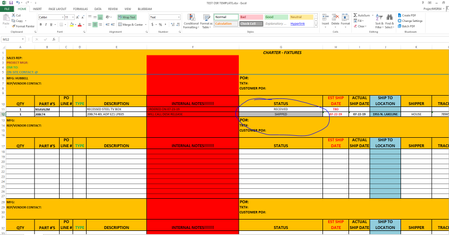
I need all cells in a row to highlight a certain color if the data in one cell contains a specific word. What I specifically want is for an entire row to turn grey if the status cell contains the word "SHIPPED." I know how to make that specific cell highlight the color I want, but not the entire row of the sheet. Thank you for your help!Solved3.7MViews10likes134CommentsRe: Conditional formatting for entire row based on data in one cell
If you would allow me one more question Yury Tokarev - What if, rather than the cell containing a specific word to make the row highlight, just having ANY text typed into the cell will cause the row to highlight? Is there a way to create a rule for that? (It has been brought to my attention that there are occasionally circumstances when something has shipped, but the row shouldn't be highlighted. I want to instead program the rule to highlight when I type in the date it was received or the name of the person who signed for it, because there is no circumstance when that wouldn't necessitate the row being highlighted.) I cannot thank you enough!2.8MViews0likes3CommentsRe: Conditional formatting for entire row based on data in one cell
Thank you for your response SergeiBaklan Sorry I'm a total novice, but when I followed your instructions (I think), it only highlighted the cell that contained the word "shipped" instead of the entire row. How can I make each individual row turn grey when the cell in column G for that row contains the word "shipped?" Thank you so much!2.8MViews1like0Comments
Recent Blog Articles
No content to show