User Profile

ecmillion
Copper Contributor
Joined Jul 26, 2019


User Widgets
Recent Discussions
Re: Public Channel Visibility issues for users
If I understand from the discussion thread, this functionality is known/understood and we can infer that it was designed this way on purpose by Microsoft? Is there any User Voice request to allow administrators to control what shows up there so we can upvote that? I really don't understand the purpose behind requiring search or a join code. It defeats the purpose of having org-wide teams available.2.6KViews0likes0CommentsRe: MS Teams crashes *sometimes* during Video calls/meetings
TIER4TSNo, not at all. For a time I had one affected employee experiencing the crash so consistently I engaged with Microsoft regularly on the issue and it never escalated out of tier 1 support. It was a struggle to even convince them there was an issue needing investigation even after displaying the crash repeatedly with the support tech - It just never escalated and I kept repeating the same demonstrations and log gathering. It was a huge waste of time. I strongly suspect Microsoft is just not supporting/developing to account for some hardware. My most interesting data point was connecting with another enterprise through an employee's spouse, whose company NEVER experienced any Teams crashing org-wide. The employee and their spouse worked from the same network (at home), had the same version of Teams, and had high volume of Teams calls every day - my employee's Teams crashed all the time, their spouse's did not. After connecting with that company's IT department I found out the only notable difference from their org and mine is they have a more modern and higher-end laptop fleet (we both use W10 and Dell laptops) So, throwing money at the problem to upgrade laptops would be one fix... obviously that's not really a solution for those of us with tighter budgets / slower replacement schedules. Completely unrelated to Teams crashing problems, we've noticed that Microsoft isn't developing some Teams features for older hardware. Most recently we discovered the new "background effects" feature requires the AVX2 video extensions, which were introduced in Haswell processors (model is 4000 series). This means Dell Latitude 6330 and earlier laptops don't support it.47KViews0likes3CommentsRe: MS Teams crashes *sometimes* during Video calls/meetings
We've found that the crashes are typically occurring with Windows 7 and seem to be much more stable in Windows 10, even with identical hardware. Beyond this, it looks like Teams pushed an application update that may help alleviate this type of software crashing issue, which we are going to test with next.60KViews0likes0CommentsRe: MS Teams crashes *sometimes* during Video calls/meetings
StevenC365 I've found that many times for these crashes, the call session is less than 30 seconds and the affected user where it crashed has "Data isn't available" for all that user's device system and connectivity areas. So basically it seems like I need to run a report for calls with missing data, then later manually combine with my records for details about their computer. My question now is, how do I get a data export of user session details where one user on the call has "Data isn't available" for all those fields?61KViews0likes0CommentsRe: MS Teams crashes *sometimes* during Video calls/meetings
StevenC365 Not that we've been able to identify so far. There are about 15 different model Dell laptops with a variety of drivers out there. Issue has affected both Windows 7 and Windows 10 on those laptops. Typically only two types of headsets are used, though the issue has affected users that don't use headsets as well. We generally have only one model of webcam deployed, and again the issue has affected users not using an external webcam as well. We use two styles of docking hardware and a variety of dock models and firmware, and the issue has affected users that are not docked at the time of the issue. I've also seen this issue affect users with different versions of MS Teams. Users with half a dozen teams calls/meetings with video daily (like yourself) will not have any issues for a week or two, and then the one day they have issues the circumstances aren't out-of-the-ordinary compared to the other numerous calls they had with no problems. This is probably the most challenging part of troubleshooting this. As you might imagine, the diverse landscape is making it challenging to identify a common thread between users with the issue. We are continuously engaging users to ask about the circumstances of the crashes to try to identify any sort of pattern: are they docked, what dock are they using, what devices were they using (model headset, webcam, any Bluetooth or wireless devices), what was network speed & latency at the time, was VPN connected, what OS version are they using, what model laptop, what graphics, wifi and ethernet drivers do they have, what Teams version do they have, do they reboot their computer regularly, what other applications were open at the time of the crash. If you can think of any other data we should be gathering to aide in this investigation to narrow down a common cause, please do share!62KViews0likes23CommentsMS Teams crashes *sometimes* during Video calls/meetings
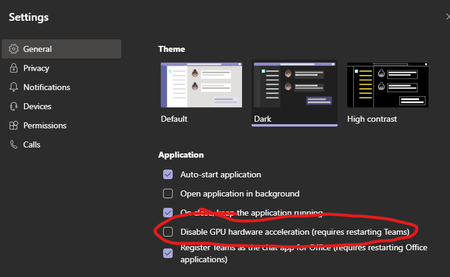
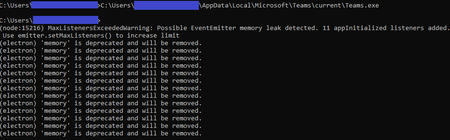
I've been researching an issue where several users are experiencing periodic Teams crashes always during a Video call/meeting. A call that crashes once is often successful right after, and the crashes don't follow any pattern. I haven't found any commonalities across hardware or drivers, and have been checking network quality pretty closely. It really seems like it's a Teams software issue. Is anyone else dealing with this kind of inconsistent stability? The errors in logs (that I've seen) are always: Renderer process crashed; rendererName=mainWindow; crashType=crashed; url=https://teams.microsoft.com; restarting app=YES Other forum threads haven't been useful; they usually point to a software glitch that has since been patched, or some common hardware issue with a specific laptop model (Surface) or webcam (Logitech). I tried to figure out if I could disable GPU rendering (just as a test) and that doesn't appear to be an option. Is there another test we could try? This seems to be related to graphics rendering, particularly since it always happens during a beginning of a Video call or meeting, and the detail in the error logs... I opened a Microsoft support case, but it's going no where fast, particularly since the issue isn't reproducible on-demand. In my various testing and research, I tried launching Teams from a command prompt window (thinking maybe "--disable-gpu" would be an option to launch with). It launched and then I stumbled upon this strange output; I eventually canceled with Ctrl+C and Teams closed. I think this is totally unrelated, but figured I'd share it in case it ends up being relevant. The messages sure look like Teams is experiencing a memory leak ("MaxListenersExceededWarning: Possible EventEmitter memory leak detected."). In any case, this output was on a system where Teams has never crashed as described before, so probably not the best clue.Solved124KViews0likes51Comments
Recent Blog Articles
No content to show