User Profile

mohd123
Copper Contributor
Joined May 02, 2019


User Widgets
Recent Discussions
Calendar option visible in Project for the web App
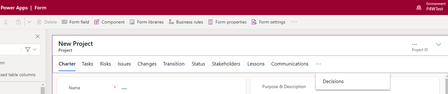
Hi, I have a managed solution in a production Power Apps environment that runs the Project for the web app. I noticed a "Calendar" option on the Project main form that was not there until last week. I then opened the unmanaged solution in the dev environment from where I export it as a managed solution, the Project table's form does not have this Calendar option. No other changes were made to the main form so where is this Calendar option appearing in my solution? I can confirm both solution versions are the same & no other user updated the solution. Unmanaged solution Project main form: The production app where the Calendar option is visible:254Views0likes0CommentsProject for the web model driven app BPF issue
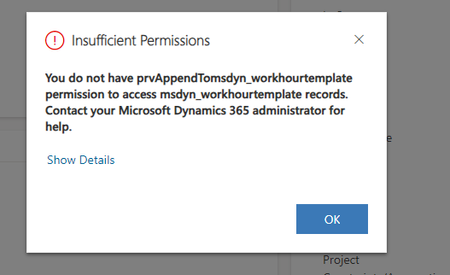
Hi everyone, I am using the Project for the web model driven app with the accelerator solution as a managed solution in my environment. My users reported that during New Project (record) creation, the BPF workflow is not visible and when they fill out mandatory form fields and click save, they get an error. On existing records the BPF is visible, users can also change values on form fields. New record creation, the BPF is missing and they get the "insufficient permission issue" No permission changes were made at environment level, and it was working until a few days ago. Please advise if anyone came across a similar situation. Thanks.450Views0likes0CommentsRe: How to enable Project Roadmap in Non Default Environment
I raised this with MS and their support team said (I quote): "Project Roadmap feature won't work in the custom environment as it is by design". This implies that Roadmap can only be enabled in the default environment. It'd require a DLP be created by global admin.952Views0likes0CommentsHow to enable Project Roadmap in Non Default Environment
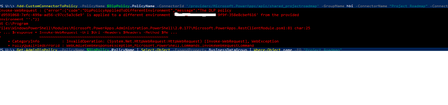
Hi all, I'd like to enable Project Roadmap (https://learn.microsoft.com/en-us/project-for-the-web/turn-project-for-the-web-off#turn-roadmap-on-or-off) in my non-default environment. I have created the DLP in the non-default environment and also confirmed that at O365 admin level the feature is allowed. When I run the PowerShell commands given in the documentation, I get the following error: "The DLP policy 'd9591068-7efc-499a-ad56-c97cc5a3c6e9' is applied to a different environment 'xxxxxxxxx-e2a8-9f9f-358e8cbef616' from the provided environment ''."}}1.1KViews0likes1CommentRe: Deploying Project for the web
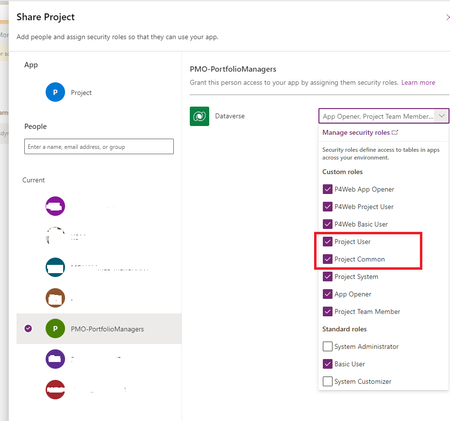
RodFromm, I verified with my team, there's no restriction on who can see Project apps. The documentation says: "Users with the Project User and Project Common roles will see the Project app tile appears in https://www.office.com/ Here are security roles assigned to an Azure group as per above: In my case, I have the "System Administrator" and "System Customizer" role for the model-driven Power App, also the tile shows up in my list of all apps. I expect the same for my team members who are part of that Azure security group. As a test, I also individually added the group members and gave them the same roles "Project User" and "Project Common" but they still do not see it as a tile.1.2KViews0likes1CommentDeploying Project for the web
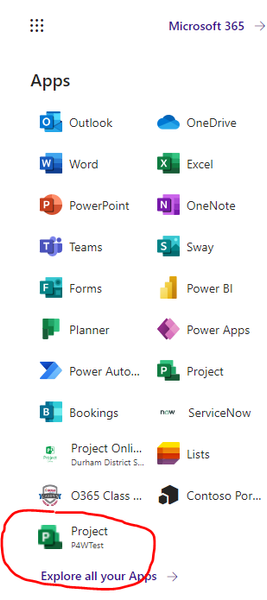
Hi, I recently deployed the Project Accelerator in the non-default environment named "P4WTest" (Type is Sandbox). I am able to see a new app in my list of Office apps as shown below. I then shared the "Project" model-driven app with my team members by adding them to security roles (mostly using out of box ones). But they do not see this app in their list of O365 apps. How are they supposed to launch the app? The Unified Interface URL for the model-driven app works when I sent it but along with it, how do I make it available in the list of all O365 apps shown in the image below?1.4KViews0likes3CommentsProject Online workflow not progressing to next stage after workflow task is complete
Hi, My PWA workflow has some approval workflow gates where once the project enters that stage, workflow tasks are created in a SP list that get notified to users who approve them & then the project moves to next stage. This was working well a few weeks ago & I noticed today the project remains stuck in the same stage even after the respective workflow task is completed. The workflow was created in SharePoint Designer. I don't see anything wrong with the workflow set up in SP Designer. I attempted to restart the workflow for this project, that didn't fix it. I expect the project to move from "vCAB Review" to "Pending" stage when the SP task is set to complete. If you've encountered this before and can help troubleshoot the issue that'd be great. Thanks937Views0likes1CommentPWA Submit is greyed out after clicking "Edit"
Hi, In my PWA instance, the "Submit" button on the ribbon that moves the workflow ahead gets greyed out even after I have clicked on "Edit". Anyone experiencing the same issue and any workaround or fix for it? Please refer to attached screenshot.375Views0likes0CommentsCan the New Project option on Project Center be made available on PWA home page?
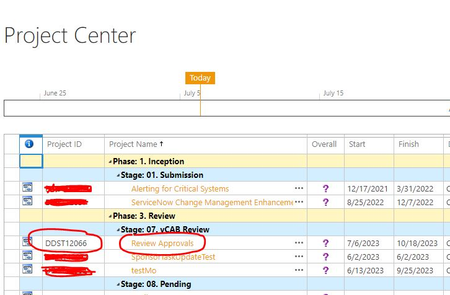
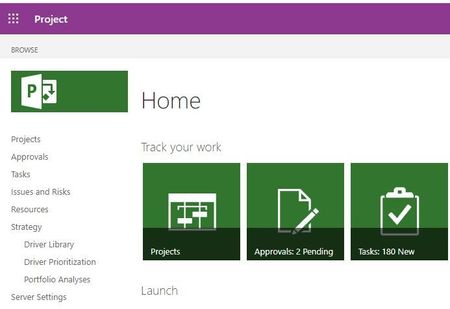
Hi everyone, When a user Iogs in to PWA, it brings you to a Home Page from where you can go to the Project Center page that houses all projects. But currently the New Project creation option is not available on the Home Page, it is only available in Project Center page. Is there a way to customize the Home Page so that users can have the New Project option available as a "tile" on the Home Page. Please see attached screenshots of the home page and project center. The highlighted option on the ribbon is what I'd like on the Home Page. Please advise if anyone has been able to customize that behavior.1KViews0likes3Comments
Recent Blog Articles
No content to show