User Profile

Preform
Copper Contributor
Joined Apr 30, 2019


User Widgets
Recent Discussions
Re: how would I get the cell to go red if the date input is greater than a year from present day?
Scott_H_7 Hm.. "date input is greater than a year from present day" was this meant as in the past? In that case, I would have thought LESS THAN would need "=TODAY() - 365" in the dialog. I'm just happy you solved it! Best regard17KViews0likes4CommentsRe: how would I get the cell to go red if the date input is greater than a year from present day?
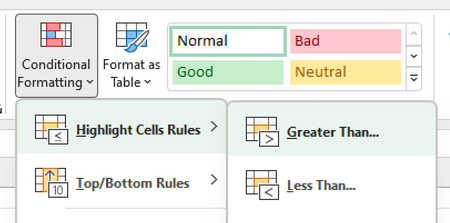
Scott_H_7 How about using Conditional formatting on the Home Tab? Select the area that you want to apply this behavior to. On the Home Tab, select Conditional Formatting - > Highlight Cells Rules -> Greater Than... Add "=Now() + 365" or "=TODAY() + 365" into the left "textbox" and select preferred color formatting in the right Dropdown. =Now() gives you the current time. ie. 2022-06-16 14:00 =TODAY() gives you the starting time of today. ie. 2022-06-16 00:00 365 is number of days and gives the same time 365 days ahead. with decimals it will look at a different time of the day.15KViews0likes6CommentsRe: Study guide and tips & tricks for Exam AZ-220: Microsoft Azure IoT Developer
Hi there, We are a class of students following the IOT prep paths for Exam AZ-220 mentined on the first row above and it disapeared gradually the last 24 hour. What happened? Our grades are supposed to be based on the progress in the tutorial paths connected to this and they ar now gone. We have worked for 1 week and has to 12/17/2021 to finnish as much as we could and report our progress to school for grades. Is there a new Cert prep that have similar content? Please advice on how to proceed! Best regards2.5KViews0likes13Comments
Recent Blog Articles
No content to show