User Profile

Molx32
Brass Contributor
Joined Apr 04, 2019


User Widgets
Recent Discussions
About Defender for Cloud aggregated logs in Advanced Hunting
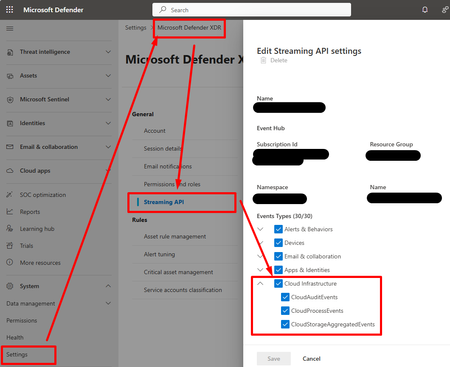
Hi, I create this threat hoping that the Microsoft team will read and hopefully provide insights about future changes and roadmap. When SOC teams use a non-Microsoft SIEM/SOAR, they need to export logs from M365 and Azure, and send them to the third-party SIEM/SOAR solution. • For M365 logs, there is the M365XDR connector that allows exporting logs using an Event Hub. • For Azure logs, we used to configure diagnostics settings and send them to an Event Hub. This began to change with new features within Defender for Cloud (c.f. picture).: • Defender for Resource Manager now sends Azure Activity logs to M365XDR portal, and can be exported using M365XDR Streaming API • Defender for Storage now sends logs to M365XDR portal, and can be exported using M365XDR Streaming API (c.f. https://www.youtube.com/watch?v=Yraeks8c8hg&t=1s). This is great as it is easy to configure and doesn't interfere with infrastructure teams managing operational logs through diagnostic settings. I have two questions : • Is there any documentation about this? I didn't find any? • What can we expect in the future weeks, months regarding this native logs collection feature through various Defender for Cloud products? For example, can we expect Defender for SQL to send logs to M365XDR natively? Thanks for you support!Defender EASM source IP addresses/location
Hey, I am currently building a service that will leverage EASM for discovery and scan for all our customers. However I have a very specific constraint : the scan must be done from a France-localized IP address. Does the resource location (FranceCentral in my case) make the scan occur from a french IP address? I didn't find anything in the blog nor the documention about the scan source IP address or the the scan source location. I'd be glad to hear from the EASM team! 🙂Azure Policy - 'Count' expressions
Hi there, I am currently trying to construct an Azure Policy that uses the 'count' expression, as described in this https://learn.microsoft.com/en-us/azure/governance/policy/how-to/author-policies-for-arrays#field-count-expressions. My policy rule looks like the following, and tries to audit or deny all network interfaces where : A public IP exists The associate resource is a VM The associate NSG has only one rule : this is where the problem comes from. I deployed two VMs for tests purposes: A VM that has one security rule -> I expect this one to be non-compliant (audit effect applies) A VM that has two security rules -> I expect this one to be compliant (audit effect doesn't apply) The issue : both VMs are compliant. I think this is easy to reproduce. Do you guys have any feedbacks about it? Best regards! "policyRule": { "if": { "allOf": [ { "field": "type", "equals": "Microsoft.Network/networkInterfaces" }, { "field": "Microsoft.Network/networkInterfaces/ipconfigurations[*].publicIpAddress.id", "exists": true }, { "field": "Microsoft.Network/networkInterfaces/virtualMachine.id", "exists": true }, { "count": { "field": "Microsoft.Network/networkInterfaces/networkSecurityGroup.securityRules[*]" }, "equals": 1 } ] }, "then": { "effect": "[parameters('effect')]" } }638Views1like0CommentsSentinel incident synchronization
Hi there, Do you have any feedback or experience about incident synchronization for fields such as "Assigned to", "Tags", and so on? According to the MS Docs, only status is synchronized, but I feel like the sync of other fields is essential. Example 1 For instance, I saw environments where people developped an Azure function to programmatically tag incidents with regions tags (e.g. emea, us, euw, etc.) within M365 Security portal based on their evidences i.e. if an evidence is email address removed for privacy reasons, it would be tagged with 'US'. But as you know this tag does not replicate to Microsoft Sentinel, and configuring the same kind of things on Sentinel side is much more complicated, or this is not a very proper way to do it. Example 2 When assigning incident to people, I think synchronization should be done. I understand that one solution rather than another should be used, but depending on people role in the company, they won't use both solution (altough they maybe should). If you take a CISO, they probably only use the M365 Security portal, but if the technical team uses Sentinel only and assign incidents to each other in Sentinel, the CISO won't see any of the assignments. It might sound like a detail, but I have multiple feedbacks for different customers that have the full MS security stack, and they really wonder how to handle things with that lack of sync. Anyway, if you ever faced to same kind of need feel free to share your experience!662Views2likes0CommentsRe: Sensitivity labels
Dino_Vo as far as I know, there is not central documentation page that describes the service limitations. However, you can find the information accorss multiple pages. A general advice when looking for such information is using Google Dorks e.g. site:microsoft.com "Purview" "limit". 1) According to https://docs.microsoft.com/en-us/microsoft-365/compliance/sensitivity-labels?view=o365-worldwide : There is no limit to the number of sensitivity labels that you can create and publish, with one exception: If the label applies encryption that specifies the users and permissions, there is a maximum of 500 labels supported with this configuration. However, as a best practice to lower admin overheads and reduce complexity for your users, try to keep the number of labels to a minimum. Real-world deployments have proved effectiveness to be noticeably reduced when users have more than five main labels or more than five sublabels per main label. 2) Although it may not be comprehensive, you have some hints in https://docs.microsoft.com/en-us/microsoft-365/compliance/apply-sensitivity-label-automatically?view=o365-worldwide : Specific to auto-labeling for SharePoint and OneDrive: Maximum of 25,000 automatically labeled files in your tenant per day. Maximum of 100 auto-labeling policies per tenant, each targeting up to 100 sites (SharePoint or OneDrive) when they're specified individually. You can also specify all sites, and this configuration is exempt from the 100 sites maximum. 3) Additional information : For simulation mode the https://docs.microsoft.com/en-us/microsoft-365/compliance/apply-sensitivity-label-automatically?view=o365-worldwide : Simulation mode supports up to 1,000,000 matched files. If more than this number of files are matched from an auto-labeling policy, you can't turn on the policy to apply the labels. In this case, you must reconfigure the auto-labeling policy so that fewer files are matched, and rerun simulation. This maximum of 1,000,000 matched files applies to simulation mode only and not to an auto-labeling policy that's already turned on to apply sensitivity labels. For Sensitive information types (SIT) limits see https://docs.microsoft.com/en-us/microsoft-365/compliance/sit-limits?view=o365-worldwide Limit Value maximum number of custom SITs created through the Compliance center 500 maximum length of regular expression 1024 characters maximum length for a given term in a keyword list 50 characters maximum number of terms in keyword list 2048 maximum number of distinct regexes per sensitive information type 20 maximum size of a keyword dictionary (post compression) 1MB (~1,000,000 characters) maximum number of keyword dictionary based SITs in a tenant 50 For eDiscovery limits : see https://docs.microsoft.com/en-us/microsoft-365/compliance/limits-ediscovery20?view=o365-worldwide (I don't copy/paste the table, way too long) For other various limits : see https://docs.microsoft.com/en-us/azure/purview/how-to-manage-quotas Resource Default Limit Maximum Limit Microsoft Purview accounts per region, per tenant (all subscriptions combined) 3 Contact Support Data Map throughput^ There's no default limit on the data map metadata storage 10 capacity units 250 operations per second 100 capacity units 2,500 operations per second vCores available for scanning, per account* 160 160 Concurrent scans per Purview account. The limit is based on the type of data sources scanned* 5 10 Maximum time that a scan can run for 7 days 7 days Size of assets per account 100M physical assets Contact Support Maximum size of an asset in a catalog 2 MB 2 MB Maximum length of an asset name and classification name 4 KB 4 KB Maximum length of asset property name and value 32 KB 32 KB Maximum length of classification attribute name and value 32 KB 32 KB Maximum number of glossary terms, per account 100K 100K4.5KViews2likes1CommentRe: Monitoring on premises servers
Short answer is : yes, you can create a query that returns the 5 information you mentionned. And you can craft your request in order to set up your workbook to display it how you want. Long answer : although I don't have a deep understanding of Windows Server logs, I think you can use the Event table from Log Analytics workspace and look for the events you want. This https://cloudadministrator.net/2018/01/24/monitoring-windows-services-sates-with-log-analytics/ explains that the 7036 event ID "contains information which service has stopped or started." So I guess a good starting point could be the following query. The only thing I changed here is that I added the last line of code that may be helpful to filter on services you're interested in. Event | where EventLog == 'System' and EventID == 7036 and Source == 'Service Control Manager' | parse kind=relaxed EventData with * '<Data Name="param1">' Windows_Service_Name '</Data><Data Name="param2">' Windows_Service_State '</Data>' * | sort by TimeGenerated desc | project Computer, Windows_Service_Name, Windows_Service_State, TimeGenerated | where Windows_Service_Name == "WhateverYourServiceNameIs1" or Windows_Service_Name == "WhateverYourServiceNameIs2" To monitor disk space, take a look at https://pixelrobots.co.uk/2019/08/monitor-your-servers-available-disk-space-using-azure-log-analytics/ that seems to answer your need by leveraging the Perf table. To monitor Heartbeat errors, just monitor the Heartbeat table. --- Since all the information you want to collect is not in the same table, you must use a union statement to end up with a table containing all the information you want. Based on this query, you must tweak it so that it integrates with your workbook. Workbooks are very powerfull, and without technical details (e.g. code, screenshots, tables, data examples) I can't provide a more precise answer.2.3KViews0likes0CommentsTag applications as Monitored or Restricted
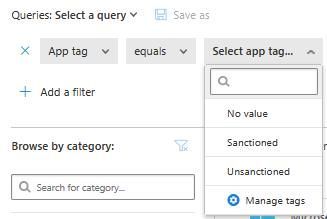
Hello there, I currently work on Cloud App Security, and I was wondering what the "Monitored" and "Restricted" application tags are. From this post, I understand that "Monitored" could be used to warn users they access a non-approved application or so, giving them the option to continue if they really want to. I didn't find any information regarding the "Restricted" tag. Do you have any information regarding these two tags ? Is it still a preview as mentionned in the previous post ? Additionally, these tags cannot be used to filter applications, and cannot be used to tag applications, as show on the screenshots. However, these tags are visible in the tag settings! I am confused regarding this, any information about it ? Thanks a lot for your feedbacksRe: Acting on policy alert - Data Exfiltration
Hello, Any improvement on these monitoring features? It would be great to have the filename, the source (e.g. sharepoint or local file), account of the exfiltration platform (e.g. Google drive account if data is exfiltrated to Google), etc.3.9KViews2likes0CommentsFilter displayed alerts on the investigation panel
Hello, I have a scenario to trigger four alerts in my Sentinel instance. This scenario does not aims at detecting a real attack and does not necessarily make sense, but exists for testing purposes. Scenario Successfull RDP Brute force attack on a Windows Server 2012, followed by the execution of multiple process within a short time frame, then executing a program named "mimikatz". The logs are streamed from the server to Sentinel. Triggered analytics rules Excessive logon failure Successfull brute force Anomalous process frequency Mimikatz detected My alerts are all triggered, as shown on the picture below. Note that I filtered incidents on the last 24h. You may also notice that incidents were not triggered in the right date order, but this is an other issue I need to fix in my underlying KQL requests. Problem: if I click on the Successfull brute force incident, and go to the navigation pane, I see my entities, such as the computer name, etc... But if I click my computer entity and display related alerts, I got too many alerts, including alerts I triggered days ago, and closed alerts, as shown on the picture below (red is the incident I initially inspected, grey is the useless alerts I don't want to see, green is the related alerts I want to see.) My questions: is there a way to display only alerts triggered the last X hours ? Another issue regarding this investigation panel is that closed alerts are displayed, and as an analyst, it would be usefull to choose whether to display them or not. Thank you all!1.1KViews0likes2CommentsRe: Azure Sentinel Teams Post
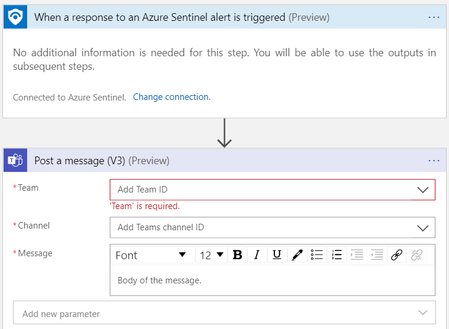
akefallonitis I just tried to deploy it, and I also have errors. I just noticed you figured this out. I post my answer anyway, maybe it'll help someone. If you're interested in deploying this playbook without using a template, you can create a simple Logic App as shown on this picture, fill the necessary fields and associate the Logic App to an analytic rule in Sentinel.4.6KViews2likes0CommentsRe: MS Threat Intel matching with custom logs
Hello Dev_Choudhary, As mentionned on the CEF Connector "By connecting your CEF logs to Azure Sentinel, you can take advantage of search & correlation, alerting, and threat intelligence enrichment for each log". So the MS Threat Intelligence is applied only when using the associated connector. However, imported logs do not get into the same connection process. This explains why the MaliciousIPCountry column is not added in the imported logs. Thus, your custom log need to be analyzed with Threat Intelligence (not necessarily MS) before being imported into the Log Analytics workspace.2.1KViews0likes0CommentsRe: Azure Sentinel Main Dashboard
Hello! As far as I know this is not possible for now. What you could do instead is retrieve the same data (events by sources, alerts, etc...) in your Log Analytics workspace and create Sentinel Workbooks. Or you could externalize it with Graphana for example (https://medium.com/wortell/creating-security-dashboards-for-azure-sentinel-with-grafana-13a6638e39d7), but I guess this doesn't fit your needs.6.6KViews0likes0CommentsRe: [Exchange online] How many mailbox received specific email?
Kim Kheng Tan The information regarding senders, receivers and subjects are available through the https://docs.microsoft.com/en-us/previous-versions/office/developer/o365-enterprise-developers/jj984335(v=office.15)#permissions. For now the Office 365 Sentinel connector does not integrate this API, but this is on developers' road map (c.f. this post). You can still can bypass this constraint by using the Message Trace report API through a Logic App. I will try to post how to do this in the next few days. Now, regarding the logs retention, I don't think MS keeps those logs for a whole year unless you ask them so. But I'll let someone with more experience give you a hint on the subject.3.3KViews0likes0CommentsRe: [OFFICE 365 - EXCHANGE] Monitor in/out mails senders
GaryBushey Thanks for your answer! I did look at Office 365 Workbook, but didn't find anything regarding email data. There are only information on the mailbox. I wonder if sender/receiver (and other data) are actually transmitted from Office 365 to Sentinel through the Office 365 connector. I try to figure out how to do this.4.1KViews0likes1Comment[OFFICE 365 - EXCHANGE] Monitor in/out mails senders
Hello, I am currently trying to establish statistics regarding the email activities on Office 365. I spent some time trying to figure out how to access the sender / receiver email or account (and other related data). I didn't find anything concluant within the OfficeActivity logs. Did you try to achieve this ? Thank you for your answer.4.2KViews0likes9Comments[DETECTION] 'Frequency', 'Period', and 'Suppression' precision
Hello, I would like to have more details about the 'Frequency', 'Period', and 'Suppression' parameters. Here is what I understand: Frequency - No problem with this: the query is run every X minute(s) or hour(s); Period - According to the documentation: "control the time window for how much data the query runs on - for example, it can run every hour across 60 minutes of data". This is where I don't understand, since the period is defined within the KQL Query, with TimeGenerated. I must be missing something. Suppression - When an alert rule is triggered for an event E, it will not be triggered again for the next X minute(s) or hour(s), for the same event E. Is that right ? So, what really is this 'Period' ? I want to be sure to understand each of these parameters. Thank you very much! Clément BONNET2.4KViews0likes2CommentsRe: Sentinel meetup in London on the 29th
Hello, as a French resident, it is impossible for me to come to London. Thus, if a presentation is made, dealing with feedbacks on the preview, would it be possible for you to share it (video record or report, or whatever else) ? This kind of events should occur soon in France, I'll let you know about feedbacks too, it if you are interested in !1KViews0likes1Comment

Recent Blog Articles
No content to show