User Profile

markwarnes
Brass Contributor
Joined Mar 22, 2019


User Widgets
Recent Discussions
Azure MFA and Flow (Power Automate)
Has anyone successfully managed to implement Azure MFA without adversely affecting Flow (Power Automate)? The Microsoft Support article "Recommendations for conditional access and multi-factor authentication in Microsoft Flow" (https://support.microsoft.com/en-gb/help/4467879/conditional-access-and-multi-factor-authentication-in-flow) refers to the Configurable Token Lifetimes which look as if that would work. However, following the link from that article to further information ("Configurable token lifetimes in Azure Active Directory (Preview)" - https://docs.microsoft.com/en-us/azure/active-directory/develop/active-directory-configurable-token-lifetimes) then says that: After May 1, 2020 you will not be able to use Configurable Token Lifetime policy to configure session and refresh tokens. You can still configure access token lifetimes after the deprecation. Instead, they will be replaced by authentication session controls in Conditional Access. So the question is: how now should we be configuring MFA via Conditional Access policies so that Flow is not adversely affected?11KViews2likes4CommentsDisable sensitivity labels in OWA / Outlook for the Web
So the AIP unified labels are now showing in Outlook on the web, which is a great thing to have. BUT there's no way to stop the labels being displayed if the customer does not want labelling in Outlook. I have customers that specifically chose not to enable AIP in Outlook on Windows for operational reasons and have disabled the AIP add-in in the application. Now that the labels are appearing in OWA, these labels are now showing and there appears to be no way to disable it that I can find in the documentation. Anyone in Microsoft have advice about this? I've now got an irate customer that is questioning the lack of change control.Adobe Acrobat Reader plug-in - user email has to be entered every time
I've been testing the Acrobat Reader plug-in to better show the assigned labels to users. No problem at all installing the client and plug-in, configuring unified labels, granting admin consent to the Acrobat Reader app in Azure AD, adding the registry key to automatically display the label. What I can't resolve, and would dearly like to, is the requirement to enter the user's email address EVERY TIME a labelled PDF is accessed. I've signed in once, selected to save the user credentials to save time, and the relevant registry value is in place (bSaveCredentials = 1), but it makes no difference - if I then try to open a labelled PDF, I still get asked to enter email address. This isn't user-friendly at all. Has anyone managed to resolve this so that it actually saves the credentials as it suggests it should? As it stands, it's not fit-for-purpose and I know I will have clients that will not want to use this in its current state.Session control not blocking multiple file downloads
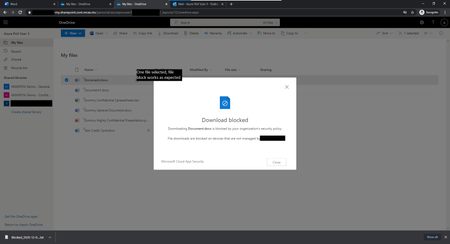
I am testing out MCAS session control to stop file downloads and am unable to block downloads when more than one file is selected. Here's what I have tested: MCAS Session control is triggered happily by conditional access, and configured to stop downloads from OneDrive to unmanaged devices. In the OneDrive folder, if I select and try to download a single file, it gets blocked as expected: But if I select more than one file and pick the Download option at the top of the page, a ZIP file with all selected documents gets downloaded without issue and does not get blocked: Has anyone seen this as well and got a solution, or is this an issue for Microsoft to resolve? It seems like a glaring hole in the controls if it isn't stopped. A colleague has also tested using the preset "Block downloads" option available in Conditional Access and that suffers the same issue (single file download blocked, multi-file download allowed). I tried adding a second session policy to block download of files with ZIP file extension, but that did not work. (Presumably, the original files are not seen to have a ZIP extension so MCAS let's those pass.)Re: AIP Tracking and Revocation
cpsecurity, Joe McGiven Corban - As far as I can tell, the classic "Track & Revoke" functionality that is curently available with the classic AIP client is not coming to the unified labelling (UL) client at any point on the roadmap. The approach that you should probably be taking now is to make use of central reporting to check for user activities on labelled documents. From the AIP documentation (https://docs.microsoft.com/en-us/azure/information-protection/rms-client/use-client#compare-the-labeling-clients-for-windows-computers) : "The document tracking site that's supported by the classic client isn't supported by the unified labeling client. However, without the need to first register the document for tracking, administrators can use https://docs.microsoft.com/en-us/azure/information-protection/reports-aip to identify whether protected documents are accessed from Windows computers, and whether access was granted or denied." This basically means the the UL client on Windows computers will report activity to the configured Log Analytics workspace when a protected document has been accessed. It's not the same as the dedicated T&R portal but it does offer opportunities to alert on particular document access (either through alerts on the analytics workspace or through monitoring using Azure Sentinel if linked up). Rafael Dominguez wrote a series of blogs about creating a custom AIP tracking portal that uses the central reporting data -(https://techcommunity.microsoft.com/t5/azure-information-protection/how-to-build-a-custom-aip-tracking-portal/ba-p/875849). Definitely worth a look if you've not seen them already. That said, there is a limitation currently - only the UL and classic clients on Windows devices can report their activity to the central reporting workspace. That means native AIP functionality in Office applications and any activity from MacOS, iOS and Android does not get reported. I'm hoping this is one of the gaps of functionality between the native and UL clients that is going to be closed in the near future.8.4KViews0likes0CommentsRe: AIP Tracking and Revocation
*** For classic AIP client only *** Only files that have protection applied (i.e. the AIP label used to classify the file includes an RMS template to control access and usage) will show up in the Track & Revoke portal. Files that are labelled without protection are not tracked because when they are accessed, no authentication happens with Azure RMS so no access attempts can be logged. (Unified labelling client does not support track & revoke.)8.4KViews0likes3CommentsRe: Problem with log queries
Dean_Gross - do you mean when you click the "Log Analytics" button on the Data Discovery report under "Analytics" section of the AIP blade? When I click that, I see this view in Log Analytics: Note the red underlines that appear after the line with "hint.strategy". To me, that looks like a malformed query, given that there is also a line space that stops the second half being executed by default. If you remove the line space, and also these lines: | extend uniqeId = iff(Location_s =~ "Endpoint", strcat(MachineName_s, ObjectId_s), ObjectId_s) | summarize hint.strategy = shuffle arg_max(TimeGenerated, *) by uniqeId then the red underlines all disappear and the query appears to work much better. I don't necessarily think it's a bug but I do think the link between the Data Discovery report and Log Analytics hasn't been configured correctly so it initiates the Log Analytics query incorrectly. Someone with better knowledge of Kusto may want to correct me of course!1KViews0likes1CommentRe: Adobe Acrobat Reader plug-in - user email has to be entered every time
I've been investigating this further and the registry keys/values can be put under the local machine registry hive (HKEY_LOCAL_MACHINE\SOFTWARE\WOW6432Node\Adobe\Acrobat Reader\DC\MicrosoftAIP) instead of the current user, which under some circumstances may make deployment easier. Unfortunately, the "enter your email address" prompt shows no sign of going. Anyone from Microsoft/Adobe able to shed some light on this behaviour?2.1KViews0likes0CommentsAdding extra detail to security alert properties when exporting to Event Hub
Has anyone got any experience collecting and embellishing details for a security event being exported to a SIEM? I'm working with an MDATP customer that was using IBM QRadar to pull alerts from MDATP. Their ideal solution though is to use the data export to Azure Event Hub functionality which recently become available in their instance, because they are already directing Azure ATP security alerts to an Event Hub so are aiming for a single source for QRadar to retrieve security events. We've got the Event Hub integration working fine, sending just alert events from the selection on offer. However, the customer has rightly pointed out that the amount of detail for each alert via Event Hub is far less than when the alerts are retrieved by the traditional pull method. I know this is because the alert details via Event Hub are effectively taken from the Alert Events table under Advanced Hunting. Is there any way to enrich these alerts with the same level of detail/properties as the pull method?709Views0likes0CommentsRe: AIP Scanner for SharePoint Online
From my experience, reporting the discovered files and info types is not great from CAS. There is also the limit of 5000 records when exporting from CAS which is a significant restriction. Ideally, there should be some means to scan the online files so that the results are reported back into the AIP central reporting where proper analysis is possible.7.9KViews2likes0CommentsRe: Roadmap for SCC Labels - Mandatory Label
MariaYacaman - The mandatory policy setting is already available in SCC. It is under the "policy settings" page when you create a Label Policy. The specific setting to select is called "Requires users to apply a label to their email or documents". Are you not seeing it there?1.2KViews1like2CommentsRe: Using Express Route for Azure ATP sensors
Gerson Levitz- Thanks for your reply, and for confirming that Azure ATP does not (currently) support ExpressRoute. It will be interesting to see how the new unified SecOps portal brings the three products together, and how this might introduce the ExpressRoute capability for Azure ATP, but for now it looks like a standalone Azure ATP sensor server will need to be used for my customer.3.9KViews0likes2CommentsUsing Express Route for Azure ATP sensors
Has anyone ever tried using Azure ATP sensors over Express route and have some details on how it is done? For domain controllers that do not have internet access (and cannot have the TCP 443 opened up, even if only outbound) but that do have access to Express Route, this would be useful information to have and provide a good (and cheaper) alternative to using standalone sensors with port mirroring.4KViews1like5Comments

Recent Blog Articles
No content to show