User Profile

RobinH
Brass Contributor
Joined Feb 15, 2019


User Widgets
Recent Discussions
Re: Syncing Azure AD Group with MECM / SCCM Device Collection
Can't help, but stumbled upon this looking for the same answer. Maybe my adding a comment will help someone else find, and answer, the question. Unless, of course, you've already found the answer Dennis? It was asked two years ago!2.3KViews0likes0CommentsRe: Windows 365 local admin support
valetedo Then, in my limited experience so far, sounds like you're asking the same question as this; https://techcommunity.microsoft.com/t5/windows-365/is-it-possible-to-have-multiple-users-per-microsoft-365-cloud-pc/m-p/3207759 - not answered, but I think the answer is going to be no. After all, the license for a single machine is assigned to a single user. That said, I just tried! And I could RDP into my Cloud PC using a different account to the one that is assigned. But, a) that account is local admin (via a Restricted Groups policy) and b) the Cloud PC is connected 'internally' via our own Azure VNET. So, it might be possible for you, but it's a question of how you'd ensure the other user (IT support I assume) was granted rights to RDP (either added to local admins, or remote desktop users), and about allowing incoming access from an untrusted network. Same scenario as a physical device at someone's home - can the IT support staff RDP to that device? If you can set that up (no VPN either, unless Device level one), then you can do the same for a Cloud PC.1.2KViews0likes0CommentsRe: Windows 365 local admin support
Are these Azure-only or Hybrid machines? I assume using Enterprise, not Business, given your Label for the question. If Hybrid, then treat them like any other domain-joined machine in terms as granting/controlling local admin rights. Can even do that for Azure-only machines. However, if you are using Microsoft's network, rather than 'bring-your-own', you probably won't want to open the Firewall enough to allow incoming connections from effectively the Internet. Perhaps you should also explain what you mean by 'connect to those pc' - just connect to the C$ share, or actually RDP onto them?1.2KViews0likes2CommentsSecure Boot off
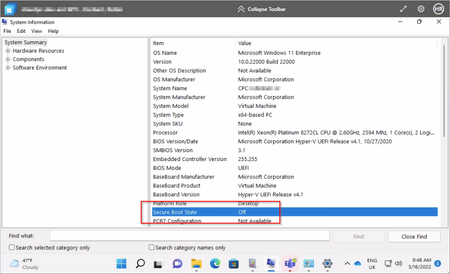
I've provisioned both a Windows 10 and Windows 11 marketplace image Cloud PC using the mid Enterprise SKU (2vCPU/8GB/128GB), but in both case Secure Boot is Off. This is affecting the use of Bitlocker and Device Guard. How can it be turned on? I get the impression from that if Windows 11 is supported, then it ought to be on already since it's a requirement for Windows 11! (Obviously you'd turn it on in the BIOS on a Physical machine, or Settings in Hyper-V. Neither of which you have access to with Windows 365.) See Securing your Windows 365 Cloud PCs - Microsoft Tech Community "Trusted launch is a series of technologies in Azure that improve the security of virtual machines (such as enabling TPM 2.0 and secure boot). As announced at Windows 365 launch, we are working on bringing Windows 11 to Windows 365 once it’s generally available later this calendar year. As part of that work, we are working to ensure that trusted launch is available in the Azure regions where Windows 365 is available today."2.7KViews1like3CommentsRe: Power Pivot in Excel 2019 - From other Sources button wont work
Looks like it's acknowledged as a bug, and due to be fixed: https://answers.microsoft.com/en-us/msoffice/forum/all/office-365-excel-version-1901-build-1123120130/fbac40b4-8e32-4862-8d23-61939d4b20dc When 1902 will be released though...12KViews2likes7Comments
Recent Blog Articles
No content to show