User Profile

AndrewDawson
Brass Contributor
Joined Dec 06, 2018


User Widgets
Recent Discussions
Re: VPP Apps Not Installing via Intune – Error 0x87D127DB Despite Valid Configuration
HiMSThomK Look like your issue started around the time of Microsoft moving to the Apple v2 VPP API, v2 is a new token with a different format. I didn’t see renewing your VPP token in the list of troubleshooting steps, please try this and let me know how you get on. See “Renewing VPP tokens or Apple Business Manager location token” under: https://learn.microsoft.com/en-us/intune/intune-service/apps/vpp-apps-ios -AndrewDawson908Views0likes0CommentsRe: Deleted Device from Intune - Lost recovery key
HiLuuk_P Your device is not toast, worst case if you can’t locate the bitlocker key you can usually reset a device using the manufacturers built in boot image, during the reset you can clear the TPM and start over. If this is not an option then check their website for a bootable usb image, lastly you can create an image from Microsoft site with vanilla windows (might be missing a few required drivers during the setup phase) Entra device cleanup is possible but unlikely, look for the cleanup settings (default is disabled) or a third party tool/script cleaning up records. The service may be there, just using a name you don’t expect, have a look for a decode without an Intune object and activity ending when it was last used. Best of luck.233Views0likes0CommentsRe: iOS updating via Intune management
Nice answer. I would add if a functional device is critical to flight operations you should consider having a backup device on all flights. Doubling your per aircraft device budget this would provide you with backup hardware and the ability to have offset update schedules. If having two devices is a factor of weight then you could always keep 1 device at base and colour code the cases depending on the schedule. I.e red for days 7-17 and blue for 22-2 (giving you a gap between the updates)3.3KViews0likes0CommentsRe: iOS DEP enrolled devices missing Enrollment Profile (breaking dynamic group and filter logic)
Microsoft has identified the root cause and is working on a fix for future enrollments and mitigation for already impacted devices. This incident has a high severity, and it should be fixed soon.3.1KViews2likes1CommentRe: iOS DEP enrolled devices missing Enrollment Profile (breaking dynamic group and filter logic)
NielsScheffers Tenant location: Asia Pacific 0101, Service release: 2205 Tenant location: Asia Pacific 0201, Service release: 2205 Note: Both were on 2204 when the issue started (yesterday), given the timing the issue seems related to the new release.3.1KViews0likes0CommentsRe: iOS DEP enrolled devices missing Enrollment Profile (breaking dynamic group and filter logic)
NielsScheffers we have at least one ticket open, has to supply additional impact information and now just waiting in feedback/resolution. Checked a third tenant on Asia Pacific 0501, this did not have the issue. Will check the versions and get back to you.3.2KViews0likes0CommentsiOS DEP enrolled devices missing Enrollment Profile (breaking dynamic group and filter logic)
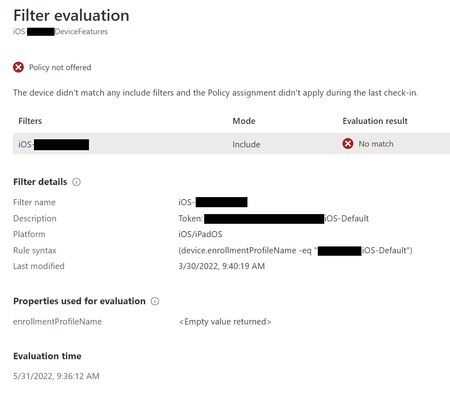
Starting 31/05/2022 new iOS enrollments via Apple Business Manager Device Enrollment do not have an Enrollment Profile attribute assigned under Hardware, generally we use this attribute to define dynamic groups/filters. I have seen this on at least two different customer tenants so far. Example of a filter no longer matching a device enrollment. (previous enrollments still show the correct Enrollment Profile Note: Testing 3 tenants we only see two in APAC impacted so far. Asia Pacific 0101 Asia Pacific 02013.5KViews0likes6CommentsRe: Company portal failing to install error 0x87D1041C
Thanks Soutumi Odd thing is this was all working fine with Company Portal in offline mode (using a device license), it just randomly broke on a few tenants with an error that seemed to indicate a problem with the application. Also noticed the app had a GUID for an app version, made me wonder if this was something to do with the new Microsoft store? Never had an issue with the online version and was using it as a work around for a customer. I am working on a new tenant build so will see how this one goes.46KViews0likes1CommentRe: How to convert exe to win32
Start by testing the application install and uninstall on a reference machine, you should be able to install and uninstall the application with the same commands used in the application deployment. i.e. cmd, navigate to the exe folder and run the install command. Once you have install/uninstall working also take not of any detection information, registry/file and folder locations as you will need this in Endpoint Manager.9.1KViews0likes1CommentRe: SOLVED: Group Policy setting CSP
Hi Ambarish Haridathan Yes look into using MDMWinsOverGP, define your Software updates > Windows 10 update ring before making CSP changes as you will likely resolve some of the issues. If you need more info on the Update CSP settings, check out https://docs.microsoft.com/en-us/windows/client-management/mdm/policy-csp-update The first two settlings looks like; ./Vendor/MSFT/Policy/Config/Update/AllowAutoUpdate ./Vendor/MSFT/Policy/Config/Update/AllowNonMicrosoftSignedUpdate I am not sure about the third, however Update CSP has had a number of recent changes so this may not matter so much. ,Andrew24KViews1like5CommentsRe: Huawei and Android Work Profile
No, unfortunately I never saw the bugreport or additional logging. I would test additional EMM’s including the AE test setup; https://enterprise.google.com/android/experience Feel free to send me a bugreport if you want to PM a link. (keep in mind some of the logged data may be sensitive)9.2KViews0likes2CommentsRe: Android for Work - Contacts?
Hi weberda Sameer1884, I have also found setting to Prompt can cause this issue, the problem can occur on any MDM platform and seems to happen to Android ~7-8 devices. Change the Default app permissions to default, this will have the same impact as prompt without defining the setting. Any application that requires Auto Grant will have to be setup using App Config under Client apps > App configuration policies. More information can be found here; https://docs.microsoft.com/en-us/intune/app-configuration-policies-use-android#preconfigure-the-permissions-grant-state-for-apps ,Andrew31KViews0likes8CommentsRe: Android for Work - Contacts?
Hi Durrante, When you set the configuration profile to auto grant permissions within the work profile, did you set this using; Device Restrictions profile, Default app permissions = Auto Grant or; an individual Managed App config for Outlook? ,Andrew32KViews0likes12CommentsRe: Huawei and Android Work Profile
Hi ThoFord Based on what I have read so far I would not jump to Intune being the issue (well not a bug anyway). You have setup https://docs.microsoft.com/en-us/intune/connect-intune-android-enterprise and want to use Work Profile (do not use the traditional Device Admin setup), other users have this device model working with Intune and it is listed as Android Enterprise Recommended on googles site (this is a very small list and takes a lot more work to get the https://androidenterprisepartners.withgoogle.com/devices/#!?AER badge). Next steps; Test another device against your Intune config (not the same make/model, a similar OS version would be ideal but not necessary) Get the log from Email Support when you have the enrollment issue (as per screenshot) Generate a https://developer.android.com/studio/debug/bug-report and take a look Also; Make sure you have licences for enrolment (second test device enrollment will help understand if this is an issue) https://docs.microsoft.com/en-us/intune/enrollment-restrictions-set, start with just the Defaults and only allow Android work profile and not Android without any additional restrictions (i.e. OS, Personally Owned). I have seen some restrictions cause problems. Make sure you are not blocking enrollment via any other method (Conditional Access) Last; Log a job with Microsoft Support46KViews1like6CommentsRe: Work profile cannot be created on Galaxy Tab S4
When Microsoft deployed Work Managed Devices they used the newer Android Management API https://developers.google.com/android/management/ Last time I checked the API does not support the use of COPE (Corporate Owned Personally Enabled), once Google creates this functionality Microsoft will be able to add support. The older DPC model supports COPE, however Microsoft only used it to develop Work Profile.4.6KViews0likes0CommentsRe: Intune blocking Android native app to work
Do you have any conditional access policies requiring the use of Modern authentication or approved client applications? https://docs.microsoft.com/en-us/azure/active-directory/conditional-access/technical-reference#approved-client-app-requirement Any screenshots would also be useful. ——————— You should also reconsider the use of Android Device Admin for a number of reasons, urgency will depend on management requirements, devices models and OS (current and updates). Read up on device admin deprecation below. https://developers.google.com/android/work/device-admin-deprecation4.4KViews0likes2CommentsRe: Work profile cannot be created on Galaxy Tab S4
Good to hear the device is working, as for the Intune setting there is not a whole lot to configure to get started. Check the following; - Managed Google Play is setup - Users are licences to enrol - Enrollment restrictions, start with just the default rule with; Android = Block Android for work = Allow If you have any additional rules they may be causing a conflict. ,Andrew4.7KViews0likes0Comments
Recent Blog Articles
No content to show