User Profile

DarrenRD
Copper Contributor
Joined Oct 04, 2018


User Widgets
Recent Discussions
Re: Need to get a list of VMs with their domains.
you can get VM list from the azure portal , select all resources from the home page and filter subscription == all and type equal virtual machine or for KQL compile a query as per link below https://www.geeksforgeeks.org/microsoft-azure-getting-vmcomputer-records-properties/1.7KViews0likes0CommentsSolution for remote development team access to private AKS managed cluster
Hi All, I am exploring options to allow my remote development team access to private AKS managed cluster in Azure with AAD and RBAC enabled . Our access options to AKS are via Bastion or VDi and each pose a unique set of challenges. I will outline each and my overall proposed solution Bastion access via kv and shared VM local credentials: problem is remote developers will require access to Azure portal then bastion into a local VM using kv shared credentials, this may work but not practical because each developers require a unique kubectl profile/config file when access aks, which is overwritten when another user logs on. Also remote access into bastion timeouts occasionally and AKS auth flow via browser into aks sometimes displays a blank page and cumbersome to logon VDI access pose similar challenges, no access to install development tools and all session settings are reset when the user logged off My proposed solution is bastion access via native rdp client access along with an AAD joined VM on the private cluster network. This solution requires no Azure portal access and provides direct RDP access into the AAD VM using AAD credentials and conditional access. Also the problem with kubectl profile no longer an issue as each logon user will have AAD credentials and user profile . Changes required to implement: Bump up Bastion sku from basic to standard to allow RDP native client, however the user (remote) session need to be initiated from a AAD registererd machine or hybrid or AAD join to establish a connection to bastion via RDP native client which then allow rdp access with AAD credentials onto the AAD joined server hosted in Azure Welcome all feedback and or corrections based on my initial solution assessment Thanks Darren693Views0likes0CommentsAzure Keyvault and bastion integration
Hello, I connect to my jump server via bastion, and uses KV to retrieve local administrator password of the jumpseever , then from my jumpserver launch RDP session onto my servers . However after setting up private endpoint , bastion is not able to retrieve the jumpserver password . i confirmed my servers can access KV over the private link and resolves to internal KV private link address . Does Azure bastion support private link? or perhaps managed identity issue and creating one bastion to allow allow access to KV would resolve the issue? if so not sure how to create Error message from bastion >>>"unable to list key" and perhaps identity permissions to KV is the issue? Any ideas? thanks8.5KViews0likes5Commentsget-content and foreach loop
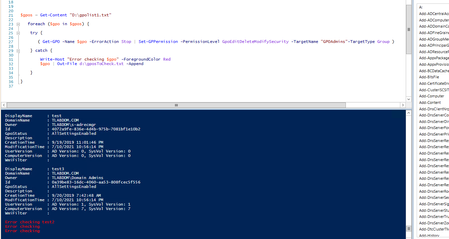
Hi I am trying to set permissions to all GPOs names in the file. I got the first PS script working by using -eq to name of a GPO in the file, but i need to set permissions to all GPOs in the file . I cant seems to figure it out . what am i doing wrong? Thanks in advance for your help! First script works just for one GPO $gpos =Get-Content "D:\gpolist1.txt" $gpos | foreach { if ($_ -eq "test") { Set-GPPermission -PermissionLevel GpoEditDeleteModifySecurity -TargetName "GPOAdmins" -TargetType Group $_ } } Not working , need to set permissions for all GPOs in the file $gpos = get-content "d:\gpolist1.txt" Write-Output $gpos foreach ($gpo in $gpos) { #call displayname if ($_ -eq $gpos) {Set-GPPermission -PermissionLevel GpoEditDeleteModifySecurity -TargetName "GPOAdmins" -TargetType Group $_ } else { write-output "no result" } }5.7KViews0likes3CommentsRe: foreach and out-file- no data
yes, the file contains SamAccountNames I tried the -identity para but received the error below Get-ADUser : Cannot validate argument on parameter 'Identity'. The argument is null. Provide a valid value for the argument, and then try running the command again. At line:4 char:26 + if (Get-ADUser -identity ($_.$User) -Properties displayname,mail,dist ... + ~~~~~~~~~~ + CategoryInfo : InvalidData: (:) [Get-ADUser], ParameterBindingValidationException + FullyQualifiedErrorId : ParameterArgumentValidationError,Microsoft.ActiveDirectory.Management.Commands.GetADUser Get-ADUser : Cannot validate argument on parameter 'Identity'. The argument is null. Provide a valid value for the argument, and then try running the command again. At line:4 char:26 + if (Get-ADUser -identity ($_.$User) -Properties displayname,mail,dist ... + ~~~~~~~~~~ + CategoryInfo : InvalidData: (:) [Get-ADUser], ParameterBindingValidationException + FullyQualifiedErrorId : ParameterArgumentValidationError,Microsoft.ActiveDirectory.Management.Commands.GetADUser2.2KViews0likes0Commentsforeach and out-file- no data
Hi, I need to return a list of active users: Display name etc. but no data is exported to my out-file. Any clues would be highly appreciated . Thanks $users = Get-Content "C:\dump\usernames2.txt" foreach ($user in $users) { if (Get-ADUser -ldapfilter "(samaccountname=$user)" -Properties displayname,mail,distinguishedName | Select-Object -Property displayname,mail,distinguishedName) { out-file "c:\dump\usersexist.txt" } else { Add-Content "C:\dump\namenotfound.txt" "$user" } } IRe: Google Chrome limits the validity of SSL Certificates to one year
Eric_Lawrence I have a similar question . We also use Cisco AnyConnect using Internal CA and issued User certificate EKU client authentication (User Template) and our VPN appliances uses internal CA as well EKU server authentication certificate (WebServer template) . Can you please confirm what happens with the validity check in this case? Thanks20KViews0likes1Comment
Recent Blog Articles
No content to show