User Profile

Geordie_ca
Copper Contributor
Joined Nov 08, 2023


User Widgets
Recent Discussions
Re: Permissions Required to Run Excel Scripts in Logic Apps
Michael-Vaquier-MSFT Hi Michael, Thanks for your response on this issue. I was not aware that when I save a script Excel that the script is actually being saves to my One Drive and not stored in the Excel document. With this info, it makes sense that the service account cannot access the script. From your response and reviewing this MS documentation page (https://learn.microsoft.com/en-us/office/dev/scripts/overview/script-storage), I have been able to move the script to Sharepoint and update my Logic App to use the service account. Since it is initiated by a 3rd party nightly process, I will find out if it works tomorrow. But it is looking good... Thanks Again. Martin1.6KViews1like0CommentsPermissions Required to Run Excel Scripts in Logic Apps
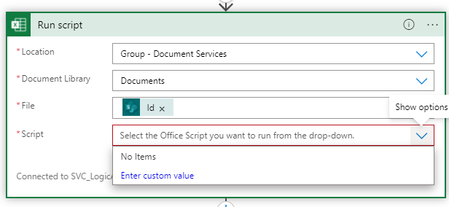
Hi, I have been trying for months to migrate a Logic App solution to the final SharePoint portal. When I originally wrote the code, I used my own credentials to set it up and resolve any issues. Now that it is ready to be deployed to the business, we want to migrate it off my credentials to a service account. The service account has owner permissions to the SharePoint site and can access the Excel template file in the document folder, create a new file etc. But when it comes to configuring the 'Run Script' block, the script available in the Excel template are not visible. Just changing to my credentials will allow the scripts to be displayed. What permissions does the service account need. We have tried giving it a basic Office 365 subscription. Any assistance will be much appreciated. Thanks in advance, MartinSolved2KViews0likes2Comments
Recent Blog Articles
No content to show