User Profile

Johnny490
Copper Contributor
Joined Nov 03, 2023


User Widgets
Recent Discussions
Re: Resolving Calculations and Formatting Issues in My Trading Journal
Is someone familiar with this? I purchased a key from Gamersoutlet and activated it on Microsoft. I've heard that it's legal since it's a valid key, but I'm starting to wonder if this could be the issue. Should I have bought a subscription directly from Microsoft? Could this also be a reason why the product isn't working properly at my home? Excel doesn't calculate correctly, and there are issues with "," and ".". I feel like getting a subscription might not solve this problem. I've also considered that the key I bought is from a different country although it's labeled as GLOBAL. So, it should work, right? Curious to hear your thoughts on this.343Views0likes0CommentsResolving Calculations and Formatting Issues in My Trading Journal
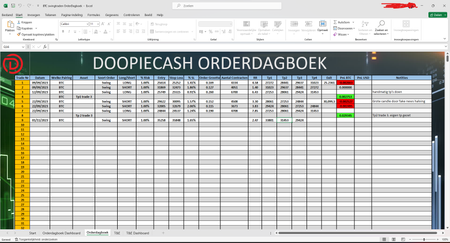
I have a problem with my trading journal, I have previously posted on this forum when I couldn't figure out why it wasn't calculating my contracts. I was assisted as best as possible, and I was also advised to create my own order diary. I have been working on that. However, some acquaintances of mine have created an order diary that I would like to use, and I want to use it on different devices. In Excel, I encountered the issue that it wasn't calculating my contracts. I have no idea what went wrong. What I did notice is that Excel has issues with my commas and periods. I also tried it in Google Sheets, and there I also have problems with commas and periods, and it doesn't calculate the contracts there either. So, it seems to be an issue with my settings. What can I do?" Maybe even Excel doesn't know what he want because of the differend devices i use (and differend settings).514Views0likes2CommentsRe: Excel formulas not calculating
Just wanted to drop a quick note to say thanks for pointing me in the right direction regarding my Excel challenge. Your suggestions did the trick. Following your advice, I've set up a trading journal in Excel, automating some of the stuff I used to scribble down on paper. Thanks for taking the time to share your insights.2.5KViews0likes0CommentsRe: Excel formulas not calculating
Thanks, HansVogelaar, for all the help and time. I had hoped it was a small issue that might be easily resolved, but unfortunately. mathetes, thanks for the info. Indeed, I engage in options trading. I think I'll create my own trading journal in Excel. I found this one ideal, but unfortunately, it's having issues now. However, with some effort, I can make my own. I'm going to do some research on Google, but to make it easier for myself, since you guys have more knowledge, which tutorial is the best for this situation to learn the specifics of Excel to create such a trading journal? Thanks in advance.2.6KViews0likes2CommentsRe: Excel formulas not calculating
HansVogelaar First time using this method. Curious to see if it works. Since the file is currently vulnerable, I'll delete it once the issue is resolved. I suspect the file is meant to be online to investigate the issue. Otherwise, I'd appreciate an explanation of what you mean exactly. There arent much personal things here for me.2.7KViews0likes8CommentsRe: Excel formulas not calculating
Huh, how did you manage to remove the protection? Anyway, it still doesn't work for me. When I enter my entry, stop loss, 1% risk, and finally my TP1, it still doesn't calculate my order size and number of contracts. From what I gather, it does calculate automatically for you? Not for me. Or maybe I misunderstood you. Yesterday, I ensured that my decimal symbol in the control panel matches the one in Excel options. But everything seems correct. What's odd is that other people use a comma in the P&NL collum, and I can use both points and commas, and both work for me. Could this be the issue? They all find it strange, and it shouldn't be like this.2.6KViews0likes2CommentsRe: Excel formulas not calculating
I took a look. I didn't personally create this Excel file. The admin doesn't know how to resolve this either, that's the reason i came to this forum.. He doesn't share the password. So, this means it's not possible. Are there any other options for me to resolve it on my own?2.7KViews0likes4CommentsRe: Excel formulas not calculating
Are you sure there's a password on it? I didn't put a password on it. When I go to the file and check access management, your name, Hans Vogelaar, is listed. Next to your name, it says 'can edit.' It should work fine, right? Otherwise, please let me know where I can find that password because I don't see it anywhere.2.8KViews0likes6CommentsExcel formulas not calculating
Hi everyone, I'm a trader and I use Excel for my trading journal. I'm currently facing an issue where Excel is not calculating my total contracts anymore. I input my entry price, stop loss, 1% risk, and take profit. Previously, Excel would automatically calculate the number of contracts I could use, but it's not doing that anymore. Any suggestions on what I can do to fix this issue? My thoughts: I have a few lines where I only enter data for take profit 2 and trade 3. This shouldn't be causing the error, right? Additionally, I've attempted to resolve it by going to Formulas and changing the 'calculation options' to 'automatic,' but that doesn't seem to solve the problem. Any guidance or advice would be much appreciated. Thanks! Edit: It's the words: Aantal contractenSolved3.4KViews0likes13Comments
Recent Blog Articles
No content to show