User Profile

JoshB531
Brass Contributor
Joined Oct 06, 2023


User Widgets
Recent Discussions
Re: Conditional Access Policy - Only allow EntraID Joined devices to access SharePoint Online
Hi There I am trying to create a Entra ID conditional access policy with the following criteria 1. Only grant Access to two cloud apps 2. Only allow access from a named location (already created) 3. Enforce MFA on each login. 4. Only apply to users in Entra ID security group. Been having a bit of nightmare getting this working. The MFA part works fine but I am still being allowed access even if I am not on the Named location. When I check signin logs, it flags I am not on the approved site but its still allowing access. Can any one help. Josh292Views0likes0CommentsRe: Azure Arc and Azure update manager
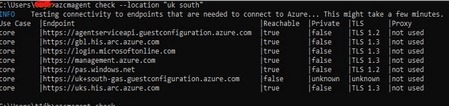
akrish17 Thanks for the quick reply I've run the checker and looks like the connection is ok Can you be more specific which log to check the and path to found it. I've checked multiple logs but unable to find an error that leads me in the right direction. Thanks1.2KViews1like2CommentsAzure Arc and Azure update manager
Hi Wondered if anything can help. I use Azure Update manager to patch my on-prem Windows servers. Recently several of them have starting failing, cant patch or do an assessment on them. They fail with the error "not able to run in specified time" The VMs are definitely connected as I can see them online and heartbeat is active. The only thing I can spot in the activity log for one of the failing VMs is the "Read Azure Arc extensions" has been running for a long time and never seems to complete (See below). I guessing this is why the patching is failing as its queued up before this. I've tried to remove the azure arc agent and re-install but this always comes back. Does anyone have any ideas how to resolve this?Solved1.7KViews0likes4CommentsIntune update rings - Use Deadline settings
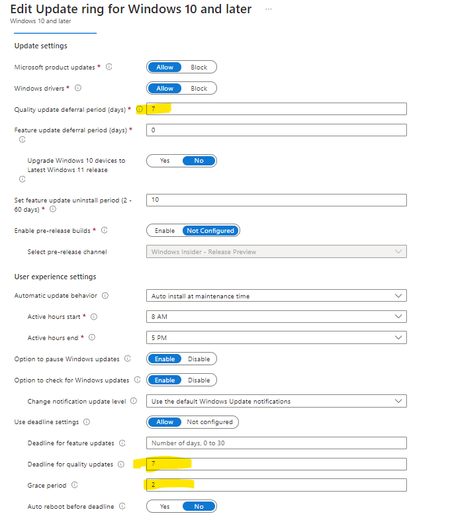
Can anyone help with recommended settings for updates rings in Intune, specifically the user deadline settings? I can currently have Quality updates deferred for 7 days. I want to enforce a deadline and grace period for this update ring but a little confused by the settings, I don't think the explanations are the best when you hover the "i" for more information. Can anyone suggest the best settings? I currently have 7 days for the deadline and 2 days for a grace period. Do you think we should be setting auto reboot before deadline to yes? Any advise would be great.1.1KViews0likes0CommentsAOVPN - RAS Server - Specified interface was not present in MGM
Morning All I have two RAS servers for Windows AOVPN. Over the last few days i've spotted the following error in the event logs and customers have been reporting failed connections. "Specified interface was not present in MGM" I really can't find anything useful online in regards to this error to point me in the right direction. Can anyone help? Thanks717Views0likes0CommentsAzure update Manager - Schedule problem
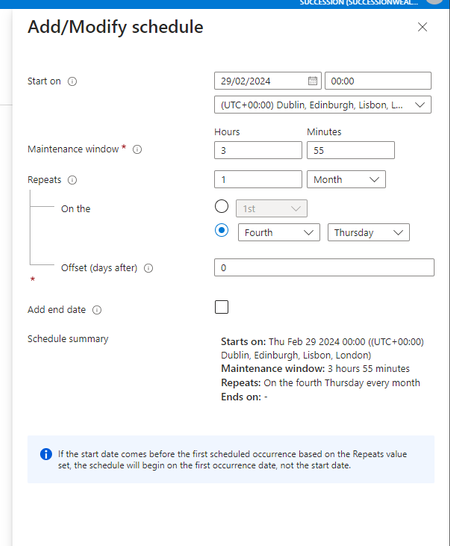
Hi All I have two Maintenance schedules setup in Azure update manager for patching servers, one runs on the 4th Tuesday of the month and the 2nd runs 4th Thursday of the month. Both contain different servers. The problem I have, the Thursday schedule didn't run last night and I cant work out why. My Tuesday schedule ran fine. Here is my schedule maintenance window settings I have the following updates included. Can anyone help, I just can't work out why its didn't run last night.997Views0likes1CommentDynamic Distribution list members
Hi All I am trying to export members of a M365 Dynamic Distribution lists but when I try via PowerShell it will only show me the GUID. I am trying to get the display name but can't figure out how to do it. I have tried the following $FTE = Get-DynamicDistributionGroup -Identity "Test Dynamic" Get-Recipient -RecipientPreviewFilter ($FTE.RecipientFilter) and Get-DynamicDistributionGroupMember -Identity "Test Dynamic" it show me members but only ever show me the GUID. I've read conflicting posts online saying you have to use Microsoft Graph. Any help would me great. ThanksSolved3.8KViews1like2CommentsRe: Intune Uninstall Error
Thank you, I think I tried this already but I will try again today. Could you also confirm, if you have a .cmd file to trigger the install, what do you type in the install command on intune? Can you just type filename.cmd or do you have to type something before it? Thanks12KViews1like4CommentsRe: Intune Uninstall Error
Sorry for slow reply, No I am still facing the same problem. I even tried as a line of business app. I have a PowerShell script which kills the app and removes perfect. If I package that up with the .msi as a intune.wim file. Can someone confirm what I should put as the uninstall command on Intune. Thanks12KViews0likes6CommentsRe: Intune Uninstall Error
Harm_Veenstra Yeah it’s just a .msi file with no other files. i was under impression it was best practise to deploy as a Win32 app rather than using a line or business app. I am fairly new to the packaging game in intune. Are there any negatives to using a line of business app. I really need to the ability to remove this app both from company portal and from the remove app section in Intune admin12KViews0likes0CommentsRe: Intune Uninstall Error
Harm_Veenstra So I try removing the extra " in the uninstall command but still failing. The latest logs show this. Exception happens when processing existing DO job aed99da0-ab1a-46a1-984c-876c7ef4a362 for app 8ad7229b-29c2-4d5a-a282-e55204d2f32f, ex = System.Runtime.InteropServices.COMException (0x80D02003): Exception from HRESULT: 0x80D02003 at Microsoft.Management.Clients.IntuneManagementExtension.Win32AppPlugIn.ContentManagement.DeliveryOptimization.IBackgroundCopyManager.GetJob(Guid& jobID, IBackgroundCopyJob& ppJob) at Microsoft.Management.Clients.IntuneManagementExtension.Win32AppPlugIn.ContentManagement.DeliveryOptimization.DOUtilities.GetJobFromId(Guid jobId) at Microsoft.Management.Clients.IntuneManagementExtension.Win32AppPlugIn.DOUtilitiesWrapper.GetJobFromId(Guid jobId) at Microsoft.Management.Clients.IntuneManagementExtension.Win32AppPlugIn.ContentDownloaderDeliveryOptimization.DownloadContent(Win32AppResult win32AppResult, SideCarApplicationClientPolicy appPolicy, SideCarContentInfo sidecarContentInfo, SideCarContentMetadata contentMetadata, String encryptedFilePath, String downloadFilePath, Boolean& fallback, Boolean& downloadRunningInBackground, EspPhase espPhase, Boolean isAvailableCheckIn)12KViews0likes13CommentsIntune Uninstall Error
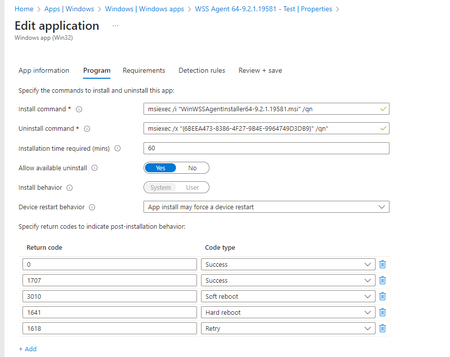
Hoping someone can help me with this issue? I am having an issue uninstalling a Win32 app deployed from Intune. The installation works fine but whenever I try and un-install from Company portal I get an error saying uninstall failed. I believe the .msi uninstall command in Intune is correct and it works fine if I run in command prompt as admin. The detection rules are right as its updating the installation install status in Intune. Looking through the Intune logs, I keep getting this when I try to run uninstall "GetRegistryValue encountered an exception: System.NullReferenceException: Object reference not set to an instance of an object.at Microsoft.Management.Services.IntuneWindowsAgent.AgentCommon.RegistryHelper.GetRegistryValue(String key, String valueName, String defaultValue, Boolean check32BitOn64)" The application was a msi and packed up as a intunewin file. Any help would be greatSolved16KViews0likes18Comments

Recent Blog Articles
No content to show