User Profile

Magnus_Kjellson
Copper Contributor
Joined Sep 20, 2023


User Widgets
Recent Discussions
Re: Creating .csv fails...
No straightforward solution found, but a work around solved it..! I opened the Excel csv-file, which contains just the needed parameters, name, and e-mail, in "Note pad" app, chose "edit" and "replace" and replaced ; (semicolon) with , (comma) and saved the file. Now in Windows Explorer I changed the name/file format of the file from Note Pad from .txt to .csv and the the import into Outlook worked flawless..!821Views0likes0CommentsRe: Creating .csv fails...
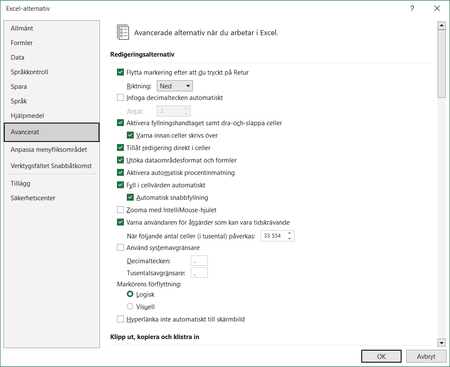
JKPieterse Hi, and thank you so much for your help! I've unchecked that box and put "." as decimal separator and "," as thousounds separator, but still get the result in Outlook as i pic below..? 😞 (Should be three values in the left column, not one long one including them all.) No luck so far. I hope you have another idea? 🙂756Views0likes1CommentCreating .csv fails...
I'm trying to import contacts to Outlook by creating a .csv file in Excel. I've got three columns with data, email - first name - last name in columns A to C. I "save as" choose .csv comma separated format, but everything stays in column A to C and when I attempt to import to Outlook, I get all three data bits as one. (Instead of getting "email", "first name" and "last name" separately to be able to map them to the corresponding field in Outlook, I get "emal;firtst name; last name" and cannot map... What am I doing wrong? Thanks so much for help!1KViews0likes3Comments
Recent Blog Articles
No content to show