User Profile

ivlukyanov
Copper Contributor
Joined Sep 18, 2023


User Widgets
Recent Discussions
Re: Windows 11 reboots unexpectedly in Sleep mode
BrianSebolyHello, I still don't have a solution for this problem. I just reinstalled Windows 11 to the latest version of 24h2 and the first problem is gone - my notebook don't reboots unexpectedly while sleeping now. But I still have the second problem: my laptop (ASUS VivoBook 3402R) can't wake up after 1 hour of sleeping and then opening the lid again. It wakes up only when I unplug and plug the power adapter again (!). I still don't know what the cause is and how to solve it.1.3KViews0likes0CommentsWindows 11 reboots unexpectedly in Sleep mode
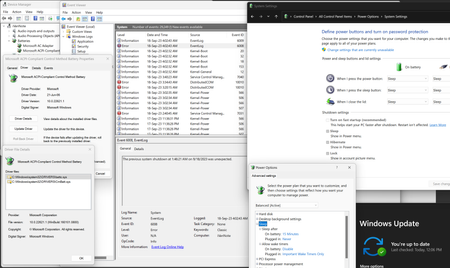
Hello, My Windows 11 system reboots suddenly in sleep mode (standby mode) without waiting for applications to finish. How I reproduce the problem: 1) I leave some applications opened (e.g. Chrome browser with tabs opened) and close the laptop screen; 2) the laptop goes into sleep mode; 3) after a few hours I open the laptop screen and it wakes up immediately, but asks me to log in as my user; 4) after authorization, I don't see any previously opened applications, and after another browser launch, I see its offer "Restore suddenly closed tabs?" 5) I open Event Viewer, look for the nearest errors and found an event with the text "The previous system shutdown at was unexpected." What else I noticed: 1) This is independent of connected power supply or battery operated - I've observed this problem in both, but more often when plugged in. 2) It doesn't happen every time, about 80% of 100% of the time being in sleep mode. Usually after being in sleep for a long time (an hour or longer). What I've tried so far: 1) I thought the problem was "hybrid sleep mode" and tried to disable it in power settings, but I couldn't find the corresponding item there. 2) I tried updating the battery driver "Microsoft ACPI-Compliant..." - I uninstalled it via device manager and rebooted the system. The system installed the exact same driver and the "hybrid sleep mode" setting did not appear. 3) I unchecked "Turn on fast startup (recommended)" in the Power settings and rebooted the system. The problem is still reproduced. Link to Events for last 2 days: https://1drv.ms/f/s!ApuQkvtWtmOfsAZyQEbeQqye3mFW?e=0oU6Qm5.4KViews0likes3Comments
Recent Blog Articles
No content to show