User Profile

Jon_Big
Copper Contributor
Joined Sep 07, 2023


User Widgets
Recent Discussions
Re: Automatically adding a timestamp after a pulldown is selected
Ok, now we are getting somewhere. I am not exactly sure how it worked, but it works. Now the next step. Can I just duplicate the code and change the values to the next set of columns I need the dates for? Or, do I have to change more details so it sees it as a separate code to run. The next set of columns are R/S. I will also need the code to work for columns U/V and W/X respectively. Thanks for all your help. You are a life saver.2.7KViews0likes1CommentRe: Automatically adding a timestamp after a pulldown is selected
Sorry, the Rev Req Y/n is Column P, and the Review decision date is column Q. Column P is a pulldown to select yes or no. I need the date to show up next to it in Column Q when something is selected. This is the first set of columns I am doing this for. I have other columns with pull down menus that have more options and I need it to record the date and time each time a new option is selected. Thanks.2.8KViews0likes3CommentsRe: Automatically adding a timestamp after a pulldown is selected
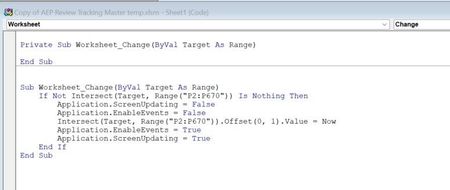
HansVogelaar Thanks for the advice, but I am still missing something. I have your code in the correct worksheet, vs the module or workbook. (See photo) But, when I select something from the pull down menu in Column P, I still get nothing in the next column (See [photo) What am I missing? Does it have something to do with the pull down menu's?2.7KViews0likes5CommentsAutomatically adding a timestamp after a pulldown is selected
I have been trying to research this myself and I thought I found the solution, but I am still stuck. I have a spreadsheet that has several columns with pull down menus for example Column P. Next to each of these columns is a blank column (Column Q) that I want to grab the date and time when the first column selection is changed (column P). I am using this code which I adapted the range from the original post. Sub Worksheet_Change(ByVal Target As Range) If Not Intersect(Target, Range("P2:P670")) Is Nothing Then Target.Offset(1, 0) = Now End If End Sub If I make a new blank spreadsheet, I can make the code work, but when I try to put it either directly into the worksheet, or in a module on the worksheet, nothing happens when I change the value of column P by selecting the pull down. No date appears on column Q. The goal is for it to record the day and time whenever that first column has something different selected from the pull down. Any ideas?3.3KViews0likes7Comments
Recent Blog Articles
No content to show