User Profile

xhaven80
Copper Contributor
Joined Aug 22, 2023


User Widgets
Recent Discussions
Re: Color checkbox cell based off checked/unchecked box and date due in Excel
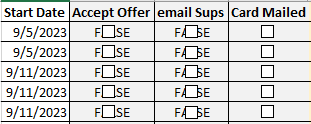
@mtarler "in theory you don't have to change those formulas or worry about the columns, you just need to assign each of those checkboxes to their corresponding cells and change the font color on those cells." I formatted the checkboxes in my sheet that didn't have your formulas. I got you. I noticed that the "FALSE" appears but not the true. Where in your syntax does that reference that to be invisible?32KViews0likes1CommentRe: Color checkbox cell based off checked/unchecked box and date due in Excel
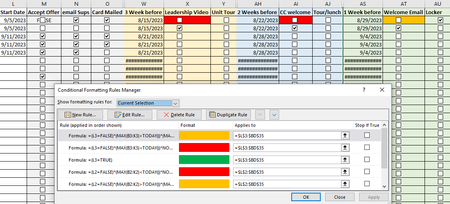
mtarler Duplicating your rules and adjusting for the new row it doesn't work. Also in your example, =$L$2:$BD$35 this does not work for any other checkboxes in row 2 i.e., N2,O2, AU2 etc...Why? Sorry for all the questions. They don't exactly teach this in college or at work.32KViews0likes0CommentsRe: Color checkbox cell based off checked/unchecked box and date due in Excel
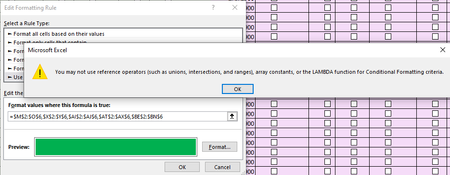
mtarler I really appreciate the help. My problem is the understanding of the syntax that goes into creating the formula. So you showed me that you could do it but I don't know the syntax to execute that formula i.e., I have no idea what MAX(B2:K2) range is referring to. What data is in the extra columns that you are inserting. I checked and there is nothing so I don't know why the columns need to be there if there is no data in them. I am trying to add the range to the formula to all the checkboxes and I am getting this error.32KViews0likes3CommentsColor checkbox cell based off checked/unchecked box and date due in Excel
I want the cell with the checkbox to be colored based on checked or unchecked and based off of the date that it corresponds to i.e., G2 is unchecked and F2 is a past date so G2:G6 and H2:H6 should all be red. If the date is within one week of being due and the boxes aren't checked I want the checkbox cells to be yellow i.e., J4:J6 and K4:K6 should all be yellow. If the checkboxes are completed for a section the checkbox cells should be green i.e., C4:C5, D4:D5, and E4:E5 should be green. I have scoured the web and this is rather difficult to find something to exactly what I need.44KViews0likes9Comments

Recent Blog Articles
No content to show