User Profile

Jeff256
Copper Contributor
Joined Aug 17, 2023


User Widgets
Recent Discussions
Re: Excel will not subtract times with decimal seconds.
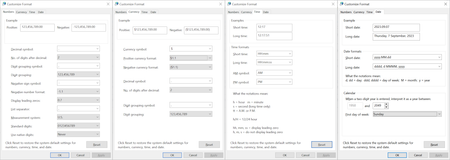
You guys have been a great help, but alas... I get the same behavior with "excel /safe" (but I learned something new - didn't know about this). I may have an unusual system date format for the USA, but it's certainly not unreasonable. Here's everything:2.7KViews0likes3CommentsRe: Excel will not subtract times with decimal seconds.
Just to answer your question... The temp, power, amps, volts were entered in Excel. The R is calculated. The times came from a CR-LF separated text file. I copied the text file and pasted it into Excel (although importing a CSV did the same thing for me). Just to match you, I tried the Time mm:ss.0 format and it still doesn't work. Remove the decimal value and the cell becomes a value; add the decimal value and it turns back into text.2.7KViews0likes10CommentsRe: Excel will not subtract times with decimal seconds.
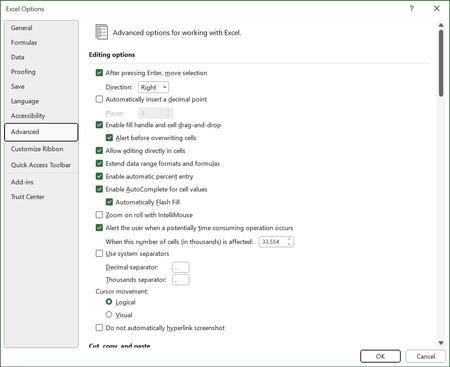
SergeiBaklan I'm sorry... are you saying it WILL work with the setting unchecked? I ask because I do have this unchecked: And the separators above match those of the OS: I'm not sure what you're stating... Just to confirm, I checked "Use system separators" and this did not work either.2.7KViews0likes12CommentsRe: Excel will not subtract times with decimal seconds.
OK, so if I put the file on OneDrive and open it from my web browser I can run the < Data > Text to Columns > command and it works. Going back to the desktop Excel I see something I didn't share before... running the < Data > Text to Columns > DOES convert the text to a number, but it has rounded all of the times to the nearest second, populated the decimal portion with .000, and added AM at the end (even though I have the custom format with hh: for 24 hour time). Adding the decimal portion back, rather than the .000, makes the "number" go back to "text". Any clues what is happening here?2.7KViews0likes0CommentsRe: Excel will not subtract times with decimal seconds.
The problem is apparently with my machine... or should I say registry? This solution apparently works on every other machine tested. I was advised to uninstall Office 365 and then reinstall. This did not correct the problem for me, leading me to think there is some setting 'stuck' in the registry. Anyone who might know how to correct the issue on my machine are invited to comment!2.8KViews0likes17CommentsExcel will not subtract times with decimal seconds.
The attached XLSX file has times with decimal seconds in column A. The format for these is hh:mm:ss.000 (to attempt to show "eleven oh four and 44.607 seconds" in cell A3). While I believe the time format is set up correctly, Excel seems to treat these cells as text. In cell G6 I'm subtracting A5 from A6 and expect to get the answer 10.393 seconds (as shown in H6). In cell G7 I'm subtracting A7 from A3 and expect to get the answer 126.168 seconds (as shown in H7). Why isn't this working? Here's what I'm trying to do... I'm logging data points by taking pictures of the instrument screen. These photos have filenames including a date time stamp (like PXL_20230828_110444607.jpg). I type the data from the photos in columns B:E. In a command prompt I use DIR >datetime.csv. I then clean up the CSV file, open it with Excel, and copy - paste these 'values' into column A. Maybe there's an easier, or more appropriate, way to accomplish this task?Solved3.8KViews0likes21CommentsHow do I define a 'seed' value for a cell in a circular reference?
My spreadsheet containing a circular reference usually works, but sometimes it puts #NUM! in both cells and stays stuck like this. To correct this I enter an appropriate value in the critical cell, to break the circular reference, and a solution is provided. I then Ctrl-Z to get the formula back in the cell and get the actual answer. --> How can I 'seed' the cell with an approximate value so there is no error? Example: In one cell, 'performance' is the inverse of 'temperature'. If 'temperature' becomes zero, 'performance' becomes infinite and the circular reference breaks. If I set 'temperature' to 50, 'performance' becomes 0.02, the circular reference would work, and when I Ctrl-Z to change 'temperature' back to the inverse of 'performance' the circular reference works.729Views0likes1Comment
Recent Blog Articles
No content to show