User Profile

Goudriaan
Copper Contributor
Joined May 30, 2023


User Widgets
Recent Discussions
Re: EXCEL ONLINE script filter pivottable with Power Automate data
SergeiBaklan Thank you! I found that the code from the first option is best usable for my situation. As it is a standard sheet which will be updated when other category names filtering, I don't need to add the collapse code. KR,2.8KViews0likes1CommentRe: EXCEL ONLINE script filter pivottable with Power Automate data
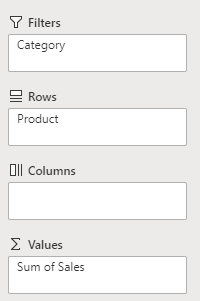
SergeiBaklan I was looking for something different as I wanted the search filter category for "*Microsoft*" to be in the Filter section as per image here: Not sure if this is possible? However, your solution works as well if I get one more step: First, I want to get this layout which I managed to get: Secondly: I want to collapse all fields to get to the following field: Thanks!2.8KViews0likes3CommentsEXCEL ONLINE script filter pivottable with Power Automate data
Hi all, I have a script where I have a pivot table (PivotTable1) on worksheet Transportkosten_klant. I want to use the customer specific name using a Power Automate flow which runs every quarter (for costs indication). My idea is using a template pivot table and filling the customer name in the filter option using a Excel Online Script. The thing is, I want to use a partial match in my PA flow -> (e.g. if I enter "Microsoft", I want the excel online script filter the pivot table to "Microsoft Apps", "Microsoft Power Automate", and "Microsoft Excel"). After that I copy the pivot table to a new Excel file on a SharePoint location with a different script. My script is found beneath and I tried multiple manners to check this without any success. function main(workbook: ExcelScript.Workbook, custName:string, pivotName:string) { const custSheet = workbook.getWorksheet("Transportkosten_klant"); /* pivotName */ const custPivot = custSheet.getPivotTable("PivotTable1"); const classificationField = custPivot.getFilterHierarchy("customernames").getFields()[0]; classificationField.applyFilter({ manualFilter: { selectedItems: ["customer1"] /* custName */ } }); } any idea's how to tackle this?Solved3.2KViews0likes5Comments
Recent Blog Articles
No content to show