User Profile

HarrisonNutrition
Copper Contributor
Joined Apr 19, 2023


User Widgets
Recent Discussions
Re: Tracking daily compliance and need assistance with pairing de-identified information
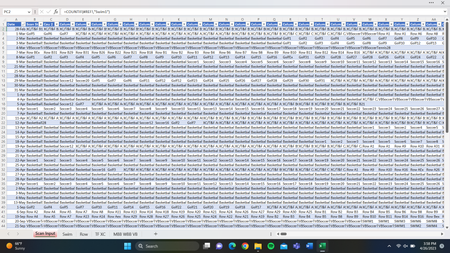
We currently use a pivot table to summarize our data, is there a way to make VLOOKUP pull the names to put into our pivot table? As we scan them in, they get inputted randomly across columns B-MV (Column A is our date column). Depending on compliance for the day we use only a fraction of those columns. The only solution I can see here using VLOOKUP, would be to create a second table and have each formula be a VLOOKUP referencing the scan input cell table for that same location? I'm wondering if there is another more efficient way. Below are some screen shots of our document: Scan Input page (Container IDs get scanned daily, order is random, and total count depends on compliance, we have our table set out 360 columns to allow for the potential of 360 misses) Example of a compliance tracking page (for swim) Like I mentioned before, our barcode scanner has the ability to scan horizontally or vertically, so if you can think of a solution that would work more efficiently scanning down 1 individual column each day rather than across we can update that too! Thank you NikolinoDE1.3KViews0likes0CommentsTracking daily compliance and need assistance with pairing de-identified information
I am looking for help with a vitamin supplement compliance tracking spreadsheet. We have 2 different documents we work off here. Spreadsheet A contains HIPAA information including name and lab values. Each name on this spreadsheet is assigned a container (Ex. Swim1, Swim2) Spreadsheet B is de-identified and is used by employees to track compliance. They do this with a barcode scanner that they scan athletes that are non-compliant. The barcode scanner links directly to our spreadsheet B, and the non-compliant containers (again, Swim1, Swim2, etc.) are scanned in "randomly" (meaning not necessarily in the same order every night). We currently have the scanner to move horizontally across columns when scanning to allow the first column to organize by date. Our scanner has the capacity to scan vertically if needed. This scanning is done on the "Scan Input" tab. We are hoping to be able to build a report that will easily allow us to view who has been non-compliant >20% of the time. Ideally we would like this report to pair the last name (from spreadsheet A) with the container compliance on spreadsheet B. Currently we have a pivot table set up for each team but this doesn't look very clean/functional. We also don't know how to tie in the names from spreadsheet A to this pivot table. In summary, I'm looking for a suggestion to clean up this data summary (we follow up with anyone who has been non-compliant >20% of the time) both in the visualization of it on excel/pivot tables/etc and in being able to sync the last names from Spreadsheet A to the report generated in spreadsheet B. Link to sheets here: https://1drv.ms/x/s!Am4qCs1ai-TLoDhsHSdb2VXYwCQd?e=rArV3G1.6KViews0likes2CommentsHelp connecting names to the corresponding code name
Hello all, I am having troubles with connecting First names to nicknames/code names in excel sheets. I have been tasked with creating an easy to read attendance tracking sheet. There are 4 teams that require participation tracking. Participants are each assigned a barcode with an ID card to check in. To check in, the barcode is scanned and a code name/data is added to a large master data excel sheet. Each team has an individual sheet that tracks team participation. Players on teams have a code name or associating label. These code names are labeled with the TEAM and participant NUMBER (ex. SWIM5, TF12, etc.) I am looking for a solution to connect the code name with the participant's First name. I have setup the sheet called "Swim" with fake names for example purposes. My ultimate goal is to view one individuals attendance without showing other participants. If Grace wanted to know how many days she attended in March, we would select "Grace" to find "SWIM2" data. PowerBi might need to be my next step, but please let me know if anyone has a solution! Thank you for your time and effort. Find the document here: https://1drv.ms/x/s!Am4qCs1ai-TLoDhsHSdb2VXYwCQd?e=RsLCUC1.2KViews0likes2Comments
Recent Blog Articles
No content to show