User Profile

jepollard
Copper Contributor
Joined Apr 07, 2023


User Widgets
Recent Discussions
Re: Append portion of even number rows to odd number rows
OliverScheurich I couldn't figure out how to add a post without replying to a specific existing post. I wanted to thank you both for your input; it's very much appreciated. There's quite a bit here for me to digest, so it may be a while before I can determine what path is best for me. But a bit more information, and a few more questions, might be in order. The sample I posted is from actual loan payments made (the lender supplied the original .CSV file), not from a calculated loan payment schedule. So I will need to be able to input the (or "a") .CSV file. [I hadn't given it enough thought before posting here, but I suppose it may be possible to make modifications to the .CSV file that would cause the principal and interest to appear in one Excel row. But I'd still like to explore "correcting" the data in Excel.] In the case of a simple interest loan (such as my auto loan); there is most likely a difference between the principal/interest splits in the loan payment schedule and the actual principal/interest splits incurred, since each payment split is determined by the lender based on the date when they receive/record each payment. I have software that can generate loan payment schedules; the project this discussion is about is for me to compare (a visual comparison is ok - at least for now), the actual loan payment principal/interest splits to the principal interest splits in the original payment schedule. My preference is not to purchase anything new, or upgrade beyond Excel 2019 (I have Excel 2013 on my laptop where I do a lot of testing). I don't expect to be doing this frequently. I don't know what "Power Query" is, but I might consider trying it; if the price is right and the learning curve isn't too steep. One question that came to mind when I read the original suggestion: will that macro handle all the rows for any loan? That is: my data is for a 60 month loan; 60 payments, two rows per payment. I only posted a few of those rows here. Can the macro handle any number of payments/rows (for this and any future loans), or would I have to modify the macro to address the actual number of rows? Thanks again.1.9KViews0likes2CommentsAppend portion of even number rows to odd number rows
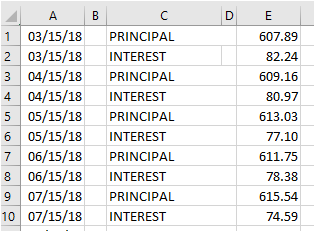
Below are a few sample rows from an Excel 2019 file, created from a .CSV file. The Excel file contains records of the loan payment transactions for an auto loan. Each payment transaction takes up two Excel rows: one row for the principal amount, followed by a second row for the interest amount. I have two questions: 1.) How can I easily modify the file so that each payment transaction occupies only one row? Then instead of 03/15/18 PRINCIPAL 607.89 03/15/18 INTEREST 82.24 I would see 03/15/18 Principal 607.89 Interest 82.24 in Row 1 - and Row 2 would be gone. 2.) Why does the vertical line between column C and column D not run all the way from the top row to the bottom row? And can I "fix" that?2.3KViews0likes10Comments
Recent Blog Articles
No content to show