User Profile

DouglasWilsonCAgmail
Copper Contributor
Joined Feb 02, 2023


User Widgets
Recent Discussions
Copying entire Column then inserting copied cells (column) takes 10-15 minutes to complete???
Hello. I have a spreadsheet with a column or two that I need to shuffle around. This column is largely empty from a data perspective. It does have a number of formulas and conditional formatting in place between rows 12 to 1500 but only approx. 18-19 rows with any kind of external data entered. When I attempt to copy a column from top row to last row then "insert copied cells" in between two other columns, it can take from 0-15 minutes...you read that right folks. 10-15 minutes to complete that task. I have pulled up my Task Mgr. to watch what is happening from a hardware perspective. Before initiating this action my CPU is 8-10% and RAM sits at 650MB-700MB out of 16Gb of total ram and no meaningful programs open and actively affecting either category. Once I initiate the action I described, the CPU moves up a bit but not anywhere above 40%. The RAM usage typically goes as high as 6,500MB with the highest level at or around 10,500MB-11,600MB or around 88%-92% of available RAM. Once the task completes the RAM continues at this level for up to an additional 10-15 mins or longer to go back to the original 650MB-700MB range. Other far smaller sheets don't experience this issue and generally my computer runs cleanly. It started doing all this with this spreadsheet (probably file specific causes at play here) around 3 days ago for no apparent reason. No massive data input or additional formulas or conditional formatting added (but a small number of cells did have these attributes added during this past 3 days which is pretty much always the case as this sheet evolves). I have included a small capture of the file details but will wait to upload the entire workbook until someone lets me know they want to take a look at this issue and need the file to do so. I do have backups of the current file but unfortunately not sequentially named so as to preserve the last known good working file. Just copies of the file with this problem... I appreciate your assistance in advance! Douglas815Views0likes2CommentsRe: I need a formula to calculate a loan payment with additional principle added to accelerate payoff...
Hello and thank you for your reply. I have been using Excel since its inception in the early 90s and Lotus 123 prior to MS and Windows 3.1 showing up on the scene. Definitely familiar with Excel and coming from 30+ years as a Real Estate & Mortgage broker in L.A., have devised many creative uses for its capabilities that I just plain couldn't find in a single software package that was capable. When I couldn't find what I needed I jumped in and created it in Excel. I am the Senior Asset Manager for a small private equity group focused in acquisition and long term hold of a variety of commercial property types. Our need for advanced calculations and a lot of "If/then, If/and and If/or" help to make the functionality of one cell solve many more complicated calculations as other cell's values change around it. In this case the amortization formula needs were far more complex than I illustrated in this post. I had been having a tough time with a rather lengthy series of nested formula within nested formula to end up with a multi-functional cell or combination of cells as part of a larger, for lack of a better term, application style solution. My skill set in Excel is certainly not current with its current capabilities but generally my older knowledge still works in the end. When it doesn't or I get completely hung up for a solution...I post in here! I have had great success in working through solutions to issues I just couldn't get my head around and very much appreciate the help others have given me these past few years. Thanks again for your reply and assistance. Douglas20KViews0likes0CommentsRe: I need a formula to calculate a loan payment with additional principle added to accelerate payoff...
Thanks for your response soksophara88! You are certainly right about the breadth and depth of a spreadsheet can take on a life of its own. Fortunately for our purposes the calculations we run are used time and time again each day as we assess the viability of various commercial real estate investments. My background is as both a real estate and mortgage broker then based in the Calabasas portion of L.A. since 1990. I transitioned into the investment end in mid 2018 and now run a Private Equity Group focused in acquisition and long term hold of commercial income producing real estate assets and use Excel more of an app than a simple singular calculation. I have set up a sheet that calculates acquisition math through post acquisition asset stabilization to conversion of acquisition financing to long term financing including the potential of using a multi-tier capital stack for some or all of the aforementioned stages. We obtain financing through many sources including mortgage brokers but the types of financing are usually outside the normal financing most brokers are acquainted with. However, we can always discuss our needs with you and see if you have something that fits our model. Feel free to provide your outside email address and I will reach out to schedule a call. Love Excel!!! Thanks again for your response! Douglas21KViews0likes0CommentsRe: I need a formula to calculate a loan payment with additional principle added to accelerate payoff...
Thanks for your reply Suegamma! I love Excel and its forefather Lotus 123 which I first used in 1986 before MS evolved from DOS to windows in the late 80s. The formula I asked for help on was but one small component of a rather large spread sheet that acts as the backbone to very detailed analytics I use to run complex commercial real estate calculations. I run a Private Equity Group focused in acquisition and long term hold of commercial income producing real estate assets and use Excel more of an app than a simple singular calculation. I have set up a sheet that calculates acquisition math through post acquisition asset stabilization to conversion of acquisition financing to long term financing including the potential of using a multi-tier capital stack for some or all of the aforementioned stages. Love Excel!!! Thanks again for your response! Douglas21KViews0likes0CommentsRe: I need a formula to calculate a loan payment with additional principle added to accelerate payoff...
Hi Peter. I appreciate your comments and will take them into consideration as much as my technical capabilities will allow that is. I run a Private Equity Group focused in acquisition and long term hold of commercial income producing real estate assets with a reasonably strong Excel background building analytics for our group's acquisition model. It kind of comes down to knowing what I know and expanding that base as needed to solve specific needs. I am not at all familiar with LAMBDA or LET and it may not make sense for me to learn these new and I am sure better ways to use Excel given that I don't make money by the additional knowledge if I can get away with existing knowledge even if a bit antiquated by today's more advanced standards. Either way, I do appreciate both your guidance and exposure to new ways to use my old friend, Excel!22KViews0likes0CommentsRe: Need to use COUNTIFS with OFFSET and COUNTA to create a dynamic range within COUNTIFS
I plugged your revision in and it worked perfectly! Thanks again Hans! The final formula... =COUNTIFS(OFFSET($D$7, 0, 0, COUNTA($D$7:$D$100000), 1), L9, OFFSET($F$7, 0, 0, COUNTA($D$7:$D$100000), 1), ">0") For anyone else that is interested in what Hans came up with that worked.2.8KViews0likes0CommentsRe: Need to use COUNTIFS with OFFSET and COUNTA to create a dynamic range within COUNTIFS
I tried out Option 2 in the sample sheet I sent you before. It did pick on matching item under "Monday" but when I added an additional entry in C19 along with an entry into F19 which should have added "1" to the prior sum, making 2 it didn't make the addition. Probably user error...just to be clear what should happen, once a value is entered into "C" it takes an additional entry of a value into "F" before a number would be added to the off sheet totals. If no entry into "F" then nothing is added. I have included a screen capture of a different area of this same sheet where I used, =OFFSET($M$13,0,0,COUNTA(M13:M27)) within the Data Validation of a List cell to automatically add additional items to the drop down based on the addition of values within the next row down. It works great for that purpose but didn't work here, or at least in the way I crafted the formula anyway. It looks like I could use some additional help on this one, maybe on the implementation side. Thanks Hans!2.9KViews0likes5CommentsNeed to use COUNTIFS with OFFSET and COUNTA to create a dynamic range within COUNTIFS
I am using the following formula, =COUNTIFS($D$7:$D$68,L9, $F$7:$F$68,">0") within the attached sheet. The two ranges need to be dynamic as thousands of rows will be added in time as my data grows. I have used the combination of OFFSET and COUNTA to accomplish this with a Data Validation List but am not sure of the proper syntax to implement it within the COUNTIFS formula above. Or, maybe there is another solution? Thanks for your help in advance!Solved3.4KViews0likes7CommentsRe: I need a formula to calculate a loan payment with additional principle added to accelerate payoff...
The reasons for development of this formula are not entirely relevant but I will try to give you the reader's digest version. My background from 1990-2018 was as a Real Estate and Mortgage Broker based in L.A. I actually owned a Mortgage Company from 2002-2012 and have a strong background working with Lotus 123 (1986-1990) then Excel since its inception. I used it to create business tools that weren't available in the software marketplace with specific calculations and reports I used with a generally upscale clientele that wanted more in depth calculations run. I moved into the investment side of the business in 2018 and had the same trouble finding software capable of running the math my appetite for more advanced analysis was once again a problem. My duties are as a Asset & Portfolio manager for a small Private Equity Group focused in acquisition and long term hold of commercial income producing real estate. In an almost short story, I needed to calculate a specific mortgage-based calculation that just wasn't working within the context I needed so I came here to flush it out. Essentially, I am developing a spreadsheet that acts more like full functioning coded software but done in a way that I can use somewhat simplistic Excel formulae. Hope that answers your curiosity...22KViews0likes2CommentsRe: Problems with Excel 365 sheet, COUNTIFS formula...see attached sheet with narrative about my issue
I would not only be happy to but prefer to. Dropbox: https://www.dropbox.com/scl/fi/h3r5umuyxefl98q101vbu/PDcalcs221-01_2023_02-02.xlsx?dl=0&rlkey=cn4xy7xkil1lbsl2iy564p383 I think I will need to share this with you which means I think I would need your email address. Maybe we would need to be outside this chat to convey such information?2.9KViews0likes2CommentsRe: Problems with Excel 365 sheet, COUNTIFS formula...see attached sheet with narrative about my issue
For clarity, D7 contains the formula, =IF(C7=""," ",WEEKDAY(C7)) thus pulling the day referenced in the manually input date held in C7. And, D7 is formatted as "dddd" as is D3. Funny thing though is that the COUNTIFS formula I created, when referencing the value in D3 works right but when referencing D7 does not. Both cells contain the same underlying format "dddd"...weird! And, the reason I add the IF(C7=""," ", portion is for visual clean up when usually an error would be reflected. Just how I prefer to create my formulas. Sorry, forgot to mention that I did try your fix in a separate cell written as =TEXT(C11,"dddd"), the change in cell reference made to choose a cell that had some results (3). I ended up with a 0 as was the case in prior attempts. Any other ideas? Either way I really appreciate your input! Douglas2.9KViews0likes4CommentsProblems with Excel 365 sheet, COUNTIFS formula...see attached sheet with narrative about my issue
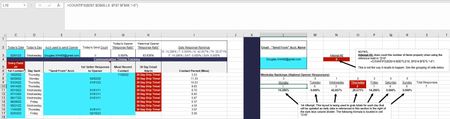
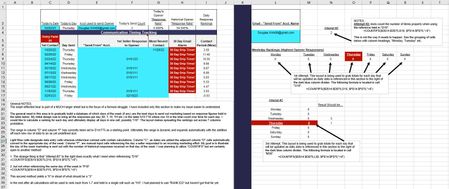
I would need to attach a sample sheet in order to adequately explain the issue at hand. I don't see a paperclip here. Let's start out by giving me instructions on how to attach an Excel sheet please. Update...It would seem I am not able to upload the functioning spreadsheet so here is a .jpg. Hopefully you will understand what I am looking to accomplish. Thanks in advance!Solved3.2KViews0likes6Comments
Recent Blog Articles
No content to show