User Profile

Bacon117
Copper Contributor
Joined Jan 20, 2023


User Widgets
Recent Discussions
Re: Pasting structured references results in link instead of normal formula
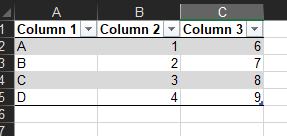
mathetes I REALLY appreciate your assistance with this. I don't know how to share documents here. But it's easy to recreate. Create and save two workbooks (I used workbookA and workbookB) In workbook A, create a table that looks like the below. Columns 1 and 2 are just the data, column 3 is the structered reference of "=[@[Column 2]]+5" Create a table in workbook B, but no data in the rows, just the headers. Copy the range A2:C5 in workbook A to cell A2 in workbook B. You will see that column 3 is linked to Workbook A instead of referencing the cells in workbookB, with no appearant way to NOT reference workbook A. The actual context of what I am doing: My team used to manage program managment calenders in excel by manually moving shapes (stars, text boxes, etc) around to keep track of important dates. I automated the managment of those shapes, so now users just have to enter dates in a table. I use a table as input for a script to use to create the specially formatted calendar. Frequently, we will copy and paste data from one input table to another workbook input table as we manage different parts of a project or start a new projct. I manage the script for other users to use and want to avoid creating an "Import" script. I'd like to try and stick to the copy/paste functionality most users are familiar with, if possible. At this point, I'm looking for a solution that only addresses the copy/paste functionality. I've googled and looked through all the options, but have yet to find any solution. I could easily create a VBA if it were just me using the document, but my boss uses it. Another possible solution is to remove all formulas from the source table so I'm only copying data. Creating a button to remove all references with vba before copying is probably my best workaround if I cannot find a solution with copy/paste. Not the best solution because we lose formulas. Hopefully, that's enough context. Please let me know otherwise. Thanks. -Russ1.7KViews0likes2CommentsRe: Pasting structured references results in link instead of normal formula
I tried all the options in paste special, nothing changed the outcome. It seems to default to the "Paste Link" option and no way to paste anything but that. Copying and pasting the text of the formula is a valid workaround, but if I'm copying and pasting a lot of cells, this isn't a viable option. Another option is to create a script, BUT I'm looking for something compatible with normal copy/paste first.1.8KViews0likes4CommentsPasting structured references results in link instead of normal formula
If I copy cells from a table in workbookA then paste into another table in workbookB, any formulas with structured references will remain linked to the table in workbookA. However, I want the structured references to refer to the table in workbookB, just like they do for normal (non-table formatted) cells. Specifically, if I have a cell in workbookA tableA with the formula "=[@[Start Date]]+4", when I copy that cell into tableB in workbookB, it changes to "='workbookA.xlsm'!Input[@[Start Date]]+4." I don't want this automatic link to be pasted, I want it to remain "=[@[Start Date]]+4" If I copy a normal formula say "A4+2", it remains "A4+2" when I paste it, no link. So, is there anyway to disable automatic link creation when working with structured references?2KViews0likes6Comments
Recent Blog Articles
No content to show