User Profile

clackarama
Copper Contributor
Joined Dec 05, 2022


User Widgets
Recent Discussions
Overlapping forms viewed by the OnVisible property prevents editing of the one underneath?
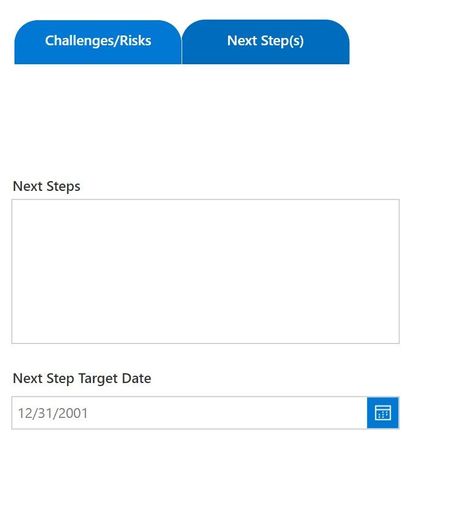
Hello, In my SharePoint item details form that I have created in PowerApps I have two forms: "Challenges/Risks" and "Next Steps" that are visible by clicking on a tab at the top of the form. I am using Set(currentTab,"Challenges/Risks") in the "Challenges/Risks" button OnSelect property and currentTab = "Challenges/Risks" on each of the elements in the form that I want to be visible when clicking the "Challenges/Risks" button. The same for the "Next Step" button and form elements. As far as I can tell the view mode for everything is by default 'edit'. The problem is that these forms are on top of each other and when I select "Challenges/Risks" form that is "behind" the Next Steps form, even though the Next Steps form is not visible, I cannot edit the one underneath. Is there a way to have overlapping forms and be able to edit the form underneath when it is visible? Thank you! AlanRe: Autofill column in a SP list with information from a different list in the same site?
Thanks for the reply, Kelly. I tried that, maybe incorrectly. If I did it right it seems that the out-of-the-box Lookup column type doesn't support getting information from a different list, even if it's in the same site. But I will try that again!Autofill column in a SP list with information from a different list in the same site?
Hello! I have two lists: "Customers" and "Projects." "Customers" has two columns: Customer_Company_Name (unique) and Customer_Company_Number (unique and sequential). In the "Projects" list there are multiple "Projects" items for each customer. In the "Projects" list I would like a column that contains the Customer_Company_Number from the "Customer" list. Something like "If the project Customer_Company_Name is X, populate the Customer_Company_Number from the "Customers" list." I have tried it with Lookup (evidently the Lookup function doesn't support drawing from a different list) and PowerAutomate, which I can't figure out. I get this far on PowerAutomate: When an item is created in the "Projects" list --> Get Items: Customer_Company_Number from the "Projects" list --> Apply to Each valuex --> the Condition: if valuex is greater than 1, then... and I'm stuck. I would be grateful for some help 🙂Solved
Recent Blog Articles
No content to show