User Profile

River_998
Copper Contributor
Joined Aug 28, 2022


User Widgets
Recent Discussions
Automatically move Excel rows up or down for certain columns so that all data of rows align well
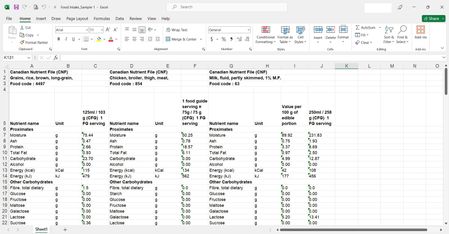
Hello. I downloaded sets of food data (one Excel file for each type of food) from https://food-nutrition.canada.ca/cnf-fce/newSearch, copied their columns, and pasted them into one Excel spreadsheet. In my sample pictures below, there is rice, chicken, and milk, as well as the component (e.g. nutrient) amounts in each food item. At the top of the sheet, each component is in its own row. As you scroll down the sheet, the other components do not align well. Is there a macro or some other method that would automatically move Excel rows up or down so that all of the data of rows align well? For example, I want all of the caffeine data (name, unit, and amount) to be in the same row for each type of food. If each component is in its own row, then it would be easier for me to calculations on the right side of the sheet (e.g. use column K to add column C, F, and J amounts together to determine total intake of caffeine). Note: I have Microsoft Excel 2021 on my laptop (Windows 10). Examples of food components include "22:6n-3 (DHA)" (a fatty acid) and "Fatty acids, saturated, total". Each type of food has one or more columns of component amounts (e.g. I have component amounts in 100 grams and 258 grams of milk in my picture below). If necessary, I could try to have only one component amount column for each type of food (e.g. keep 100 g milk and delete 258 g milk). I know how to move rows manually, but it's a slow process. If helpful, I could email my sample Excel file to you. Thank you!Solved3.8KViews0likes3Comments
Recent Blog Articles
No content to show