User Profile

johnsbox
Copper Contributor
Joined Aug 24, 2022


User Widgets
Recent Discussions
Using the multiple formulas (One being Multiplication the other being IF
So I want to have cell F2 Multiply E2*17% but then also IF K2 has a total of $30(or any number) in it to deduct 17% of $30 from F2 and if another cell L2 has $40(or any number) in it to deduct 17% of $40 from the total in F2 as well854Views0likes1CommentMultiple Criteria IFS function AGAIN so sorry
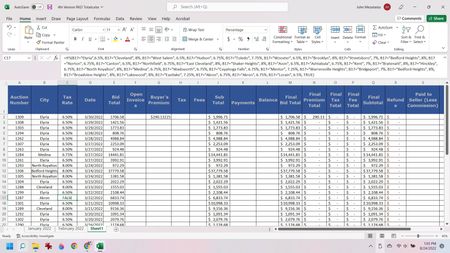
Hello, For B17 & C17, when I type Akron in B17, according to the formula which is identical to every other city listed that all appear, for some reason it says FALSE. I have tried entering it in different areas in the formula. I have added other cities after it and they work but Akron doesn't. Why? Can anyone help me? Here is a screen shot of my sheet:1.1KViews0likes2CommentsIFS Function Multiple Criteria
I am trying to write an IFS formula (for a tax spreadsheet) where I type in the name of a city and it automatically enters the sales tax rate for that particular locality. Here is an example: If I type CLEVELAND in A1 then I want B1 to say 8% If I type CHICAGO in A2 then I want B2 to say 10% and if an Unknown City is typed in or it is left blank I want it to say "Enter Sales Tax Rate" I researched the formula and thought I was putting it in in correctly but it keeps saying #VALUE! and I completely baffled. This is how I wrote the formula: =IFS(B2="Elyria",6.5%, "Cleveland", 8%, "West Salem", 6.5%, "Hudson", 6.75%, "Toledo", 7.75%, TRUE, "Enter Sales Tax Rate") I hope someone can help!Solved1.3KViews0likes3Comments
Recent Blog Articles
No content to show