User Profile

dragnevdrg365
Copper Contributor
Joined Aug 08, 2022


User Widgets
Recent Discussions
Cannot login with domain user on my Laptop
I have the following setup: - Azure AD/Domain joined laptop - Domain non-administrative user Issue: - the user cannot login inside windows - the user cannot login inside windows on any of the domain joined laptops - the user can successfully login in http://www.office.com - the user was ok the previous day. I left the office and the next day - this issue occurred Things I tried: - Re-joining the domain - no change! - Changing the password - no change! - Verifying if the account is locked - not locked! - Entered 10 times wrong password so the system can lock the account - the system didn't lock the account, no trace of that activity in "Microsoft 365 admin center" > "Last sign-in" Can some advise?1.5KViews0likes0CommentsRe: Make calls on behalf of Call Queue (or resource account)
Hi, unfortunately mine was never resolved. I simply abandoned the desired setup. Long story short: I opened service ticket with MS. I was contacted by agent to whom I had to explain the issue. He then came back to me with the suggestion to use the following setup: - 5 call center agent are assigned their own numbers. Licensed accordingly. - One Call Queue is assigned number trough CQ RA. Licensed accordingly. Used for incoming calls. - Another AA RA is assigned number. Licensed accordingly. Used by the agent for outbound calls. I even did the suggested setup. I couldn't get it working as I was having the same issue you described: "When I choose the RA, the call never connects". After that I decided that the agent will be using their own numbers for Outbound and that we will keep only the Call Queue Number. On the call with MS agent later, when they call you to check your satisfaction, I was told that this functionality I want is not supported yet. I think MS is still not ready to step in the field of Unified Communication. Simplicity if the principle they decided to avoid, I think.7.9KViews0likes0CommentsRe: Make calls on behalf of Call Queue (or resource account)
Same with me, not interested in CallingIdPolicy as it will overwrite the number on every call. It simply needs to work as 2-SIM card mobile phone: 1 to handle personal contacts and 2nd to handle customer contacts. In my case we also don't need Auto Attendant as we have no need to configure options: press 1, press 2, etc. We need just one Call Queue. I have opened now ticket with Tech Data, see how it goes.41KViews1like5CommentsRe: Make calls on behalf of Call Queue (or resource account)
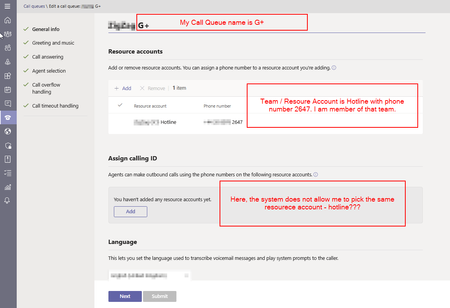
My RA "Hotline" is of type "Call Queue" and has been assigned phone number. The CQ related is G+. I could possible created second RA of type "AutoAttendant" and place it in Assign Caller ID. But this way I am setting one CQ with 2 resource accounts and 2 phone numbers - makes no sense to me.41KViews0likes7CommentsRe: Make calls on behalf of Call Queue (or resource account)
Grootj860 That's my CQ setup. I am member of the Channel and it is not possible to do a call on behalf of the CQ. We need this so we can call customers from unified number, no all 20 agents calling from their own number. Here you can see I have no drop down menu to switch my number. I wander if I need to rise a ticket with Microsoft. This has been real pain lately.40KViews0likes9CommentsRe: Make calls on behalf of Call Queue (or resource account)
Hi Dewalt Kotze, can you please provide a screenshot to illustrate the above statement: "agents can choose to make outbound calls as themselves or as the queue". I have configured this and the queue I use is now routing between the Chanel members. They however cannot use the Call Queue Phone number the make a call on its behalf.43KViews0likes19Comments
Recent Blog Articles
No content to show