User Profile

TungNguyen1600
Copper Contributor
Joined Jun 27, 2022


User Widgets
Recent Discussions
Managing Win32 apps in intune with Powershell
Hi guys, Is anyone proficient with managing Win32 apps using Powershell? I'm reading this article: https://msendpointmgr.com/2020/03/17/manage-win32-applications-in-microsoft-intune-with-powershell/ I'm not sure about the below command to install the script, where is the script? Or how do I create the script for another application eg Chrome, and what would the Get- command be? Install-Script -Name Get-LatestAdobeReaderInstaller Sorry if I'm being dumb! Thanks TungSolved3.1KViews0likes2CommentsRe: Google Drive App Install Issue
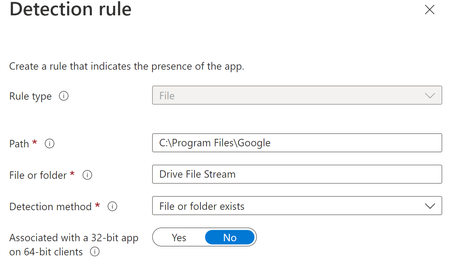
Harm_Veenstra Yeah just checking if the folder exists. I've just changed it so that it's one folder up (see screenshot) instead of the version number folder and will see if that makes any difference. With the detection.ps1 script, would i package that along with the install.cmd and GD exe with the winapp32 deployment tool? Or is there another way to use the script? Sorry, I'm a mac admin, so win admin is quite new to me.7.9KViews0likes7CommentsCorrect App detection rule File Path for User Folder
Hi Guys, I have deployed a file to the user's folder, but I don't think I have the correct syntax for the "Current User", I have tried: %username% %userprofile% But Intune doesn't like them as it is showing that it has failed even though it has deployed the file in the correct folder. Below is the detection rule file path. Does anyone know what the correct syntax for the current user is? Many thanks, TungSolved44KViews0likes13CommentsGoogle Drive App Install Issue
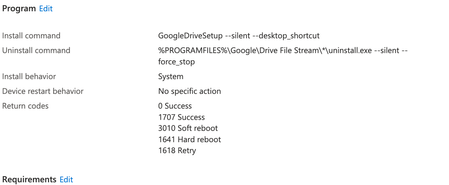
Hi guys, I deploy Google Drive (GD) to all devices, but i am getting a failed status (see below). GD is definitely installing correctly so it must be something to do with my config (see attached). In the detection rule it is looking for a folder 54.0.3.0 which is present on the devices. Any help would be appreciated. Status Failed: Another version of this product is already installed. Installation of this version cannot continue. To configure or remove the existing version of this product, use Add/Remove Programs on the Control Panel (0x80070666)Solved8.7KViews0likes10Comments

Recent Blog Articles
No content to show