User Profile

littlevillage
Iron Contributor
Joined Jun 16, 2022


User Widgets
Recent Discussions
Functions return the expected result at the real time.
Hi, Could have any function that returns the expected result with criteria is a period of specific time.? For example: SUMIFS with criteria is a time between 7:AM and 10:AM of date 2023-01-28. How can the function return the expected result at that real time? =SUMIFS(Table1[sales],Table1[product],$J$3,Table1[units],$J$4,Table1[Date],$I$3) Any ideas, please. Thank you.Solved1.4KViews0likes2CommentsRe: CALCULATE function not allowed use in a TRUE/FALSE expression.
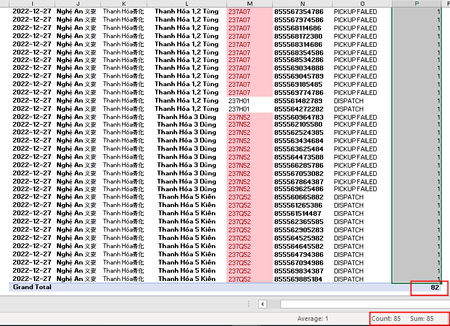
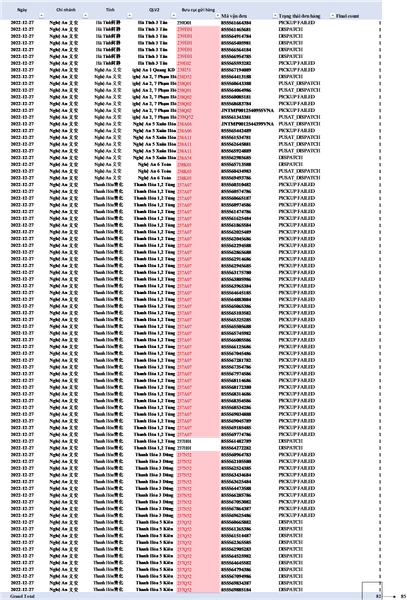
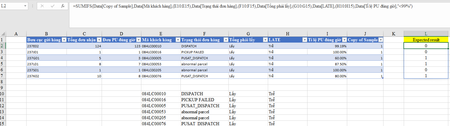
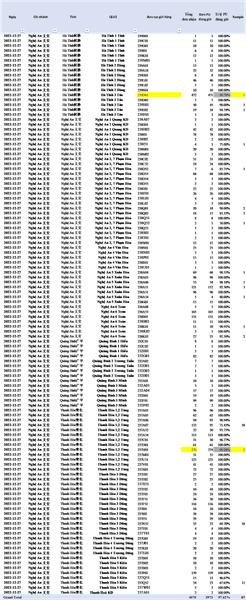
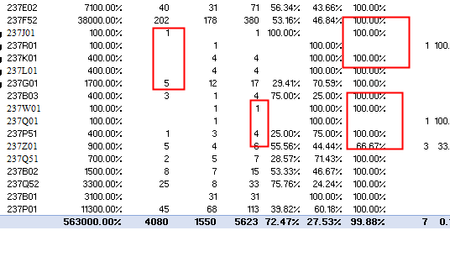
SergeiBaklan in the image below, I have added 2 fields (Mã vận đơn and Trạng thái đơn hàng), it still show 82 but actually, sum of Final count column is 85. May be 239D01 and 237H01 should be removed becasue "Tỉ lệ PU đúng giờ" > 99% then result is 82. Hope for your response.3.8KViews0likes1CommentRe: CALCULATE function not allowed use in a TRUE/FALSE expression.
SergeiBaklan Thank you very much, Expected results are 100% correctly. it's just that i still don't quite understand, if i add 2 fields "Mã vận đơn" and "Trạng thái đơn hàng" as shown then result still 85 instead of 82 because 239D01 and 237H01 have been added respectively.3.8KViews0likes3CommentsRe: CALCULATE function not allowed use in a TRUE/FALSE expression.
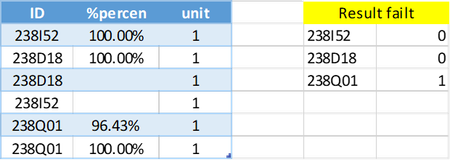
SergeiBaklan Thank you for response, The logic like: =SUMIFS(Data[Copy of Sample],Data[Mã khách hàng],(E10:E15),Data[Trạng thái đơn hàng],(F10:F15),Data[Tổng phải lấy],(G10:G15),Data[LATE],(H10:H15),Data[Tỉ lệ PU đúng giờ],"<99%") How can we do the same that in Power Pivot,3.9KViews0likes5Comments- 1.3KViews0likes0Comments
Re: CALCULATE function not allowed use in a TRUE/FALSE expression.
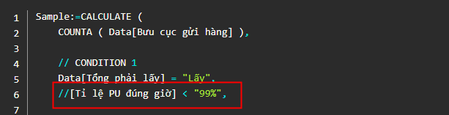
SergeiBaklan Tỉ lệ PU đúng giờ:=[Đơn PU đúng giờ]/[Tổng đơn nhận] Đơn PU đúng giờ:=CALCULATE(COUNTA(Data[Bưu cục gửi hàng]),Data[PU đúng giờ]="PU đúng giờ",Data[Tổng phải lấy]="Lấy",OR(OR(OR(Data[Mã khách hàng]="084LC00010",Data[Mã khách hàng]="084LC00016"),OR(Data[Mã khách hàng]="084LC00005",Data[Mã khách hàng]="084LC00053")),OR(Data[Mã khách hàng]="084LC00205",Data[Mã khách hàng]="084LC00076"))) Tổng đơn nhận:=CALCULATE(COUNTA(Data[Bưu cục gửi hàng]),Data[Tổng phải lấy]="Lấy",OR(OR(OR(Data[Mã khách hàng]="084LC00010",Data[Mã khách hàng]="084LC00016"),OR(Data[Mã khách hàng]="084LC00005",Data[Mã khách hàng]="084LC00053")),OR(Data[Mã khách hàng]="084LC00205",Data[Mã khách hàng]="084LC00076"))) I try to create a column of "Tỉ lệ PU đúng giơ" with logic like above,̀ and then reference that column to the function as a criteria: //[Tỉ lệ PU đúng giờ] < "99%", Hope for your response Thank you.4KViews0likes7CommentsRe: CALCULATE function not allowed use in a TRUE/FALSE expression.
SergeiBaklan I am sorry for my idea not clear the formula is missing a condition : [Tỉ lệ PU đúng giơ] < "99%"̀ If it's worked, 239D01 with [Tỉ lệ PU đúng giơ] =99.79%, so Sample column not count 1 unit for 239D01 237H01 with [Tỉ lệ PU đúng giơ] =99.28%, so Sample column not count 2 unit for 237H01 the expected result is 82 instead of 853.9KViews0likes0CommentsCALCULATE function not allowed use in a TRUE/FALSE expression.
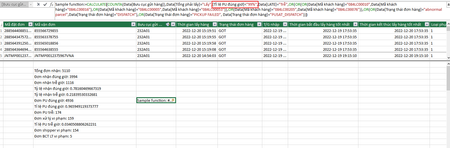
Hi, I would like to filter data with criteria : [Tỉ lệ PU đúng giờ]<"99%" I try to write a sample function as below in Power Pivot. Sample function:=CALCULATE(COUNTA(Data[Bưu cục gửi hàng]),Data[Tổng phải lấy]="Lấy",[Tỉ lệ PU đúng giờ]<"99%",Data[LATE]="Trễ",OR(OR(OR(Data[Mã khách hàng]="084LC00010",Data[Mã khách hàng]="084LC00016"),OR(Data[Mã khách hàng]="084LC00005",Data[Mã khách hàng]="084LC00053")),OR(Data[Mã khách hàng]="084LC00205",Data[Mã khách hàng]="084LC00076")),OR(OR(Data[Trạng thái đơn hàng]="abnormal parcel",Data[Trạng thái đơn hàng]="DISPATCH"),OR(Data[Trạng thái đơn hàng]="PICKUP FAILED", Data[Trạng thái đơn hàng]="PUSAT_DISPATCH"))) But it not working. Some better ideas, please. Hope for your help. Thank you.Solved4.7KViews0likes12Comments

Recent Blog Articles
No content to show