User Profile

bumurzokov
Copper Contributor
Joined Jun 06, 2022


User Widgets
Recent Discussions
Expose APIs from Apache APISIX to the Power Platform
In this article, we will show you how to create a https://learn.microsoft.com/en-us/connectors/custom-connectors/ for the open-source https://apisix.apache.org/ API Gateway in https://powerplatform.microsoft.com/en-us/ as an alternative to https://learn.microsoft.com/en-us/azure/api-management/export-api-power-platform in case you are building up additional components to an existing system with usable APIs and your system's infrastructure is hosted on-premises or on other cloud services provider rather than https://azure.microsoft.com/en-us. https://api7.ai/blog/expose-apis-to-power-platformManage serverless APIs with Apache APISIX
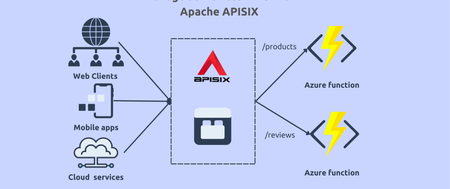
Serverless computing enables developers to build applications faster by eliminating the need for them to manage infrastructure. With serverless APIs in the cloud, the cloud service provider automatically provisions, scales, and manages the infrastructure required to run the code. This article shows a simple example of how to manage Java-based serverless APIs built with https://azure.microsoft.com/en-in/products/functions/. It uses https://apisix.apache.org/docs/apisix/plugins/azure-functions/ plugin to integrate https://apisix.apache.org/ with Azure Serverless Function that invokes the HTTP trigger functions and returns the response from https://azure.microsoft.com/en-us. Apache APISIX offers https://apisix.apache.org/docs/apisix/plugins/serverless/ that can be used with other serverless solutions like https://aws.amazon.com/lambda/. Learning objectives You will learn the following throughout the article: What serverless APIs? The role of API Gateway in managing complex serverless API traffic. How to set up Apache APISIX Gateway. How to build serverless APIs with Azure Functions. How to expose serverless APIs as upstream services. How to secure serverless APIs with APISIX authentication plugins. How to apply rate-limiting policies. Before we get started with the practical side of the tutorial, let's go through some concepts. What serverless APIs? https://www.koombea.com/blog/serverless-apis/ are the same as traditional APIs, except they utilize a serverless backend. For businesses and developers, serverless computing means they no longer have to worry about server maintenance or scaling server resources to meet user demands. Also, serverless APIs avoid the issue of scaling because they create server resources every time a request is made. Serverless APIs reduce latency because they are hosted on an origin server. Last but not least serverless computing is far more cost-efficient than the traditional alternative such as building entire https://www.ideamotive.co/blog/serverless-vs-microservices-architecture#:~:text=Serverless%20vs%20Microservices%20%E2%80%93%20Main%20Differences,can%20host%20microservices%20on%20serverless.. Serverless APIs using Azure function An https://learn.microsoft.com/en-us/azure/azure-functions/functions-overview is a simple way of running small pieces of code in the cloud. You don’t have to worry about the infrastructure required to host that code. You can write the Function in C#, Java, JavaScript, PowerShell, Python, or any of the languages that are listed in the https://learn.microsoft.com/en-us/azure/azure-functions/supported-languages. With Azure Functions, you can rapidly build HTTP APIs for your web apps without the headache of web frameworks. Azure Functions is serverless, so you're only charged when an HTTP endpoint is called. When the endpoints aren't being used, you aren't being charged. These two things combined make serverless platforms like Azure Functions an ideal choice for APIs where you experience unexpected spikes in traffic. API Gateway for Serverless APIs traffic management An https://apisix.apache.org/docs/apisix/terminology/api-gateway/ is the fundamental part of serverless API because it is responsible for the connection between a defined API and the function handling requests to that API. There are many benefits of API Gateway in the serverless-based APIs architecture. In addition to API Gateway’s Primary edge functionalities such as authentication, rate throttling, observability, caching, and so on, it is capable of invoking serverless APIs, subscribing to events, then processing them using callbacks and forward authentication requests to external authorization services with completely custom serverless function logic. Manage serverless APIs with Apache APISIX demo With enough theoretical knowledge in mind, now we can jump into a practical session. We use an example project repo https://github.com/Boburmirzo/apisix-manage-serverless-apis hosted on GitHub. You can find the source code and sample curl commands we use in this tutorial. For our mini-project, we’ll work with two simple Azure functions written in Java that simulates our serverless APIs for https://github.com/Boburmirzo/apisix-manage-serverless-apis/tree/main/upstream/src/main/java/com/function/products and https://github.com/Boburmirzo/apisix-manage-serverless-apis/tree/main/upstream/src/main/java/com/function/reviews services. Prerequisites Must be familiar with fundamental API concepts Must have a working knowledge of Azure Functions, for example https://learn.microsoft.com/en-us/training/modules/build-api-azure-functions/1-introduction shows how to build an HTTP API using the Azure Functions extension for Visual Studio Code. https://www.docker.com/products/docker-desktop/ https://azure.microsoft.com/en-us/free/ https://docs.microsoft.com/cli/azure/install-azure-cli https://aka.ms/azure-jdks, at least version 8 https://maven.apache.org/ https://www.npmjs.com/package/azure-functions-core-tools https://code.visualstudio.com/download https://dev.to/apisix/manage-serverless-apis-with-apache-apisix-55a8 https://marketplace.visualstudio.com/items?itemName=ms-azuretools.vscode-azurefunctions Set up the project This first thing you clone the project repo from GitHub: git clone https://github.com/Boburmirzo/apisix-manage-serverless-apis.git Open the project folder in your favorite code editor. The tutorial leverages https://code.visualstudio.com/. Run Apache APISIX To run Apache APISIX and Azure functions locally, you can follow these steps: Open a new terminal window and run docker compose up command from the root folder of the project: docker compose up -d Above command will run Apache APISIX and etcd together with Docker. For example, if Docker desktop is installed on your machine, you can see running containers there: We installed APISIX on our local environment in this demo but you can also deploy it to Azure and run it on https://learn.microsoft.com/en-us/azure/container-instances/. See the https://dev.to/apisix/run-apache-apisix-on-microsoft-azure-container-instance-1gdk. Run Azure functions Then, navigate to /upstream folder: mvn clean installmvn azure-functions:run The two functions will start in a terminal window. You can request both serverless APIs in your browser: For example: Deploy Azure functions Next, we deploy functions code to Azure Function App by running below cmd: mvn azure-functions:deploy Or you can simply follow this tutorial on https://learn.microsoft.com/en-us/azure/azure-functions/create-first-function-cli-java?tabs=bash%2Cazure-cli%2Cbrowser#deploy-the-function-project-to-azure Note that the function app name is randomly generated based on your artifactId, appended with a randomly generated number. In the tutorial cmds, the function app name serverless-apis is mentioned. Just to make sure our function works, we can test an invocation call directly requesting it URL in the browser: https://serverless-apis.azurewebsites.net/api/products https://serverless-apis.azurewebsites.net/api/reviews Exposing serverless APIs in APISIX Once the setup is complete, now we will expose serverless Azure function APIs as upstream services in APISIX. To do so, we need to create a new https://apisix.apache.org/docs/apisix/terminology/route/ with azure-function plugin enabled for both products and review serverless backend APIs. If azure-function plugin is enabled on a route, APISIX listens for requests on that route’s path, and then it invokes the remote Azure Function code with the parameters from that request. Create a Route for Products To create a route for Products function, run the following command: curl http://127.0.0.1:9180/apisix/admin/routes/1 -H 'X-API-KEY: edd1c9f034335f136f87ad84b625c8f1' -X PUT -d ' { "name": "Create a route with Azure function plugin", "plugins": { "azure-functions": { "function_uri": "https://serverless-apis.azurewebsites.net/api/products", "ssl_verify": false } }, "uri": "/products" }' Note that we set ssl_verify attribute of azure-functions plugin to false to disable SSL verification for only the demo purpose. You can also enable it to perform more secure requests from APISIX to Azure Functions. Learn other https://apisix.apache.org/docs/apisix/plugins/azure-functions/#attributes. Test With a Curl Request We can use curl to send a request, seeing if APISIX listens on the path correctly and forwards the request to the upstream service successfully: curl -i -XGET http://127.0.0.1:9080/products HTTP/1.1 200 OK [ { "id": 1, "name": "Product1", "description": "Description1" }, { "id": 2, "name": "Product2", "description": "Description2" } ] Great! We got a response from the actual serverless API on Azure Function. Next, we will make a similar configuration for the reviews function. Create a Route for Reviews and test Create the second route with Azure function plugin enabled: curl http://127.0.0.1:9180/apisix/admin/routes/2 -H 'X-API-KEY: edd1c9f034335f136f87ad84b625c8f1' -X PUT -d ' { "plugins": { "azure-functions": { "function_uri": "https://serverless-apis.azurewebsites.net/api/reviews", "ssl_verify": false } }, "uri": "/reviews" }' Test serverless API response: curl -i -XGET http://127.0.0.1:9080/reviews In this section, we introduced the new route and added azure-functions plugin to our serverless APIs so that APISIX can invoke remote Azure functions and manage the traffic. In the following sections, we will learn how to authenticate API consumers and apply runtime policies like rate-limiting. Secure serverless APIs with APISIX authentication plugins Up to now, our serverless APIs are public and accessible by unauthorized users. In this section, we will enable the authentication feature to disallow unauthorized requests to serverless APIs. Apache APISIX can verify the identity associated with API requests through credential and token validation. Also, it is capable of determining which traffic is authorized to pass through the API to backend services. You can check all available https://apisix.apache.org/docs/apisix/plugins/key-auth/. Let's create a new consumer for our serverless APIs and add https://apisix.apache.org/docs/apisix/plugins/basic-auth/ plugin for the existing route so that only allowed users can access them. Create a new consumer for serverless APIs The below command will create our new consumer with its credentials such as username and password: curl http://127.0.0.1:9180/apisix/admin/consumers -H 'X-API-KEY: edd1c9f034335f136f87ad84b625c8f1' -X PUT -d ' { "username": "consumer1", "plugins": { "basic-auth": { "username": "username1", "password": "password1" } } } Add a basic auth plugin to the existing Products and Services routes. Now we configure the basic-auth plugin for routes to let APISIX check the request header with the API consumer credentials each time APIs are called: curl http://127.0.0.1:9180/apisix/admin/routes/1 -H 'X-API-KEY: edd1c9f034335f136f87ad84b625c8f1' -X PUT -d ' { "name": "Create a route with Azure function plugin", "plugins": { "azure-functions": { "function_uri": "https://serverless-apis.azurewebsites.net/api/products", "ssl_verify": false }, "basic-auth": {} }, "uri": "/products" }' curl http://127.0.0.1:9180/apisix/admin/routes/2 -H 'X-API-KEY: edd1c9f034335f136f87ad84b625c8f1' -X PUT -d ' { "plugins": { "azure-functions": { "function_uri": "https://serverless-apis.azurewebsites.net/api/reviews", "ssl_verify": false }, "basic-auth": {} }, "uri": "/reviews" }' Test basic auth plugin Now if we request the serverless APIs without user credentials in the header, we will get an unauthorized error: curl -i http://127.0.0.1:9080/products HTTP/1.1 401 Unauthorized {"message":"Missing authorization in request"} The result is as we expected. But if we provide the correct user credentials in the request and access the same endpoint, it should work well: curl -i -u username1:password1 http://127.0.0.1:9080/products HTTP/1.1 200 OK We have validated the client’s identity attempting to request serverless APIs by using basic authentication plugin with the help of Apache APISIX. Apply rate limiting policies for serverless APIs In this section, we will protect serverless APIs from abuse by applying a throttling policy. In Apache APISIX Gateway we can apply rate limiting to restrict the number of incoming calls. Apply and test the rate-limit policy With the existing route configurations for Products and Reviews functions selected, we can apply a rate-limit policy with https://apisix.apache.org/docs/apisix/plugins/limit-count/ plugin to protect our API from abnormal usage. We will limit the number of API calls to 2 per 60s per API consumer. To enable the limit-count plugin for the existing Products route, we need to add the plugin to the plugins attribute in our Json route configuration: curl http://127.0.0.1:9180/apisix/admin/routes/1 -H 'X-API-KEY: edd1c9f034335f136f87ad84b625c8f1' -X PUT -d ' { "name": "Create a route with Azure function plugin", "plugins": { "azure-functions": { "function_uri": "https://serverless-apis.azurewebsites.net/api/products", "ssl_verify": false }, "basic-auth": {}, "limit-count": { "count": 2, "time_window": 60, "rejected_code": 403, "rejected_msg": "Requests are too frequent, please try again later." } }, "uri": "/products" }' Apache APISIX will handle the first two requests as usual. However, a third request in the same period will return a 403 HTTP Forbidden code with our custom error message: HTTP/1.1 403 Forbidden {"error_msg":"Requests are too frequent, please try again later."} Next steps In this article, we learned step by step how to create Java-based serverless APIs with Azure Functions and Apache APISIX Gateway to manage your APIs throughout their full lifecycle from the exposing serverless APIs as upstream services in APISIX to properly secure and apply rate-limiting to limit the number of requests. This opens the doors to other use-cases of API Gateway and serverless APIs integration. You can explore other capabilities of APISIX Gateway by chaining of various https://apisix.apache.org/plugins/ to transform requests, https://dev.to/apisix/apis-observability-with-apache-apisix-plugins-1bnm, performance, and usage of our serverless APIs, https://apisix.apache.org/blog/2022/12/14/web-caching-server/ and further evolve them by https://blog.frankel.ch/evolve-apis/#:~:text=Joe%0AHello%20Joe-,Version%20the%20API,-Evolving%20an%20API that helps you to reduce development time, increase scalability, and cost savings. Apache APISIX is fully open-source API Gateway solution. If you require to have more advanced API management features for serverless APIs, you can use https://api7.ai/apisix-vs-api7 or https://api7.ai/cloud which are powered by APISIX. Related resources https://azure.microsoft.com/en-in/products/functions/. https://learn.microsoft.com/en-us/training/modules/build-api-azure-functions/. https://learn.microsoft.com/en-us/azure/azure-functions/create-first-function-vs-code-java. https://dev.to/apisix/run-apache-apisix-on-microsoft-azure-container-instance-1gdk. Recommended content https://iambobur.com/2022/11/22/how-to-choose-the-right-api-gateway/. https://api7.ai/blog/why-is-apache-apisix-the-best-api-gateway https://api7.ai/blog/api-gateway-policies. Community:right_arrow_curving_down: 🙋 https://apisix.apache.org/docs/general/join/ :bird: https://twitter.com/ApacheAPISIX :memo: https://join.slack.com/t/the-asf/shared_invite/zt-vlfbf7ch-HkbNHiU_uDlcH_RvaHv9gQ2.6KViews0likes0CommentsInfrastructure as code (IaC) for Java-based apps on Azure
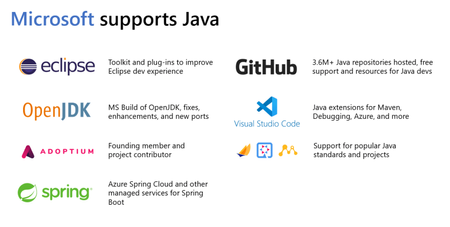
The evolution of Java Over the past several years, the https://www.java.com/en/ ecosystem landscape has evolved, from monolith https://www.oracle.com/java/technologies/java-ee-glance.html applications running on application servers and the Spring Framework to modern smaller-footprint https://spring.io/projects/spring-boot/, https://microprofile.io/, and https://jakarta.ee/ microservices. Today, more and more Java developers are looking at how they can bring their existing Java applications to the cloud—or at how to build new https://docs.microsoft.com/en-us/dotnet/architecture/cloud-native/definition applications. Many organizations have significant investments in the migration of mission-critical Java applications running on-premises to fully supported environments to run these apps in the cloud. 💁🏻In this blog post, let's take a closer look at Java at https://www.microsoft.com/et-ee?rtc=1 and on https://azure.microsoft.com/en-us/ and understand what Microsoft can offer to modernize existing Java-based apps or bring new ones with the well-known practice of Infrastructure as Code or IaC. Java at Microsoft We all know that Microsoft's evolution and main focus are on https://www.microsoft.com/en-us/windows?r=1 with https://dotnet.microsoft.com/en-us/ mindset. Well, I expect this comes as a surprise to some people as I was really surprised 😯 and had a ton of questions in my mind 😕 about how it came to be Java on Azure and why Microsoft’s choice is Java? Why not use other public clouds such as AWS? Because at that time, I was totally new to Azure as I got used to developing, building, and deploying apps in the https://aws.amazon.com/ ecosystem. Maybe one of the reasons is that recent https://www.codingdojo.com/blog/unicorn-languages-report has shown Java is in the top three languages among the world’s top start-ups and Java continues to gain more popularity according to https://redmonk.com/sogrady/2021/03/01/language-rankings-1-21/ and https://pypl.github.io/PYPL.html ✊. https://aws.amazon.com/ and https://azure.microsoft.com/en-us/ have been persistent in the market for many years and have taken the top honors for a while now. However, we are not going to answer the question that bothers people most about which Cloud vendor to choose. In this article https://azure.microsoft.com/en-us/pricing/azure-vs-aws/, you can learn more about the difference. After making a small investigation, I found out that Microsoft actively supports https://lightrun.com/java/16-top-java-communities-forums-and-groups-the-ultimate-guide/ organizations to help promote the future of Java, including the ongoing development of the Java language and the https://en.wikipedia.org/wiki/Java_virtual_machine. Microsoft is contributing directly to the https://openjdk.org/, and nowadays they are providing builds of the OpenJDK, starting with https://www.oracle.com/java/technologies/javase/jdk11-archive-downloads.html and https://www.oracle.com/java/technologies/javase/jdk16-archive-downloads.html, and providing support for those binaries on Azure. We can't forget about https://github.com/, which hosts millions of Java repositories and provides free CI/CD and vulnerability scans, not only for Java but other popular programming languages as well. Microsoft also publishes plugins for popular Java IDEs and DevTools such as https://maven.apache.org/, https://www.jetbrains.com/idea/, and https://www.eclipse.org/ to meet Java developers where they are and more easily integrate them into their development workflows. Last but not least, there are over half a million JVMs running across production products and services at Microsoft. https://www.linkedin.com/, for example, relies heavily on Java. The backend of https://www.microsoft.com/en-us/microsoft-365/yammer/yammer-overview is also written in Java. You can read more about tools for the Java developers on 👉 https://cdn.graph.office.net/prod/media/java/how-microsoft-applies-java.pdf?v=%7B1/string%7D e-book. Java on Azure Another surprise 😮 comes with Azure offerings for the Java ecosystem as it includes diverse technologies such as https://www.oracle.com/java/technologies/java-se-glance.html, https://jakarta.ee/ (successor to Java EE and J2EE), Spring, numerous application servers, and other frameworks. Whatever you’re doing with Java—building an app, using a framework, and running an application server—Azure supports your workload with plenty of choices and deployment options including infrastructure-as-a-service (IaaS) with no rearchitecting or code changes you can migrate existing apps, containers-as-a-service (CaaS), and fully managed platform-as-a-service (PaaS) for example, Azure Spring Cloud, which provides a managed platform for hosting Spring Boot microservice applications. You can use https://azure.microsoft.com/en-us/services/virtual-machines/ or https://docs.microsoft.com/en-us/azure/virtual-machine-scale-sets/overview to host your Java applications. Scale sets, in particular, allow you to scale your applications across hundreds to thousands of VMs very rapidly. As we all probably know, virtual machines require a high level of management and configuration versus some other options out there. If your organization leverages containers, you can use the Kubernetes service on Azure, known as https://azure.microsoft.com/en-us/services/kubernetes-service/#overview. Or you can use https://azure.microsoft.com/en-us/services/openshift/, a jointly managed and supported offering from https://www.redhat.com/en and https://azure.microsoft.com/en-us/. On the other hand, going even further up the spectrum, if your organization does not want to work with virtual machines or be in the business of orchestrating containers, service like https://azure.microsoft.com/en-us/services/app-service/provide a managed platform for deploying code or Containers. Sometimes you don’t need an entire Java-based microservice. You can build serverless APIs with the help of https://docs.microsoft.com/en-us/azure/azure-functions/functions-overview. For example, Azure functions have a bunch of built-in connectors like https://azure.microsoft.com/en-us/services/event-hubs/ to process event-driven Java code and send the data to https://azure.microsoft.com/en-us/products/cosmos-db/ in real-time. https://www.fedex.com/en-ee/home.htmland https://www.ubs.com/global/en.html projects are great examples of real-time, event-driven Java. I also recommend you to go through 👉 https://cdn.graph.office.net/prod/media/java/code-deploy-scale-java-your-way.pdf?v=%7B1/string%7D e-book to discover other ways of developing modern https://azure.microsoft.com/en-us/resources/developers/java/. Infrastructure as code for cloud After you decide to move your infrastructure to Azure Cloud and choose suitable a deployment strategy, next task you have to do is automatically provisioning your services. Of course, you can always deploy your services manually from https://azure.microsoft.com/en-us/get-started/azure-portal/ or by using https://docs.microsoft.com/en-us/cli/azure/install-azure-cli. However, these approaches do not provide much flexibility when it comes to creating release stages, deployment versioning, updating, deleting, and managing all your cloud resources. Cloud applications usually have separate deployment environments for the stages of their release lifecycle. It’s common to have development, staging, and production environments. These environments are composed of many resources such as networking resources: https://docs.microsoft.com/en-us/azure/virtual-network/virtual-networks-overview(VNet), https://docs.microsoft.com/en-us/azure/virtual-network/network-security-groups-overview (NSG) or https://docs.microsoft.com/en-us/training/modules/manage-secrets-with-azure-key-vault/, https://azure.microsoft.com/en-us/products/category/compute/, https://docs.microsoft.com/en-us/azure/load-balancer/load-balancer-overview, and https://azure.microsoft.com/en-us/products/category/databases/. Without Infrastructure as code (also referred to as IaC), managing all those resources can be a disorganized and delicate process. Because the DevOps team manually connects to remote cloud providers and uses API or web dashboards to provision new hardware and resources each time when a new release happens. Or they may manually make changes to one environment and forget to follow through on the other. This is how environment drift occurs. In this case, you may consider using the widely accepted practice of IaC. Let’s briefly review the IaC definition: Infrastructure as code is an IT practice that codifies and manages underlying IT infrastructure as software. The purpose of infrastructure as code is to enable developers or operations teams to automatically manage, monitor and provision resources, rather than manually configure discrete hardware devices and operating systems. Infrastructure as code is sometimes referred to as programmable or software-defined infrastructure. Azure native support for IaC Azure provides native support for IaC via the https://docs.microsoft.com/en-us/azure/azure-resource-manager/management/overview model. Teams can define declarative https://docs.microsoft.com/en-us/azure/azure-resource-manager/templates/overview that specify the infrastructure required to deploy solutions. Likewise, https://www.terraform.io/, https://www.ansible.com/, https://www.chef.io/, and https://www.pulumi.com/ third-party platforms also support IaC to manage automated infrastructure. Specifying your cloud infrastructure through ARM templates alone can be quite challenging. Especially, if your resources are frequently updated and the different environments use a diverse set of resources (customization of deployments per environment), and you would like to set custom runtime validation of your resources. In this case, there is a need for a new tool to greatly simplify how you specify infrastructure in higher-level Java code with the best software development practices and manage low-level ARM models via HTTP client APIs by hiding internal complexity. The solution can support parametrization and service developers only define parameters for the resource in code and offer observability feature by default. Azure offers an open-source https://docs.microsoft.com/en-us/azure/developer/java/sdk/overview that simplifies provisioning, managing, and using Azure resources from Java application code. To implement infrastructure as code in Java, you can use the https://github.com/Azure/azure-sdk-for-java/tree/main/sdk/resourcemanager#readme of Azure Java SDK. With the management libraries, you can write configuration and deployment scripts to perform the same tasks that you can do through the https://azure.microsoft.com/en-us/get-started/azure-portal/ or the https://docs.microsoft.com/en-us/cli/azure/install-azure-cli. There are plenty of samples available on how to use this library, you can check them on the ARM sample client library for the https://github.com/Azure/azure-sdk-for-java. Java library can sync new changes automatically when ARM templates introduce new Azure features as soon as they are released without needing any code changes since the dedicated team is working on configuring them regularly to recognize the latest changes in Azure or if it is missing security-related updates. Java client library IaC example Let’s assume that you create your https://docs.microsoft.com/en-us/azure/azure-functions/functions-reference-java?tabs=bash%2Cconsumption then you can make automation of deployment via the library. Or use other deployment options through like CLI, IntelliJ Idea, Azure Portal, and VS Code. Look at the following code example of how easy to create an Azure Function App in Java together with all required dependencies such as https://docs.microsoft.com/en-us/azure/storage/common/storage-account-overview and https://docs.microsoft.com/en-us/azure/app-service/overview-hosting-plans: Creatable<StorageAccount> creatableStorageAccount = azure.storageAccounts() .define("<storage-account-name>") .withRegion(Region.US_EAST) .withExistingResourceGroup(rgName) .withGeneralPurposeAccountKindV2() .withSku(StorageAccountSkuType.STANDARD_LRS); Creatable<AppServicePlan> creatableAppServicePlan = azure.appServicePlans() .define("<app-service-plan-name>") .withRegion(Region.US_EAST) .withExistingResourceGroup(rgName) .withPricingTier(PricingTier.STANDARD_S1) .withOperatingSystem(OperatingSystem.LINUX); FunctionApp linuxFunctionApp = azure.functionApps().define("<function-app-name>") .withRegion(Region.US_EAST) .withExistingResourceGroup(rgName) .withNewLinuxAppServicePlan(creatableAppServicePlan) .withBuiltInImage(FunctionRuntimeStack.JAVA_8) .withNewStorageAccount(creatableStorageAccount) .withHttpsOnly(true) .withAppSetting("WEBSITE_RUN_FROM_PACKAGE", "<function-app-package-url>") .create(); Java library supports almost all Azure services. You can see the full list of them https://github.com/Azure/azure-sdk-for-java/tree/main/sdk/resourcemanager#:~:text=listed%20as%20below%3A-,List%20of%20services,-In%20the%20case. You can select to use the single-service package for each service and import it simply to your let’s say https://maven.apache.org/pom.html. If you would like to leverage the https://azure.microsoft.com/en-us/services/active-directory/ for managing authentication flow, you can do it with Java code as well by simply adding the package. <dependency> <groupId>com.azure</groupId> <artifactId>azure-identity</artifactId> <version>{LATEST_VERSION}</version> </dependency> Conclusion With IaC, you automate platform provisioning. You essentially apply software engineering practices such as testing and versioning to your DevOps practices. Tools like https://github.com/Azure/azure-sdk-for-java/tree/main/sdk/resourcemanager enable you to declaratively script the cloud infrastructure you require. On top of that, you can scale your Java applications smoothly and confidently on Azure including necessities such as security, supporting data and messaging services, caching, monitoring, and automation. Related resources ➔ https://docs.microsoft.com/en-us/devops/deliver/what-is-infrastructure-as-code. ➔ https://cdn.graph.office.net/prod/media/java/code-deploy-scale-java-your-way.pdf?v=%7B1/string%7D. ➔ https://cdn.graph.office.net/prod/media/java/how-microsoft-applies-java.pdf?v=%7B1/string%7D. Recommended content 💁 ➔ Watch Video Tutorial: https://docs.microsoft.com/en-us/events/jdconf-2022/cloud-native-java-development-on-visual-studio-code. https://docs.microsoft.com/en-us/events/jdconf-2022/?WT.mc_id=jdconf-56324-jemorg. https://www.microsoft.com/en-us/videoplayer/embed/RE52aYU. ➔ Read the blog posts: https://devblogs.microsoft.com/java/.2.6KViews0likes0CommentsAPI Gateway Caching for ASP.NET Core WEB API
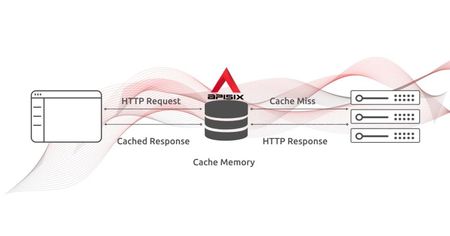
Improve performance with caching When you are building an API, you want to keep it simple and fast. Once the concurrent need to read the same data increase, you'll face a few issues😐 where you might be considering introducing caching: :cross_mark: There is latency on some API requests which is noticeably affecting the user's experience. :cross_mark: Fetching data from a database takes more time to respond. :cross_mark: Availability of your API is threatened by the API's high throughput. :cross_mark: There are some network failures in getting frequently accessed information from your API. In this post, we will focus primarily on handling caching at the API Gateway level by using https://apisix.apache.org/docs/apisix/getting-started/ and you will learn how to use proxy-caching plugin to improve response efficiency for https://docs.microsoft.com/en-us/aspnet/core/?view=aspnetcore-6.0 WEB API. Here is an overview of what we cover in this walkthrough: :heavy_check_mark: Caching in API Gateway :heavy_check_mark: About https://apisix.apache.org/docs/apisix/getting-started/ :heavy_check_mark: Run the demo project https://github.com/Boburmirzo/apisix-dotnet-docker :heavy_check_mark: Configure the https://apisix.apache.org/docs/apisix/plugins/proxy-cache/ plugin :heavy_check_mark: Validate Proxy Caching Caching in API Gateway https://en.wikipedia.org/wiki/Cache_(computing) is capable of storing and retrieving network requests and their corresponding responses. Caching happens at different levels in a web application: Edge caching or CDN Database caching Server caching (API caching) Browser caching Reverse Proxy Caching is yet another caching mechanism that is usually implemented inside API Gateway. It can reduce the number of calls made to your endpoint and also improve the latency of requests to your API by caching a response from the upstream. If the API Gateway cache has a fresh copy of the requested resource, it uses that copy to satisfy the request directly instead of making a request to the endpoint. If the cached data is not found, the request travels to the intended upstream services (backend services). Apache APISIX API Gateway https://apisix.apache.org/docs/apisix/getting-started/ is a lightweight, fast, and open-source API Gateway. It can act as a single entry point for all requests into your service network. APISIX can be further extended with built-in plugins to manage network traffic by handling authentication, security, observability, transformation and many more. Also, you can enable API caching with https://apisix.apache.org/docs/apisix/plugins/proxy-cache/ plugin:electric_plug:to cache your API endpoint's responses and enhance the performance. It can be used together with other Plugins too and currently supports disk-based caching. The data to be cached can be filtered with response codes, request modes, or more complex methods using the no_cache and cache_bypass attributes. You can specify cache expiration time or a memory capacity in the plugin configuration as well. Please, refer to other proxy-cache plugin's https://apisix.apache.org/docs/apisix/plugins/proxy-cache/. 🙋🏼 With all this in mind, we'll look next at an example of using proxy-cache plugin offered by Apache APISIX and apply it for ASP.NET Core Web API with a single endpoint. Prerequisites ☝️ If you followed the previous blog post about https://dev.to/apisix/manage-net-microservices-apis-with-apache-apisix-api-gateway-2cbk, make sure you have read it and completed the steps (Run APISIX, etcd and ASP.NET WEB API) before continuing with a demo session. 💁 To execute and customize the example project per your need shown in this post, here are the minimum requirements you need to install in your system: :right_arrow: https://dotnet.microsoft.com/en-us/download :right_arrow: https://visualstudio.microsoft.com/downloads/ with the Web Development, and/or .NET cross-platform development workload installed. This includes by default .NET 6 development tools. Or https://code.visualstudio.com/. :right_arrow: https://docs.docker.com/desktop/windows/install/ - you need also https://www.docker.com/products/docker-desktop/ installed locally to complete this tutorial. It is available for https://desktop.docker.com/win/edge/Docker%20Desktop%20Installer.exe or https://desktop.docker.com/mac/edge/Docker.dmg. Or install the https://docs.docker.com/engine/context/aci-integration/#install-the-docker-aci-integration-cli-on-linux. Run the demo project Until now, I assume that you have the demo project https://github.com/Boburmirzo/apisix-dotnet-docker up and running. You can see the complete source code on Github and the instruction on how to build a multi-container APISIX via Docker CLI. In the ASP.NET Core project, there is a simple API to get all products list from the service layer in https://github.com/Boburmirzo/apisix-dotnet-docker/blob/main/ProductApi/Controllers/ProductsController.cs file. Let's assume that this product list is usually updated only once a day and the endpoint receives repeated billions of requests every day to fetch the product list partially or all of them. In this scenario, using the API caching technique with the proxy-cache plugin might be really helpful🙌. For the demo purpose, we only enable caching for GET method. Ideally, GET requests should be cachable by default - until a special condition arises. Configure the Proxy Cache Plugin Now let's start with adding a proxy-cache plugin to Apache APISIX declarative configuration file config.yaml in the project. Because in the current project, we have not registered yet the plugin we are going to use for this demo. We appended the proxy-cache plugin's name to the end of the plugins list: plugins: - http-logger - ip-restriction … - proxy-cache You can add your cache configuration in the same file if you need to specify values like disk_size, memory_size as shown below: proxy_cache: cache_ttl: 10s # default caching time if the upstream doesn't specify the caching time zones: - name: disk_cache_one # name of the cache. Admin can specify which cache to use in the Admin API by name memory_size: 50m # size of shared memory, used to store the cache index disk_size: 1G # size of disk, used to store the cache data disk_path: "/tmp/disk_cache_one" # path to store the cache data cache_levels: "1:2" # hierarchy levels of the cache Next, we can directly run apisix reload command to reload the latest plugin code without restarting Apache APISIX. See the command to reload the newly added plugin: curl http://127.0.0.1:9080/apisix/admin/plugins/reload -H 'X-API-KEY: edd1c9f034335f136f87ad84b625c8f1' -X PUT Then, we run two more curl commands to configure an Upstream and Route for the /api/products endpoint. The following command creates a sample upstream (that's our API Server): curl "http://127.0.0.1:9080/apisix/admin/upstreams/1" -H "X-API-KEY: edd1c9f034335f136f87ad84b625c8f1" -X PUT -d ' { "type": "roundrobin", "nodes": { "productapi:80": 1 } }' Next, we will add a new route with caching ability by setting proxy-cache plugin in plugins property and giving a reference to the upstream service by its unique id to forward requests to the API server: curl "http://127.0.0.1:9080/apisix/admin/routes/1" -H "X-API-KEY: edd1c9f034335f136f87ad84b625c8f1" -X PUT -d ' { "name": "Route for API Caching", "methods": ["GET"], "uri": "/api/products", "plugins": { "proxy-cache": { "cache_key": ["$uri", "-cache-id"], "cache_bypass": ["$arg_bypass"], "cache_method": ["GET"], "cache_http_status": [200], "hide_cache_headers": true, "no_cache": ["$arg_test"] } }, "upstream_id": 1 }' As you can see in the above configuration, we defined some plugin attributes that we want to cache only successful responses from the GET method of API. Validate Proxy Caching🙎 Finally, we can test the proxy caching if it is working as it is expected. We will send multiple requests to the /api/products path and we should receive HTTP 200 OK response each time. However, the Apisix-Cache-Status in the response shows MISS meaning that the response has not cached yet when the request hits the route for the first time. Now, if you make another request, you will see that you get a cached response with the caching indicator as HIT. Now we can make an initial request: curl http://localhost:9080/api/products -i The response looks like as below: HTTP/1.1 200 OK … Apisix-Cache-Status: MISS When you do the next call to the service, the route responds to the request with a cached response since it has already cached in the previous request: HTTP/1.1 200 OK … Apisix-Cache-Status: HIT Or if you try again to hit the endpoint after the time-to-live (TTL) period for the cache ends, you will get: HTTP/1.1 200 OK … Apisix-Cache-Status: EXPIRED Excellent! We enabled caching for our API endpoint😎 Additional test case 💁🏼 Optionally, you can also add some delay in the Product controller code and measure response time properly with and without cache: [HttpGet] public IActionResult GetAll() { Console.Write("The delay starts.\n"); System.Threading.Thread.Sleep(5000); Console.Write("The delay ends."); return Ok(_productsService.GetAll()); } The curl command to check response time would be: curl -i 'http://localhost:9080/api/products' -s -o /dev/null -w "Response time: %{time_starttransfer} seconds\n" What's next As we learned, it is easy to configure and quick to set up API response caching for our ASP.NET Core WEB API with the help of Apache APISIX. It can reduce significantly the number of calls made to your endpoint and also improve the latency of requests to your API. There are other numerous built-in plugins available in Apache APISIX, you can check them on https://apisix.apache.org/plugins and use them per your need. Recommended content 💁 ➔ Watch Video Tutorial https://youtu.be/dUOjJkb61so. ➔ Read the blog post https://dev.to/apisix/overview-of-apache-apisix-api-gateway-plugins-2m8o. ➔ Read the blog post https://dev.to/apisix/run-apache-apisix-on-microsoft-azure-container-instance-1gdk. ➔ Read the blog post https://dev.to/apisix/api-security-with-oidc-by-using-apache-apisix-and-microsoft-azure-ad-50h3. ➔ Read the blog post https://dev.to/apisix/apis-observability-with-apache-apisix-plugins-1bnm. Community:right_arrow_curving_down: 🙋 https://apisix.apache.org/docs/general/community :bird: https://twitter.com/ApacheAPISIX :memo: https://join.slack.com/t/the-asf/shared_invite/zt-vlfbf7ch-HkbNHiU_uDlcH_RvaHv9gQ :e_mail: https://email address removed for privacy reasons/ with your questions.2.3KViews0likes0CommentsManage .NET Microservices APIs with Apache APISIX API Gateway
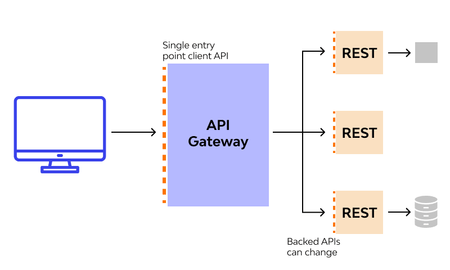
The API Gateway topic could easily carry several blog posts like this one. In this section, we focus specifically on the usage of https://apisix.apache.org/ for applications developed in https://docs.microsoft.com/en-us/aspnet/core/?view=aspnetcore-6.0 (Assume that you have an API that manages products) and provide an easy example of how to deploy multiple images using https://docs.docker.com/compose/. Now before going to the demo session. Let's discuss first what is API gateway?🤔 API Gateway as a single entry point In today's https://microservices.io/patterns/microservices.html, we usually create multiple microservices for a particular product and the client apps usually need to consume functionality from more than one microservice. And for each of these services, we will have different endpoints accessing these services from the external world it doesn't make sense to expose multiple URLs we should have a single entry point to all our services, and based on the different paths we should be doing the routing as it is shown in the below picture. There are other numerous aspects of an https://wikitech.wikimedia.org/wiki/API_Gateway in building https://dotnet.microsoft.com/en-us/ microservices APIs and web applications. In many scenarios, authentication, security, observability, caching, and transformation are handled centrally. Without an https://apisix.apache.org/docs/apisix/getting-started in place, you might typically implement these concerns for each service, because maintaining them for each service would be a very challenging task and time-consuming. At the same time, you can get the benefit of an https://microservices.io/patterns/apigateway.html in reducing complexity, and delivering high performance for your APIs and it helps you to scale your https://en.wikipedia.org/wiki/Microservices. Prerequisites 👉 To execute and customize the example project per your need shown in this post, here are the minimum requirements you need to install in your system: :right_arrow: https://dotnet.microsoft.com/en-us/download :right_arrow: https://visualstudio.microsoft.com/downloads/ with the Web Development, and/or .NET cross-platform development workload installed. This includes by default .NET 6 development tools. Or https://code.visualstudio.com/. :right_arrow: https://docs.docker.com/desktop/windows/install/ - you need also https://www.docker.com/products/docker-desktop/ installed locally to complete this tutorial. It is available for https://desktop.docker.com/win/edge/Docker%20Desktop%20Installer.exe or https://desktop.docker.com/mac/edge/Docker.dmg. Or install the https://docs.docker.com/engine/context/aci-integration/#install-the-docker-aci-integration-cli-on-linux. Here, is a short summary of what we do: :white_heavy_check_mark: Clone the demo project https://github.com/Boburmirzo/apisix-dotnet-docker from GitHub. :white_heavy_check_mark: Understand the structure of the project and docker-compose.yaml file. :white_heavy_check_mark: Build a multi-container APISIX via Docker CLI. :white_heavy_check_mark: Configure APISIX API Gateway routing for the ASP.NET API. :white_heavy_check_mark: Enable a traffic management plugin. Clone the demo project For this demonstration, we’ll leverage the demo project https://github.com/Boburmirzo/apisix-dotnet-docker I prepared in advance. You can see the complete source code on Github. Use https://git-scm.com/downloads to clone the repository: git clone 'https://github.com/Boburmirzo/apisix-dotnet-docker' Go to root directory of apisix-dotnet-docker cd apisix-dotnet-docker You can open the project in your favorite code editor. I used https://visualstudio.microsoft.com/downloads/. You’ll see the following project directory structure: Understand the structure of the project In the project folders, here is the list of main components you can take a look at: APISIX's config files - All the services are configured by mounting external configuration files in the project onto the docker containers: https://github.com/Boburmirzo/apisix-dotnet-docker/blob/main/apisix_conf/config.yaml defines the configs for apisix. Similarly, configs for etcd, prometheus, and grafana are located in https://github.com/Boburmirzo/apisix-dotnet-docker/blob/main/etcd_conf/etcd.conf.yml, https://github.com/Boburmirzo/apisix-dotnet-docker/blob/main/prometheus_conf/prometheus.yml, and https://github.com/Boburmirzo/apisix-dotnet-docker/tree/main/grafana_conf respectively. ☝️Note that grafana_conf, prometheus_conf, and dashboard_conf are all optional, only if you would like to use them in your project. APISIX's logs - in the https://github.com/Boburmirzo/apisix-dotnet-docker/tree/main/apisix_log folder, APISIX Admin and Control API requests are logged such as access.logor error.log when APISIX is running. ASP.NET WEB API - Next, the https://github.com/Boburmirzo/apisix-dotnet-docker/tree/main/ProductApi folder keeps basically ASP.NET Core application with Controller, Domain, and Service classes). You can also see ProductsController.cs file where there is a simple API to get all products list from the service layer. We will enable routing and Apache APISIX plugins for this endpoint in the next steps. [Route("api/[controller]")] [ApiController] public class ProductsController : ControllerBase { private IProductsService _productsService; public ProductsController(IProductsService productsService) { _productsService = productsService; } [HttpGet] public IActionResult GetAll() { return Ok(_productsService.GetAll()); } } Now let's have a look at a Dockerfile inside the ProductApi folder. It has just a standard Docker file structure and this file is responsible for pulling .NET6 SDK and ASP.NET6 images from docker registry, building and running the applications docker images. FROM mcr.microsoft.com/dotnet/sdk:6.0 AS build-env WORKDIR /app COPY . ./ RUN dotnet restore "ProductApi.csproj" RUN dotnet publish "ProductApi.csproj" -c Release -o out FROM mcr.microsoft.com/dotnet/aspnet:6.0 ENV TZ=America/Sao_Paulo RUN ln -snf /usr/share/zoneinfo/$TZ /etc/localtime && echo $TZ > /etc/timezone WORKDIR /app COPY --from=build-env /app/out . ENTRYPOINT ["dotnet", "ProductApi.dll"] Docker compose file - The https://github.com/Boburmirzo/apisix-security-java-spring/blob/main/docker-compose.yml file defines an application with some services: apisix-dashboard - It runs https://apisix.apache.org/docs/dashboard/USER_GUIDE on port 9000. :information: The Dashboard offers another way to interact with APISIX Admin API and we can achieve the same configuration result with the CLI as with the Dashboard. apisix- deploys APISIX and exposes it on port 9080. On your local machine, you can access APISIX Admin API by sending requests to the following URL http://127.0.0.1:9080/ etcd - APISIX uses etcd to save and synchronize configuration. prometheus - APISIX can fetch metrics data about upstream APIs together with https://apisix.apache.org/docs/apisix/plugins/prometheus. grafana - Metrics exported by the [prometheus plugin]https://apisix.apache.org/docs/apisix/plugins/prometheus can be also graphed in Grafana and you can see the running dashboard on port 3000. ProductApi - While deploying the .NET application, docker compose maps port 5555 of the backend service container to port 80 of the host. ☝️You may notice all services are mapped to apisix network. The apisix-dotnet-docker project makes use of the similar example https://github.com/apache/apisix-docker/tree/master/example. Build a multi-container APISIX via Docker CLI Now we can start our application by running docker compose up command from the root folder of the project: docker compose up -d Sample output: [+] Running 7/7 - Network apisix-dotnet-docker_apisix Created 0.0s - Container apisix-dotnet-docker-apisix-dashboard-1 Started 1.2s - Container apisix-dotnet-docker-prometheus-1 Started 0.7s - Container apisix-dotnet-docker-etcd-1 Started 0.9s - Container apisix-dotnet-docker-grafana-1 Started 1.2s - Container apisix-dotnet-docker-productapi-1 Started 0.7s - Container apisix-dotnet-docker-apisix-1 Started 2.0s The running container list you can see by running docker compose ps CLI command or using docker desktop: NAME COMMAND SERVICE STATUS PORTS apisix-dotnet-docker-apisix-1 "sh -c '/usr/bin/api…" apisix running 0.0.0.0:9080->9080/tcp, 0.0.0.0:9091-9092->9091-9092/tcp, 0.0.0.0:9443->9443/tcp apisix-dotnet-docker-apisix-dashboard-1 "/usr/local/apisix-d…" apisix-dashboard running 0.0.0.0:9000->9000/tcp apisix-dotnet-docker-etcd-1 "/opt/bitnami/script…" etcd running 0.0.0.0:12379->2379/tcp apisix-dotnet-docker-grafana-1 "/run.sh" grafana running 0.0.0.0:3000->3000/tcp apisix-dotnet-docker-productapi-1 "dotnet ProductApi.d…" productapi running 0.0.0.0:5555->80/tcp apisix-dotnet-docker-prometheus-1 "/bin/prometheus --c…" prometheus running 0.0.0.0:9090->9090/tcp Once the containers are running, navigate to http://localhost:5555/api/products in your web browser and you will see the following output: Configure APISIX API Gateway When you set up Apache APISIX API Gateway for your APIs, it adds many capabilities including :downwards_button: Routing. Request Aggregation. Authentication. Authorization. Rate Limiting. Caching. Retry policies / QoS. Load Balancing. Logging / Tracing / Metrics. Headers / Method / Query String / gRPC / Claims Transformation. Configuration / Administration REST API. and many more... For more information see the https://apisix.apache.org/docs/. Apache APISIX is based on a couple of primitives: One of them is the https://apisix.apache.org/docs/apisix/terminology/route Another is the https://apisix.apache.org/docs/apisix/terminology/upstream We can create a Route and configure the underlying Upstream. When Apache APISIX receives a request matching the Route, it forwards it to the underlying Upstream. Now let's start with adding a Route and Upstream for the /api/products endpoint. The following command creates a sample Route together with an upstream: curl "http://127.0.0.1:9080/apisix/admin/routes/1" -H "X-API-KEY: edd1c9f034335f136f87ad84b625c8f1" -X PUT -d ' { "methods": ["GET"], "uri": "/api/products", "upstream": { "type": "roundrobin", "nodes": { "productapi:80": 1 } } }' Once we have created the Route and upstream, we can check whether it works. Apache APISIX should forward the request to our target API /api/products. curl http://127.0.0.1:9080/api/products -i Urraaa👏, yes, it actually does. You can see a sample output: HTTP/1.1 200 OK Content-Type: application/json; charset=utf-8 Transfer-Encoding: chunked Connection: keep-alive Server: APISIX/2.13.1 [{"name":"Macbook Pro","price":1299.9},{"name":"SurfaceBook 3","price":1599.9}] You can also add two or more routes to the API Gateway, let's say one will serve for you Product and another for Customer microservices with the URL path /api/customers. Enable a traffic management plugin With the help of the API Gateway, one can set automatic retries, timeouts, circuit breakers, or rate-limiting for an external upstream API or microservice. Rate limiting is a strategy for limiting network traffic. It puts a cap on how often someone can repeat an action within a specific timeframe – for instance, trying to log into an account. The https://apisix.apache.org/docs/apisix/plugins/limit-count/ :electric_plug: is one among many limiting plugins. It limits the request rate by a fixed number of requests in a given time window. Let’s enable the limit-count plugin on the Route and Upstream. To do so, run the following command: curl -i http://127.0.0.1:9080/apisix/admin/routes/1 -H 'X-API-KEY: edd1c9f034335f136f87ad84b625c8f1' -X PUT -d ' { "methods": ["GET"], "uri": "/api/products", "plugins": { "limit-count": { "count": 2, "time_window": 60, "rejected_code": 403, "rejected_msg": "Requests are too frequent, please try again later.", "key_type": "var", "key": "remote_addr" } }, "upstream": { "type": "roundrobin", "nodes": { "productapi:80": 1 } } }' The above configuration limits the number of requests to two in 60 seconds. Apache APISIX will handle the first two requests as usual, but a third request in the same period will return a 403 HTTP code: curl http://127.0.0.1:9080/api/products -i Sample output after calling the API 3 times within 60 sec: HTTP/1.1 403 Forbidden Content-Type: text/plain; charset=utf-8 Transfer-Encoding: chunked Connection: keep-alive Server: APISIX/2.13.1 {"error_msg":"Requests are too frequent, please try again later."} Indeed, after reaching the threshold, subsequent requests are not allowed by APISIX. Conclusion We made use of https://github.com/apache/apisix-docker repo where we deployed several components in one run and we demonstrated how the API Gateway can be used to manage sample ASP.NET Core application to retrieve product data using Product microservice's API. Also, you learned how to enable limit-count plugin for the API endpoint. There are many other built-in plugins available in Apache APISIX, you can check them on https://apisix.apache.org/plugins. Basically, APISIX can be a lightweight middleware API Gateway regardless of which programming language, frameworks, tools, or platforms you are developing a microservice or application. Recommended content 💁 ➔ Watch Video Tutorial https://youtu.be/dUOjJkb61so. ➔ Read the blog post https://dev.to/apisix/overview-of-apache-apisix-api-gateway-plugins-2m8o. ➔ Read the blog post https://dev.to/apisix/run-apache-apisix-on-microsoft-azure-container-instance-1gdk. ➔ Read the blog post https://dev.to/apisix/api-security-with-oidc-by-using-apache-apisix-and-microsoft-azure-ad-50h3. ➔ Read the blog post https://dev.to/apisix/apis-observability-with-apache-apisix-plugins-1bnm. Community:right_arrow_curving_down: 🙋 https://apisix.apache.org/docs/general/community :bird: https://twitter.com/ApacheAPISIX :memo: https://join.slack.com/t/the-asf/shared_invite/zt-vlfbf7ch-HkbNHiU_uDlcH_RvaHv9gQ :e_mail: https://email address removed for privacy reasons/ with your questions.3.6KViews0likes0CommentsRun Apache APISIX on Microsoft Azure Container Instance
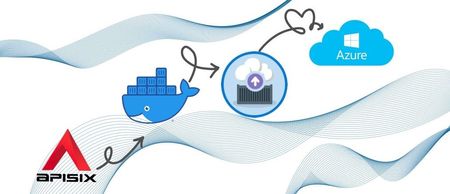
Introduction https://apisix.apache.org/ is an open-source Microservice API gateway and platform designed for managing microservices requests of high availability, fault tolerance, and distributed system. You can install Apache APISIX by the https://apisix.apache.org/docs/apisix/how-to-build (https://www.docker.com/, https://helm.sh/, or https://rpm.org/) and run it in the various public cloud providers because of its cloud-native behavior. In this post, you will learn how easily run Apache APISIX API Gateway in https://azure.microsoft.com/en-us/services/container-instances/ with multiple containers (Apisix and etcd) straight from Docker CLI. ☝️Alternatively, there are a bunch of options you can also deploy APISIX in Azure: https://azure.microsoft.com/en-us/services/kubernetes-service/, if you want a complete orchestration solution and if you need to manage your deployment and infrastructure. https://azure.microsoft.com/en-us/services/service-fabric/ for containers and services orchestration. https://azure.microsoft.com/en-us/product-categories/compute/, to build your own solution. In this walkthrough, you will Create an Azure resource group. Configure Azure Container Instances. Create an Azure context for Docker to offload Apisix and etcd containers execution to ACI. Get https://github.com/apache/apisix-docker for Docker from GitHub. Modify Docker compose file there. Setup volumes in https://docs.microsoft.com/en-us/azure/storage/common/storage-account-create?tabs=azure-portal with https://docs.microsoft.com/en-us/azure/storage/files/storage-files-introduction. Add APISIX config files to Azure File Share. Bring up APISIX in Azure Container Instances. Verify APISIX running. Cleanup after you finish. Prerequisites Azure subscription - create a https://azure.microsoft.com/en-gb/free/ before you begin. Azure CLI - you must have Azure CLI installed on your local computer hence we are going to use Azure CLI to interact with all Azure resources. See https://docs.microsoft.com/en-us/cli/azure/install-azure-cli and how to set up. Docker Desktop - you need also https://www.docker.com/products/docker-desktop/ installed locally to complete this tutorial. It is available for https://desktop.docker.com/win/edge/Docker%20Desktop%20Installer.exe or https://desktop.docker.com/mac/edge/Docker.dmg. Or install the https://docs.docker.com/engine/context/aci-integration/#install-the-docker-aci-integration-cli-on-linux. We use https://docs.docker.com/compose/ to define and deploy two containers for Apisix and https://github.com/etcd-io/etcd as a https://docs.microsoft.com/en-us/azure/container-instances/container-instances-container-groups in Azure Container Instances. APISIX uses etcd to save and synchronize configuration. Before installing APISIX, you need to install etcd on your machine. It would be installed automatically if you choose the Docker compose, so it is a perfect fit for this example. 💁Run containers in Azure Container Instances on-demand when you develop cloud-native apps like APISIX with Docker and you want to switch seamlessly from local development to cloud deployment. This excellent capability is enabled by https://docs.docker.com/cloud/aci-integration/ Create a resource group Before you create and manage your APISIX container instance, you need a resource group to deploy it to. A resource group is a logical collection into which all Azure resources are deployed and managed. Create a resource group with the az group create command. In the following example, a resource group named apisix is created in the centralus region: az group create --name apisix --location centralus Configure Azure Container Instances You can now run the Azure CLI with the az command from any command-line interface. Note that I used Windows OS with Docker desktop installed on my machine for this demo and I run az commands from either Windows Command Prompt or PowerShell. We use Docker commands to run containers in Azure Container Instances, so the first thing we need to log into Azure by running the following command: docker login azure You can also log in using a Service Principal (SP). Provide the id and password of the SP using --client-id and --client-secret arguments when calling docker login azure. Create an Azure context Once logged in, you will create an ACI context by running docker context create aci. The context is responsible for associating requests issued by Docker CLI to nodes or clusters in ACI. For example, to create a context called apisixacicontext you can use: docker context create aci apisixacicontext docker context create is an interactive command. It guides you through the process of configuring a new Docker context for our existing Azure resource group. Run docker context ls to confirm that you added the ACI context to your Docker contexts: docker context ls Output: Next, change to the ACI context. Subsequent Docker commands run in this context. docker context use apisixacicontext Get Apache APISIX from GitHub In this demo, we are using https://github.com/apache/apisix-docker and it contains an example docker-compose.yaml file and other config files that show how to start APISIX using docker compose. We try out this example: Use https://git-scm.com/downloads to clone the repository and cd into the example folder. git clone 'https://github.com/apache/apisix-docker' cd apisix-docker/example Modify Docker compose file Next, open docker-compose.yaml in a text editor. The https://github.com/apache/apisix-docker/blob/master/example/docker-compose.yml defines several services: apisix-dashboard, apisix, etcd, web1, web2, prometheus, and grafana: apisix-dashboard, apisix, etcd are the essential services required for starting apisix-dashboard, apisix, and etcd. web1, web2 are sample backend services used for testing purposes. They use nginx-alpine image. prometheus, grafana are services used for exposing metrics of the running services. For the sake of simplicity, we are going to use and run only APISIX and etcd services in this demo. We can simply do the following changes by removing other services and defining volumes like etcd-data and apisix-data. In the next step, we use Azure file share as volumes. version: "3" services: apisix: image: apache/apisix:2.13.1-alpine restart: always volumes: - apisix-data:/apisix/conf/ depends_on: - etcd ports: - "9080:9080/tcp" - "9091:9091/tcp" - "9443:9443/tcp" - "9092:9092/tcp" networks: apisix: etcd: image: bitnami/etcd:3.4.15 restart: always volumes: - etcd-data:/bitnami/etcd environment: ETCD_ENABLE_V2: "true" ALLOW_NONE_AUTHENTICATION: "yes" ETCD_ADVERTISE_CLIENT_URLS: "http://0.0.0.0:2379" ETCD_LISTEN_CLIENT_URLS: "http://0.0.0.0:2379" ports: - "2379:2379/tcp" networks: apisix: networks: apisix: driver: bridge volumes: etcd-data: driver: azure_file driver_opts: share_name: etcdshare storage_account_name: apisixstorage apisix-data: driver: azure_file driver_opts: share_name: apisixshare storage_account_name: apisixstorage Setup volumes using Azure file share Apache APISIX has to persist etcd state and mount external configuration files like /apisix_conf/conf.yaml (defines the configs for apisix) in the repo folder onto the containers. You can store persistent data outside of the container-filesystem in https://docs.docker.com/cloud/aci-integration/#using-azure-file-share-as-volumes-in-aci-containers:~:text=must%20be%20available.-,Using%20Azure%20file%20share%20as%20volumes%20in%20ACI%20containers,-%F0%9F%94%97 since Azure Container Instances are stateless. If the container is restarted, crashes, or stops, all of its state is lost. :information:More about https://docs.microsoft.com/en-us/azure/container-instances/container-instances-volume-azure-files As you may notice, we declared two volumes in docker-compose.yaml file and set the driver to azure_file. Before using an Azure file share with Azure Container Instances, you must create a new Azure Storage account to host the file share and add a file share to it. To create Azure storage with the name, for example, apisixstorage : az storage account create --resource-group apisix --name apisixstorage --location centralus --sku Standard_LRS Run the following two commands to create two Azure file shares combined with the required Azure Storage Account respectively using docker volume create. For the first volume apisixshare: docker volume create apisixshare --storage-account apisixstorage For the second volume etcdshare: docker volume create etcdshare --storage-account apisixstorage You can see created the storage with two files shares in the Azure portal too. Having the volume in place, we can run stateful APISIX in ACI as shown in the next section. Add APISIX config files to Azure File Share Now we need to upload manually Apache APISIX config files to Azure File Share. You can simply use the Azure portal to do so. Or you can always use https://docs.microsoft.com/en-us/azure/storage/files/storage-how-to-use-files-portal?tabs=azure-cli Azure CLI command. Find the File shares from the navigation bar of apisixstorage storage we created in the previous step and select apisixshare file-share to open. The fileshare panel opens. In the menu at the top, select Upload. The Upload files panel opens. Download and add all files including directories from https://github.com/apache/apisix/tree/master/conf. The final list of config files in apisixshare file-share should match Apache APISIX conf folder. Similar to the output below: Here one more thing notice whatever the files you will add/update in file share it will add/update in container as well after you mount the file share as volume to the container. However, there are some limitations to this like you can only mount the whole share and not the subfolders or single file within it that's why we define the mount path to be /apisix/conf in the volume property of docker-compose.yaml file. Read more about https://docs.microsoft.com/en-us/azure/container-instances/container-instances-volume-azure-files#limitations. ... volumes: - apisix-data:/apisix/conf/ ... Behind the scene, ACI copies all the above config files from apisixshare file-share to /apisix/conf/ folder in Linux APISIX container. Bring up APISIX in ACI Finally, now we can deploy APISIX with etcd to Azure Container Instances. Execute docker compose up to create the container group in Azure Container Instances. docker compose up Wait until the container group is deployed. Then, you can also verify container instances are created in the Azure portal. You can also assign the value apisixaci to the domainname property under apisix service in the docker-compose.yaml file which results a custom DNS name in ACI. In other words, you instruct Azure to link a subdomain of azurecontainer.io to the public IP address of the exposed container. The FQDN (the fully qualified domain name) follows the schema and will expose APISIX instance on apisixaci.centralus.azurecontainer.io serving the proxy on port 9080. However, with the current configuration, we can access our APISIX with its the public IP address. Next, you run docker ps to see the running containers and the IP address assigned to the container group. To see the logs of the APISIX, run the docker logs command. For example: docker logs example_apisix Sample output: ... 2022/06/11 19:02:45 [warn] 211#211: *4 [lua] plugin.lua:223: load_stream(): new plugins: {"limit-conn":true,"ip-restriction":true,"mqtt-proxy":true}, context: ... Verify Apache APISIX running To verify if Apache APISIX is running in the cloud, we run the below curl command and check the response from APISIX's https://apisix.apache.org/docs/apisix/admin-api. You need to replace ACI_PUBLIC_IP_ADDRESS to your container instance group's the public IP address or FQDN. curl "http://{ACI_PUBLIC_IP_ADDRESS}:9080/apisix/admin/services/" -H 'X-API-KEY: edd1c9f034335f136f87ad84b625c8f1' The response indicates that APISIX is running successfully: { "count":0, "action":"get", "node":{ "key":"/apisix/services", "nodes":[], "dir":true } } Here we go, Apache APISIX is up and running in Azure Container Instance group and responding to your requests 👏💪. Troubleshoot😕 When you are requesting Apache APISIX Admin API, you may get 403 Forbidden HTTP status error. The reason is that your client IP address might be not whitelisted in the https://github.com/apache/apisix/blob/master/conf/config.yaml. The REST Admin API to control Apache APISIX, which only allows 127.0.0.1 access by default, you can modify the allow_admin field in conf/config.yaml to specify a list of IPs that are allowed to call the Admin API. Also, note that the Admin API uses key auth to verify the identity of the caller. The admin_key field in conf/config.yaml needs to be modified before deployment to ensure security. allow_admin: # http://nginx.org/en/docs/http/ngx_http_access_module.html#allow - 0.0.0.0/0 # We need to restrict ip access rules for security. 0.0.0.0/0 is for test. - YOUR_IP_ADDRESS admin_key: - name: "admin" key: YOUR_ADMIN_API_KEY role: admin # admin: manage all configuration data Cleanup after you finish When you finish trying the application, stop the application and containers with docker compose down inside the apisix-docker/compose folder. docker compose down This command deletes all containers apisix and etcd in Azure Container Instances. You can also remove the Docker context created during this demo, use the docker context rm apisixacicontext command after switching back to the default context: docker context use default Then, you run docker context rm apisixacicontext Conclusion Up to now, we learn how to deploy Apache APISIX to Azure Cloud with Docker Compose to switch from running a multi-container APISIX locally to running in Azure Container Instances. From this stage, you can create a https://apisix.apache.org/docs/apisix/getting-started#:~:text=Copy-,Create%20a%20Route,-%23, https://apisix.apache.org/docs/apisix/getting-started#:~:text=10%20by%20APISIX.-,Abstracting%20to%20Upstream,-%23 and manage the traffic to your backend services with the available https://apisix.apache.org/plugins if you want to take advantage of more APISIX's features. You can provision other services with APISIX Docker compose like prometheus, grafana as well. Recommended content ➔ Watch Video Tutorial https://youtu.be/dUOjJkb61so ➔ Read the blog post https://dev.to/apisix/overview-of-apache-apisix-api-gateway-plugins-2m8o ➔ Read the blog post https://dev.to/apisix/centralized-authentication-with-apache-apisix-plugins-30fo ➔ Read the blog post https://dev.to/apisix/api-security-with-oidc-by-using-apache-apisix-and-microsoft-azure-ad-50h3 Community:right_arrow_curving_down: 🙋 https://apisix.apache.org/docs/general/community :bird: https://twitter.com/ApacheAPISIX :memo: https://join.slack.com/t/the-asf/shared_invite/zt-vlfbf7ch-HkbNHiU_uDlcH_RvaHv9gQ :e_mail: https://email address removed for privacy reasons/ with your questions3.1KViews0likes0Comments
Recent Blog Articles
No content to show