User Profile

LC_CCMC
Copper Contributor
Joined May 27, 2022


User Widgets
Recent Discussions
Re: Outlook Deleted Files Missing
Those aren't the ones I'm having issues with. It's Sub folders with Sub/Sub folders. It's an arduous task to do each one that has this glitch. I also discovered a secondary issue: That when I clicked on a folder with this issue the Clear Offline only addresses PART of the problem. The other part affecting me not seeing emails in a folder was discovered by clicking on the Folder - Going to "Filter" on the bottom of the Home tab bar - going to the Advanced tab - and I discovered that under "find items that match these criteria" there is something that says "Owner Contains L". which is so random. But it's on every folder and once I removed them (after the Clear Offline) I could see everything!!!9KViews0likes0CommentsRe: Outlook Deleted Files Missing
OMG! I've been having this issue for over a year. I can see all Deleted Items emails in the online/web version but on the Desktop Outlook I can see that there are thousands of emails listed in the [brackets] but zero show up in one email and only ones more than 2 years old show up in another. It made NO sense. I've spent HOURS Googling this. Hours on with Microsoft support. I've created new profiles. Deleted OST files. Reinstalled. NOTHING worked until I tried your solution to right click and select "Clear Offline Items", then I synchronized the folder (which took a few minutes) and POOF - there they are!!!! THANK YOU!!!!!!!!!!!! I'm having the same issue with other sub folders. Any idea how to do the "Clear Offline Items" for the parent and ALL subfolders?9.2KViews0likes2CommentsTasks by Planner and To Do: Create New Plan changes mirrored in Original Plan
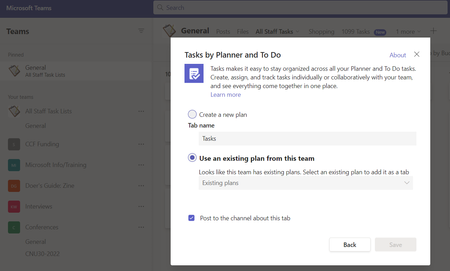
1. I'm working on Teams for Windows Desktop. 2. In Teams I have an "All Staff Tasks" tab that was created in "Tasks by Planner and To Do". My employees and I have "Buckets" created for each of us that have long lists of "Tasks" and within these Tasks, there are long "Checklists" for us to have visibility on everything we are working on (past, present, and future). 3. On the top bar I clicked the "+" sign to "Add a Tab" with "Tasks by Planner and To Do". 4. I wanted to create a COPY of the "All Staff Tasks" so that I could use the COPY as a NEW TAB to be modified from the ORIGINAL. 5. The new Tab was created with a new name "1099 Tasks". 6. I made modifications on the "1099 Tasks" Tab Buckets by deleted some buckets, moving buckets around, adding new buckets, etc. 7. The changes that I made to the "1099 Tasks" tab made the SAME CHANGES on the "All Staff Tasks" tab. So the new tab isn't a COPY. It's a MIRROR. So that any changes that occur on one, occur on the other. 8. I was horrified to see that the Bucket deletions I had made on "1099" made the same deletions on "All Staff". 9, I contacted Microsoft Help immediately and was told that absolutely nothing can be done to undelete, restore, or recovery the deleted Buckets. 10. I need help as this is catastrophic to my company. 11. Please do not reply with opinions agreement or disagreement with how absolutely stupid Microsoft it (we know where we stand). 12. Does ANYONE have any sort of restore an old version option or anything at all I can try????? I'm disparate. Best, LC1.5KViews0likes1Comment
Recent Blog Articles
No content to show