User Profile

BeyK40
Brass Contributor
Joined May 17, 2022


User Widgets
Recent Discussions
Re: Excel filter and hide other columns
HansVogelaar Charla74 Thanks! One more question. The cells with te partners refer to another sheet (main sheet). With data valadition there is no problem, still get a list to filter. But the code doesnt work.. Is there a way to fix this? (the code does work if I just type in the partner, but I it has to refer to the main sheet, because if a partner changes, I wanted it to automatically change in all the sheets.)4.9KViews0likes2CommentsExcel filter and hide other columns
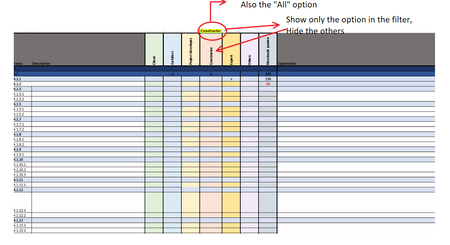
Hi all, I am curently working on a general table for our company. I've made a table for our partners. In the table they see some tasks, they all have responsibilities for different tasks, and they recieve points per task. But, they don't need to see the other partners. They now see a complete overview, I want to minimaze that. So, I want an option to filter partners, and the result has to be that they only see their party and their responsibility. In the filter option, I also want the "All" function, so that they still can see a overall overview ( situation atm). To show what I want, I've added the table that I use ( but blank), and the result I want. Who can help me? Thanks! Result has to be:Solved5.2KViews0likes10CommentsRe: Hide worksheet
Hanneke2445 I see that you also can't insert a new worksheet or delete one. If the workbook structure is protected with a password, you're unable to add, delete, move, copy, remane, hide or unhide sheets. Check if you're using a protected workbook. 1. Go to FILE -> Info 2. If it is protected with a paswoord you have to type in the correct paswoord to unprotect the workbook.1.3KViews1like1CommentRe: Excel Automatic Formula
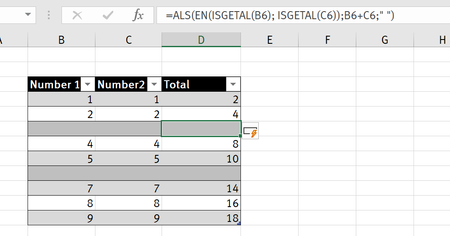
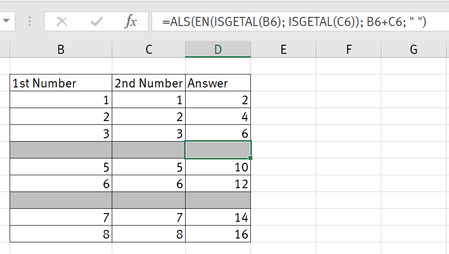
upashi Well, you just have to create a real table. The column with the answer is a calculated column. You just have to insert the formula in the first cell, and it will automatically copy the the rest. If you change one of the formula's, all of them will change.1.3KViews0likes0CommentsRe: Excel Automatic Formula
upashi There is an easy way. You could use the IF formula combined with "ISNUMBER", see formula below. As you see, the blank columns has also got the forumla. Forumla: =IF(AND(ISNUMBER(B2), ISNUMBER(C2)),B2*C2," ") Use the forumla in one cell, CRTL Shift Down arrow to insert it in the row.1.3KViews0likes2CommentsRe: Help with corrupt Excel file
I found this for you It usually indicates the file is not compatible with the Excel version of the file that has come corrupt or damaged. Here, we will show you all the possible solutions, and you can try these until your issue is fixed. Before you follow the solutions, check if Excel is working normally. Step 1. Press Windows+R keys, type excel.exe /safe, and click "OK". Loading Excel without templates and add-ins allows you to see if the program works as it should or if it is corrupted. Step 2. If Excel opens normally, check for any add-ins that are causing problems in Excel. Disable the add-ins and click on the "OK" button. Then, restart Excel to check if the problem is fixed. If not, move on to the fixes below. So, if it still doesnt work, try the possible solutions in the link below. https://www.easeus.com/amp/file-recovery/excel-cannot-open-the-file.html4.4KViews0likes1Comment- 1.1KViews0likes0Comments
- 1.5KViews0likes0Comments
Re: Excel Table
Thanks for your reply! 1. Energy consultancy 2. External partners (like architects) 3. The points represent certain requirements that must be met. However, each party has its own responsibilities. 4. Its a long-term project. Its a general table which we can use for different projects. 5. Yes, we want to give the same workbook to each partner. The columns don't need to be locked. I want to give them the opportunity to hide the columns, so that they only can see their responsibilities ( but also still the whole overview)1.6KViews0likes2CommentsExcel Table
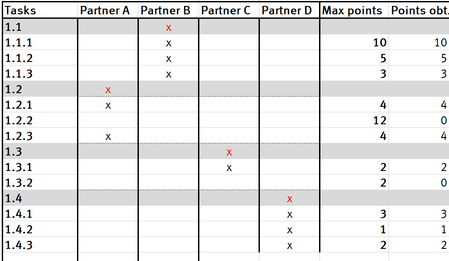
Hi all, Have been trying to make a table where I can filter a few things. See image for example. I want a specific thing in my table: - If there is a red X in a row, for example Partner B has a Red X at 1.1, I only want to see that column and the max points. I want that the table automatticly hides the other partners. So for Partner B I only want to see 1.1, but when there is a 'x' in chapter 4.1. I also want to see that. Its a complitcated table. I just need to know if there is a way where I can filter and hide the others columns that a spefic partner doen'st need to see. Thanks!1.8KViews0likes4Comments

Recent Blog Articles
No content to show