User Profile

Starrysky1988
Iron Contributor
Joined Feb 27, 2022


User Widgets
Recent Discussions
Re: Need help with replicating a formula
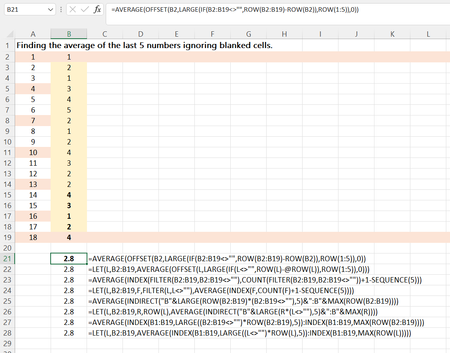
F to L 7 cells, T to Z 7 cells in your formula. If I understand correctly, the second formula must be like below. =IFERROR(AVERAGE(Daily!M4:S4), "0") If I'm correct, you may write the formula in F4 as below and drag formula to right. =IFERROR(AVERAGE(OFFSET(Daily!$F4,0,(COLUMN(A1)-1)*7,1,7)),0)685Views0likes0CommentsRe: Formula worked in google sheets but now doesnt work in Microsoft 365
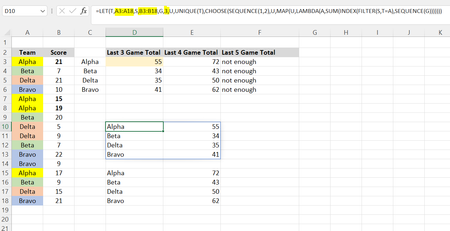
Morro91 If you are office365 subscriber, you may write the single array formula as below. =LET(T,A3:A18,S,B3:B18,G,3,U,UNIQUE(T),CHOOSE(SEQUENCE(1,2),U,MAP(U,LAMBDA(A,SUM(INDEX(FILTER(S,T=A),SEQUENCE(G)))))))2.5KViews0likes0CommentsRe: Formula worked in google sheets but now doesnt work in Microsoft 365
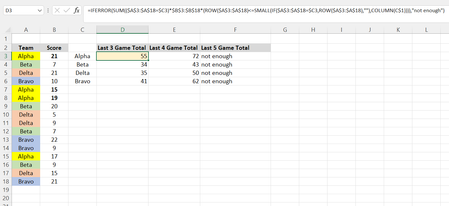
Morro91 Below is what you want. I've used "IFERROR" for not enough game count. =IFERROR(SUM(($A$3:$A$18=$C3)*$B$3:$B$18*(ROW($A$3:$A$18)<=SMALL(IF($A$3:$A$18=$C3,ROW($A$3:$A$18),""),COLUMN(C$1)))),"not enough")2.8KViews0likes4CommentsRe: Conditional Formatting, 3 conditions met in row
What I thought that you want to highlight based on 3 criteria that you specify. Now I understand that it is not what you want and what you want is to highlight all duplicate items if 3 conditions are met each other in the data table.14KViews0likes0CommentsRe: Conditional Formatting, 3 conditions met in row
Robinmf1979 1. Select the whole data table starting from Row 37 onwards. 2. Home>Conditional Formatting> New Rule> Use a formula to determine which cells to format. Under format values where this formula is true, write the formula as below. =And($A37=Store,$C37=YearWeek,$I37=ProductName) Store,YearWeek and ProductName are 3 conditions that you want to match. All need to be defined names or absolute reference locked with $ sign for both row and column (for e.g $A$1). 3. Press Format and under fill tab, you may change the background color you want and then press ok.14KViews0likes3CommentsRe: Conditional Formatting, 3 conditions met in row
Are you referencing the wrong cells? The formula should be something like that. 3 criterias to meet the conditions are "MADISON", "20 2020" and "Chana Masala bowl". =AND($A37="MADISON",$C37="20 2020",$I37="Chana Masala bowl") It should be the right way. But, if it is still not working, I have no idea.14KViews0likes0CommentsRe: Interpret tags using a look-up table
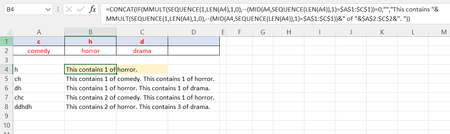
Blake385 Here is the formula with the reference. =CONCAT(IF(MMULT(SEQUENCE(1,LEN(A4),1,0),--(MID(A4,SEQUENCE(LEN(A4)),1)=$A$1:$C$1))=0,"", "This contains "&MMULT(SEQUENCE(1,LEN(A4),1,0),--(MID(A4,SEQUENCE(LEN(A4)),1)=$A$1:$C$1))&" of "&$A$2:$C$2&". ")) If you can use LET function, you may shorten the formula as below. =LET(A,MMULT(SEQUENCE(1,LEN(A4),1,0),--(MID(A4,SEQUENCE(LEN(A4)),1)=$A$1:$C$1)),CONCAT(IF(A=0,"", "This contains "&A&" of "&$A$2:$C$2&". ")))1KViews0likes0CommentsRe: Interpret tags using a look-up table
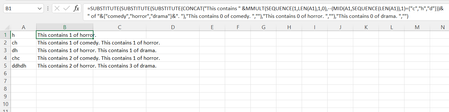
Blake385 You may write the formula as below. =SUBSTITUTE(SUBSTITUTE(SUBSTITUTE(CONCAT("This contains " & MMULT(SEQUENCE(1,LEN(A1),1,0),--(MID(A1,SEQUENCE(LEN(A1)),1)={"c","h","d"}))&" of "&{"comedy","horror","drama"}&". "),"This contains 0 of comedy. ",""),"This contains 0 of horror. ",""),"This contains 0 of drama. ","")1KViews0likes3CommentsRe: Date format error issue
Let's assume that TextDate = 3/31/2022. Only4DigitYear = RIGHT(TextDate, 4) AnyDigitYear =TRIM(RIGHT(SUBSTITUTE(TextDate,"/",REPT(" ",5)),5)) Month =TRIM(MID(SUBSTITUTE(I14,"/",REPT(" ",5)),5,5)) Day =LEFT(TextDate, FIND("/",TextDate)-1) To get the actual Date value, the formula can be written as below. Date=DATE(TRIM(RIGHT(SUBSTITUTE(TextDate,"/",REPT(" ",5)),5)),LEFT(TextDate, FIND("/",TextDate)-1),TRIM(MID(SUBSTITUTE(TextDate,"/",REPT(" ",5)),5,5)))13KViews1like1CommentRe: Date format error issue
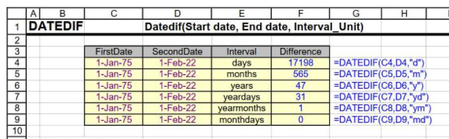
hotsurf Whether month or day comes first in a date is very important when you are working with the dates. When you type the date in Excel, the sequence of day and moth must always be the same as your operation system date format. Year can be first or last only by typing. If you want to see year in the middle, you need to apply custom format like "dd yyy mm" or "mm yyy dd". 3/21/2022 3/30/2022 is month and day sequence, ignoring year. 2022-03-21 2022-03-30 is the same as above. It should work the same for both if the dates are correct date formats. WHY TYPE 1 DOESN'T WORK? And you got value error #value for the first one. That means the date is wrong and it is not the date format and has no value. As Mr. Peter has explained your date may not be actual date format and it may be text format that represents or looks like the date or it may be text only with wrongly typed date and month sequence. If the date is text format with correct sequence, you may use Datevalue or Value function to convert text to actual date format like below. Datevalue("3/30/2022") or Value("3/30/2022") Datevalue("3/21/2022") or Value("3/21/2022") If the date are wrongly typed in day and month sequence, you may need to use Left, Right, Mid Functions to swap day and month correctly as per the system date. The syntax of Datedif function is as below. =Datedif(start_date, end_date, interval_unit) *StartDate must be minimmum date. *EndDate must be maximum date.13KViews1like4Comments
Recent Blog Articles
No content to show