User Profile

WorkflowIQ
Copper Contributor
Joined Nov 10, 2021


User Widgets
Recent Discussions
SharePoint Pnp Search v4 People seach verticals issue with Location
I am trying to resolve an issue with SharePoint (online) PnP search v4 for an employee search page. I have a search box web part and filter web part for department and job title. In my search results i can successfully retrieve results by typing the full or partial name of the employee into the search box. I can also filter the results by department or job title successfully using the PnP Search Filters webpart. The text in the PnP Search Results is "{?Title:{inputQueryText}*} Department:*". (I am also filtering out any users with the Department filed blank successfully) I would like to use a search vertical web part to filter by location. I have set up the verticals web part with the default "all" tab with a value of "*" and other tabs with locations that match what has been entered into the Microsoft 365 user profile for the users. I was getting 0 results when selecting the search vertical tabs. I have checked the mapping of the "baseOfficeLocation" managed property and it was mapped to People:SPS-Location and when that didn't work, based on some research, i changed the mapping to People:Office. That didn't make a difference. I also mapped a spare refinableString managed property to People:Office. I checked to make sure the "People:Office" property in SharePoint user profiles was the correct property with values. If i used the text "{?|(RefinableString01:{UserInput}" in the query template, in the search results web part, I was able to get successful filtering by location based on this new mapping, by typing into the search box the location name to get only users from that location, or "*" to get all users with a location entered. This tells me that there are results getting retrieved. I have tried "RefinableString01:{vertical.value}" in the query template but that retrieves no results.77Views0likes1Comment- 5.2KViews0likes0Comments
Re: JSON format broken?
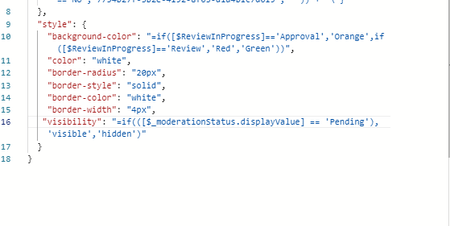
Danie365 LOL, I have no idea either about the plural, i usually give in and Google it 🙂 The rest of the code is OK, i tested by just replacing "visibility": "=if(([$_moderationStatus.displayValue] == ‘Pending’),’visible’,’hidden’)" with "visibility": "visible" and everything else works. (the button i am trying to conditionally hide always shows though of course) I also tried dropping one of the parenthesisss so that is is: "visibility": "=if([$_moderationStatus.displayValue]=='Pending','visible','hidden')" Still no luck....... I'll keep looking and post back here when I have something that works. Thanks again!!5.2KViews0likes4CommentsRe: JSON format broken?
Danie365 Thanks for the help, i really appreciate it. I still can't get it to work though. I pasted your code exactly, just adding my correct flow id, and replacing the single quotes (as they paste a different character if copying from here). Do you have any other suggections on what could be wrong? Thanks again, screenshot below.5.3KViews0likes6CommentsRe: JSON format broken?
Danie365 Thanks. I agree. It looks like Microsoft added a feature that someone requested, and broke something that already worked. Changing [$_moderationStatus] with [$_moderationStatus.displayValue] didn't work for me for some reason. It may be something simple i have missed, as i have been staring at this code for days.... The column still is not showing for files where the Approval Status is "Pending". Can you please take a quick look to see if you can see something i have done wrong? { "$schema": "https://developer.microsoft.com/json-schemas/sp/v2/column-formatting.schema.json", "elmType": "button", "customRowAction": { "action": "executeFlow", "actionParams": "='{\"id\": \"' + if([$ReviewInProgress]=='','xxxxxxxx',if([$ReviewInProgress]=='No','xxxxxxxxx',' ')) + '\"}'" }, "txtContent": "=if([$ReviewInProgress]=='Approval','Sent for Approval','Send for Approval')", "style": { "background-color": "=if([$ReviewInProgress]=='Approval','Orange','Green')", "color": "white", "border-radius": "20px", "border-style": "solid", "border-color": "white", "border-width": "4px", "visibility": { "operator": "?", "operands": [ { "operator": "==", "operands": [ "[$_moderationStatus.displayValue]", "Pending" ] }, "visible", "hidden" ] } } }5.3KViews0likes8CommentsRe: JSON format broken?
ganeshsanap Jordaromera Thanks, I am not as skilled in JSON as i would like to be, so can you help with my code? The code i was using was as below. What would it change to, to meet the requirements of the new Moderationstatus changes? "visibility": { "operator": "?", "operands": [ { "operator": "==", "operands": [ "[$_ModerationStatus]", "Pending" ] }, "visible", "hidden" ] }5.4KViews0likes11CommentsRe: JSON column formatting on Approval status broken?
Danie365 There is another post where someone has given an answer saying there was a change to how JSON handles the Approval Status column. I am not super skilled in JSON so I am trying to work out myself, and ask a few others what the replacement code would be. I will post here if I work it out or someone helps us out with this one. Post: https://techcommunity.microsoft.com/t5/sharepoint/json-format-broken/m-p/2968990/highlight/false#M551392.4KViews0likes0CommentsJSON column formatting on Approval status broken?
Hi all, I have just noticed today that a formatted column button I use in SharePoint libraries for many different customers no longer shows. I have checked multiple tenants where the JSON for the button has not changed for a long time, suddenly no longer displays. It was displaying correctly the last time i checked a few days ago. Can someone else please check? It may be system wide and affect a lot of people. Sample JSON below { "$schema": "https://developer.microsoft.com/json-schemas/sp/v2/column-formatting.schema.json", "elmType": "button", "txtContent": "=if([$ReviewStatus]=='Approval','Sent for Approval',if([$ReviewStatus]=='Review','Review in progress','Send for Approval'))", "customRowAction": { "action": "executeFlow", "actionParams": "='{\"id\": \"' + if([$ReviewStatus]=='','Flowidhere',if([$ReviewStatus]=='No','Flowidhere',' ')) + '\"}'" }, "style": { "background-color": "=if([$ReviewStatus]=='Approval','Orange',if([$ReviewStatus]=='Review','Red','Green'))", "color": "white", "border-radius": "20px", "border-style": "solid", "border-color": "white", "border-width": "4px", "visibility": { "operator": "?", "operands": [ { "operator": "==", "operands": [ "[$_ModerationStatus]", "Pending" ] }, "visible", "hidden" ] } } }Solved2.8KViews0likes4CommentsRe: JSON format broken?
Hi, I am having exactly the same issue. I have checked multiple tenants where a similar JSON is used in a number of libraries and the same issue is show for all. Can we please get some feedback from Microsoft?? My post: https://techcommunity.microsoft.com/t5/sharepoint/json-column-formatting-broken/m-p/29529375.5KViews0likes15CommentsRe: JSON column formatting on Approval status broken?
I have performed some testing (by elimination) and the issue seems to be with the if statement looking at the status of the approval. If I change: ""visibility": { "operator": "?", "operands": [ { "operator": "==", "operands": [ "[$_ModerationStatus]", "Pending" ] }, "visible", "hidden" ] }" to "visibility": "visible" The buttons show and work correctly except they always show. I need them to only show when the status of the document is "Pending" as the button launches a document approval flow. Does anyone know if there were any changes to the way the approval Status is handled in SP JSON?2.6KViews0likes2Comments
Recent Blog Articles
No content to show