User Profile

Mich8261
Copper Contributor
Joined Nov 02, 2021


User Widgets
Recent Discussions
- 145Views0likes0Comments
Am I loosing my mind? Copy and Paste filtered cells
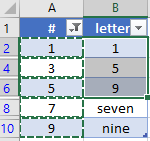
did I change some global setting without realising it? I work in Excel probably 40% of my work day. It seems to me that until two days ago I could Copy from filtered cells into another set of filtered cells by simply highlighting the (filtered) cells, Ctrl + C, clicking the first cell where I want to paste and then Ctrl + V. In the simple example below I have copied the filtered cells A2, A4, A6, A8, A10; clicked in cell B2 and pressed Ctrl + V. The cells were pasted contiguously (B2:B6). My expectation was for the values to be pasted into cells B2, B4, B6, B8, B10.Solved388Views0likes1Commentthere must be a better way to do this than using multiple pivot tables
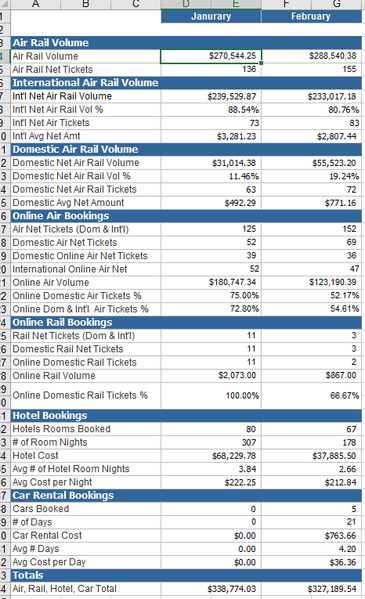
I am trying to recreate a summary like the image below. I have a table of data that includes all the elements needed to produce this but at this point my skills limit me to using multiple pivot tables, hiding rows, using calculated fields for averages, etc. I imagine there is probably a better way. Can someone point me to it? Thank youSolved840Views0likes1CommentConverting number to time
I am trying to automate the conversion of a data point, which is supposed to capture the hour and minutes an action takes place. The data entry is meant to capture HH:MM but on the Excel file it comes across as a simple number, so 0030 which is 12:30 AM comes across as 30. 2049 which is 8:49 PM come across as 2049. I can't use duration because it turns 2049 into 2,049 minutes, which is not the same as 8:49 PM. I tried using =TEXT(K7,"H:MM AM/PM") but that only returns every value as 12:00 AM. I was hoping to accomplish this in Power Query, since it's already taking care of other elements in my table. Thank you PS: AM/PM is not essential. 24-hour clock would be fine too.41KViews0likes5CommentsConsolidate multiple sheets on one worksheet
I use a simple log to track client tasks, incidents, and basic projects. There’s less then a dozen columns which include some free form text (e.g. comment or issue description), dates (creation, due date), and some items restricted to a drop down list (category and status). The log is the same for all clients. I plan to move all client logs into a single Excel document (one tab per client). I would like to have a main tab where the information from each tab is visible which also allows me to filter based on status and/or category. thank you in advanceSolved1KViews0likes2Comments
Recent Blog Articles
No content to show