User Profile

EliasEkman
Copper Contributor
Joined Sep 21, 2021


User Widgets
Recent Discussions
Re: Drop down list change other multiple cells
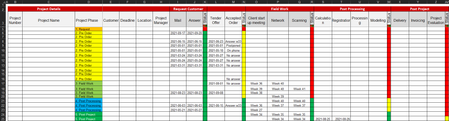
Hello mathetes ! Thank you for your reply. I'm sure that there were a few surprises that didn't make any sense for you when you started to dissect my document. It was just to give to you as an better understanding of the question rather than for you to find discrepancies in it. However, I'm thankful for your input and will make sure to clean my document further once I solve my initial problem. This is my first time that I submit a question on this forum and therefore was unsure if people usually do actual modification in the documents rather than to explain for the sender how to do it them selves. The documents intent is for me and my co-workers to be able to go in, add a new project and follow its progress. Right now I use it most frequently out of anybody. About a few times a week. Now I have been manually changing the dates as a request is submitted, answered, tender given and so on. It has been very time consuming and I have fail to be consistent in this work. Therefor I wanted to facilitate this by just changing the the drop down list in column D and this would complete the affected cells with date and so on, as I described it in the question. Do we come any closer to a salvation? I basically look for a function that says when this cell changes in the drop down list, 'insert date in these cells' and 'change these drop down lists'. Thanks again for engaging in this topic to help me. /Elias6.8KViews0likes1CommentDrop down list change other multiple cells
Hi, I have a question regarding if it's possible by changing a value in a drop down list - can it affect multiple other cells with commands? I want everything to be depending on column D where I have a drop down list. If i change the value there i want the rest of the document to follow. For intstance, if I change the value in the drop down list from '1. Requested' to '2. Pre order'. Firstly, I want the cells in column I and J to change and be given todays date. Secondly, I want the color (in other drop down list) in column K change the status to Green (finished) and in column N to change to yellow (ongoing). Same thing from when I change from '2. Pre Order' to '3. Field Work' then I want the cells in column O, P, Q to be given todays date and the colors to change from Green (finished) and in column N to change to yellow (ongoing) in column R. And so on. Does this question make sense? Would my request be possible in any way? Thanks a bunch! I'll attach the file.7.2KViews0likes3Comments
Recent Blog Articles
No content to show