User Profile

Ccrossed
Copper Contributor
Joined Aug 13, 2021


User Widgets
Recent Discussions
Re: Help with a big formula using and, xlookup, if and sumifs
SergeiBaklan Awesome! yes I also believe a table would be a more efficient way of dealing with the data, so I'm definitely gonna propose that change to our reports. One last thing I would like help with would be to update the formula to look into different sheets for the complementary tables, this so I can translate the formula to our main workbook as smoothly as possible. My knowledge on Excel is still limited so I'm having some trouble understanding some components on your formula. New dummy attached.5.1KViews0likes1CommentRe: Help with a big formula using and, xlookup, if and sumifs
Thank you Sergei, it seems to be doing its job. One thing tho, would it be possible to adapt this formula from a table to a range? Original document is continuously growing with now more than 2k rows and each of the tables here are on separate tabs. Thanks!5.2KViews0likes3CommentsRe: Help with a big formula using and, xlookup, if and sumifs
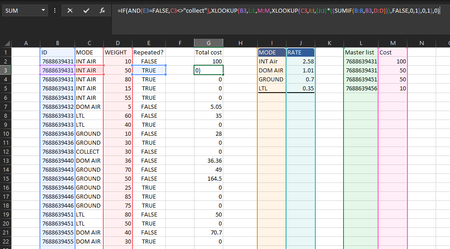
Thanks for your reply, I know how complex this worksheet is so I'm more than glad to clarify anything possible. The master list contains a record of IDs and their cost, these can be repeated and I'm trying to get a total cost for said ID, however if any ID is not found on the master list then it should be manually calculated by multiplying a base rate (J:J) by the weight of said ID (if there are multiple matching IDs it's ok we would just have to add the total weight before getting that specific ID's total cost) However!: If and ID has "collect" on C:C and TRUE on E:E then it shall be ignored and given a 0 on total cost. Let me know if that helps!5.3KViews0likes4CommentsHelp with a big formula using and, xlookup, if and sumifs
Hello all! I'm working on a report (per company policy can't share) on which I would like to optimize with formulas. I made a dummy example as close as I could so I could explain myself better for a specific case I'm having trouble with. Looking to build a formula to do the following: Search for the ID number on the master list ONLY IF: On column [Repeated?] it has FALSE, AND on column [MODE] it has anything other than "COLLECT" / Otherwise return a 0. -If found, retrieve the COST (if the number repeats then sum all costs for matching ID) -If the ID is not on the master list then the cost must be calculated: Sum the weight on all matching IDs and multiply that for the corresponding RATE matching the MODE I'm showing what I have built so far, and the cost calculation works but cannot make the highlighted part work/not sure how to add it. =IF(AND(E2=FALSE,C2<>"collect"),XLOOKUP(B2,L:L,M:M,XLOOKUP(C2,I:I,(J:J)*((SUMIF(B:B,B2,D:D))),FALSE,0,1),0,1),0) Also, I would like to implement a minimum for below cases: For GROUND IDs total cost may not be below 5.28, if the calculation falls below that it must return 5.28 For LTL IDs total cost may not fall below 86.11 so it must return 86.11 if it does. I'm open to all suggestions as well as questions if something is not clear enough. Thanks in advance!!Solved5.8KViews0likes15CommentsCombining Xlookup and Sumif
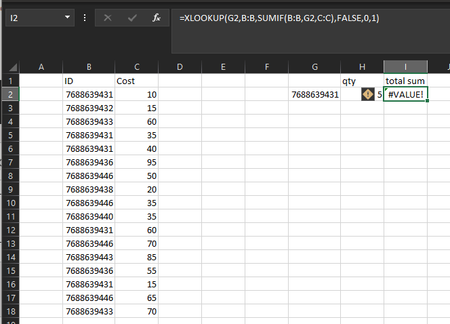
Hello! Im currently trying to combine the use of xlookup and sumif for below sheet. I thought of using sumif on the return array section of xlookup but I keep getting #value! error. i just need to print the sum of cost for an id if it is found. I need it to be in conjunction with xlookup as it will then be added to a larger formula.12KViews1like1CommentHelp with IF and (ISNUMBER(SEARCH
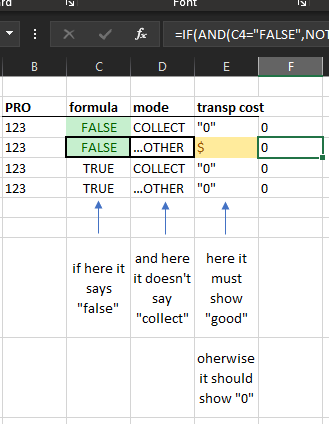
Hello! I was wondering if you guys could help me with a complex problem using IF and pieces of text. Below formula: =IF(AND(J21519=ISNUMBER(SEARCH("PILOT",J21519)),OR(Q21519=ISNUMBER(SEARCH("Matam",Q21519)),X21519=ISNUMBER(SEARCH("Matam",X21519)),S21519=ISNUMBER(SEARCH("MAM",S21519)),Z21519=ISNUMBER(SEARCH("MAM",Z21519)))),"Verify",0) Is attempting to show "verify" if: cell J21519 has "pilot" in it AND any one of the following is true: cell Q21519 has "Matam" cell X21519 has "Matam" cell S21519 has "mam" cell Z21519 has "mam". Otherwise, show a 0. So far it only shows 0 even after adding one of the conditions above that should make it print a "verify". Also, I'm planning on making it an IFS function as many more of these (messy) formulas will be added for every variable on cell J21519.2KViews0likes1Comment
Recent Blog Articles
No content to show