User Profile

The4Houses
Copper Contributor
Joined May 07, 2021


User Widgets
Recent Discussions
Calendar Color - Configuring Show As field Color Options
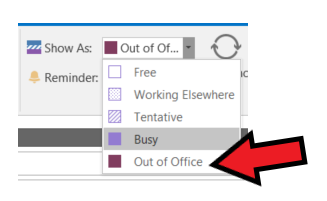
I am wondering if there's a way to configure the Show As field color options when booking a meeting or an appointment. My color show like this: Free = White Working Elsewhere, Tentative, Busy = Light Purple (with different patterns) Out of Office = Deep Purple (maybe maroon-ish) I'd like to change the Out of Office color - if possible - to say, #ff0000 (aka Red) I've checked numerous tips and tricks sites, I've played around with the various settings myself within Outlook, but have failed to change that color. Is this something that simply can't be done? (I'm guessing it can as it's been set already). Or is this something that must be done via a Registry setting? If so, can you please point me to the setting? Appreciate any help. Thanks, T4H1.1KViews0likes0CommentsRe: Missing Profile Icon
I can confirm this is the case on my end as well. (as per Dave Isaac's comment about it being there, but you just can't see it). Now, in my case, I don't actually have a photo, just my initials. But, I haven't noticed any specific action or activity or timing that triggers it to disappear. I will see if I can identify something. A simple quit and restart allows the icon to reappear. I am currently using Dark Mode (in case that makes a difference or is common amongst the problemed users).40KViews0likes0Comments
Recent Blog Articles
No content to show