User Profile

s_01496
Copper Contributor
Joined Mar 24, 2021


User Widgets
Recent Discussions
Redundant File Share for SQL Server Failover Instance Installation / Redundant Cluster Shared Volume
Setup : Server 1(S1) Server 2(S2) Domain Controller 1(DC1) Domain Controller 2(DC2) All are Windows Server 2019. S1 and S2 are in a Cluster. I have installed SQL Server Failover Cluster Instance on Server 1 and give a Share of DC1 as the path of root directory of installation. Then add a node(i.e. S2) to the failover cluster instance. Now I want to make the replication of Share of DC1 in DC2, So that if DC1 fails DC2 take care of SQL Instance. Basically I want redundant Cluster Shared Volume. So that if one fails other take care of database/Instance. Please tell me whether it is possible or not. If yes, Then How?Issue in communicating through Cluster IP Address.
I have two clustered nodes. Failover Clustering is working fine in SQL Server. But the problem is in initiating the communication. When I connected any device in the LAN and starts sending packets, the packets are not going anywhere(Nothing can be captured in wireshark) but as I do failover (by removing LAN or by any means), packets starts coming(Captured in wireshark). So, I think the problem is of IP-MAC Conflict. When failover happens node send G-ARP to all the devices, so that devices got to know that now Cluster IP is associated to this MAC address. But how to resolve this IP-MAC conflict initially because if I don't do failover no packets received and just after doing failover packets starts coming on the current primary node of SQL Server Availability Group.896Views0likes0CommentsIP-MAC conflict when communicating through Availability Group Listener IP Address.
I have an Availability group of 2 nodes. Failover Clustering is working fine. But the problem is in initiating the communication. When I connected any device in the LAN and starts sending packets, the packets are not going anywhere(Nothing can be captured in wireshark) but as I do failover (by removing LAN or by any means), packets starts coming(Captured in wireshark). So, I think the problem is of IP-MAC Conflict. When failover happens node send G-ARP to all the devices, so that devices got to know that now listener IP is associated to this MAC address. But how to resolve this IP-MAC conflict initially because if I don't do failover no packets received and just after doing failover packets starts coming on the current primary node.1.1KViews0likes0CommentsRe: SQL Server 2019 installation Error on Domain Controller Server
olafhelper, Thank you for your reply. But I wanted to know whether it is possible to install SQL Server on domain controller or not. In the link you mentioned It says that "SQL Server Setup will not block installation on a computer that is a domain controller". It means that we can install SQL Server on domain controller then why in my case it is not allowing me to install.6.5KViews0likes0CommentsSQL Server 2019 installation Error on Domain Controller Server
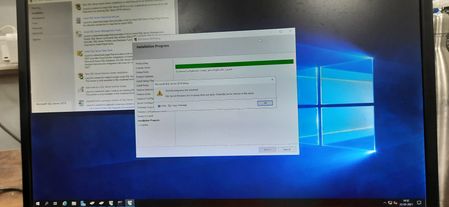
Hello All, I am getting the Error " SQL Server Browser service group does not exists. Check for earlier failures in the setup" while installing SQL Server in the Domain Controller Server. In other Server it is installed correctly but in the domain controller Server it is showing the above Error. We also tried by adding the following security group : SQLServer2008SQLBrowserUser${ServerName}SQLServer2005SQLBrowserUser${ServerName} SQLServer2019SQLBrowserUser${ServerName} But it does not work. Error Photo is also attached. Please suggest some solutions for this problem.6.7KViews0likes3Comments
Recent Blog Articles
No content to show