Forum Discussion

kitthirasaki
Dec 21, 2023Copper Contributor
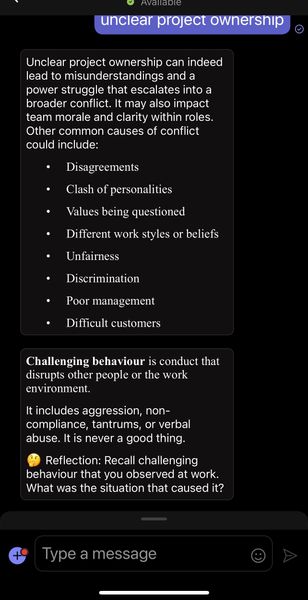
AdaptiveCard markdown on iOS is rendered in serif font, and font is really tiny
On iOS, I am using AdaptiveCard with TextBlock elements. When the block element contains markdown text, it improperly renders in a serif (instead of sans serif) font. It works fine on desktop web and...

Prasad_Das-MSFT Microsoft
Jan 01, 2024MicrosoftHi kitthirasaki , please do share the adaptive card JSON which you used along with the snapshots of the card in all the clients (Mobile, Desktop, Web etc) how its behaving, so that we can raise a bug accordingly if we have repro.
calm2504299
Jun 03, 2024Copper Contributor
I'm facing the same issue, using the examples from here: https://learn.microsoft.com/en-us/adaptive-cards/authoring-cards/text-features#markdown-example
On iOS it changes the font on the elements that contain any markdown, and hostConfiguration doesn't seem to work either.
{
"$schema": "http://adaptivecards.io/schemas/adaptive-card.json",
"type": "AdaptiveCard",
"version": "1.0",
"body": [
{
"type": "TextBlock",
"text": "This is some **bold** text"
},
{
"type": "TextBlock",
"text": "This is some _italic_ text"
},
{
"type": "TextBlock",
"text": "- Bullet \r- List \r",
"wrap": true
},
{
"type": "TextBlock",
"text": "1. Numbered\r2. List\r",
"wrap": true
},
{
"type": "TextBlock",
"text": "Check out [Adaptive Cards](https://adaptivecards.io)"
}
]
}
On iOS it changes the font on the elements that contain any markdown, and hostConfiguration doesn't seem to work either.
{
"$schema": "http://adaptivecards.io/schemas/adaptive-card.json",
"type": "AdaptiveCard",
"version": "1.0",
"body": [
{
"type": "TextBlock",
"text": "This is some **bold** text"
},
{
"type": "TextBlock",
"text": "This is some _italic_ text"
},
{
"type": "TextBlock",
"text": "- Bullet \r- List \r",
"wrap": true
},
{
"type": "TextBlock",
"text": "1. Numbered\r2. List\r",
"wrap": true
},
{
"type": "TextBlock",
"text": "Check out [Adaptive Cards](https://adaptivecards.io)"
}
]
}