learning
738 TopicsOn-Premises Manufacturing Intelligence
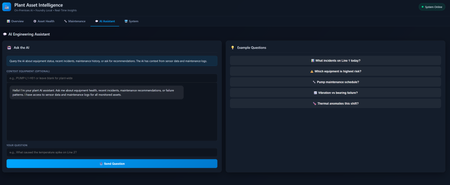
Manufacturing facilities face a fundamental dilemma in the AI era: how to harness artificial intelligence for predictive maintenance, equipment diagnostics, and operational insights while keeping sensitive production data entirely on-premises. Industrial environments generate proprietary information, CNC machining parameters, quality control thresholds, equipment performance signatures, maintenance histories, that represents competitive advantage accumulated over decades of process optimization. Sending this data to cloud APIs risks intellectual property exposure, regulatory non-compliance, and operational dependencies that manufacturing operations cannot accept. Traditional cloud-based AI introduces unacceptable vulnerabilities. Network latency of 100-500ms makes real-time decision support impossible for time-sensitive manufacturing processes. Internet dependency creates single points of failure in environments where connectivity is unreliable or deliberately restricted for security. API pricing models become prohibitively expensive when analyzing thousands of sensor readings and maintenance logs continuously. Most critically, data residency requirements for aerospace, defense, pharmaceutical, and automotive industries make cloud AI architectures non-compliant by design ITAR, FDA 21 CFR Part 11, and customer-specific mandates require data never leaves facility boundaries. This article demonstrates a sample solution for manufacturing asset intelligence that runs entirely on-premises using Microsoft Foundry Local, Node.js, and JavaScript. The FoundryLocal-IndJSsample repository provides production-ready implementation with Express backend, HTML/JavaScript frontend, and comprehensive Foundry Local SDK integration. Facilities can deploy sophisticated AI-powered monitoring without external dependencies, cloud costs, data exposure risks, or network requirements. Every inference happens locally on facility hardware with predictable performance and zero data egress. Why On-Premises AI Matters for Industrial Operations The case for local AI inference in manufacturing extends beyond simple preference, it addresses fundamental operational, security, and compliance requirements that cloud solutions cannot satisfy. Understanding these constraints shapes architectural decisions that prioritize reliability, data sovereignty, and cost predictability. Data Sovereignty and Intellectual Property Protection Manufacturing processes represent years of proprietary research, optimization, and competitive advantage. Equipment configurations, cycle times, quality thresholds, and maintenance schedules contain intelligence that competitors would value highly. Sending this data to third-party cloud services, even with contractual protections, introduces risks that manufacturing operations cannot accept. On-premises AI ensures that production data never leaves the facility network perimeter. Telemetry from CNC machines, hydraulic systems, conveyor networks, and control systems remains within air-gapped environments where physical access controls and network isolation provide demonstrable data protection. This architectural guarantee of data locality satisfies both internal security policies and external audit requirements without relying on contractual assurances or encryption alone. Operational Resilience and Network Independence Factory floors frequently operate in environments with limited, unreliable, or intentionally restricted internet connectivity. Remote facilities, secure manufacturing zones, and legacy industrial networks cannot depend on continuous cloud access for critical monitoring functions. When network failures occur, whether from ISP outages, DDoS attacks, or infrastructure damage, AI capabilities must continue operating to prevent production losses. Local inference provides true operational independence. Equipment health monitoring, anomaly detection, and maintenance prioritization continue functioning during network disruptions. This resilience is essential for 24/7 manufacturing operations where downtime costs can exceed tens of thousands of dollars per hour. By eliminating external dependencies, on-premises AI becomes as reliable as the local power supply and computing infrastructure. Latency Requirements for Real-Time Decision Making Manufacturing processes involve precise timing where milliseconds determine quality outcomes. Automated inspection systems must classify defects before products leave the production line. Safety interlocks must respond to hazardous conditions before injuries occur. Predictive maintenance alerts must trigger before catastrophic equipment failures cascade through production lines. Cloud-based AI introduces latency that incompatible with these requirements. Network round-trips to cloud endpoints typically require 100-500 milliseconds, in some case latency is unacceptable for real-time applications. Local inference with Foundry Local delivers sub-50ms response times by eliminating network hops, enabling true real-time AI integration with SCADA systems, PLCs, and manufacturing execution systems. Cost Predictability at Industrial Scale Manufacturing facilities generate enormous volumes of time-series data from thousands of sensors, producing millions of data points daily. Cloud AI services charge per API call or per token processed, creating unpredictable costs that scale linearly with data volume. High-throughput industrial applications can quickly accumulate tens of thousands of dollars in monthly API fees. On-premises AI transforms this variable operational expense into fixed capital infrastructure costs. After initial hardware investment, inference costs remain constant regardless of query volume. For facilities analyzing equipment telemetry, maintenance logs, and operator notes continuously, this economic model provides cost certainty and eliminates budget surprises. Regulatory Compliance and Audit Requirements Regulated industries face strict data handling requirements. Aerospace manufacturers must comply with ITAR controls on technical data. Pharmaceutical facilities must satisfy FDA 21 CFR Part 11 requirements for electronic records. Automotive suppliers must meet customer-specific data residency mandates. Cloud AI services complicate compliance by introducing third-party data processors, cross-border data transfers, and shared infrastructure concerns. Local AI simplifies regulatory compliance by eliminating external data flows. Audit trails remain within the facility. Data handling procedures avoid third-party agreements. Compliance demonstrations become straightforward when AI infrastructure resides entirely within auditable physical and network boundaries. Architecture: Manufacturing Intelligence Without Cloud Dependencies The manufacturing asset intelligence system demonstrates a practical architecture for deploying AI capabilities entirely on-premises. The design prioritizes operational reliability, straightforward integration patterns, and maintainable code structure that facilities can adapt to their specific requirements. System Components and Technology Stack The implementation consists of three primary layers that separate concerns and enable independent scaling: Foundry Local Layer: Provides the local AI inference runtime. Foundry Local manages model loading, execution, and resource allocation. It supports multiple model families (Phi-3.5, Phi-4, Qwen2.5) with automatic hardware acceleration detection for NVIDIA GPUs (CUDA), Intel GPUs (OpenVINO), ARM Qualcomm (QNN) and optimized CPU inference. The service exposes a REST API on localhost that the backend layer consumes for completions. Backend Service Layer: An Express Node.js application that serves as the integration point between the AI runtime and the manufacturing data systems. This layer implements business logic for equipment monitoring, maintenance log classification, and conversational interfaces. It formats prompts with equipment context, calls Foundry Local for inference, and structures responses for the frontend. The backend persists chat history and provides RESTful endpoints for all AI operations. Frontend Interface Layer: A standalone HTML/JavaScript application that provides operator interfaces for equipment monitoring, maintenance management, and AI assistant interactions. The UI fetches data from the backend service and renders dashboards, equipment status views, and chat interfaces. No framework dependencies or build steps are required, the frontend operates as static files that any web server or file system can serve. Data Flow for Equipment Analysis Understanding how data moves through the system clarifies integration points and extension opportunities. When an operator requests AI analysis of equipment status, the following sequence occurs: The frontend collects equipment context including asset ID, current telemetry values, alert status, and recent maintenance history. It constructs an HTTP request to the backend's equipment summary endpoint, passing this context as query parameters or request body. The backend retrieves additional context from the equipment database, including specifications, normal operating ranges, and historical performance patterns. The backend constructs a detailed prompt that provides the AI model with comprehensive context: equipment specifications, current telemetry with alarming conditions highlighted, recent maintenance notes, and specific questions about operational status. This prompt engineering is critical, the model's accuracy depends entirely on the context provided. Generic prompts produce generic responses; detailed, structured prompts yield actionable insights. The backend calls Foundry Local's completion API with the formatted prompt, specifying temperature, max tokens, and other generation parameters. Foundry Local loads the configured model (if not already in memory) and generates a response analyzing the equipment's condition. The inference occurs locally with no network traffic leaving the facility. Response time typically ranges from 500ms to 3 seconds depending on prompt complexity and model size. Foundry Local returns the generated text to the backend, which parses the response for structured information if required (equipment health classifications, priority levels, recommended actions). The backend formats this analysis as JSON and returns it to the frontend. The frontend renders the AI-generated summary in the equipment health dashboard, highlighting critical findings and recommended operator actions. Prompt Engineering for Maintenance Log Classification The maintenance log classification feature demonstrates effective prompt engineering for extracting structured decisions from language models. Manufacturing facilities accumulate thousands of maintenance notes, operator observations, technician reports, and automated system logs. Automatically classifying these entries by severity enables priority-based work scheduling without manual review of every log entry. The classification prompt provides the model with clear instructions, classification categories with definitions, and the maintenance note text to analyze: const classificationPrompt = `You are a manufacturing maintenance expert analyzing equipment log entries. Classify the following maintenance note into one of these categories: CRITICAL: Immediate safety hazard, equipment failure, or production stoppage HIGH: Degraded performance, abnormal readings requiring same-shift attention MEDIUM: Scheduled maintenance items or routine inspections LOW: Informational notes, normal operations logs Provide your response in JSON format: { "classification": "CRITICAL|HIGH|MEDIUM|LOW", "reasoning": "Brief explanation of classification decision", "recommended_action": "Specific next steps for maintenance team" } Maintenance Note: ${maintenanceNote} Classification:`; const response = await foundryClient.chat.completions.create({ model: currentModelAlias, messages: [{ role: 'user', content: classificationPrompt }], temperature: 0.1, // Low temperature for consistent classification max_tokens: 300 }); Key aspects of this prompt design: Role definition: Establishing the model as a "manufacturing maintenance expert" activates relevant knowledge and reasoning patterns in the model's training data. Clear categories: Explicit classification options with definitions prevent ambiguous outputs and enable consistent decision-making across thousands of logs. Structured output format: Requesting JSON responses with specific fields enables automated parsing and integration with maintenance management systems without fragile text parsing. Temperature control: Setting temperature to 0.1 reduces randomness in classifications, ensuring consistent severity assessments for similar maintenance conditions. Context isolation: Separating the maintenance note text from the instructions with clear delimiters prevents prompt injection attacks where malicious log entries might attempt to manipulate classification logic. This classification runs locally for every maintenance log entry without API costs or network delays. Facilities processing hundreds of maintenance notes daily benefit from immediate, consistent classification that routes critical issues to technicians automatically while filtering routine informational logs. Model Selection and Performance Trade-offs Foundry Local supports multiple model families with different memory requirements, inference speeds, and accuracy characteristics. Choosing appropriate models for manufacturing environments requires balancing these trade-offs against hardware constraints and operational requirements: Qwen2.5-0.5b (500MB memory): The smallest available model provides extremely fast inference (100-200ms responses) on limited hardware. Suitable for simple classification tasks, keyword extraction, and high-throughput scenarios where response speed matters more than nuanced understanding. Works well on older servers or edge devices with constrained resources. Phi-3.5-mini (2.1GB memory): The recommended default model balances accuracy with reasonable memory requirements. Provides strong reasoning capabilities for equipment analysis, maintenance prioritization, and conversational assistance. Response times of 1-3 seconds on modern CPUs are acceptable for interactive dashboards. This model handles complex prompts with detailed equipment context effectively. Phi-4-mini (3.6GB memory): Increased model capacity improves understanding of technical terminology and complex equipment relationships. Best choice when analyzing detailed maintenance histories, interpreting sensor correlation patterns, or providing nuanced operational recommendations. Requires more memory but delivers noticeably improved analysis quality for complex scenarios. Qwen2.5-7b (4.7GB memory): The largest supported model provides maximum accuracy and sophisticated reasoning. Ideal for facilities with modern server hardware where best-possible analysis quality justifies longer inference times (3-5 seconds). Consider this model for critical applications where operator decisions depend heavily on AI recommendations. Facilities can download all models during initial setup and switch between them based on specific use cases. Use faster models for real-time dashboard updates and automated classification. Deploy larger models for detailed equipment analysis and maintenance planning where operators can wait several seconds for comprehensive insights. Implementation: Equipment Monitoring and AI Analysis The practical implementation reveals how straightforward on-premises AI integration can be with modern JavaScript tooling and proper architectural separation. The backend service manages all AI interactions, shielding the frontend from inference complexity and providing clean REST interfaces. Backend Service Architecture with Express The Node.js backend initializes the Foundry Local SDK client and exposes endpoints for equipment operations: const express = require('express'); const { FoundryLocalClient } = require('foundry-local-sdk'); const cors = require('cors'); const app = express(); const PORT = process.env.PORT || 3000; // Initialize Foundry Local client const foundryClient = new FoundryLocalClient({ baseURL: 'http://localhost:8008', // Default Foundry Local endpoint timeout: 30000 }); // Middleware configuration app.use(cors()); // Enable cross-origin requests from frontend app.use(express.json()); // Parse JSON request bodies // Health check endpoint for monitoring app.get('/api/health', (req, res) => { res.json({ ok: true, service: 'manufacturing-ai-backend' }); }); // Start server app.listen(PORT, () => { console.log(`Manufacturing AI backend running on port ${PORT}`); console.log(`Foundry Local endpoint: http://localhost:8008`); }); This foundational structure establishes the Express application with CORS support for browser-based frontends and JSON request handling. The Foundry Local client connects to the local inference service running on port 8008, no external network configuration required. Equipment Summary Generation with Context-Rich Prompts The equipment summary endpoint demonstrates effective context injection for accurate AI analysis: app.get('/api/assets/:id/summary', async (req, res) => { try { const assetId = req.params.id; const asset = equipmentDatabase.find(a => a.id === assetId); if (!asset) { return res.status(404).json({ error: 'Asset not found' }); } // Construct detailed equipment context const contextPrompt = buildEquipmentContext(asset); // Generate AI analysis const completion = await foundryClient.chat.completions.create({ model: 'phi-3.5-mini', messages: [{ role: 'user', content: contextPrompt }], temperature: 0.3, max_tokens: 500 }); const analysis = completion.choices[0].message.content; res.json({ assetId: asset.id, assetName: asset.name, analysis: analysis, generatedAt: new Date().toISOString() }); } catch (error) { console.error('Equipment summary error:', error); res.status(500).json({ error: 'AI analysis failed', details: error.message }); } }); The equipment context builder assembles comprehensive information for accurate analysis: function buildEquipmentContext(asset) { const alerts = asset.alerts.filter(a => a.severity !== 'INFO'); const telemetry = asset.currentTelemetry; return `Analyze the following manufacturing equipment status: Equipment: ${asset.name} (${asset.id}) Type: ${asset.type} Location: ${asset.location} Current Telemetry: - Temperature: ${telemetry.temperature}°C (Normal range: ${asset.specs.tempRange}) - Vibration: ${telemetry.vibration} mm/s (Threshold: ${asset.specs.vibrationThreshold}) - Pressure: ${telemetry.pressure} PSI (Normal: ${asset.specs.pressureRange}) - Runtime: ${telemetry.runHours} hours (Next maintenance due: ${asset.nextMaintenance}) Active Alerts: ${alerts.map(a => `- ${a.severity}: ${a.message}`).join('\n')} Recent Maintenance History: ${asset.recentMaintenance.slice(0, 3).map(m => `- ${m.date}: ${m.description}`).join('\n')} Provide a concise operational summary focusing on: 1. Current equipment health status 2. Any concerning trends or anomalies 3. Recommended operator actions if applicable 4. Maintenance priority level Summary:`; } This context-rich approach produces accurate, actionable analysis because the model receives equipment specifications, current telemetry with context, alert history, maintenance patterns, and structured output guidance. The model can identify abnormal conditions accurately rather than guessing what values seem unusual. Conversational AI Assistant with Manufacturing Context The chat endpoint enables natural language queries about equipment status and operational questions: app.post('/api/chat', async (req, res) => { try { const { message, conversationId } = req.body; // Retrieve conversation history for context const history = conversationStore.get(conversationId) || []; // Build plant-wide context for the query const plantContext = buildPlantOperationsContext(); // Construct system message with domain knowledge const systemMessage = { role: 'system', content: `You are an AI assistant for a manufacturing facility's operations team. You have access to real-time equipment data and maintenance records. Current Plant Status: ${plantContext} Provide specific, actionable responses based on actual equipment data. If you don't have information to answer a query, clearly state that. Never speculate about equipment conditions beyond available data.` }; // Include conversation history for multi-turn context const messages = [ systemMessage, ...history, { role: 'user', content: message } ]; const completion = await foundryClient.chat.completions.create({ model: 'phi-3.5-mini', messages: messages, temperature: 0.4, max_tokens: 600 }); const assistantResponse = completion.choices[0].message.content; // Update conversation history history.push( { role: 'user', content: message }, { role: 'assistant', content: assistantResponse } ); conversationStore.set(conversationId, history); res.json({ response: assistantResponse, conversationId: conversationId, timestamp: new Date().toISOString() }); } catch (error) { console.error('Chat error:', error); res.status(500).json({ error: 'Chat request failed', details: error.message }); } }); The conversational interface enables operators to ask natural language questions and receive grounded responses based on actual equipment data, citing specific asset IDs, current metric values, and alert statuses rather than speculating. Deployment and Production Operations Deploying on-premises AI in industrial settings requires consideration of hardware placement, network architecture, integration patterns, and operational procedures that differ from typical web application deployments. Hardware and Infrastructure Requirements The system runs on standard server hardware without specialized AI accelerators, though GPU availability improves performance significantly. Minimum requirements include 8GB RAM for the Phi-3.5-mini model, 4-core CPU, and 50GB storage for model files and application data. Production deployments benefit from 16GB+ RAM to support larger models and concurrent analysis requests. For facilities with NVIDIA GPUs, Foundry Local automatically utilizes CUDA acceleration, reducing inference times by 3-5x compared to CPU-only execution. Deploy the backend service on dedicated server hardware within the factory network. Avoid running AI workloads on the same systems that host critical SCADA or MES applications due to resource contention concerns. Network Architecture and SCADA Integration The AI backend should reside on the manufacturing operations network with firewall rules permitting connections from operator workstations and monitoring systems. Do not expose the backend service directly to the internet, all access should occur through the facility's internal network with authentication via existing directory services. Integrate with SCADA systems through standard industrial protocols. Configure OPC-UA clients to subscribe to equipment telemetry topics and forward readings to the AI backend via REST API calls. Modbus TCP gateways can bridge legacy PLCs to modern APIs by polling register values and POSTing updates to the backend's telemetry ingestion endpoints. Security and Compliance Considerations Many manufacturing facilities operate air-gapped networks where physical separation prevents internet connectivity entirely. Deploy Foundry Local and the AI application in these environments by transferring model files and application packages via removable media during controlled maintenance windows. Implement role-based access control (RBAC) using Active Directory integration. Configure the backend to validate user credentials against LDAP before serving AI analysis requests. Maintain detailed audit logs of all AI invocations including user identity, timestamp, equipment queried, and model version used. Store these logs in immutable append-only databases for compliance audits. Key Takeaways Building production-ready AI systems for industrial environments requires architectural decisions that prioritize operational reliability, data sovereignty, and integration simplicity: Data locality by architectural design: On-premises AI ensures proprietary production data never leaves facility networks through fundamental architectural guarantees rather than configuration options Model selection impacts deployment feasibility: Smaller models (0.5B-2B parameters) enable deployment on commodity hardware without specialized accelerators while maintaining acceptable accuracy Fallback logic preserves operational continuity: AI capabilities enhance but don't replace core monitoring functions, ensuring equipment dashboards display raw telemetry even when AI analysis is unavailable Context-rich prompts determine accuracy: Effective prompts include equipment specifications, normal operating ranges, alert thresholds, and maintenance history to enable grounded recommendations Structured outputs enable automation: JSON response formats allow automated systems to parse classifications and route work orders without fragile text parsing Integration patterns bridge legacy systems: OPC-UA and Modbus TCP gateways connect decades-old PLCs and SCADA systems to modern AI without replacing functional control infrastructure Resources and Further Exploration The complete implementation with extensive comments and documentation is available in the GitHub repository. Additional resources help facilities customize and extend the system for their specific requirements. FoundryLocal-IndJSsample GitHub Repository – Full source code with JavaScript backend, HTML frontend, and sample data files Quick Start Guide and Documentation – Installation instructions, API documentation, and troubleshooting guidance Microsoft Foundry Local Documentation – Official SDK reference, model catalog, and deployment guidance Sample Manufacturing Data – Example equipment telemetry, maintenance logs, and alert structures Backend Implementation Reference – Express server code with Foundry Local SDK integration patterns OPC Foundation – Industrial communication standards for SCADA and PLC integration Edge AI for Beginners - Online FREE course and resources for learning more about using AI on Edge Devices Why On-Premises AI Cloud AI services offer convenience, but they fundamentally conflict with manufacturing operational requirements. Understanding these conflicts explains why local AI isn't just preferable, it's mandatory for production environments. Data privacy and intellectual property protection stand paramount. A CNC machining program represents years of optimization, feed rates, tool paths, thermal compensation algorithms. Quality control measurements reveal product specifications competitors would pay millions to access. Sending this data to external APIs, even with encryption, creates unacceptable exposure risk. Every API call generates logs on third-party servers, potentially subject to subpoenas, data breaches, or regulatory compliance failures. Latency requirements eliminate cloud viability for real-time decisions. When a thermal sensor detects bearing temperature exceeding safe thresholds, the control system needs AI analysis in under 50 milliseconds to prevent catastrophic failure. Cloud APIs introduce 100-500ms baseline latency from network round-trips alone, before queue times and processing. For safety systems, quality inspection, and process control, this latency is operationally unacceptable. Network dependency creates operational fragility. Factory floors frequently have limited connectivity, legacy equipment, RF interference, isolated production cells. Critical AI capabilities cannot fail because internet service drops. Moreover, many defense, aerospace, and pharmaceutical facilities operate air-gapped networks for security compliance. Cloud AI is simply non-operational in these environments. Regulatory requirements mandate data residency. ITAR (International Traffic in Arms Regulations) prohibits certain manufacturing data from leaving approved facilities. FDA 21 CFR Part 11 requires strict data handling controls for pharmaceutical manufacturing. GDPR demands data residency in approved jurisdictions. On-premises AI simplifies compliance by eliminating cross-border data transfers. Cost predictability at scale favors local deployment. A high-volume facility generating 10,000 equipment events per day, each requiring AI analysis, would incur significant cloud API costs. Local models have fixed infrastructure costs that scale economically with usage, making AI economically viable for continuous monitoring. Application Architecture: Web UI + Local AI Backend The FoundryLocal-IndJSsample implements a clean separation between data presentation and AI inference. This architecture ensures the UI remains responsive while AI operations run independently, enabling real-time dashboard updates without blocking user interactions. The web frontend serves a single-page application with vanilla HTML, CSS, and JavaScript, no frameworks, no build tools. This simplicity is intentional: factory IT teams need to audit code, customize interfaces, and deploy on legacy systems. The UI presents four main interfaces: Plant Asset Overview (real-time health cards for all equipment), Asset Health (AI-generated summaries and trend analysis), Maintenance Logs (classification and priority routing), and AI Assistant (natural language interface for operations queries). The Node.js backend runs Express as the HTTP server, handling static file serving, API routing, and WebSocket connections for real-time updates. It loads sample manufacturing data from JSON files, equipment telemetry, maintenance logs, historical events, simulating the data streams that would come from SCADA systems, PLCs, and MES platforms in production. Foundry Local provides the AI inference layer. The backend uses foundry-local-sdk to communicate with the locally running service. All model loading, prompt processing, and response generation happens on-device. The application detects Foundry Local automatically and falls back to rule-based analysis if unavailable, ensuring core functionality persists even when AI is offline. Here's the architectural flow for asset health analysis: User Request (Web UI) ↓ Express API Route (/api/assets/:id/summary) ↓ Load Equipment Data (from JSON/database) ↓ Build Analysis Prompt (Equipment ID, telemetry, alerts) ↓ Foundry Local SDK Call (local AI inference) ↓ Parse AI Response (structured insights) ↓ Return JSON Result (with metadata: model, latency, confidence) ↓ Display in UI (formatted health summary) This architecture demonstrates several industrial system design principles: Offline-first operation: Core functionality works without internet connectivity, with AI as an enhancement rather than dependency Graceful degradation: If AI fails, fall back to rule-based logic rather than crashing operations Minimal external dependencies: Simple stack reduces attack surface and simplifies air-gapped deployment Data locality: All processing happens on-premises, no external API calls Real-time updates: WebSocket connections enable push-based event streaming for dashboard updates Setting Up Foundry Local for Industrial Applications Industrial deployments require careful model selection that balances accuracy, speed, and hardware constraints. Factory edge devices often run on limited hardware—industrial PCs with modest GPUs or CPU-only configurations. Model choice significantly impacts deployment feasibility. Install Foundry Local on the industrial edge device: # Windows (most common for industrial PCs) winget install Microsoft.FoundryLocal # Verify installation foundry --version For manufacturing asset intelligence, model selection trades off speed versus quality: # Fast option: Qwen 0.5B (500MB, <100ms inference) foundry model load qwen2.5-0.5b # Balanced option: Phi-3.5 Mini (2.1GB, ~200ms inference) foundry model load phi-3.5-mini # High quality option: Phi-4 Mini (3.6GB, ~500ms inference) foundry model load phi-4 # Check which model is currently loaded foundry model list For real-time monitoring dashboards where hundreds of assets update continuously, qwen2.5-0.5b provides sufficient quality at speeds that don't bottleneck refresh cycles. For detailed root cause analysis or maintenance report generation where quality matters most, phi-4 justifies the slightly longer inference time. Industrial systems benefit from proactive model caching during downtime: # During maintenance windows, pre-download models foundry model download phi-3.5-mini foundry model download qwen2.5-0.5b # Models cache locally, eliminating runtime downloads The backend automatically detects Foundry Local and selects the loaded model: // backend/services/foundry-service.js import { FoundryLocalClient } from 'foundry-local-sdk'; class FoundryService { constructor() { this.client = null; this.modelAlias = null; this.initializeClient(); } async initializeClient() { try { // Detect Foundry Local endpoint const endpoint = process.env.FOUNDRY_LOCAL_ENDPOINT || 'http://127.0.0.1:5272'; this.client = new FoundryLocalClient({ endpoint }); // Query which model is currently loaded const models = await this.client.models.list(); this.modelAlias = models.data[0]?.id || 'phi-3.5-mini'; console.log(`✅ Foundry Local connected: ${this.modelAlias}`); } catch (error) { console.warn('⚠️ Foundry Local not available, using rule-based fallback'); this.client = null; } } async generateCompletion(prompt, options = {}) { if (!this.client) { // Fallback to rule-based analysis return this.ruleBasedAnalysis(prompt); } try { const startTime = Date.now(); const completion = await this.client.chat.completions.create({ model: this.modelAlias, messages: [ { role: 'system', content: 'You are an industrial asset intelligence assistant analyzing manufacturing equipment.' }, { role: 'user', content: prompt } ], temperature: 0.3, // Low temperature for factual analysis max_tokens: 400, ...options }); const latency = Date.now() - startTime; return { content: completion.choices[0].message.content, model: this.modelAlias, latency_ms: latency, tokens: completion.usage?.total_tokens }; } catch (error) { console.error('Foundry inference error:', error); return this.ruleBasedAnalysis(prompt); } } ruleBasedAnalysis(prompt) { // Fallback logic for when AI is unavailable // Pattern matching and heuristics return { content: '(Rule-based analysis) Equipment status: Monitoring...', model: 'rule-based-fallback', latency_ms: 5, tokens: 0 }; } } export default new FoundryService(); This service layer demonstrates critical production patterns: Automatic endpoint detection: Tries environment variable first, falls back to default Model auto-discovery: Queries Foundry Local for currently loaded model rather than hardcoding Robust error handling: Every API call wrapped in try-catch with fallback logic Performance tracking: Latency measurement enables monitoring and capacity planning Conservative temperature: 0.3 temperature reduces hallucination for factual equipment analysis Implementing AI-Powered Asset Health Analysis Equipment health monitoring forms the core use case, synthesizing telemetry from multiple sources into actionable insights. Traditional monitoring systems show raw metrics (temperature, vibration, pressure) but require expert interpretation. AI transforms this into natural language summaries that any operator can understand and act upon. Here's the API endpoint that generates asset health summaries: // backend/routes/assets.js import express from 'express'; import foundryService from '../services/foundry-service.js'; import { getAssetData } from '../data/asset-loader.js'; const router = express.Router(); router.get('/api/assets/:id/summary', async (req, res) => { try { const assetId = req.params.id; // Load equipment data const asset = await getAssetData(assetId); if (!asset) { return res.status(404).json({ error: 'Asset not found' }); } // Build analysis prompt with context const prompt = buildHealthAnalysisPrompt(asset); // Generate AI summary const analysis = await foundryService.generateCompletion(prompt); // Structure response res.json({ asset_id: assetId, asset_name: asset.name, summary: analysis.content, model_used: analysis.model, latency_ms: analysis.latency_ms, timestamp: new Date().toISOString(), telemetry_snapshot: { temperature: asset.telemetry.temperature, vibration: asset.telemetry.vibration, runtime_hours: asset.telemetry.runtime_hours }, active_alerts: asset.alerts.filter(a => a.active).length }); } catch (error) { console.error('Asset summary error:', error); res.status(500).json({ error: 'Analysis failed' }); } }); function buildHealthAnalysisPrompt(asset) { return ` Analyze the health of this manufacturing equipment and provide a concise summary: Equipment: ${asset.name} (${asset.id}) Type: ${asset.type} Location: ${asset.location} Current Telemetry: - Temperature: ${asset.telemetry.temperature}°C (Normal: ${asset.specs.normal_temp_range}) - Vibration: ${asset.telemetry.vibration} mm/s (Threshold: ${asset.specs.vibration_threshold}) - Operating Pressure: ${asset.telemetry.pressure} PSI - Runtime: ${asset.telemetry.runtime_hours} hours - Last Maintenance: ${asset.maintenance.last_service_date} Active Alerts: ${asset.alerts.map(a => `- ${a.severity}: ${a.message}`).join('\n')} Recent Events: ${asset.recent_events.slice(0, 3).map(e => `- ${e.timestamp}: ${e.description}`).join('\n')} Provide a 3-4 sentence summary covering: 1. Overall equipment health status 2. Any concerning trends or anomalies 3. Recommended actions or monitoring focus Be factual and specific. Do not speculate beyond the provided data. `.trim(); } export default router; This prompt construction demonstrates several best practices for industrial AI: Structured data presentation: Organize telemetry, specs, and alerts in clear sections with labels Context enrichment: Include normal operating ranges so AI can assess abnormality Explicit constraints: Instruction to avoid speculation reduces hallucination risk Output formatting guidance: Request specific structure (3-4 sentences, covering key points) Temporal context: Include recent events so AI understands trend direction Example AI-generated asset summary: { "asset_id": "CNC-L2-M03", "asset_name": "CNC Mill #3", "summary": "Equipment is operating outside normal parameters with elevated temperature at 92°C, significantly above the 75-80°C normal range. Thermal Alert indicates possible coolant flow issue. Vibration levels remain acceptable at 2.8 mm/s. Recommend immediate inspection of coolant system and thermal throttling may impact throughput until resolved.", "model_used": "phi-3.5-mini", "latency_ms": 243, "timestamp": "2026-01-30T14:23:18Z", "telemetry_snapshot": { "temperature": 92, "vibration": 2.8, "runtime_hours": 12847 }, "active_alerts": 2 } This summary transforms raw telemetry into actionable intelligence—operations staff immediately understand the problem, its severity, and the appropriate response, without requiring deep equipment expertise. Maintenance Log Classification with AI Maintenance departments generate hundreds of logs daily, technician notes, operator observations, inspection reports. Manually categorizing and prioritizing these logs consumes significant time. AI classification automatically routes logs to appropriate teams, identifies urgent issues, and extracts key information. The classification endpoint processes maintenance notes: // backend/routes/maintenance.js router.post('/api/logs/classify', async (req, res) => { try { const { log_text, equipment_id } = req.body; if (!log_text || log_text.length < 10) { return res.status(400).json({ error: 'Log text required (min 10 chars)' }); } const classificationPrompt = ` Classify this maintenance log entry into appropriate categories and priority: Equipment: ${equipment_id || 'Unknown'} Log Text: "${log_text}" Classify into EXACTLY ONE primary category: - MECHANICAL: Physical components, bearings, belts, motors - ELECTRICAL: Power systems, sensors, controllers, wiring - HYDRAULIC: Pumps, fluid systems, pressure issues - THERMAL: Cooling, heating, temperature control - SOFTWARE: PLC programming, HMI issues, control logic - ROUTINE: Scheduled maintenance, inspections, calibration Assign priority level: - CRITICAL: Immediate action required, safety or production impact - HIGH: Resolve within 24 hours, performance degradation - MEDIUM: Schedule within 1 week, minor issues - LOW: Routine maintenance, cosmetic issues Extract key details: - Symptoms described - Suspected root cause (if mentioned) - Recommended actions Return ONLY a JSON object with this exact structure: { "category": "MECHANICAL", "priority": "HIGH", "symptoms": ["grinding noise", "vibration above 5mm/s"], "suspected_cause": "bearing wear", "recommended_actions": ["inspect bearings", "order replacement parts"] } `.trim(); const analysis = await foundryService.generateCompletion(classificationPrompt); // Parse AI response as JSON let classification; try { // Extract JSON from response (AI might add explanation text) const jsonMatch = analysis.content.match(/\{[\s\S]*\}/); classification = JSON.parse(jsonMatch[0]); } catch (parseError) { // Fallback parsing if JSON extraction fails classification = parseClassificationText(analysis.content); } // Validate classification const validCategories = ['MECHANICAL', 'ELECTRICAL', 'HYDRAULIC', 'THERMAL', 'SOFTWARE', 'ROUTINE']; const validPriorities = ['CRITICAL', 'HIGH', 'MEDIUM', 'LOW']; if (!validCategories.includes(classification.category)) { classification.category = 'ROUTINE'; } if (!validPriorities.includes(classification.priority)) { classification.priority = 'MEDIUM'; } res.json({ original_log: log_text, classification, model_used: analysis.model, latency_ms: analysis.latency_ms, timestamp: new Date().toISOString() }); } catch (error) { console.error('Classification error:', error); res.status(500).json({ error: 'Classification failed' }); } }); function parseClassificationText(text) { // Fallback parser for when AI doesn't return valid JSON // Extract category, priority, and details using regex patterns const categoryMatch = text.match(/category[":]\s*(MECHANICAL|ELECTRICAL|HYDRAULIC|THERMAL|SOFTWARE|ROUTINE)/i); const priorityMatch = text.match(/priority[":]\s*(CRITICAL|HIGH|MEDIUM|LOW)/i); return { category: categoryMatch ? categoryMatch[1].toUpperCase() : 'ROUTINE', priority: priorityMatch ? priorityMatch[1].toUpperCase() : 'MEDIUM', symptoms: [], suspected_cause: 'Unknown', recommended_actions: [] }; } This implementation demonstrates several critical patterns for structured AI outputs: Explicit output format requirements: Prompt specifies exact JSON structure to encourage parseable responses Defensive parsing: Try JSON extraction first, fall back to text parsing if that fails Validation with sensible defaults: Validate categories and priorities against allowed values, default to safe values on mismatch Constrained classification vocabulary: Limit categories to predefined set rather than open-ended categories Priority inference rules: Guide AI to assess urgency based on safety, production impact, and timeline Example classification output: POST /api/logs/classify { "log_text": "Hydraulic pump PUMP-L1-H01 making grinding noise during startup. Vibration readings spiked to 5.2 mm/s this morning. Possible bearing wear. Recommend inspection.", "equipment_id": "PUMP-L1-H01" } Response: { "original_log": "Hydraulic pump PUMP-L1-H01 making grinding noise...", "classification": { "category": "MECHANICAL", "priority": "HIGH", "symptoms": ["grinding noise during startup", "vibration spike to 5.2 mm/s"], "suspected_cause": "bearing wear", "recommended_actions": ["inspect bearings", "schedule replacement if confirmed worn"] }, "model_used": "phi-3.5-mini", "latency_ms": 187, "timestamp": "2026-01-30T14:35:22Z" } This classification automatically routes the log to the mechanical maintenance team, marks it high priority for same-day attention, and extracts actionable details, all without human intervention. Building the Natural Language Operations Assistant The AI Assistant interface enables operations staff to query equipment status, ask diagnostic questions, and get contextual guidance using natural language. This interface bridges the gap between complex SCADA systems and operators who need quick answers without navigating multiple screens. The chat endpoint implements contextual conversation: // backend/routes/chat.js router.post('/api/chat', async (req, res) => { try { const { message, conversation_id } = req.body; if (!message || message.length < 3) { return res.status(400).json({ error: 'Message required (min 3 chars)' }); } // Load conversation history if exists const history = conversation_id ? await loadConversationHistory(conversation_id) : []; // Build context from current plant state const plantContext = await buildPlantContext(); // Construct system prompt with operational context const systemPrompt = ` You are an operations assistant for a manufacturing facility. Answer questions about equipment status, maintenance, and operational issues. Current Plant Status: ${plantContext} Guidelines: - Provide specific, actionable answers based on current data - Reference specific equipment IDs when relevant - Suggest appropriate next steps for issues - If information is unavailable, say so clearly - Use concise language suitable for busy operators Do not speculate about issues without data to support it. `.trim(); // Build message chain with history const messages = [ { role: 'system', content: systemPrompt }, ...history.map(h => ({ role: h.role, content: h.content })), { role: 'user', content: message } ]; // Generate response const response = await foundryService.generateCompletion( message, { messages } // Pass full conversation context ); // Save conversation const newConversationId = conversation_id || generateConversationId(); await saveConversationTurn(newConversationId, message, response.content); res.json({ response: response.content, conversation_id: newConversationId, model_used: response.model, latency_ms: response.latency_ms, timestamp: new Date().toISOString() }); } catch (error) { console.error('Chat error:', error); res.status(500).json({ error: 'Chat failed' }); } }); async function buildPlantContext() { const assets = await getAllAssets(); // Summarize plant-wide status const criticalAlerts = assets.flatMap(a => a.alerts.filter(alert => alert.severity === 'CRITICAL') ); const equipmentStatus = assets.map(a => `${a.id}: ${a.status} (Temp: ${a.telemetry.temperature}°C, Alerts: ${a.alerts.length})` ); return ` Total Equipment: ${assets.length} Critical Alerts: ${criticalAlerts.length} Equipment Status Summary: ${equipmentStatus.join('\n')} `.trim(); } Example conversational interactions: User: "What's wrong with Line 2?" AI: "Line 2 has elevated issues. CNC-L2-M03 is running 12°C above normal temperature at 92°C with a thermal alert active. This has caused 28% below-target throughput as the equipment throttles to prevent damage. The coolant system requires immediate inspection—flow rate dropped to 3.2 L/min from the normal 5.5 L/min, indicating a potential blockage or pump failure. Other Line 2 equipment (CONV-L2-B01, PLC-L2-MAIN) is operating normally." User: "How's the hydraulic pump performing?" AI: "PUMP-L1-H01 has a high-priority maintenance alert. Grinding noise was reported during startup with vibration at 5.2 mm/s, exceeding the 4.0 mm/s threshold. This pattern suggests bearing wear. Current operational status shows the pump is running but degraded. Recommend inspection today to prevent catastrophic failure. Bearing replacement typically requires 2-4 hours downtime." User: "What should I prioritize this shift?" AI: "Priority order for this shift: 1) CNC-L2-M03 coolant inspection (CRITICAL - impacting production, safety risk), 2) PUMP-L1-H01 bearing check (HIGH - prevent failure progression), 3) Routine inspections on CONV-L1-B02 (scheduled maintenance). Focus immediate attention on Line 2 thermal issues. Line 1 is stable." The assistant provides grounded, specific responses citing actual equipment IDs, current metrics, and actionable priorities. This data-grounded approach maintains operational credibility, operators quickly learn to trust responses that reference specific equipment conditions they can independently verify on SCADA systems. Real-World Industrial Scenario: Thermal Event Response To understand the system's practical value, consider how it supports operators during an actual equipment incident. This scenario simulates realistic manufacturing conditions where multiple issues develop simultaneously and operators need rapid situational awareness. Scenario Setup: Assembly Line Degradation During Shift B operations on a Tuesday evening at a precision manufacturing facility, multiple equipment anomalies develop on production lines. The plant overview dashboard begins displaying elevated alert counts. Telemetry monitoring detects concerning patterns across Assembly Line 2 equipment. CNC mill CNC-L2-M03 reports sustained high temperature at 92°C compared to normal operating range of 65-75°C. Coolant flow sensors indicate 40% reduction from baseline levels—dropping from 5.5 L/min to 3.2 L/min. Equipment throughput has decreased 28% as thermal management systems automatically throttle spindle speeds to prevent damage. The mill has accumulated 12,847 runtime hours with next scheduled maintenance in 153 hours. Simultaneously, hydraulic pump PUMP-L1-H01 on Line 1 logged a maintenance note during startup: "Grinding noise observed during pump startup, vibration spike detected." Automated vibration sensors registered 5.2 mm/s compared to the 4.0 mm/s alarm threshold. The pump's condition monitoring system flagged bearing wear as probable cause based on frequency analysis of vibration signatures. The shift supervisor, monitoring the plant overview dashboard, sees both alerts flagged as high priority. Traditional response would require accessing SCADA screens, checking telemetry history, reviewing maintenance logs across multiple systems, correlating patterns, and consulting equipment experts, consuming 15-20 minutes of investigation time while equipment conditions potentially worsen. AI-Assisted Response Workflow Instead, the supervisor uses the AI Assistant interface to rapidly assess the situation. The workflow demonstrates how local AI transforms incident response: Step 1 - Initial Assessment Query: Supervisor types "What's the current plant status?" The AI assistant analyzes the complete equipment database and returns: "Plant status as of 22:14: 14 assets monitored, 2 high-priority alerts active. Critical issues: CNC-L2-M03 thermal event (92°C, coolant flow reduced 40%, throughput down 28%). High-priority: PUMP-L1-H01 mechanical degradation (bearing wear suspected, 5.2 mm/s vibration). All other equipment operating within normal parameters. Recommend immediate attention to Line 2 thermal issue—production impact and potential equipment damage risk." Step 2 - Detailed Equipment Analysis: Supervisor navigates to Asset Health tab and selects CNC-L2-M03 for detailed analysis. Within 1.8 seconds, the AI summary generates: "CNC-L2-M03 Health Summary: DEGRADED - IMMEDIATE ACTION REQUIRED Current Status: Elevated thermal condition with active coolant flow issue. Operating temperature 92°C exceeds normal range (65-75°C) by 22%. Coolant flow rate 3.2 L/min indicates 42% reduction from baseline 5.5 L/min. Impact Assessment: Throughput reduced 28% due to automatic thermal throttling. Spindle speed limited to 65% capacity to prevent thermal damage. Current production rate: 18 parts/hour vs. target 25 parts/hour. Root Cause Analysis: Coolant flow reduction suggests blockage in cooling circuit or coolant pump degradation. Temperature rise pattern correlates with gradual flow reduction observed over past 6 hours. Recommended Actions: 1. Immediate: Verify coolant reservoir level and pump operation 2. Inspect: Check cooling circuit for blockages or debris 3. Monitor: Temperature trend every 15 minutes until resolved 4. Consider: Production pause if temperature exceeds 95°C Maintenance Priority: HIGH - Production impact and equipment damage risk if unresolved. Estimated repair time: 1-2 hours for coolant system service." Step 3 - Maintenance Log Classification: When the pump maintenance note is entered, the AI classification system analyzes it and returns structured classification within 240ms: { "classification": { "category": "MECHANICAL", "priority": "HIGH", "symptoms": ["grinding noise during startup", "vibration spike to 5.2 mm/s", "frequency pattern indicates bearing wear"], "suspected_cause": "bearing wear - inner race degradation probable", "recommended_actions": [ "schedule bearing inspection within 8 hours", "prepare replacement bearings (6208-2RS)", "plan maintenance window: 2-4 hours", "order backup pump if repair extended" ], "estimated_downtime": "2-4 hours for bearing replacement" } } Step 4 - Decision Support and Prioritization: Supervisor asks "What should I prioritize tonight?" The AI synthesizes all context: "Priority recommendations for Shift B: IMMEDIATE (next 30 minutes): - CNC-L2-M03: Dispatch maintenance to coolant system NOW. Production impacted, equipment damage risk if temperature continues rising. Impact: $2,400/hour revenue loss at current throughput reduction. HIGH (within 4 hours): - PUMP-L1-H01: Schedule bearing inspection for line changeover at 02:00. Pump operational but degraded—plan bearing replacement parts and backup pump. Risk: Catastrophic failure if bearing fully degrades. STANDARD (this week): - CONV-L1-B02: Scheduled inspection per maintenance calendar - Routine: Daily checklist completion for all lines Resource allocation: Focus maintenance team lead on CNC thermal issue. Assign technician to prepare pump bearing replacement kit during current production run." Outcome: Rapid Response Enabled by Local AI The AI-assisted workflow reduced incident assessment time from 15-20 minutes to under 3 minutes. The supervisor immediately dispatched maintenance to investigate CNC-L2-M03's coolant system, identified as root cause. Technicians found debris blocking a cooling circuit junction, 5-minute clearance procedure restored coolant flow to 5.3 L/min. Equipment temperature dropped to 73°C within 10 minutes, and full production throughput resumed. For the hydraulic pump, bearing inspection was scheduled during planned line changeover at 02:00, preventing emergency production stoppage. Bearings were replaced preemptively, avoiding the catastrophic pump failure that would have caused 6-8 hours of unplanned downtime. Total downtime avoided: 8+ hours. Revenue protection: ~$48,000 based on facility's production value. All decisions made with AI running entirely on local edge device, no cloud dependency, no data exposure, no network latency impact. The complete incident response workflow operated on facility-controlled infrastructure with full data sovereignty. Key Takeaways for Manufacturing AI Deployment Building production-ready AI systems for industrial environments requires architectural decisions that prioritize operational reliability, data sovereignty, and integration pragmatism over cutting-edge model sophistication. Several critical lessons emerge from implementing on-premises manufacturing intelligence: Data locality through architectural guarantee: On-premises AI ensures proprietary production data never leaves facility networks not through configuration but through fundamental architecture. There are no cloud API calls to misconfigure, no data upload features to accidentally enable, no external endpoints to compromise. This physical data boundary satisfies security audits and competitive protection requirements with demonstrable certainty rather than contractual assurance. Model selection determines deployment feasibility: Smaller models (0.5B-2B parameters) enable deployment on commodity server hardware without specialized AI accelerators. These models provide sufficient accuracy for industrial classification, summarization, and conversational assistance while maintaining sub-3-second response times essential for operator acceptance. Larger models improve nuance but require GPU infrastructure and longer inference times that may not justify marginal accuracy gains for operational decision-making. Graceful degradation preserves operations: AI capabilities enhance but never replace core monitoring functions. Equipment dashboards must display raw telemetry, alert states, and historical trends even when AI analysis is unavailable. This architectural separation ensures operations continue during AI service maintenance, model updates, or system failures. AI becomes value-add intelligence rather than critical dependency. Context-rich prompts determine accuracy: Generic prompts produce generic responses unsuitable for operational decisions. Effective industrial prompts include equipment specifications, normal operating ranges, alert thresholds, maintenance history, and temporal context. This structured context enables models to provide grounded, specific recommendations citing actual equipment conditions rather than hallucinated speculation. Prompt engineering matters more than model size for operational accuracy. Structured outputs enable automation: JSON response formats with predefined fields allow automated systems to parse classifications, severity levels, and recommended actions without fragile natural language parsing. Maintenance management systems can automatically route work orders, trigger alerts, and update dashboards based on AI classification results. This structured integration scales AI beyond human-read summaries into automated workflow systems. Integration patterns bridge legacy and modern: OPC-UA clients and Modbus TCP gateways connect decades-old PLCs and SCADA systems to modern AI backends without replacing functional control infrastructure. This evolutionary approach enables AI adoption without massive capital equipment replacement. Manufacturing facilities can augment existing investments rather than ripping and replacing proven systems. Responsible AI through grounding and constraints: Industrial AI must acknowledge limits and avoid speculation beyond available data. System prompts should explicitly instruct models: "If you don't have information to answer, clearly state that" and "Do not speculate about equipment conditions beyond provided data." This reduces hallucination risk and maintains operator trust. Operators must verify AI recommendations against domain expertise, position AI as decision support augmenting human judgment, not replacing it. Getting Started: Installation and Deployment Implementing the manufacturing intelligence system requires Foundry Local installation, Node.js backend deployment, and frontend hosting, achievable within a few hours for facilities with existing IT infrastructure and server hardware. Prerequisites and System Requirements Hardware requirements depend on selected AI models. Minimum configuration supports Phi-3.5-mini model (2.1GB): 8GB RAM, 4-core CPU (Intel Core i5/AMD Ryzen 5 or better) 50GB available storage for model files and application data Windows 11/Server 2025 distribution. Recommended production configuration: 16GB+ RAM (supports larger models and concurrent requests), 8-core CPU or NVIDIA GPU (RTX 3060/4060 or better for 3-5x inference acceleration), 100GB SSD storage, gigabit network interface for intra-facility communication. Software prerequisites: Node.js 18 or newer (download from nodejs.org or install via system package manager), Git for repository cloning, modern web browser (Chrome, Edge, Firefox) for frontend access, Windows: PowerShell 5.1+. Foundry Local Installation and Model Setup Install Foundry Local using system-appropriate package manager: # Windows installation via winget winget install Microsoft.FoundryLocal # Verify installation foundry --version # macOS installation via Homebrew brew install microsoft/foundrylocal/foundrylocal Download AI models based on hardware capabilities and accuracy requirements: # Fast option: Qwen 0.5B (500MB, 100-200ms inference) foundry model download qwen2.5-0.5b # Balanced option: Phi-3.5 Mini (2.1GB, 1-3 second inference) foundry model download phi-3.5-mini # High quality option: Phi-4 Mini (3.6GB, 2-5 second inference) foundry model download phi-4-mini # Check downloaded models foundry model list Load a model into the Foundry Local service: # Load default recommended model foundry model run phi-3.5-mini # Verify service is running and model is loaded foundry service status The Foundry Local service will start automatically and expose a REST API on localhost:8008 (default port). The backend application connects to this endpoint for all AI inference operations. Backend Service Deployment Clone the repository and install dependencies: # Clone from GitHub git clone https://github.com/leestott/FoundryLocal-IndJSsample.git cd FoundryLocal-IndJSsample # Navigate to backend directory cd backend # Install Node.js dependencies npm install # Start the backend service npm start The backend server will initialize and display startup messages: Manufacturing AI Backend Starting... ✓ Foundry Local client initialized: http://localhost:8008 ✓ Model detected: phi-3.5-mini ✓ Sample data loaded: 6 assets, 12 maintenance logs ✓ Server running on port 3000 ✓ Frontend accessible at: http://localhost:3000 Health check: http://localhost:3000/api/health Verify backend health: # Test backend API curl http://localhost:3000/api/health # Expected response: {"ok":true,"service":"manufacturing-ai-backend"} # Test Foundry Local integration curl http://localhost:3000/api/models/status # Expected response: {"serviceRunning":true,"model":"phi-3.5-mini"} Frontend Access and Validation Open the web interface by navigating to web/index.html in a browser or starting from the backend URL: # Windows: Open frontend directly start http://localhost:3000 # macOS/Linux: Open frontend open http://localhost:3000 # or xdg-open http://localhost:3000 The web interface displays a navigation bar with four main sections: Overview: Plant-wide dashboard showing all equipment with health status cards, alert counts, and "Load Scenario" button to populate sample data Asset Health: Equipment selector dropdown, telemetry display, active alerts list, and "Generate AI Summary" button for detailed analysis Maintenance: Text area for maintenance log entry, "Classify Log" button, and classification result display showing category, priority, and recommendations AI Assistant: Chat interface with message input, conversation history, and natural language query capabilities Running the Sample Scenario Test the complete system with included sample data: Load scenario data: Click "Load Scenario Inputs" button in Overview tab. This populates equipment database with CNC-L2-M03 thermal event, PUMP-L1-H01 vibration alert, and baseline telemetry for all assets. Generate asset summary: Navigate to Asset Health tab, select "CNC-L2-M03" from dropdown, click "Generate AI Analysis". Within 2-3 seconds, detailed health summary appears explaining thermal condition, coolant flow issue, impacts, and recommended actions. Classify maintenance note: Go to Maintenance tab, enter text: "Grinding noise on startup, vibration 5.2 mm/s, suspect bearing wear". Click "Classify Log". AI categorizes as MECHANICAL/HIGH priority with specific repair recommendations. Ask operational questions: Open AI Assistant tab, type "What's wrong with Line 2?" or "Which equipment needs attention?" AI responds with specific equipment IDs, current conditions, and prioritized action list. Production Deployment Considerations For actual manufacturing facility deployment, several additional configurations apply: Hardware placement: Deploy backend service on dedicated server within manufacturing network zone. Avoid co-locating AI workloads with critical SCADA/MES systems due to resource contention. Use physical server or VM with direct hardware access for GPU acceleration. Network configuration: Backend should reside behind facility firewall with access restricted to internal networks. Do not expose AI service directly to internetm use VPN for remote access if required. Implement authentication via Active Directory/LDAP integration. Configure firewall rules permitting connections from operator workstations and monitoring systems only. Data integration: Replace sample JSON data with connections to actual data sources. Implement OPC-UA client for SCADA integration, connect to MES database for production schedules, integrate with CMMS for maintenance history. Code includes placeholder functions for external data source integration, customize for facility-specific systems. Model selection: Choose appropriate model based on hardware and accuracy requirements. Start with phi-3.5-mini for production deployment. Upgrade to phi-4-mini if analysis quality needs improvement and hardware supports it. Use qwen2.5-0.5b for high-throughput scenarios where speed matters more than nuanced understanding. Test all models against validation scenarios before production promotion. Monitoring and maintenance: Implement health checks monitoring Foundry Local service status, backend API responsiveness, model inference latency, and error rates. Set up alerting when inference latency exceeds thresholds or service unavailable. Establish procedures for model updates during planned maintenance windows. Keep audit logs of all AI invocations for compliance and troubleshooting. Resources and Further Learning The complete implementation with detailed comments, sample data, and documentation provides a foundation for building custom manufacturing intelligence systems. Additional resources support extension and adaptation to specific facility requirements. FoundryLocal-IndJSsample GitHub Repository – Complete source code with JavaScript backend, HTML/CSS/JS frontend, sample manufacturing data, and comprehensive README Installation and Configuration Guide – Detailed setup instructions, API documentation, troubleshooting procedures, and deployment guidance Microsoft Foundry Local Documentation – Official SDK reference, model catalog, hardware requirements, and performance tuning guidance Sample Manufacturing Data Format – JSON structure examples for equipment telemetry, maintenance logs, alert definitions, and operational events Backend Implementation Reference – Express server architecture, Foundry Local SDK integration patterns, API endpoint implementations, and error handling OPC Foundation – Industrial communication standards (OPC-UA, OPC DA) for SCADA system integration and PLC connectivity ISA Standards – International Society of Automation standards for industrial systems, SCADA architecture, and manufacturing execution systems EdgeAI for Beginner - Learn more about Edge AI using these course materials The manufacturing intelligence implementation demonstrates that sophisticated AI capabilities can run entirely on-premises without compromising operational requirements. Facilities gain predictive maintenance insights, natural language operational support, and automated equipment analysis while maintaining complete data sovereignty, zero network dependency, and deterministic performance characteristics essential for production environments.
📣 MSLE Office Hours — Português
Olá, 👋 Espero que estejam bem! Tem dúvidas sobre o Programa MSLE? Nós temos as respostas! Participe das nossas Office Hours do MSLE: um espaço para conectar, aprender e receber apoio personalizado. ✅ Tire suas dúvidas sobre o programa ✅ Explore recursos e boas práticas ✅ Conecte-se com outros educadores e com nossa equipe do MSLE Traga suas perguntas, ideias e curiosidades — estamos aqui para ajudar você a aproveitar ao máximo sua experiência com o MSLE! No horário indicado, favor realizar acesso ao link: Teams meeting.📣 Getting Started with AI and MS Copilot — Português
Olá, 👋 📢 Quer explorar IA e Microsoft Copilot de forma prática para o aprendizado? Participe da sessão “Introdução à IA com o uso do MS Copilot”, pensada especialmente para docentes que estão começando a usar o Copilot. Vamos aprender os fundamentos da IA generativa, como criar boas instruções e aplicar essas ferramentas na sala de aula. 📌 Sessão com exemplos práticos, materiais para utilizar e um espaço ideal para praticar e tirar dúvidas. No horário indicado, favor realizar acesso ao link: Teams meeting.Level up your Python + AI skills with our complete series
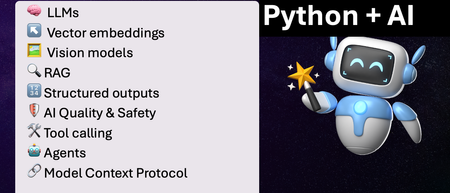
We've just wrapped up our live series on Python + AI, a comprehensive nine-part journey diving deep into how to use generative AI models from Python. The series introduced multiple types of models, including LLMs, embedding models, and vision models. We dug into popular techniques like RAG, tool calling, and structured outputs. We assessed AI quality and safety using automated evaluations and red-teaming. Finally, we developed AI agents using popular Python agents frameworks and explored the new Model Context Protocol (MCP). To help you apply what you've learned, all of our code examples work with GitHub Models, a service that provides free models to every GitHub account holder for experimentation and education. Even if you missed the live series, you can still access all the material using the links below! If you're an instructor, feel free to use the slides and code examples in your own classes. If you're a Spanish speaker, check out the Spanish version of the series. Python + AI: Large Language Models 📺 Watch recording In this session, we explore Large Language Models (LLMs), the models that power ChatGPT and GitHub Copilot. We use Python to interact with LLMs using popular packages like the OpenAI SDK and LangChain. We experiment with prompt engineering and few-shot examples to improve outputs. We also demonstrate how to build a full-stack app powered by LLMs and explain the importance of concurrency and streaming for user-facing AI apps. Slides for this session Code repository with examples: python-openai-demos Python + AI: Vector embeddings 📺 Watch recording In our second session, we dive into a different type of model: the vector embedding model. A vector embedding is a way to encode text or images as an array of floating-point numbers. Vector embeddings enable similarity search across many types of content. In this session, we explore different vector embedding models, such as the OpenAI text-embedding-3 series, through both visualizations and Python code. We compare distance metrics, use quantization to reduce vector size, and experiment with multimodal embedding models. Slides for this session Code repository with examples: vector-embedding-demos Python + AI: Retrieval Augmented Generation 📺 Watch recording In our third session, we explore one of the most popular techniques used with LLMs: Retrieval Augmented Generation. RAG is an approach that provides context to the LLM, enabling it to deliver well-grounded answers for a particular domain. The RAG approach works with many types of data sources, including CSVs, webpages, documents, and databases. In this session, we walk through RAG flows in Python, starting with a simple flow and culminating in a full-stack RAG application based on Azure AI Search. Slides for this session Code repository with examples: python-openai-demos Python + AI: Vision models 📺 Watch recording Our fourth session is all about vision models! Vision models are LLMs that can accept both text and images, such as GPT-4o and GPT-4o mini. You can use these models for image captioning, data extraction, question answering, classification, and more! We use Python to send images to vision models, build a basic chat-with-images app, and create a multimodal search engine. Slides for this session Code repository with examples: openai-chat-vision-quickstart Python + AI: Structured outputs 📺 Watch recording In our fifth session, we discover how to get LLMs to output structured responses that adhere to a schema. In Python, all you need to do is define a Pydantic BaseModel to get validated output that perfectly meets your needs. We focus on the structured outputs mode available in OpenAI models, but you can use similar techniques with other model providers. Our examples demonstrate the many ways you can use structured responses, such as entity extraction, classification, and agentic workflows. Slides for this session Code repository with examples: python-openai-demos Python + AI: Quality and safety 📺 Watch recording This session covers a crucial topic: how to use AI safely and how to evaluate the quality of AI outputs. There are multiple mitigation layers when working with LLMs: the model itself, a safety system on top, the prompting and context, and the application user experience. We focus on Azure tools that make it easier to deploy safe AI systems into production. We demonstrate how to configure the Azure AI Content Safety system when working with Azure AI models and how to handle errors in Python code. Then we use the Azure AI Evaluation SDK to evaluate the safety and quality of output from your LLM. Slides for this session Code repository with examples: ai-quality-safety-demos Python + AI: Tool calling 📺 Watch recording In the final part of the series, we focus on the technologies needed to build AI agents, starting with the foundation: tool calling (also known as function calling). We define tool call specifications using both JSON schema and Python function definitions, then send these definitions to the LLM. We demonstrate how to properly handle tool call responses from LLMs, enable parallel tool calling, and iterate over multiple tool calls. Understanding tool calling is absolutely essential before diving into agents, so don't skip over this foundational session. Slides for this session Code repository with examples: python-openai-demos Python + AI: Agents 📺 Watch recording In the penultimate session, we build AI agents! We use Python AI agent frameworks such as the new agent-framework from Microsoft and the popular LangGraph framework. Our agents start simple and then increase in complexity, demonstrating different architectures such as multiple tools, supervisor patterns, graphs, and human-in-the-loop workflows. Slides for this session Code repository with examples: python-ai-agent-frameworks-demos Python + AI: Model Context Protocol 📺 Watch recording In the final session, we dive into the hottest technology of 2025: MCP (Model Context Protocol). This open protocol makes it easy to extend AI agents and chatbots with custom functionality, making them more powerful and flexible. We demonstrate how to use the Python FastMCP SDK to build an MCP server running locally and consume that server from chatbots like GitHub Copilot. Then we build our own MCP client to consume the server. Finally, we discover how easy it is to connect AI agent frameworks like LangGraph and Microsoft agent-framework to MCP servers. With great power comes great responsibility, so we briefly discuss the security risks that come with MCP, both as a user and as a developer. Slides for this session Code repository with examples: python-mcp-demo6KViews2likes0CommentsAchievement Code Request not available in UAE
Hi Team, we are facing issues in our UAE Region to create Achievement Codes for our classes next week. It is only in this region where we are missing the Achievement Code button at the moment. Other countries working well. Can you please immediately advise back if there are any issues or any workaround to solve this issue? Thanks for your support! DianaBuilding Interactive Agent UIs with AG-UI and Microsoft Agent Framework
Introduction Picture this: You've built an AI agent that analyzes financial data. A user uploads a quarterly report and asks: "What are the top three expense categories?" Behind the scenes, your agent parses the spreadsheet, aggregates thousands of rows, and generates visualizations. All in 20 seconds. But the user? They see a loading spinner. Nothing else. No "reading file" message, no "analyzing data" indicator, no hint that progress is being made. They start wondering: Is it frozen? Should I refresh? The problem isn't the agent's capabilities - it's the communication gap between the agent running on the backend and the user interface. When agents perform multi-step reasoning, call external APIs, or execute complex tool chains, users deserve to see what's happening. They need streaming updates, intermediate results, and transparent progress indicators. Yet most agent frameworks force developers to choose between simple request/response patterns or building custom solutions to stream updates to their UIs. This is where AG-UI comes in. AG-UI is a fairly new event-based protocol that standardizes how agents communicate with user interfaces. Instead of every framework and development team inventing their own streaming solution, AG-UI provides a shared vocabulary of structured events that work consistently across different agent implementations. When an agent starts processing, calls a tool, generates text, or encounters an error, the UI receives explicit, typed events in real time. The beauty of AG-UI is its framework-agnostic design. While this blog post demonstrates integration with Microsoft Agent Framework (MAF), the same AG-UI protocol works with LangGraph, CrewAI, or any other compliant framework. Write your UI code once, and it works with any AG-UI-compliant backend. (Note: MAF supports both Python and .NET - this blog post focuses on the Python implementation.) TL;DR The Problem: Users don't get real-time updates while AI agents work behind the scenes - no progress indicators, no transparency into tool calls, and no insight into what's happening. The Solution: AG-UI is an open, event-based protocol that standardizes real-time communication between AI agents and user interfaces. Instead of each development team and framework inventing custom streaming solutions, AG-UI provides a shared vocabulary of structured events (like TOOL_CALL_START, TEXT_MESSAGE_CONTENT, RUN_FINISHED) that work across any compliant framework. Key Benefits: Framework-agnostic - Write UI code once, works with LangGraph, Microsoft Agent Framework, CrewAI, and more Real-time observability - See exactly what your agent is doing as it happens Server-Sent Events - Built on standard HTTP for universal compatibility Protocol-managed state - No manual conversation history tracking In This Post: You'll learn why AG-UI exists, how it works, and build a complete working application using Microsoft Agent Framework with Python - from server setup to client implementation. What You'll Learn This blog post walks through: Why AG-UI exists - how agent-UI communication has evolved and what problems current approaches couldn't solve How the protocol works - the key design choices that make AG-UI simple, reliable, and framework-agnostic Protocol architecture - the generic components and how AG-UI integrates with agent frameworks Building an AG-UI application - a complete working example using Microsoft Agent Framework with server, client, and step-by-step setup Understanding events - what happens under the hood when your agent runs and how to observe it Thinking in events - how building with AG-UI differs from traditional APIs, and what benefits this brings Making the right choice - when AG-UI is the right fit for your project and when alternatives might be better Estimated reading time: 15 minutes Who this is for: Developers building AI agents who want to provide real-time feedback to users, and teams evaluating standardized approaches to agent-UI communication To appreciate why AG-UI matters, we need to understand the journey that led to its creation. Let's trace how agent-UI communication has evolved through three distinct phases. The Evolution of Agent-UI Communication AI agents have become more capable over time. As they evolved, the way they communicated with user interfaces had to evolve as well. Here's how this evolution unfolded. Phase 1: Simple Request/Response In the early days of AI agent development, the interaction model was straightforward: send a question, wait for an answer, display the result. This synchronous approach mirrored traditional API calls and worked fine for simple scenarios. # Simple, but limiting response = agent.run("What's the weather in Paris?") display(response) # User waits... and waits... Works for: Quick queries that complete in seconds, simple Q&A interactions where immediate feedback and interactivity aren't critical. Breaks down: When agents need to call multiple tools, perform multi-step reasoning, or process complex queries that take 30+ seconds. Users see nothing but a loading spinner, with no insight into what's happening or whether the agent is making progress. This creates a poor user experience and makes it impossible to show intermediate results or allow user intervention. Recognizing these limitations, development teams began experimenting with more sophisticated approaches. Phase 2: Custom Streaming Solutions As agents became more sophisticated, teams recognized the need for incremental feedback and interactivity. Rather than waiting for the complete response, they implemented custom streaming solutions to show partial results as they became available. # Every team invents their own format for chunk in agent.stream("What's the weather?"): display(chunk) # But what about tool calls? Errors? Progress? This was a step forward for building interactive agent UIs, but each team solved the problem differently. Also, different frameworks had incompatible approaches - some streamed only text tokens, others sent structured JSON, and most provided no visibility into critical events like tool calls or errors. The problem: No standardization across frameworks - client code that works with LangGraph won't work with Crew AI, requiring separate implementations for each agent backend Each implementation handles tool calls differently - some send nothing during tool execution, others send unstructured messages Complex state management - clients must track conversation history, manage reconnections, and handle edge cases manually The industry needed a better solution - a common protocol that could work across all frameworks while maintaining the benefits of streaming. Phase 3: Standardized Protocol (AG-UI) AG-UI emerged as a response to the fragmentation problem. Instead of each framework and development team inventing their own streaming solution, AG-UI provides a shared vocabulary of events that work consistently across different agent implementations. # Standardized events everyone understands async for event in agent.run_stream("What's the weather?"): if event.type == "TEXT_MESSAGE_CONTENT": display_text(event.delta) elif event.type == "TOOL_CALL_START": show_tool_indicator(event.tool_name) elif event.type == "TOOL_CALL_RESULT": show_tool_result(event.result) The key difference is structured observability. Rather than guessing what the agent is doing from unstructured text, clients receive explicit events for every stage of execution: when the agent starts, when it generates text, when it calls a tool, when that tool completes, and when the entire run finishes. What's different: A standardized vocabulary of event types, complete observability into agent execution, and framework-agnostic clients that work with any AG-UI-compliant backend. You write your UI code once, and it works whether the backend uses Microsoft Agent Framework, LangGraph, or any other framework that speaks AG-UI. Now that we've seen why AG-UI emerged and what problems it solves, let's examine the specific design decisions that make the protocol work. These choices weren't arbitrary - each one addresses concrete challenges in building reliable, observable agent-UI communication. The Design Decisions Behind AG-UI Why Server-Sent Events (SSE)? Aspect WebSockets SSE (AG-UI) Complexity Bidirectional Unidirectional (simpler) Firewall/Proxy Sometimes blocked Standard HTTP Reconnection Manual implementation Built-in browser support Use case Real-time games, chat Agent responses (one-way) For agent interactions, you typically only need server→client communication, making SSE a simpler choice. SSE solves the transport problem - how events travel from server to client. But once connected, how does the protocol handle conversation state across multiple interactions? Why Protocol-Managed Threads? # Without protocol threads (client manages): conversation_history = [] conversation_history.append({"role": "user", "content": message}) response = agent.complete(conversation_history) conversation_history.append({"role": "assistant", "content": response}) # Complex, error-prone, doesn't work with multiple clients # With AG-UI (protocol manages): thread = agent.get_new_thread() # Server creates and manages thread agent.run_stream(message, thread=thread) # Server maintains context # Simple, reliable, shareable across clients With transport and state management handled, the final piece is the actual messages flowing through the connection. What information should the protocol communicate, and how should it be structured? Why Standardized Event Types? Instead of parsing unstructured text, clients get typed events: RUN_STARTED - Agent begins (start loading UI) TEXT_MESSAGE_CONTENT - Text chunk (stream to user) TOOL_CALL_START - Tool invoked (show "searching...", "calculating...") TOOL_CALL_RESULT - Tool finished (show result, update UI) RUN_FINISHED - Complete (hide loading) This lets UIs react intelligently without custom parsing logic. Now that we understand the protocol's design choices, let's see how these pieces fit together in a complete system. Architecture Overview Here's how the components interact: The communication between these layers relies on a well-defined set of event types. Here are the core events that flow through the SSE connection: Core Event Types AG-UI provides a standardized set of event types to describe what's happening during an agent's execution: RUN_STARTED - agent begins execution TEXT_MESSAGE_START, TEXT_MESSAGE_CONTENT, TEXT_MESSAGE_END - streaming segments of text TOOL_CALL_START, TOOL_CALL_ARGS, TOOL_CALL_END, TOOL_CALL_RESULT - tool execution events RUN_FINISHED - agent has finished execution RUN_ERROR - error information This model lets the UI update as the agent runs, rather than waiting for the final response. The generic architecture above applies to any AG-UI implementation. Now let's see how this translates to Microsoft Agent Framework. AG-UI with Microsoft Agent Framework While AG-UI is framework-agnostic, this blog post demonstrates integration with Microsoft Agent Framework (MAF) using Python. MAF is available in both Python and .NET, giving you flexibility to build AG-UI applications in your preferred language. Understanding how MAF implements the protocol will help you build your own applications or work with other compliant frameworks. Integration Architecture The Microsoft Agent Framework integration involves several specialized layers that handle protocol translation and execution orchestration: Understanding each layer: FastAPI Endpoint - Handles HTTP requests and establishes SSE connections for streaming AgentFrameworkAgent - Protocol wrapper that translates between AG-UI events and Agent Framework operations Orchestrators - Manage execution flow, coordinate tool calling sequences, and handle state transitions ChatAgent - Your agent implementation with instructions, tools, and business logic ChatClient - Interface to the underlying language model (Azure OpenAI, OpenAI, or other providers) The good news? When you call add_agent_framework_fastapi_endpoint, all the middleware layers are configured automatically. You simply provide your ChatAgent, and the integration handles protocol translation, event streaming, and state management behind the scenes. Now that we understand both the protocol architecture and the Microsoft Agent Framework integration, let's build a working application. Hands-On: Building Your First AG-UI Application This section demonstrates how to build an AG-UI server and client using Microsoft Agent Framework and FastAPI. Prerequisites Before building your first AG-UI application, ensure you have: Python 3.10 or later installed Basic understanding of async/await patterns in Python Azure CLI installed and authenticated (az login) Azure OpenAI service endpoint and deployment configured (setup guide) Cognitive Services OpenAI Contributor role for your Azure OpenAI resource You'll also need to install the AG-UI integration package: pip install agent-framework-ag-ui --pre This automatically installs agent-framework-core, fastapi, and uvicorn as dependencies. With your environment configured, let's create the server that will host your agent and expose it via the AG-UI protocol. Building the Server Let's create a FastAPI server that hosts an AI agent and exposes it via AG-UI: # server.py import os from typing import Annotated from dotenv import load_dotenv from fastapi import FastAPI from pydantic import Field from agent_framework import ChatAgent, ai_function from agent_framework.azure import AzureOpenAIChatClient from agent_framework_ag_ui import add_agent_framework_fastapi_endpoint from azure.identity import DefaultAzureCredential # Load environment variables from .env file load_dotenv() # Validate environment configuration openai_endpoint = os.getenv("AZURE_OPENAI_ENDPOINT") model_deployment = os.getenv("AZURE_OPENAI_DEPLOYMENT_NAME") if not openai_endpoint: raise RuntimeError("Missing required environment variable: AZURE_OPENAI_ENDPOINT") if not model_deployment: raise RuntimeError("Missing required environment variable: AZURE_OPENAI_DEPLOYMENT_NAME") # Define tools the agent can use @ai_function def get_order_status( order_id: Annotated[str, Field(description="The order ID to look up (e.g., ORD-001)")] ) -> dict: """Look up the status of a customer order. Returns order status, tracking number, and estimated delivery date. """ # Simulated order lookup orders = { "ORD-001": {"status": "shipped", "tracking": "1Z999AA1", "eta": "Jan 25, 2026"}, "ORD-002": {"status": "processing", "tracking": None, "eta": "Jan 23, 2026"}, "ORD-003": {"status": "delivered", "tracking": "1Z999AA3", "eta": "Delivered Jan 20"}, } return orders.get(order_id, {"status": "not_found", "message": "Order not found"}) # Initialize Azure OpenAI client chat_client = AzureOpenAIChatClient( credential=DefaultAzureCredential(), endpoint=openai_endpoint, deployment_name=model_deployment, ) # Configure the agent with custom instructions and tools agent = ChatAgent( name="CustomerSupportAgent", instructions="""You are a helpful customer support assistant. You have access to a get_order_status tool that can look up order information. IMPORTANT: When a user mentions an order ID (like ORD-001, ORD-002, etc.), you MUST call the get_order_status tool to retrieve the actual order details. Do NOT make up or guess order information. After calling get_order_status, provide the actual results to the user in a friendly format.""", chat_client=chat_client, tools=[get_order_status], ) # Initialize FastAPI application app = FastAPI( title="AG-UI Customer Support Server", description="Interactive AI agent server using AG-UI protocol with tool calling" ) # Mount the AG-UI endpoint add_agent_framework_fastapi_endpoint(app, agent, path="/chat") def main(): """Entry point for the AG-UI server.""" import uvicorn print("Starting AG-UI server on http://localhost:8000") uvicorn.run(app, host="0.0.0.0", port=8000, log_level="info") # Run the application if __name__ == "__main__": main() What's happening here: We define a tool: get_order_status with the AI_function decorator Use Annotated and Field for parameter descriptions to help the agent understand when and how to use the tool We create an Azure OpenAI chat client with credential authentication The ChatAgent is configured with domain-specific instructions and the tools parameter add_agent_framework_fastapi_endpoint automatically handles SSE streaming and tool execution The server exposes the agent at the /chat endpoint Note: This example uses Azure OpenAI, but AG-UI works with any chat model. You can also integrate with Azure AI Foundry's model catalog or use other LLM providers. Tool calling is supported by most modern LLMs including GPT-4, GPT-4o, and Claude models. To run this server: # Set your Azure OpenAI credentials export AZURE_OPENAI_ENDPOINT="https://your-resource.openai.azure.com/" export AZURE_OPENAI_DEPLOYMENT_NAME="gpt-4o" # Start the server python server.py With your server running and exposing the AG-UI endpoint, the next step is building a client that can connect and consume the event stream. Streaming Results to Clients With the server running, clients can connect and stream events as the agent processes requests. Here's a Python client that demonstrates the streaming capabilities: # client.py import asyncio import os from dotenv import load_dotenv from agent_framework import ChatAgent, FunctionCallContent, FunctionResultContent from agent_framework_ag_ui import AGUIChatClient # Load environment variables from .env file load_dotenv() async def interactive_chat(): """Interactive chat session with streaming responses.""" # Connect to the AG-UI server base_url = os.getenv("AGUI_SERVER_URL", "http://localhost:8000/chat") print(f"Connecting to: {base_url}\n") # Initialize the AG-UI client client = AGUIChatClient(endpoint=base_url) # Create a local agent representation agent = ChatAgent(chat_client=client) # Start a new conversation thread conversation_thread = agent.get_new_thread() print("Chat started! Type 'exit' or 'quit' to end the session.\n") try: while True: # Collect user input user_message = input("You: ") # Handle empty input if not user_message.strip(): print("Please enter a message.\n") continue # Check for exit commands if user_message.lower() in ["exit", "quit", "bye"]: print("\nGoodbye!") break # Stream the agent's response print("Agent: ", end="", flush=True) # Track tool calls to avoid duplicate prints seen_tools = set() async for update in agent.run_stream(user_message, thread=conversation_thread): # Display text content if update.text: print(update.text, end="", flush=True) # Display tool calls and results for content in update.contents: if isinstance(content, FunctionCallContent): # Only print each tool call once if content.call_id not in seen_tools: seen_tools.add(content.call_id) print(f"\n[Calling tool: {content.name}]", flush=True) elif isinstance(content, FunctionResultContent): # Only print each result once result_id = f"result_{content.call_id}" if result_id not in seen_tools: seen_tools.add(result_id) result_text = content.result if isinstance(content.result, str) else str(content.result) print(f"[Tool result: {result_text}]", flush=True) print("\n") # New line after response completes except KeyboardInterrupt: print("\n\nChat interrupted by user.") except ConnectionError as e: print(f"\nConnection error: {e}") print("Make sure the server is running.") except Exception as e: print(f"\nUnexpected error: {e}") def main(): """Entry point for the AG-UI client.""" asyncio.run(interactive_chat()) if __name__ == "__main__": main() Key features: The client connects to the AG-UI endpoint using AGUIChatClient with the endpoint parameter run_stream() yields updates containing text and content as they arrive Tool calls are detected using FunctionCallContent and displayed with [Calling tool: ...] Tool results are detected using FunctionResultContent and displayed with [Tool result: ...] Deduplication logic (seen_tools set) prevents printing the same tool call multiple times as it streams Thread management maintains conversation context across messages Graceful error handling for connection issues To use the client: # Optional: specify custom server URL export AGUI_SERVER_URL="http://localhost:8000/chat" # Start the interactive chat python client.py Example Session: Connecting to: http://localhost:8000/chat Chat started! Type 'exit' or 'quit' to end the session. You: What's the status of order ORD-001? Agent: [Calling tool: get_order_status] [Tool result: {"status": "shipped", "tracking": "1Z999AA1", "eta": "Jan 25, 2026"}] Your order ORD-001 has been shipped! - Tracking Number: 1Z999AA1 - Estimated Delivery Date: January 25, 2026 You can use the tracking number to monitor the delivery progress. You: Can you check ORD-002? Agent: [Calling tool: get_order_status] [Tool result: {"status": "processing", "tracking": null, "eta": "Jan 23, 2026"}] Your order ORD-002 is currently being processed. - Status: Processing - Estimated Delivery: January 23, 2026 Your order should ship soon, and you'll receive a tracking number once it's on the way. You: exit Goodbye! The client we just built handles events at a high level, abstracting away the details. But what's actually flowing through that SSE connection? Let's peek under the hood. Event Types You'll See As the server streams back responses, clients receive a series of structured events. If you were to observe the raw SSE stream (e.g., using curl), you'd see events like: curl -N http://localhost:8000/chat \ -H "Content-Type: application/json" \ -H "Accept: text/event-stream" \ -d '{"messages": [{"role": "user", "content": "What'\''s the status of order ORD-001?"}]}' Sample event stream (with tool calling): data: {"type":"RUN_STARTED","threadId":"eb4d9850-14ef-446c-af4b-23037acda9e8","runId":"chatcmpl-xyz"} data: {"type":"TEXT_MESSAGE_START","messageId":"e8648880-a9ff-4178-a17d-4a6d3ec3d39c","role":"assistant"} data: {"type":"TOOL_CALL_START","toolCallId":"call_GTWj2N3ZyYiiQIjg3fwmiQ8y","toolCallName":"get_order_status","parentMessageId":"e8648880-a9ff-4178-a17d-4a6d3ec3d39c"} data: {"type":"TOOL_CALL_ARGS","toolCallId":"call_GTWj2N3ZyYiiQIjg3fwmiQ8y","delta":"{\""} data: {"type":"TOOL_CALL_ARGS","toolCallId":"call_GTWj2N3ZyYiiQIjg3fwmiQ8y","delta":"order"} data: {"type":"TOOL_CALL_ARGS","toolCallId":"call_GTWj2N3ZyYiiQIjg3fwmiQ8y","delta":"_id"} data: {"type":"TOOL_CALL_ARGS","toolCallId":"call_GTWj2N3ZyYiiQIjg3fwmiQ8y","delta":"\":\""} data: {"type":"TOOL_CALL_ARGS","toolCallId":"call_GTWj2N3ZyYiiQIjg3fwmiQ8y","delta":"ORD"} data: {"type":"TOOL_CALL_ARGS","toolCallId":"call_GTWj2N3ZyYiiQIjg3fwmiQ8y","delta":"-"} data: {"type":"TOOL_CALL_ARGS","toolCallId":"call_GTWj2N3ZyYiiQIjg3fwmiQ8y","delta":"001"} data: {"type":"TOOL_CALL_ARGS","toolCallId":"call_GTWj2N3ZyYiiQIjg3fwmiQ8y","delta":"\"}"} data: {"type":"TOOL_CALL_END","toolCallId":"call_GTWj2N3ZyYiiQIjg3fwmiQ8y"} data: {"type":"TOOL_CALL_RESULT","messageId":"f048cb0a-a049-4a51-9403-a05e4820438a","toolCallId":"call_GTWj2N3ZyYiiQIjg3fwmiQ8y","content":"{\"status\": \"shipped\", \"tracking\": \"1Z999AA1\", \"eta\": \"Jan 25, 2026\"}","role":"tool"} data: {"type":"TEXT_MESSAGE_START","messageId":"8215fc88-8cb6-4ce4-8bdb-a8715dcd26cf","role":"assistant"} data: {"type":"TEXT_MESSAGE_CONTENT","messageId":"8215fc88-8cb6-4ce4-8bdb-a8715dcd26cf","delta":"Your"} data: {"type":"TEXT_MESSAGE_CONTENT","messageId":"8215fc88-8cb6-4ce4-8bdb-a8715dcd26cf","delta":" order"} data: {"type":"TEXT_MESSAGE_CONTENT","messageId":"8215fc88-8cb6-4ce4-8bdb-a8715dcd26cf","delta":" ORD"} data: {"type":"TEXT_MESSAGE_CONTENT","messageId":"8215fc88-8cb6-4ce4-8bdb-a8715dcd26cf","delta":"-"} data: {"type":"TEXT_MESSAGE_CONTENT","messageId":"8215fc88-8cb6-4ce4-8bdb-a8715dcd26cf","delta":"001"} data: {"type":"TEXT_MESSAGE_CONTENT","messageId":"8215fc88-8cb6-4ce4-8bdb-a8715dcd26cf","delta":" has"} data: {"type":"TEXT_MESSAGE_CONTENT","messageId":"8215fc88-8cb6-4ce4-8bdb-a8715dcd26cf","delta":" been"} data: {"type":"TEXT_MESSAGE_CONTENT","messageId":"8215fc88-8cb6-4ce4-8bdb-a8715dcd26cf","delta":" shipped"} data: {"type":"TEXT_MESSAGE_CONTENT","messageId":"8215fc88-8cb6-4ce4-8bdb-a8715dcd26cf","delta":"!"} ... (additional TEXT_MESSAGE_CONTENT events streaming the response) ... data: {"type":"TEXT_MESSAGE_END","messageId":"8215fc88-8cb6-4ce4-8bdb-a8715dcd26cf"} data: {"type":"RUN_FINISHED","threadId":"eb4d9850-14ef-446c-af4b-23037acda9e8","runId":"chatcmpl-xyz"} Understanding the flow: RUN_STARTED - Agent begins processing the request TEXT_MESSAGE_START - First message starts (will contain tool calls) TOOL_CALL_START - Agent invokes the get_order_status tool Multiple TOOL_CALL_ARGS events - Arguments stream incrementally as JSON chunks ({"order_id":"ORD-001"}) TOOL_CALL_END - Tool invocation structure complete TOOL_CALL_RESULT - Tool execution finished with result data TEXT_MESSAGE_START - Second message starts (the final response) Multiple TEXT_MESSAGE_CONTENT events - Response text streams word-by-word TEXT_MESSAGE_END - Response message complete RUN_FINISHED - Entire run completed successfully This granular event model enables rich UI experiences - showing tool execution indicators ("Searching...", "Calculating..."), displaying intermediate results, and providing complete transparency into the agent's reasoning process. Seeing the raw events helps, but truly working with AG-UI requires a shift in how you think about agent interactions. Let's explore this conceptual change. The Mental Model Shift Traditional API Thinking # Imperative: Call and wait response = agent.run("What's 2+2?") print(response) # "The answer is 4" Mental model: Function call with return value AG-UI Thinking # Reactive: Subscribe to events async for event in agent.run_stream("What's 2+2?"): match event.type: case "RUN_STARTED": show_loading() case "TEXT_MESSAGE_CONTENT": display_chunk(event.delta) case "RUN_FINISHED": hide_loading() Mental model: Observable stream of events This shift feels similar to: Moving from synchronous to async code Moving from REST to event-driven architecture Moving from polling to pub/sub This mental shift isn't just philosophical - it unlocks concrete benefits that weren't possible with request/response patterns. What You Gain Observability # You can SEE what the agent is doing TOOL_CALL_START: "get_order_status" TOOL_CALL_ARGS: {"order_id": "ORD-001"} TOOL_CALL_RESULT: {"status": "shipped", "tracking": "1Z999AA1", "eta": "Jan 25, 2026"} TEXT_MESSAGE_START: "Your order ORD-001 has been shipped..." Interruptibility # Future: Cancel long-running operations async for event in agent.run_stream(query): if user_clicked_cancel: await agent.cancel(thread_id, run_id) break Transparency # Users see the reasoning process "Looking up order ORD-001..." "Order found: Status is 'shipped'" "Retrieving tracking information..." "Your order has been shipped with tracking number 1Z999AA1..." To put these benefits in context, here's how AG-UI compares to traditional approaches across key dimensions: AG-UI vs. Traditional Approaches Aspect Traditional REST Custom Streaming AG-UI Connection Model Request/Response Varies Server-Sent Events State Management Manual Manual Protocol-managed Tool Calling Invisible Custom format Standardized events Framework Varies Framework-locked Framework-agnostic Browser Support Universal Varies Universal Implementation Simple Complex Moderate Ecosystem N/A Isolated Growing You've now seen AG-UI's design principles, implementation details, and conceptual foundations. But the most important question remains: should you actually use it? Conclusion: Is AG-UI Right for Your Project? AG-UI represents a shift toward standardized, observable agent interactions. Before adopting it, understand where the protocol stands and whether it fits your needs. Protocol Maturity The protocol is stable enough for production use but still evolving: Ready now: Core specification stable, Microsoft Agent Framework integration available, FastAPI/Python implementation mature, basic streaming and threading work reliably. Choose AG-UI If You Building new agent projects - No legacy API to maintain, want future compatibility with emerging ecosystem Need streaming observability - Multi-step workflows where users benefit from seeing each stage of execution Want framework flexibility - Same client code works with any AG-UI-compliant backend Comfortable with evolving standards - Can adapt to protocol changes as it matures Stick with Alternatives If You Have working solutions - Custom streaming working well, migration cost not justified Need guaranteed stability - Mission-critical systems where breaking changes are unacceptable Build simple agents - Single-step request/response without tool calling or streaming needs Risk-averse environment - Large existing implementations where proven approaches are required Beyond individual project decisions, it's worth considering AG-UI's role in the broader ecosystem. The Bigger Picture While this blog post focused on Microsoft Agent Framework, AG-UI's true power lies in its broader mission: creating a common language for agent-UI communication across the entire ecosystem. As more frameworks adopt it, the real value emerges: write your UI once, work with any compliant agent framework. Think of it like GraphQL for APIs or OpenAPI for REST - a standardization layer that benefits the entire ecosystem. The protocol is young, but the problem it solves is real. Whether you adopt it now or wait for broader adoption, understanding AG-UI helps you make informed architectural decisions for your agent applications. Ready to dive deeper? Here are the official resources to continue your AG-UI journey. Resources AG-UI & Microsoft Agent Framework Getting Started with AG-UI (Microsoft Learn) - Official tutorial AG-UI Integration Overview - Architecture and concepts AG-UI Protocol Specification - Official protocol documentation Backend Tool Rendering - Adding function tools Security Considerations - Production security guidance Microsoft Agent Framework Documentation - Framework overview AG-UI Dojo Examples - Live demonstrations UI Components & Integration CopilotKit for Microsoft Agent Framework - React component library Community & Support Microsoft Q&A - Community support Agent Framework GitHub - Source code and issues Related Technologies Azure AI Foundry Documentation - Azure AI platform FastAPI Documentation - Web framework Server-Sent Events (SSE) Specification - Protocol standard This blog post introduces AG-UI with Microsoft Agent Framework, focusing on fundamental concepts and building your first interactive agent application.Agents League: Two Weeks, Three Tracks, One Challenge
We're inviting all developers to join Agents League, running February 16-27. It's a two-week challenge where you'll build AI agents using production-ready tools, learn from live coding sessions, and get feedback directly from Microsoft product teams. We've put together starter kits for each track to help you get up and running quickly that also includes requirements and guidelines. Whether you want to explore what GitHub Copilot can do beyond autocomplete, build reasoning agents on Microsoft Foundry, or create enterprise integrations for Microsoft 365 Copilot, we have a track for you. Important: Register first to be eligible for prizes and your digital badge. Without registration, you won't qualify for awards or receive a badge when you submit. What Is Agents League? It's a 2-week competition that combines learning with building: 📽️ Live coding battles – Watch Product teams, MVPs and community members tackle challenges in real-time on Microsoft Reactor 💻 Async challenges – Build at your own pace, on your schedule 💬 Discord community – Connect with other participants, join AMAs, and get help when you need it 🏆 Prizes – $500 per track winner, plus GitHub Copilot Pro subscriptions for top picks The Three Tracks 🎨 Creative Apps — Build with GitHub Copilot (Chat, CLI, or SDK) 🧠 Reasoning Agents — Build with Microsoft Foundry 💼 Enterprise Agents — Build with M365 Agents Toolkit (or Copilot Studio) More details on each track below, or jump straight to the starter kits. The Schedule Agents League starts on February 16th and runs through Feburary 27th. Within 2 weeks, we host live battles on Reactor and AMA sessions on Discord. Week 1: Live Battles (Feb 17-19) We're kicking off with live coding battles streamed on Microsoft Reactor. Watch experienced developers compete in real-time, explaining their approach and architectural decisions as they go. Tue Feb 17, 9 AM PT — 🎨 Creative Apps battle Wed Feb 18, 9 AM PT — 🧠 Reasoning Agents battle Thu Feb 19, 9 AM PT — 💼 Enterprise Agents battle All sessions are recorded, so you can watch on your own schedule. Week 2: Build + AMAs (Feb 24-26) This is your time to build and ask questions on Discord. The async format means you work when it suits you, evenings, weekends, whatever fits your schedule. We're also hosting AMAs on Discord where you can ask questions directly to Microsoft experts and product teams: Tue Feb 24, 9 AM PT — 🎨 Creative Apps AMA Wed Feb 25, 9 AM PT — 🧠 Reasoning Agents AMA Thu Feb 26, 9 AM PT — 💼 Enterprise Agents AMA Bring your questions, get help when you're stuck, and share what you're building with the community. Pick Your Track We've created a starter kit for each track with setup guides, project ideas, and example scenarios to help you get started quickly. 🎨 Creative Apps Tool: GitHub Copilot (Chat, CLI, or SDK) Build innovative, imaginative applications that showcase the potential of AI-assisted development. All application types are welcome, web apps, CLI tools, games, mobile apps, desktop applications, and more. The starter kit walks you through GitHub Copilot's different modes and provides prompting tips to get the best results. View the Creative Apps starter kit. 🧠 Reasoning Agents Tool: Microsoft Foundry (UI or SDK) and/or Microsoft Agent Framework Build a multi-agent system that leverages advanced reasoning capabilities to solve complex problems. This track focuses on agents that can plan, reason through multi-step problems, and collaborate. The starter kit includes architecture patterns, reasoning strategies (planner-executor, critic/verifier, self-reflection), and integration guides for tools and MCP servers. View the Reasoning Agents starter kit. 💼 Enterprise Agents Tool: M365 Agents Toolkit or Copilot Studio Create intelligent agents that extend Microsoft 365 Copilot to address real-world enterprise scenarios. Your agent must work on Microsoft 365 Copilot Chat. Bonus points for: MCP server integration, OAuth security, Adaptive Cards UI, connected agents (multi-agent architecture). View the Enterprise Agents starter kit. Prizes & Recognition To be eligible for prizes and your digital badge, you must register before submitting your project. Category Winners ($500 each): 🎨 Creative Apps winner 🧠 Reasoning Agents winner 💼 Enterprise Agents winner GitHub Copilot Pro subscriptions: Community Favorite (voted by participants on Discord) Product Team Picks (selected by Microsoft product teams) Everyone who registers and submits a project wins: A digital badge to showcase their participation. Beyond the prizes, every participant gets feedback from the teams who built these tools, a valuable opportunity to learn and improve your approach to AI agent development. How to Get Started Register first — This is required to be eligible for prizes and to receive your digital badge. Without registration, your submission won't qualify for awards or a badge. Pick a track — Choose one track. Explore the starter kits to help you decide. Watch the battles — See how experienced developers approach these challenges. Great for learning even if you're still deciding whether to compete. Build your project — You have until Feb 27. Work on your own schedule. Submit via GitHub — Open an issue using the project submission template. Join us on Discord — Get help, share your progress, and vote for your favorite projects on Discord. Links Register: https://aka.ms/agentsleague/register Starter Kits: https://github.com/microsoft/agentsleague/starter-kits Discord: https://aka.ms/agentsleague/discord Live Battles: https://aka.ms/agentsleague/battles Submit Project: Project submission templateFrom Zero to 16 Games in 2 Hours
From Zero to 16 Games in 2 Hours: Teaching Prompt Engineering to Students with GitHub Copilot CLI Introduction What happens when you give a room full of 14-year-olds access to AI-powered development tools and challenge them to build games? You might expect chaos, confusion, or at best, a few half-working prototypes. Instead, we witnessed something remarkable: 16 fully functional HTML5 games created in under two hours, all from students with varying programming experience. This wasn't magic, it was the power of GitHub Copilot CLI combined with effective prompt engineering. By teaching students to communicate clearly with AI, we transformed a traditional coding workshop into a rapid prototyping session that exceeded everyone's expectations. The secret weapon? A technique called "one-shot prompting" that enables anyone to generate complete, working applications from a single, well-crafted prompt. In this article, we'll explore how we structured this workshop using CopilotCLI-OneShotPromptGameDev, a methodology designed to teach prompt engineering fundamentals while producing tangible, exciting results. Whether you're an educator planning STEM workshops, a developer exploring AI-assisted coding, or simply curious about how young people can leverage AI tools effectively, this guide provides a practical blueprint you can replicate. What is GitHub Copilot CLI? GitHub Copilot CLI extends the familiar Copilot experience beyond your code editor into the command line. While Copilot in VS Code suggests code completions as you type, Copilot CLI allows you to have conversational interactions with AI directly in your terminal. You describe what you want to accomplish in natural language, and the AI responds with shell commands, explanations, or in our case, complete code files. This terminal-based approach offers several advantages for learning and rapid prototyping. Students don't need to configure complex IDE settings or navigate unfamiliar interfaces. They simply type their request, review the AI's output, and iterate. The command line provides a transparent view of exactly what's happening, no hidden abstractions or magical "autocomplete" that obscures the learning process. For our workshop, Copilot CLI served as a bridge between students' creative ideas and working code. They could describe a game concept in plain English, watch the AI generate HTML, CSS, and JavaScript, then immediately test the result in a browser. This rapid feedback loop kept engagement high and made the connection between language and code tangible. Installing GitHub Copilot CLI Setting up Copilot CLI requires a few straightforward steps. Before the workshop, we ensured all machines were pre-configured, but students also learned the installation process as part of understanding how developer tools work. First, you'll need Node.js installed on your system. Copilot CLI runs as a Node package, so this is a prerequisite: # Check if Node.js is installed node --version # If not installed, download from https://nodejs.org/ # Or use a package manager: # Windows (winget) winget install OpenJS.NodeJS.LTS # macOS (Homebrew) brew install node # Linux (apt) sudo apt install nodejs npm These commands verify your Node.js installation or guide you through installing it using your operating system's preferred package manager. Next, install the GitHub CLI, which provides the foundation for Copilot CLI: # Windows winget install GitHub.cli # macOS brew install gh # Linux sudo apt install gh This installs the GitHub command-line interface, which handles authentication and provides the framework for Copilot integration. With GitHub CLI installed, authenticate with your GitHub account: gh auth login This command initiates an interactive authentication flow that connects your terminal to your GitHub account, enabling access to Copilot features. Finally, install the Copilot CLI extension: gh extension install github/gh-copilot This adds Copilot capabilities to your GitHub CLI installation, enabling the conversational AI features we'll use for game development. Verify the installation by running: gh copilot --help If you see the help output with available commands, you're ready to start prompting. The entire setup takes about 5-10 minutes on a fresh machine, making it practical for classroom environments. Understanding One-Shot Prompting Traditional programming education follows an incremental approach: learn syntax, understand concepts, build small programs, gradually tackle larger projects. This method is thorough but slow. One-shot prompting inverts this model—you start with the complete vision and let AI handle the implementation details. A one-shot prompt provides the AI with all the context it needs to generate a complete, working solution in a single response. Instead of iteratively refining code through multiple exchanges, you craft one comprehensive prompt that specifies requirements, constraints, styling preferences, and technical specifications. The AI then produces complete, functional code. This approach teaches a crucial skill: clear communication of technical requirements. Students must think through their entire game concept before typing. What does the game look like? How does the player interact with it? What happens when they win or lose? By forcing this upfront thinking, one-shot prompting develops the same analytical skills that professional developers use when writing specifications or planning architectures. The technique also demonstrates a powerful principle: with sufficient context, AI can handle implementation complexity while humans focus on creativity and design. Students learned they could create sophisticated games without memorizing JavaScript syntax—they just needed to describe their vision clearly enough for the AI to understand. Crafting Effective Prompts for Game Development The difference between a vague prompt and an effective one-shot prompt is the difference between frustration and success. We taught students a structured approach to prompt construction that consistently produced working games. Start with the game type and core mechanic. Don't just say "make a game"—specify what kind: Create a complete HTML5 game where the player controls a spaceship that must dodge falling asteroids. This opening establishes the fundamental gameplay loop: control a spaceship, avoid obstacles. The AI now has a clear mental model to work from. Add visual and interaction details. Games are visual experiences, so specify how things should look and respond: Create a complete HTML5 game where the player controls a spaceship that must dodge falling asteroids. The spaceship should be a blue triangle at the bottom of the screen, controlled by left and right arrow keys. Asteroids are brown circles that fall from the top at random positions and increasing speeds. These additions provide concrete visual targets and define the input mechanism. The AI can now generate specific CSS colors and event handlers. Define win/lose conditions and scoring: Create a complete HTML5 game where the player controls a spaceship that must dodge falling asteroids. The spaceship should be a blue triangle at the bottom of the screen, controlled by left and right arrow keys. Asteroids are brown circles that fall from the top at random positions and increasing speeds. Display a score that increases every second the player survives. The game ends when an asteroid hits the spaceship, showing a "Game Over" screen with the final score and a "Play Again" button. This complete prompt now specifies the entire game loop: gameplay, scoring, losing, and restarting. The AI has everything needed to generate a fully playable game. The formula students learned: Game Type + Visual Description + Controls + Rules + Win/Lose + Score = Complete Game Prompt. Running the Workshop: Structure and Approach Our two-hour workshop followed a carefully designed structure that balanced instruction with hands-on creation. We partnered with University College London and students access to GitHub Education to access resources specifically designed for classroom settings, including student accounts with Copilot access and amazing tools like VSCode and Azure for Students and for Schools VSCode Education. The first 20 minutes covered fundamentals: what is AI, how does Copilot work, and why does prompt quality matter? We demonstrated this with a live example, showing how "make a game" produces confused output while a detailed prompt generates playable code. This contrast immediately captured students' attention, they could see the direct relationship between their words and the AI's output. The next 15 minutes focused on the prompt formula. We broke down several example prompts, highlighting each component: game type, visuals, controls, rules, scoring. Students practiced identifying these elements in prompts before writing their own. This analysis phase prepared them to construct effective prompts independently. The remaining 85 minutes were dedicated to creation. Students worked individually or in pairs, brainstorming game concepts, writing prompts, generating code, testing in browsers, and iterating. Instructors circulated to help debug prompts (not code an important distinction) and encourage experimentation. We deliberately avoided teaching JavaScript syntax. When students encountered bugs, we guided them to refine their prompts rather than manually fix code. This maintained focus on the core skill: communicating with AI effectively. Surprisingly, this approach resulted in fewer bugs overall because students learned to be more precise in their initial descriptions. Student Projects: The Games They Created The diversity of games produced in 85 minutes of building time amazed everyone present. Students didn't just follow a template, they invented entirely new concepts and successfully communicated them to Copilot CLI. One student created a "Fruit Ninja" clone where players clicked falling fruit to slice it before it hit the ground. Another built a typing speed game that challenged players to correctly type increasingly difficult words against a countdown timer. A pair of collaborators produced a two-player tank battle where each player controlled their tank with different keyboard keys. Several students explored educational games: a math challenge where players solve equations to destroy incoming meteors, a geography quiz with animated maps, and a vocabulary builder where correct definitions unlock new levels. These projects demonstrated that one-shot prompting isn't limited to entertainment, students naturally gravitated toward useful applications. The most complex project was a procedurally generated maze game with fog-of-war mechanics. The student spent extra time on their prompt, specifying exactly how visibility should work around the player character. Their detailed approach paid off with a surprisingly sophisticated result that would typically require hours of manual coding. By the session's end, we had 16 complete, playable HTML5 games. Every student who participated produced something they could share with friends and family a tangible achievement that transformed an abstract "coding workshop" into a genuine creative accomplishment. Key Benefits of Copilot CLI for Rapid Prototyping Our workshop revealed several advantages that make Copilot CLI particularly valuable for rapid prototyping scenarios, whether in educational settings or professional development. Speed of iteration fundamentally changes what's possible. Traditional game development requires hours to produce even simple prototypes. With Copilot CLI, students went from concept to playable game in minutes. This compressed timeline enables experimentation, if your first idea doesn't work, try another. This psychological freedom to fail fast and try again proved more valuable than any technical instruction. Accessibility removes barriers to entry. Students with no prior coding experience produced results comparable to those who had taken programming classes. The playing field leveled because success depended on creativity and communication rather than memorized syntax. This democratization of development opens doors for students who might otherwise feel excluded from technical fields. Focus on design over implementation teaches transferable skills. Whether students eventually become programmers, designers, product managers, or pursue entirely different careers, the ability to clearly specify requirements and think through complete systems applies universally. They learned to think like system designers, not just coders. The feedback loop keeps engagement high. Seeing your words transform into working software within seconds creates an addictive cycle of creation and testing. Students who typically struggle with attention during lectures remained focused throughout the building session. The immediate gratification of seeing their games work motivated continuous refinement. Debugging through prompts teaches root cause analysis. When games didn't work as expected, students had to analyze what they'd asked for versus what they received. This comparison exercise developed critical thinking about specifications a skill that serves developers throughout their careers. Tips for Educators: Running Your Own Workshop If you're planning to replicate this workshop, several lessons from our experience will help ensure success. Pre-configure machines whenever possible. While installation is straightforward, classroom time is precious. Having Copilot CLI ready on all devices lets you dive into content immediately. If pre-configuration isn't possible, allocate the first 15-20 minutes specifically for setup and troubleshoot as a group. Prepare example prompts across difficulty levels. Some students will grasp one-shot prompting immediately; others will need more scaffolding. Having templates ranging from simple ("Create Pong") to complex (the spaceship example above) lets you meet students where they are. Emphasize that "prompt debugging" is the goal. When students ask for help fixing broken code, redirect them to examine their prompt. What did they ask for? What did they get? Where's the gap? This redirection reinforces the workshop's core learning objective and builds self-sufficiency. Celebrate and share widely. Build in time at the end for students to demonstrate their games. This showcase moment validates their work and often inspires classmates to try new approaches in future sessions. Consider creating a shared folder or simple website where all games can be accessed after the workshop. Access GitHub Education resources at education.github.com before your workshop. The GitHub Education program provides free access to developer tools for students and educators, including Copilot. The resources there include curriculum materials, teaching guides, and community support that can enhance your workshop. Beyond Games: Where This Leads The techniques students learned extend far beyond game development. One-shot prompting with Copilot CLI works for any development task: creating web pages, building utilities, generating data processing scripts, or prototyping application interfaces. The fundamental skill, communicating requirements clearly to AI applies wherever AI-assisted development tools are used. Several students have continued exploring after the workshop. Some discovered they enjoy the creative aspects of game design and are learning traditional programming to gain more control. Others found that prompt engineering itself interests them, they're exploring how different phrasings affect AI outputs across various domains. For professional developers, the workshop's lessons apply directly to working with Copilot, ChatGPT, and other AI coding assistants. The ability to craft precise, complete prompts determines whether these tools save time or create confusion. Investing in prompt engineering skills yields returns across every AI-assisted workflow. Key Takeaways Clear prompts produce working code: The one-shot prompting formula (Game Type + Visuals + Controls + Rules + Win/Lose + Score) reliably generates playable games from single prompts Copilot CLI democratizes development: Students with no coding experience created functional applications by focusing on communication rather than syntax Rapid iteration enables experimentation: Minutes-per-prototype timelines encourage creative risk-taking and learning from failures Prompt debugging builds analytical skills: Comparing intended versus actual results teaches specification writing and root cause analysis Sixteen games in two hours is achievable: With proper structure and preparation, young students can produce impressive results using AI-assisted development Conclusion and Next Steps Our workshop demonstrated that AI-assisted development tools like GitHub Copilot CLI aren't just productivity boosters for experienced programmers, they're powerful educational instruments that make software creation accessible to beginners. By focusing on prompt engineering rather than traditional syntax instruction, we enabled 14-year-old students to produce complete, functional games in a fraction of the time traditional methods would require. The sixteen games created during those two hours represent more than just workshop outputs. They represent a shift in how we might teach technical creativity: start with vision, communicate clearly, iterate quickly. Whether students pursue programming careers or not, they've gained experience in thinking systematically about requirements and translating ideas into specifications that produce real results. To explore this approach yourself, visit the CopilotCLI-OneShotPromptGameDev repository for prompt templates, workshop materials, and example games. For educational resources and student access to GitHub tools including Copilot, explore GitHub Education. And most importantly, start experimenting. Write a prompt, generate some code, and see what you can create in the next few minutes. Resources CopilotCLI-OneShotPromptGameDev Repository - Workshop materials, prompt templates, and example games GitHub Education - Free developer tools and resources for students and educators GitHub Copilot CLI Documentation - Official installation and usage guide GitHub CLI - Foundation tool required for Copilot CLI GitHub Copilot - Overview of Copilot features and pricing340Views2likes3CommentsBuild an AI-Powered Space Invaders Game
Build an AI-Powered Space Invaders Game: Integrating LLMs into HTML5 Games with Microsoft Foundry Local Introduction What if your game could talk back to you? Imagine playing Space Invaders while an AI commander taunts you during battle, delivers personalized mission briefings, and provides real-time feedback based on your performance. This isn't science fiction it's something you can build today using HTML, JavaScript, and a locally-running AI model. In this tutorial, we'll explore how to create an HTML5 game with integrated Large Language Model (LLM) features using Microsoft Foundry Local. You'll learn how to combine classic game development with modern AI capabilities, all running entirely on your own machine—no cloud services, no API costs, no internet connection required during gameplay. We'll be working with the Space Invaders - AI Commander Edition project, which demonstrates exactly how to architect games that leverage local AI. Whether you're a student learning game development, exploring AI integration patterns, or building your portfolio, this guide provides practical, hands-on experience with technologies that are reshaping how we build interactive applications. What You'll Learn By the end of this tutorial, you'll understand how to combine traditional web development with local AI inference. These skills transfer directly to building chatbots, interactive tutorials, AI-enhanced productivity tools, and any application where you want intelligent, context-aware responses. Set up Microsoft Foundry Local for running AI models on your machine Understand the architecture of games that integrate LLM features Use GitHub Copilot CLI to accelerate your development workflow Implement AI-powered game features like dynamic commentary and adaptive feedback Extend the project with your own creative AI features Why Local AI for Games? Before diving into the code, let's understand why running AI locally matters for game development. Traditional cloud-based AI services have limitations that make them impractical for real-time gaming experiences. Latency is the first challenge. Cloud API calls typically take 500ms to several seconds, an eternity in a game running at 60 frames per second. Local inference can respond in tens of milliseconds, enabling AI responses that feel instantaneous and natural. When an enemy ship appears, your AI commander can taunt you immediately, not three seconds later. Cost is another consideration. Cloud AI services charge per token, which adds up quickly when generating dynamic content during gameplay. Local models have zero per-use cost, once installed, they run entirely on your hardware. This frees you to experiment without worrying about API bills. Privacy and offline capability complete the picture. Local AI keeps all data on your machine, perfect for games that might handle player information. And since nothing requires internet connectivity, your game works anywhere, on planes, in areas with poor connectivity, or simply when you want to play without network access. Understanding Microsoft Foundry Local Microsoft Foundry Local is a runtime that enables you to run small language models (SLMs) directly on your computer. It's designed for developers who want to integrate AI capabilities into applications without requiring cloud infrastructure. Think of it as having a miniature AI assistant living on your laptop. Foundry Local handles the complex work of loading AI models, managing memory, and processing inference requests through a simple API. You send text prompts, and it returns AI-generated responses, all happening locally on your CPU or GPU. The models are optimized to run efficiently on consumer hardware, so you don't need a supercomputer. For our Space Invaders game, Foundry Local powers the "AI Commander" feature. During gameplay, the game sends context about what's happening, your score, accuracy, current level, enemies remaining and receives back contextual commentary, taunts, and encouragement. The result feels like playing alongside an AI companion who actually understands the game. Setting Up Your Development Environment Let's get your machine ready for AI-powered game development. We'll install Foundry Local, clone the project, and verify everything works. The entire setup takes about 10-15 minutes. Step 1: Install Microsoft Foundry Local Foundry Local installation varies by operating system. Open your terminal and run the appropriate command: # Windows (using winget) winget install Microsoft.FoundryLocal # macOS (using Homebrew) brew install microsoft/foundrylocal/foundrylocal These commands download and install the Foundry Local runtime along with a default small language model. The installation includes everything needed to run AI inference locally. Verify the installation by running: foundry --version If you see a version number, Foundry Local is ready. If you encounter errors, ensure you have administrator/sudo privileges and that your package manager is up to date. Step 2: Install Node.js (If Not Already Installed) Our game's AI features require a small Node.js server to communicate between the browser and Foundry Local. Check if Node.js is installed: node --version If you see a version number (v16 or higher recommended), you're set. Otherwise, install Node.js: # Windows winget install OpenJS.NodeJS.LTS # macOS brew install node # Linux sudo apt install nodejs npm Node.js provides the JavaScript runtime that powers our proxy server, bridging browser code with the local AI model. Step 3: Clone the Project Get the Space Invaders project onto your machine: git clone https://github.com/leestott/Spaceinvaders-FoundryLocal.git cd Spaceinvaders-FoundryLocal This downloads all game files, including the HTML interface, game logic, AI integration module, and server code. Step 4: Install Dependencies and Start the Server Install the Node.js packages and launch the AI-enabled server: npm install npm start The first command downloads required packages (primarily for the proxy server). The second starts the server, which listens for AI requests from the game. You should see output indicating the server is running on port 3001. Step 5: Play the Game Open your browser and navigate to: http://localhost:3001 You should see Space Invaders with "AI: ONLINE" displayed in the game HUD, indicating that AI features are active. Use arrow keys or A/D to move, SPACE to fire, and P to pause. The AI Commander will start providing commentary as you play! Understanding the Project Architecture Now that the game is running, let's explore how the different pieces fit together. Understanding this architecture will help you modify the game and apply these patterns to your own projects. The project follows a clean separation of concerns, with each file handling a specific responsibility: Spaceinvaders-FoundryLocal/ ├── index.html # Main game page and UI structure ├── styles.css # Retro arcade visual styling ├── game.js # Core game logic and rendering ├── llm.js # AI integration module ├── sound.js # Web Audio API sound effects ├── server.js # Node.js proxy for Foundry Local └── package.json # Project configuration index.html: Defines the game canvas and UI elements. It's the entry point that loads all other modules. game.js: Contains the game loop, physics, collision detection, scoring, and rendering logic. This is the heart of the game. llm.js: Handles all communication with the AI backend. It formats game state into prompts and processes AI responses. server.js: A lightweight Express server that proxies requests between the browser and Foundry Local. sound.js: Synthesizes retro sound effects using the Web Audio API—no audio files needed! How the AI Integration Works The magic of the AI Commander happens through a simple but powerful pattern. Let's trace the flow from gameplay event to AI response. When something interesting happens in the game, you clear a wave, achieve a combo, or lose a life, the game logic in game.js triggers an AI request. This request includes context about the current game state: your score, accuracy percentage, current level, lives remaining, and what just happened. The llm.js module formats this context into a prompt. For example, when you clear a wave with 85% accuracy, it might construct: You are an AI Commander in a Space Invaders game. The player just cleared wave 3 with 85% accuracy. Score: 12,500. Lives: 3. Provide a brief, enthusiastic comment (1-2 sentences). This prompt travels to server.js , which forwards it to Foundry Local. The AI model processes the prompt and generates a response like: "Impressive accuracy, pilot! Wave 3 didn't stand a chance. Keep that trigger finger sharp!" The response flows back through the server to the browser, where llm.js passes it to the game. The game displays the message in the HUD, creating the illusion of playing alongside an AI companion. This entire round trip typically completes in 50-200 milliseconds, fast enough to feel responsive without interrupting gameplay. Using GitHub Copilot CLI to Explore and Modify the Code GitHub Copilot CLI accelerates your development workflow by letting you ask questions and generate code directly in your terminal. Let's use it to understand and extend the Space Invaders project. Installing Copilot CLI If you haven't installed Copilot CLI yet, here's the quick setup: # Install GitHub CLI winget install GitHub.cli # Windows brew install gh # macOS # Authenticate with GitHub gh auth login # Add Copilot extension gh extension install github/gh-copilot # Verify installation gh copilot --help With Copilot CLI ready, you can interact with AI directly from your terminal while working on the project. Exploring Code with Copilot CLI Use Copilot to understand unfamiliar code. Navigate to the project directory and try: gh copilot explain "How does llm.js communicate with the server?" Copilot analyzes the code and explains the communication pattern, helping you understand the architecture without reading every line manually. You can also ask about specific functions: gh copilot explain "What does the generateEnemyTaunt function do?" This accelerates onboarding to unfamiliar codebases, a valuable skill when working with open source projects or joining teams. Generating New Features Want to add a new AI feature? Ask Copilot to help generate the code: gh copilot suggest "Create a function that asks the AI to generate a mission briefing at the start of each level, including the level number and a random mission objective" Copilot generates starter code that you can customize and integrate. This combination of AI-powered development tools and AI-integrated gameplay demonstrates how LLMs are transforming both how we build games and how games behave. Customizing the AI Commander The default AI Commander provides generic gaming commentary, but you can customize its personality and responses. Open llm.js to find the prompt templates that control AI behavior. Changing the AI's Personality The system prompt defines who the AI "is." Find the base prompt and modify it: // Original const systemPrompt = "You are an AI Commander in a Space Invaders game."; // Customized - Drill Sergeant personality const systemPrompt = `You are Sergeant Blaster, a gruff but encouraging drill sergeant commanding space cadets. Use military terminology, call the player "cadet," and be tough but fair.`; // Customized - Supportive Coach personality const systemPrompt = `You are Coach Nova, a supportive and enthusiastic gaming coach. Use encouraging language, celebrate small victories, and provide gentle guidance when players struggle.`; These personality changes dramatically alter the game's feel without changing any gameplay code. It's a powerful example of how AI can add variety to games with minimal development effort. Adding New Commentary Triggers Currently the AI responds to wave completions and game events. You can add new triggers in game.js : // Add AI commentary when player achieves a kill streak if (killStreak >= 5 && !streakCommentPending) { requestAIComment('killStreak', { count: killStreak }); streakCommentPending = true; } // Add AI reaction when player narrowly avoids death if (nearMissOccurred) { requestAIComment('nearMiss', { livesRemaining: lives }); } Each new trigger point adds another opportunity for the AI to engage with the player, making the experience more dynamic and personalized. Understanding the Game Features Beyond AI integration, the Space Invaders project demonstrates solid game development patterns worth studying. Let's explore the key features. Power-Up System The game includes eight different power-ups, each with unique effects: SPREAD (Orange): Fires three projectiles in a spread pattern LASER (Red): Powerful beam with high damage RAPID (Yellow): Dramatically increased fire rate MISSILE (Purple): Homing projectiles that track enemies SHIELD (Blue): Grants an extra life EXTRA LIFE (Green): Grants two extra lives BOMB (Red): Destroys all enemies on screen BONUS (Gold): Random score bonus between 250-750 points Power-ups demonstrate state management, tracking which power-up is active, applying its effects to player actions, and handling timeouts. Study the power-up code in game.js to understand how temporary state modifications work. Leaderboard System The game persists high scores using the browser's localStorage API: // Saving scores localStorage.setItem('spaceInvadersScores', JSON.stringify(scores)); // Loading scores const savedScores = localStorage.getItem('spaceInvadersScores'); const scores = savedScores ? JSON.parse(savedScores) : []; This pattern works for any data you want to persist between sessions—game progress, user preferences, or accumulated statistics. It's a simple but powerful technique for web games. Sound Synthesis Rather than loading audio files, the game synthesizes retro sound effects using the Web Audio API in sound.js . This approach has several benefits: no external assets to load, smaller project size, and complete control over sound parameters. Examine how oscillators and gain nodes combine to create laser sounds, explosions, and victory fanfares. This knowledge transfers directly to any web project requiring audio feedback. Extending the Project: Ideas for Students Ready to make the project your own? Here are ideas ranging from beginner-friendly to challenging, each teaching valuable skills. Beginner: Customize Visual Theme Modify styles.css to create a new visual theme. Try changing the color scheme from green to blue, or create a "sunset" theme with orange and purple gradients. This builds CSS skills while making the game feel fresh. Intermediate: Add New Enemy Types Create a new enemy class in game.js with different movement patterns. Perhaps enemies that move in sine waves, or boss enemies that take multiple hits. This teaches object-oriented programming and game physics. Intermediate: Expand AI Interactions Add new AI features like: Pre-game mission briefings that set up the story Dynamic difficulty hints when players struggle Post-game performance analysis and improvement suggestions AI-generated names for enemy waves Advanced: Multiplayer Commentary Modify the game for two-player support and have the AI provide play-by-play commentary comparing both players' performance. This combines game networking concepts with advanced AI prompting. Advanced: Voice Integration Use the Web Speech API to speak the AI Commander's responses aloud. This creates a more immersive experience and demonstrates browser speech synthesis capabilities. Troubleshooting Common Issues If something isn't working, here are solutions to common problems. "AI: OFFLINE" Displayed in Game This means the game can't connect to the AI server. Check that: The server is running ( npm start shows no errors) You're accessing the game via http://localhost:3001 , not directly opening the HTML file Foundry Local is installed correctly ( foundry --version works) Server Won't Start If npm start fails: Ensure you ran npm install first Check that port 3001 isn't already in use by another application Verify Node.js is installed ( node --version ) AI Responses Are Slow Local AI performance depends on your hardware. If responses feel sluggish: Close other resource-intensive applications Ensure your laptop is plugged in (battery mode may throttle CPU) Consider that first requests may be slower as the model loads Key Takeaways Local AI enables real-time game features: Microsoft Foundry Local provides fast, free, private AI inference perfect for gaming applications Clean architecture matters: Separating game logic, AI integration, and server code makes projects maintainable and extensible AI personality is prompt-driven: Changing a few lines of prompt text completely transforms how the AI interacts with players Copilot CLI accelerates learning: Use it to explore unfamiliar code and generate new features quickly The patterns transfer everywhere: Skills from this project apply to chatbots, assistants, educational tools, and any AI-integrated application Conclusion and Next Steps You've now seen how to integrate AI capabilities into a browser-based game using Microsoft Foundry Local. The Space Invaders project demonstrates that modern AI features don't require cloud services or complex infrastructure, they can run entirely on your laptop, responding in milliseconds. More importantly, you've learned patterns that extend far beyond gaming. The architecture of sending context to an AI, receiving generated responses, and integrating them into user experiences applies to countless applications: customer support bots, educational tutors, creative writing tools, and accessibility features. Your next step is experimentation. Clone the repository, modify the AI's personality, add new commentary triggers, or build an entirely new game using these patterns. The combination of GitHub Copilot CLI for development assistance and Foundry Local for runtime AI gives you powerful tools to bring intelligent applications to life. Start playing, start coding, and discover what you can create when your games can think. Resources Space Invaders - AI Commander Edition Repository - Full source code and documentation Play Space Invaders Online - Try the basic version without AI features Microsoft Foundry Local Documentation - Official installation and API guide GitHub Copilot CLI Documentation - Installation and usage guide GitHub Education - Free developer tools for students Web Audio API Documentation - Learn about browser sound synthesis Canvas API Documentation - Master HTML5 game rendering259Views0likes1Comment
Seeking Guidance & Partners for Promoting Microsoft TSP Training
Hello everyone, I’m exploring effective ways to market our Microsoft TSP (Training Services Partner) courses and would really appreciate insights from the community. If you have experience promoting Microsoft training offerings, I’d love to learn about recommended approaches, or useful resources that have worked for you. I’m also open to connecting with individuals or partners who support course marketing on a commission basis. If you have suggestions, guidance, or services you’d like to offer, please feel free to share. Your expertise would be greatly appreciated. Thank you in advance for your support. vk2