document library
3225 Topics
SharePoint not refreshing file date
SharePoint is not refreshing the file date but it is refreshing the versions and date properly within the “Version History” tab. Can you tell me what I can do on my end to fix? I tried to add screenshots but, the file upload did not work. My apologies.8Views0likes0Comments
SharePoint Library - Invisibile Metadata
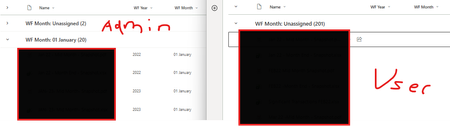
Hi All, Strange issue I'm running into on a library Left is my Admin profile where files are grouped by WF Year (metadata column) Right is a couple users with the issue where its showing Unassigned due to blank Year and Month I've exported the data from both accounts and both have the Year and Month Tried going to Properties on User account and the Year field appears like this ...very strange, any help would be appreciated :)52Views0likes0Comments
Quantity of View Per Site
Hi, We are working on a sharepoint sites for a document repository. We are looking at having to create about 100 different views to allow the documents to be filtered and structured in a relevant way for users (using file meta data). I have found online advice that says a recommended limitation is to use no more than 50 views. Have people created more than 50 ? Why is the recommendation to only use 50 ? What issues are we going to run into ? Thanks21Views1like1Comment
Label Disposition Review Did Not Trigger
I am having an issue where Labels I created did not trigger a disposition review. I setup retention labels to trigger a disposition review after a period of time, published the labels, applied the labels to a set of documents, but I did not receive any email updates on the documents were past the disposition review. I verified these disposition review emails were supposed to go to my email, and also verified that they did not go to any other folder other then my inbox. I verified everything was applied correctly on the labels and documents. Also, I am not able to see the Disposition page under Data Governance. Has anyone had a similar issue, or have more information to help me?1.7KViews0likes2Comments
Adjust Context Menu Modern Document Library
Is there an option to adjust Context Menu for Modern Document Library. End Users prefer to have Version History and Checkout to be available on menu bar rather than click three dots to access those options. Please let me know.Solved6.6KViews0likes2CommentsIntermittent failures when creating new libraries in modern SharePoint
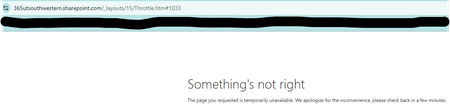
Hi everyone, I’m seeing an issue in our modern SharePoint Online site collection where creating new document libraries has started failing. This site has worked normally for years, but over the past week, most library creation attempts haven't worked. 1) The page briefly flashes or glitches during the creation process. and 2) A non‑ending spinning wheel when I hit "create" or 3) Creation attempts return “Something's not right.” error page. The failures happen across all subsites, in multiple browsers, and I’m a Site Collection Administrator. No permission changes were made recently. Has anyone seen similar intermittent library creation failures in a modern site collection, or know what might cause this kind of inconsistent behavior? Any guidance would be appreciated. Thanks! Meagan255Views1like6Comments
Document libraries added programmatically as tabs to Shared Channels are not visible
With the recent Teams UX updates, any document libraries added programmatically to Shared Channels no longer appear in the Teams interface even though they do show up when queried through PowerShell. Following the guidance in https://learn.microsoft.com/en-us/graph/teams-configuring-builtin-tabs%22https://learn.microsoft.com/en-us/graph/teams-configuring-builtin-tabs%22https://learn.microsoft.com/en-us/graph/teams-configuring-builtin-tabs%22https://learn.microsoft.com/en-us/graph/teams-configuring-builtin-tabs%22as well as the approaches I outlined in my blog post https://reshmeeauckloo.com/posts/powershell-teams-add-documentlibrary-as-tab/%22https://reshmeeauckloo.com/posts/powershell-teams-add-documentlibrary-as-tab/%22 using Microsoft Graph or PnP PowerShell, the tabs still fail to surface in the new Teams experience. The behaviour is inconsistent: The same tab‑creation methods work perfectly in standard channels. They also work for users who haven’t yet received the new Teams UX. And if the document libraries are added manually, they appear as expected in shared channels. At the moment, I’m trying to determine whether there is a supported way to add document library tabs to shared channels programmatically so that they remain visible in the new Teams interface. Any insights or confirmed workarounds would be appreciated.53Views0likes0Comments
File Type Version Limits
Hi all, In trying to solve an old issue I stumbled across this new feature currently in preview and am wondering if the file type arrays will be editable or if new arrays could be or will be added? I have a handful of file types which do not need 100 versions, let alone a version every 2-5 minutes, requiring frequent culling... Ling. https://learn.microsoft.com/en-us/sharepoint/file-type-version-limits28Views0likes0CommentsRenaming a folder with too many files
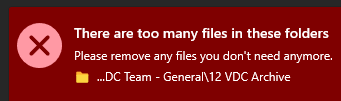
One of our teams has a Team/SharePoint site with an archive folder. Everything in there is old files, and they'd like to rename the folder. However, we get the error that it exceeds the list view threshold. I've spent the afternoon trying to find out how to get this folder renamed and so far nothing has worked. The general consensus is to create a filtered view, but I'm not sure what to filter it based on, as all of the files have been there and untouched for some time, causing most of the columns I could index be fairly similar (they were moved to SharePoint 3 years ago from an on-prem fileshare). One of the options I'd seen was to sync it using OneDrive and rename it locally but that still gave me the same error. I also tried renaming the folder from within Teams without success. If someone could provide some guidance for how to get this done, I'd appreciate it. Right now, I'm thinking I'll just have to move a bunch of stuff out of some of the folders to temporary locations, but even that is challenging as I'm not aware of a good way to get a count of items in folders and subfolders in SharePoint to know which are the best ones to move out.77Views1like0CommentsTrimming SharePoint Version History - Minor Versions
Hello, I am a SharePoint Admin at my organization and I have been asked to reduce our total storage usage by reducing the number of versions and minor versions in our environment on all SharePoint sites. I have written a simple PowerShell script that loops through a csv file with site addresses, and runs this command per site -> New-SPOSiteFileVersionBatchDeleteJob -Identity $site.siteURL -MajorVersionLimit 100 -MajorWithMinorVersionsLimit 5 It was my understanding that for all sites in the csv file, for all document libraries on the site, and for all files in the libraries this command will reduce the file to the last 100 Major versions, and the last 5 minor versions of each major version. Unfortunately, this command is not actually reducing the minor versions. It is working with the Major versions just fine, but all minor versions are being retained for each major version retained. Is my understanding of this command wrong, or is it not working? Are there other factors to consider? Does anyone know of an alternative that can fit my needs? The overall plan is to trim the current version history, then apply the automatic version setting to each library in our tenant. Here is the MS guide I referenced, maybe I missed something -> https://learn.microsoft.com/en-us/sharepoint/tutorial-queue-a-trim-job Any help is greatly appreciated, Cam107Views1like1Comment