windows update
74 Topics
Windows 10 ESU – Registrierungsbutton erscheint nicht trotz 22H2 (Rollout-Basis)
Hallo zusammen, ich möchte mein Windows 10 Pro-System für die Extended Security Updates (ESU) registrieren. Alle Voraussetzungen sind erfüllt (Version 22H2, Build 19045.6396, aktuelle Updates installiert, Microsoft-Konto aktiv). Trotzdem erscheint in Windows Update keine Schaltfläche „Jetzt registrieren“. Der Microsoft-Support hat mir heute bestätigt, dass der ESU-Rollout phasenweise fortgesetzt wird, auch nach dem 14. Oktober, nur Geräte unter 22H2 vom Supportende betroffen sind, und dass mein System automatisch berücksichtigt wird. Da ich mein Gerät gern rechtzeitig registrieren möchte, um Sicherheitsupdates nahtlos zu erhalten, meine Frage an das Entwicklerteam: Gibt es einen bekannten Zeitrahmen für den weiteren Rollout der ESU-Registrierung an 22H2-Geräte, oder spezifische Regionen- bzw. Kontoabhängigkeiten? Vielen Dank und viele Grüße Matthias103Views0likes3Comments
Proposal: Dedicated Windows “Repair Companion” Device for Automatic Deep System Recovery
I’d like to propose a new hardware‑assisted recovery solution for Windows that would dramatically improve system reliability and reduce catastrophic failures caused by deep OS corruption. Today, Windows can repair many issues on its own, but certain types of corruption — such as servicing stack failures, broken WinSxS manifests, failed migrations, or damaged bootloaders — require offline repair or manual intervention. These situations often force users into time‑consuming troubleshooting or full reinstallations. My proposal is a dedicated, consumer‑friendly “Windows Repair Companion” device that connects to a home network and provides a trusted, isolated environment for deep system repair. This would be similar in concept to enterprise out‑of‑band management, but simplified and designed for everyday users. Key Features: • A small hardware device (similar in size to a Surface Dock or streaming box) that plugs into a router or PC. • Contains a hardened, read‑only repair OS and clean Windows recovery images. • Supports automatic network boot (PXE/UEFI) when a PC detects severe corruption or cannot boot normally. • Performs offline repairs: DISM, SFC, CHKDSK, servicing stack rebuilds, WinSxS restoration, bootloader repair, and update rollback. • Provides a true “push‑button restore” experience without requiring user technical knowledge. • Could leverage existing Surface recovery technology, secure boot chains, and cloud restore infrastructure. • Offers a new potential revenue stream for Microsoft while significantly improving Windows reliability. Benefits: • Makes Windows effectively unbrickable for most users. • Eliminates many catastrophic update failures and servicing issues. • Reduces support costs and frustration for consumers and small businesses. • Provides a clean, consistent recovery path across all OEM hardware. • Bridges the gap between consumer Windows and enterprise‑grade resilience. This device would give users peace of mind and provide Microsoft with a modern, hardware‑assisted recovery model that aligns with the direction of Surface and Windows Core OS technologies. Thank you for considering this idea — I believe it could meaningfully improve the Windows experience for millions of users.11Views0likes0Comments
Unable to deploy out of band update 26200.7628
Hello, I need to deploy OOB 26200.7628 on our computers. We use deployment rings. The 2026.1 OOB update appeared in Releases on January 24. I created an expedite policy with a group of users I want to target with this update (with a restart within 0 days). But nothing has happened since Monday, everyone is still on 26200.7623. Where am I going wrong? Thank you.Solved891Views1like6Comments
Keyboard stopped working windows updates KB4023057
-After Windows updates, specifically KB4023057, Keyboard stopped to work(Function key also stuck ON). -Tried to uninstall the update a multiple times but it got installed again when windows starts always. -Currently uninstall option is no longer available in Windows updates. -Tried to Recover/restore/Reinstall Windows but the update is there. -Cannot be uninstalled from recovery screen, says uninstall failed. Keyboard TBS: -Laptop is generally a bit old so not eligible for Windows 11, currently running Windows 10. -Uninstalled device from devices manager (Keyboard PS2) - restarted -No rollback option available (greyed out) -T440s Laptop (ThinkPad) - Type 20AQ - PC02PBLN ----> downloaded all online drive updates from lenovo. -Tried to look for older keyboard drivers but none found or available. What else could be done This is certainly nor a hardware issue as device was left overnight when the update was completed and then next morning it stopped working?467Views0likes1CommentDoes the CDN for Microsoft Windows Update seem to be malfunctioning?
I purchased a code signing certificate, but strangely, Windows did not automatically download the missing root certificate. When I tried to manually download the root certificate according to the manual, I found that the CDN seemed to return the wrong certificate and I was unable to establish a secure connection with the website. (At least in Chinese Mainland) https://ctldl.windowsupdate.com/msdownload/update/v3/static/trustedr/en/test/authrootstl.cab Can other regions be accessed normally?102Views0likes0CommentsWindows update in settings not showing up (something went wrong. Try open settings later)
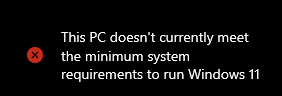
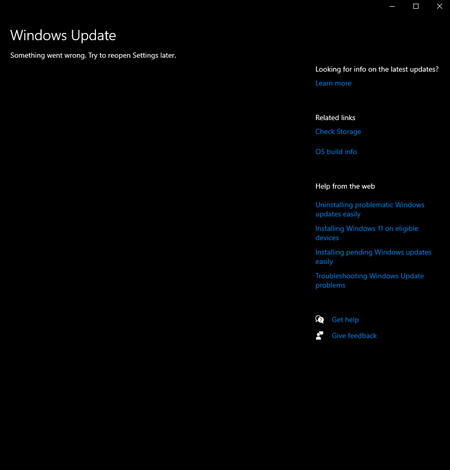
i've had this problem a while now but didnt think much of it until i needed newer versions of windows to run apps. tried many ways like resetting settings to refresh. tried pc health check, troubleshoots which gave results that the problem was no identifiable. im not sure what i should do. i am trying to update to the lastest win 10 version as my pc does not support win 11.87Views0likes1Comment
Device don't report to Windows Update for Business reports
We start using Autopatch. I setup all thigs for this report. Create LA and setup it. https://learn.microsoft.com/en-us/windows/deployment/update/wufb-reports-overview But from 750 device i see only 42. I try creating new LA, and onboard it but number of computers is same. On my NB i try even script but nothing works https://learn.microsoft.com/en-us/windows/deployment/update/wufb-reports-configuration-script Any help?111Views0likes1CommentWindows Server 2022 Updates Anomaly
Hi, I've got 4 Windows 2022 servers configured for automatic updates using the following Group Policy option on the 3rd Wednesday of each month: 2 - Notify for download and auto install These servers are meant to have Windows updates manually installed by an Administrator. One of those servers stopped reporting to WSUS and it turns out the computer certificate (issued by an internal Microsoft CA) was missing. Once that was resolved, it reported to WSUS correctly. To test, I ran the following commands: usoclient.exe startscan Get-WindowsUpdate Several minutes after running the above commands, Event ID 44 was generated by the Windows Update Client downloading the updates. This was quickly followed by Event ID 43 where it started installing the updates. And about 12 hours later at 11:58PM, Event ID 1074 was generated where svchost.exe on behalf of NT AUTHORITY\SYSTEM initiated a reboot. 2 minutes later at 12:00AM, another Event ID 1074 saw TrustedInstaller on behalf of user NT AUTHORITY\SYSTEM initiated a reboot. And finally at 12:03am, Event ID 19 was generated saying the update was successfully installed. Event ID 19 was repeated again 1 minute later. As far as I can tell, usoclient.exe startscan and Get-WindowsUpdate without any options does NOT initiated a download and install of the updates. The other 3 servers behaved themselves until an Administrator went in and downloaded and installed the updates. This 1 rogue server decided to take its own initiative and the only difference from the other 3 is the missing computer certificate which was subsequently restored. Any pointers as to how this could happened would be much appreciated. Thanks.161Views0likes1CommentWindows Insider Program Issue
I was exploring the Windows Insider Program settings and noticed a channel called Canary. Out of curiosity, I switched to the Canary channel, which prompted an update. After completing the update and restarting my PC, I noticed some things seemed off, and certain features weren’t functioning properly. When I tried to switch back to the Dev or Beta channels, I realized I wasn’t allowed to change channels from Canary. I’d appreciate your help in resolving this issue without resetting my PC.132Views0likes1Comment