tips and tricks
803 TopicsIf You're Building AI on Azure, ECS 2026 is Where You Need to Be
Let me be direct: there's a lot of noise in the conference calendar. Generic cloud events. Vendor showcases dressed up as technical content. Sessions that look great on paper but leave you with nothing you can actually ship on Monday. ECS 2026 isn't that. As someone who will be on stage at Cologne this May, I can tell you the European Collaboration Summit combined with the European AI & Cloud Summit and European Biz Apps Summit is one of the few events I've seen where engineers leave with real, production-applicable knowledge. Three days. Three summits. 3,000+ attendees. One of the largest Microsoft-focused events in Europe, and it keeps getting better. If you're building AI systems on Azure, designing cloud-native architectures, or trying to figure out how to take your AI experiments to production — this is where the conversation is happening. What ECS 2026 Actually Is ECS 2026 runs May 5–7 at Confex in Cologne, Germany. It brings together three co-located summits under one roof: European Collaboration Summit — Microsoft 365, Teams, Copilot, and governance European AI & Cloud Summit — Azure architecture, AI agents, cloud security, responsible AI European BizApps Summit — Power Platform, Microsoft Fabric, Dynamics For Azure engineers and AI developers, the European AI & Cloud Summit is your primary destination. But don't ignore the overlap, some of the most interesting AI conversations happen at the intersection of collaboration tooling and cloud infrastructure. The scale matters here: 3,000+ attendees, 100+ sessions, multiple deep-dive tracks, and a speaker lineup that includes Microsoft executives, Regional Directors, and MVPs who have built, broken, and rebuilt production systems. The Azure + AI Track - What's Actually On the Agenda The AI & Cloud Summit agenda is built around real technical depth. Not "intro to AI" content, actual architecture decisions, patterns that work, and lessons from things that didn't. Here's what you can expect: AI Agents and Agentic Systems This is where the energy is right now, and ECS is leaning in. Expect sessions covering how to design agent workflows, chain reasoning steps, handle memory and state, and integrate with Azure AI services. Marco Casalaina, VP of Products for Azure AI at Microsoft, is speaking if you want to understand the direction of the Azure AI platform from the people building it, this is a direct line. Azure Architecture at Scale Cloud-native patterns, microservices, containers, and the architectural decisions that determine whether your system holds up under real load. These sessions go beyond theory you'll hear from engineers who've shipped these designs at enterprise scale. Observability, DevOps, and Production AI Getting AI to production is harder than the demos suggest. Sessions here cover monitoring AI systems, integrating LLMs into CI/CD pipelines, and building the operational practices that keep AI in production reliable and governable. Cloud Security and Compliance Security isn't optional when you're putting AI in front of users or connecting it to enterprise data. Tracks cover identity, access patterns, responsible AI governance, and how to design systems that satisfy compliance requirements without becoming unmaintainable. Pre-Conference Deep Dives One underrated part of ECS: the pre-conference workshops. These are extended, hands-on sessions typically 3–6 hours that let you go deep on a single topic with an expert. Think of them as intensive short courses where you can actually work through the material, not just watch slides. If you're newer to a particular area of Azure AI, or you want to build fluency in a specific pattern before the main conference sessions, these are worth the early travel. The Speaker Quality Is Different Here The ECS speaker roster includes Microsoft executives, Microsoft MVPs, and Regional Directors, people who have real accountability for the products and patterns they're presenting. You'll hear from over 20 Microsoft speakers: Marco Casalaina — VP of Products, Azure AI at Microsoft Adam Harmetz — VP of Product at Microsoft, Enterprise Agent And dozens of MVPs and Regional Directors who are in the field every day, solving the same problems you are. These aren't keynote-only speakers — they're in the session rooms, at the hallway track, available for real conversations. The Hallway Track Is Not a Cliché I know "networking" sounds like a corporate afterthought. At ECS it genuinely isn't. When you put 3,000 practitioners, engineers, architects, DevOps leads, security specialists in one venue for three days, the conversations between sessions are often more valuable than the sessions themselves. You get candid answers to "how are you actually handling X in production?" that you won't find in documentation. The European Microsoft community is tight-knit and collaborative. ECS is where that community concentrates. Why This Matters Right Now We're in a period where AI development is moving fast but the engineering discipline around it is still maturing. Most teams are figuring out: How to move from AI prototype to production system How to instrument and observe AI behaviour reliably How to design agent systems that don't become unmaintainable How to satisfy security and compliance requirements in AI-integrated architectures ECS 2026 is one of the few places where you can get direct answers to these questions from people who've solved them — not theoretically, but in production, on Azure, in the last 12 months. If you go, you'll come back with practical patterns you can apply immediately. That's the bar I hold events to. ECS consistently clears it. Register and Explore the Agenda Register for ECS 2026: ecs.events Explore the AI & Cloud Summit agenda: cloudsummit.eu/en/agenda Dates: May 5–7, 2026 | Location: Confex, Cologne, Germany Early registration is worth it the pre-conference workshops fill up. And if you're coming, find me, I'll be the one talking too much about AI agents and Azure deployments. See you in Cologne.
Feature Request: Add Search Functionality in Copilot Chat History
Hi everyone, I’d like to suggest a feature for Microsoft Copilot that I believe would significantly improve usability and productivity: searching within chat history. Currently, users cannot search past conversations inside Copilot. This makes it difficult to retrieve previous answers, references, or technical instructions—especially in long or complex chats. Adding a search bar or keyword filter would allow users to quickly locate relevant messages without scrolling manually. This feature would be especially helpful for developers, IT professionals, and anyone using Copilot for technical troubleshooting or documentation. It would also reduce repeated questions and improve continuity across sessions. Please consider adding this capability in future updates. If others agree, feel free to upvote or share your use cases. Thanks!195Views1like2CommentsCopilot for Outlook: Automatically Prioritize Your Inbox with AI (New Feature Explained)
🚀 Copilot for Outlook just got smarter: “Prioritize my inbox” is here ✉️🤖 Managing email overload is a daily challenge. With the new “Prioritize my inbox” feature, Copilot for Outlook uses AI to automatically highlight what really matters — without delays or complex rules. ✅ Emails are classified as High, Normal, or Low priority ✅ Copilot explains why an email is important ✅ Priority rules are fully customizable ✅ Works across Windows, Mac, and mobile Instead of spending time filtering and sorting, Copilot helps you focus on action‑required emails first — learning from your preferences over time. I’ve just published a new video where I walk through: How the feature works How to enable it Practical productivity scenarios When it’s better than classic Outlook rules 🎥 Watch it here: https://youtu.be/91WuRsYlRvE 👉 I’m curious: Would you trust AI to prioritize your inbox, or do you still prefer manual rules? #MicrosoftCopilot #Outlook #Microsoft365 #AIProductivity #EmailManagement #CopilotForOutlook #ModernWork #ProductivityTips149Views1like0CommentsSingle Agent vs Multi-Agent Architectures: When Do You Need Each?
As artificial intelligence systems grow more sophisticated, the question of how to structure them becomes increasingly important. One of the most fundamental design decisions is whether to use a single-agent architecture or a multi-agent architecture. While both approaches can solve complex problems, they differ significantly in how they scale, adapt, and handle complexity. https://dellenny.com/single-agent-vs-multi-agent-architectures-when-do-you-need-each-with-microsoft-technologies-explained/49Views0likes0CommentsSupercharge Your Dev Workflows with GitHub Copilot Custom Skills
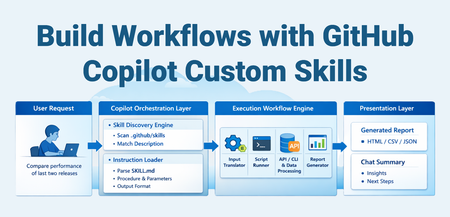
The Problem Every team has those repetitive, multi-step workflows that eat up time: Running a sequence of CLI commands, parsing output, and generating a report Querying multiple APIs, correlating data, and summarizing findings Executing test suites, analyzing failures, and producing actionable insights You've probably documented these in a wiki or a runbook. But every time, you still manually copy-paste commands, tweak parameters, and stitch results together. What if your AI coding assistant could do all of that — triggered by a single natural language request? That's exactly what GitHub Copilot Custom Skills enable. What Are Custom Skills? A skill is a folder containing a SKILL.md file (instructions for the AI), plus optional scripts, templates, and reference docs. When you ask Copilot something that matches the skill's description, it loads the instructions and executes the workflow autonomously. Think of it as giving your AI assistant a runbook it can actually execute, not just read. Without Skills With Skills Read the wiki for the procedure Copilot loads the procedure automatically Copy-paste 5 CLI commands Copilot runs the full pipeline Manually parse JSON output Script generates a formatted HTML report 15-30 minutes of manual work One natural language request, ~2 minutes How It Works The key insight: the skill file is the contract between you and the AI. You describe what to do and how, and Copilot handles the orchestration. Prerequisites Requirement Details VS Code Latest stable release GitHub Copilot Active Copilot subscription (Individual, Business, or Enterprise) Agent mode Select "Agent" mode in the Copilot Chat panel (the default in recent versions) Runtime tools Whatever your scripts need — Python, Node.js, .NET CLI, az CLI, etc. Note: Agent Skills follow an open standard — they work across VS Code, GitHub Copilot CLI, and GitHub Copilot coding agent. No additional extensions or cloud services are required for the skill system itself. Anatomy of a Skill .github/skills/my-skill/ ├── SKILL.md # Instructions (required) └── references/ ├── resources/ │ ├── run.py # Automation script │ ├── query-template.sql # Reusable query template │ └── config.yaml # Static configuration └── reports/ └── report_template.html # Output template The SKILL.md File Every skill has the same structure: --- name: my-skill description: 'What this does and when to use it. Include trigger phrases so Copilot knows when to load it. USE FOR: specific task A, task B. Trigger phrases: "keyword1", "keyword2".' argument-hint: 'What inputs the user should provide.' --- # My Skill ## When to Use - Situation A - Situation B ## Quick Start \```powershell cd .github/skills/my-skill/references/resources py run.py <arg1> <arg2> \``` ## What It Does | Step | Action | Purpose | |------|--------|---------| | 1 | Fetch data from source | Gather raw input | | 2 | Process and transform | Apply business logic | | 3 | Generate report | Produce actionable output | ## Output Description of what the user gets back. Key Design Principles Description is discovery. The description field is the only thing Copilot reads to decide whether to load your skill. Pack it with trigger phrases and keywords. Progressive loading. Copilot reads only name + description (~100 tokens) for all skills. It loads the full SKILL.md body only for matched skills. Reference files load only when the procedure references them. Self-contained procedures. Include everything the AI needs to execute — exact commands, parameter formats, file paths. Don't assume prior knowledge. Scripts do the heavy lifting. The AI orchestrates; your scripts execute. This keeps the workflow deterministic and reproducible. Example: Build a Deployment Health Check Skill Let's build a skill that checks the health of a deployment by querying an API, comparing against expected baselines, and generating a summary. Step 1 — Create the folder structure .github/skills/deployment-health/ ├── SKILL.md └── references/ └── resources/ ├── check_health.py └── endpoints.yaml Step 2 — Write the SKILL.md --- name: deployment-health description: 'Check deployment health across environments. Queries health endpoints, compares response times against baselines, and flags degraded services. USE FOR: deployment validation, health check, post-deploy verification, service status. Trigger phrases: "check deployment health", "is the deployment healthy", "post-deploy check", "service health".' argument-hint: 'Provide the environment name (e.g., staging, production).' --- # Deployment Health Check ## When to Use - After deploying to any environment - During incident triage to check service status - Scheduled spot checks ## Quick Start \```bash cd .github/skills/deployment-health/references/resources python check_health.py <environment> \``` ## What It Does 1. Loads endpoint definitions from `endpoints.yaml` 2. Calls each endpoint, records response time and status code 3. Compares against baseline thresholds 4. Generates an HTML report with pass/fail status ## Output HTML report at `references/reports/health_<environment>_<date>.html` Step 3 — Write the script # check_health.py import sys, yaml, requests, time, json from datetime import datetime def main(): env = sys.argv[1] with open("endpoints.yaml") as f: config = yaml.safe_load(f) results = [] for ep in config["endpoints"]: url = ep["url"].replace("{env}", env) start = time.time() resp = requests.get(url, timeout=10) elapsed = time.time() - start results.append({ "service": ep["name"], "status": resp.status_code, "latency_ms": round(elapsed * 1000), "threshold_ms": ep["threshold_ms"], "healthy": resp.status_code == 200 and elapsed * 1000 < ep["threshold_ms"] }) healthy = sum(1 for r in results if r["healthy"]) print(f"Health check: {healthy}/{len(results)} services healthy") # ... generate HTML report ... if __name__ == "__main__": main() Step 4 — Use it Just ask Copilot in agent mode: "Check deployment health for staging" Copilot will: Match against the skill description Load the SKILL.md instructions Run python check_health.py staging Open the generated report Summarize findings in chat More Skill Ideas Skills aren't limited to any specific domain. Here are patterns that work well: Skill What It Automates Test Regression Analyzer Run tests, parse failures, compare against last known-good run, generate diff report API Contract Checker Compare Open API specs between branches, flag breaking changes Security Scan Reporter Run SAST/DAST tools, correlate findings, produce prioritized report Cost Analysis Query cloud billing APIs, compare costs across periods, flag anomalies Release Notes Generator Parse git log between tags, categorize changes, generate changelog Infrastructure Drift Detector Compare live infra state vs IaC templates, flag drift Log Pattern Analyzer Query log aggregation systems, identify anomaly patterns, summarize Performance Bench marker Run benchmarks, compare against baselines, flag regressions Dependency Auditor Scan dependencies, check for vulnerabilities and outdated packages The pattern is always the same: instructions (SKILL.md) + automation script + output template. Tips for Writing Effective Skills Do Front-load the description with keywords — this is how Copilot discovers your skill Include exact commands — cd path/to/dir && python script.py <args> Document input/output clearly — what goes in, what comes out Use tables for multi-step procedures — easier for the AI to follow Include time zone conversion notes if dealing with timestamps Bundle HTML report templates — rich output beats plain text Don't Don't use vague descriptions — "A useful skill" won't trigger on anything Don't assume context — include all paths, env vars, and prerequisites Don't put everything in SKILL.md — use references/ for large files Don't hardcode secrets — use environment variables or Azure Key Vault Don't skip error guidance — tell the AI what common errors look like and how to fix them Skill Locations Skills can live at project or personal level: Location Scope Shared with team? .github/skills/<name>/ Project Yes (via source control) .agents/skills/<name>/ Project Yes (via source control) .claude/skills/<name>/ Project Yes (via source control) ~/.copilot/skills/<name>/ Personal No ~/.agents/skills/<name>/ Personal No ~/.claude/skills/<name>/ Personal No Project-level skills are committed to your repo and shared with the team. Personal skills are yours and roam with your VS Code settings sync. You can also configure additional skill locations via the chat.skillsLocations VS Code setting. How Skills Fit in the Copilot Customization Stack Skills are one of several customization primitives. Here's when to use what: Primitive Use When Workspace Instructions (.github/copilot-instructions.md) Always-on rules: coding standards, naming conventions, architectural guidelines File Instructions (.github/instructions/*.instructions.md) Rules scoped to specific file patterns (e.g., all *.test.ts files) Prompts (.github/prompts/*.prompt.md) Single-shot tasks with parameterized inputs Skills (.github/skills/<name>/SKILL.md) Multi-step workflows with bundled scripts and templates Custom Agents (.github/agents/*.agent.md) Isolated subagents with restricted tool access or multi-stage pipelines Hooks (.github/hooks/*.json) Deterministic shell commands at agent lifecycle events (auto-format, block tools) Plugins Installable skill bundles from the community (awesome-copilot) Slash Commands & Quick Creation Skills automatically appear as slash commands in chat. Type / to see all available skills. You can also pass context after the command: /deployment-health staging /webapp-testing for the login page Want to create a skill fast? Type /create-skill in chat and describe what you need. Copilot will ask clarifying questions and generate the SKILL.md with proper frontmatter and directory structure. You can also extract a skill from an ongoing conversation: after debugging a complex issue, ask "create a skill from how we just debugged that" to capture the multi-step procedure as a reusable skill. Controlling When Skills Load Use frontmatter properties to fine-tune skill availability: Configuration Slash command? Auto-loaded? Use case Default (both omitted) Yes Yes General-purpose skills user-invocable: false No Yes Background knowledge the model loads when relevant disable-model-invocation: true Yes No Skills you only want to run on demand Both set No No Disabled skills The Open Standard Agent Skills follow an open standard that works across multiple AI agents: GitHub Copilot in VS Code — chat and agent mode GitHub Copilot CLI — terminal workflows GitHub Copilot coding agent — automated coding tasks Claude Code, Gemini CLI — compatible agents via .claude/skills/ and .agents/skills/ Skills you write once are portable across all these tools. Getting Started Create .github/skills/<your-skill>/SKILL.md in your repo Write a keyword-rich description in the YAML frontmatter Add your procedure and reference scripts Open VS Code, switch to Agent mode, and ask Copilot to do the task Watch it discover your skill, load the instructions, and execute Or skip the manual setup — type /create-skill in chat and describe what you need. That's it. No extension to install. No config file to update. No deployment pipeline. Just markdown and scripts, version-controlled in your repo. Custom Skills turn your documented procedures into executable AI workflows. Start with your most painful manual task, wrap it in a SKILL.md, and let Copilot handle the rest. Further Reading: Official Agent Skills docs Community skills & plugins (awesome-copilot) Anthropic reference skillsCopilot in Outlook Can Now Reschedule Conflicting Meetings Automatically | Microsoft 365 AI
📅 Microsoft Copilot just made Outlook meetings smarter. A new Copilot feature in Outlook can now automatically detect conflicting meetings and propose a reschedule — no more manual calendar juggling. Copilot analyzes: ✔ Your calendar ✔ Existing conflicts ✔ Availability of participants …and suggests the best new time, directly in Outlook. For busy professionals and teams, this is a big productivity win and another step toward truly AI‑assisted workdays. I’ve just published a short video showing how it works in practice 👇 https://youtu.be/xhTkvF8rCq8 Would you trust Copilot to manage your meetings? #MicrosoftCopilot #Outlook #Microsoft365 #AIProductivity #FutureOfWork83Views0likes0CommentsHow Copilot Automates Enterprise Workflows (Technical Breakdown)
In today’s enterprise landscape, automation is no longer just a competitive advantage it’s a necessity. However, traditional automation approaches like RPA (Robotic Process Automation) and custom scripting often require significant development effort, rigid rule definitions, and ongoing maintenance. Enter Microsoft Copilot a generative AI-powered assistant that transforms enterprise workflow automation by combining natural language processing, contextual understanding, and deep integration with business systems. This article goes beyond surface-level benefits and explores the technical architecture, real-world scenarios, and implementation strategies that make Copilot a powerful automation engine. https://dellenny.com/how-copilot-automates-enterprise-workflows-technical-breakdown/62Views0likes0CommentsCopilot Chat vsus. Microsoft 365 Copilot. What's the difference?
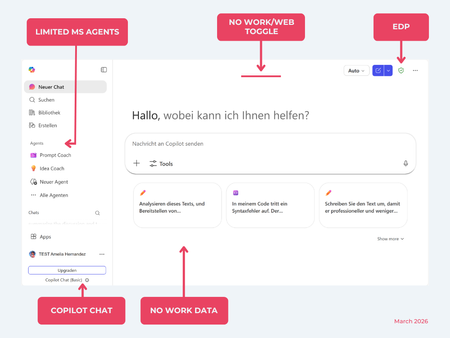
While their names sound similar at first glance, Microsoft 365 Copilot and Microsoft 365 Copilot Chat, they differ in several aspects. And more importantly: one is built on top of the other. What is Copilot Chat (Basic)? First things first. Microsoft 365 Copilot Chat is often simply called Copilot Chat. Copilot Chat (Basic) generates answers based on web content, while Microsoft 365 Copilot (Premium) is also grounded on users' data, like emails, meetings, files, and more. Since early 2025, Microsoft 365 Copilot Chat has been available to all users in organizations, becoming the entry point to AI assistance for many organizations. Copilot Chat (Basic) is the foundational Copilot experience available at no extra cost for everyone with an eligible Microsoft 365 plan, including: Microsoft 365 E3 / E5 Microsoft 365 A3 / A5 Microsoft 365 Business Standard & Business Premium Copilot Chat (Basic) is secured, compliant, and it does not required the full Copilot add-on license. Copilot Chat (Basic) is able to ground responses on: Public web content. Content explicitly shared or work data manually uploaded to the chat by the user. On-screen content or content displayed on-screen in apps like Outlook, Word, Excel, PowerPoint, and OneNote. When it comes to agents, Copilot Chat (Basic) offers these features: You can create your own declarative agents grounded on public web content with Agent Builder. You can use agents built by your org grounded on organizational data with the pay-as-you-go method. There are Microsoft prebuilt agents available like Prompt Coach, however Microsoft premium prebuilt agents like Researcher or Analyst are not included. The screenshot below shows how Copilot Chat looks and highlights its main capabilities. Note the Upgrade button, meaning this is not Microsoft 365 Copilot, but the Copilot Chat (Basic) experience. Note that EDP (Enterprise Data Protection) is available in Copilot Chat (Basic). What is Microsoft 365 Copilot (Premium)? Microsoft 365 Copilot (Premium) is a paid add-on license that builds on top of Copilot Chat and unlocks Copilot's full power. It is available for selected Microsoft 365 plans, including: Microsoft 365 E3 / E5 Microsoft 365 A3 / A5 Microsoft 365 Business Standard & Business Premium With a Microsoft 365 Copilot license, users get everything Copilot Chat (Basic) offers, plus much more: Data grounding: Microsoft 365 Copilot (Premium) includes Copilot Chat grounded on web and/or on user's Microsoft 365 data like emails, meetings, chats, and documents. Office apps: It integrates deeply into Microsoft 365 apps like Outlook, Teams, Word, Excel, and more. The integration includes features like Edit with Copilot allowing Copilot to adjust live your documents or email based on your prompts. Custom agents: It brings the capability to create your own declarative agents grounded in organizational data and/or web data. You can create agent either using Agent Builder or Copilot Studio. MS prebuilt agents: Premium prebuilt agents like Researcher and Analyst are included in Microsoft 365 Copilot (Premium). The screenshot below shows the Copilot chat experience for users who have a Microsoft 365 Copilot license. Note that EDP or Enterprise Data Protection also applies here How can I access Microsoft 365 Copilot Chat? Today, Copilot Chat is accessible via https://m365.cloud.microsoft or https://copilot.cloud.microsoft using your Entra ID (work or school account). One important difference in day-to-day experience: Users with a Microsoft 365 Copilot license typically see Copilot prominently surfaced across Microsoft 365 apps. Users with Copilot Chat only may not see it pinned by default on the Microsoft 365 home page. To improve discoverability, Microsoft 365 Copilot administrators can pin Copilot Chat via the Microsoft 365 admin center, ensuring that users can easily access it without friction. Especially convenient is that if you use the M365 Copilot Chat app on Windows, you can open Copilot using the keyboard shortcut Ctrl + C. What’s the difference? The differences between Copilot Chat and Microsoft 365 Copilot mainly come down to: Licensing Data grounding (web-only vs. personal work data) Integration depth within Microsoft 365 apps I’ve listed the key differences in the comparison below. 👇Solved1.8KViews5likes17CommentsThe “Copilot Loop” in Loop: Collaborative Content Generation and Iteration in the Flow of Work
Modern work isn’t just fast—it’s fluid. Ideas evolve mid-conversation, documents are never truly “final,” and collaboration happens across time zones and tools. In this environment, traditional content creation draft, review, revise, approve feels too linear. Enter the “Copilot Loop”: a new way of working where AI-assisted creation and human collaboration happen simultaneously, continuously, and contextually inside Microsoft Loop. https://dellenny.com/the-copilot-loop-in-loop-collaborative-content-generation-and-iteration-in-the-flow-of-work/68Views0likes0Comments