sharepoint
3960 Topics
Celebrating creativity: Awards ceremony | SharePoint Hackathon 206
✨ Design, create and share! ✨ We are excited to invite you to the SharePoint Hackathon 2026, dedicated to crafting engaging experiences using AI and the latest SharePoint features! 💡 Learn more about the SharePoint Hackathon, including official rules, full stream schedule, and more: https://aka.ms/SPat25/Hackathon32Views0likes0CommentsBeyond the site: Building intelligent apps with SharePoint Embedded | SharePoint Hackathon 2026
✨ Design, create and share! ✨ We are excited to invite you to the SharePoint Hackathon 2026, dedicated to crafting engaging experiences using AI and the latest SharePoint features! 💡 Learn more about the SharePoint Hackathon, including official rules, full stream schedule, and more: https://aka.ms/SPat25/Hackathon56Views0likes0CommentsReinventing SharePoint with SPFx, Copilot, and AI | SharePoint Hackathon 2026
✨ Design, create and share! ✨ We are excited to invite you to the SharePoint Hackathon 2026, dedicated to crafting engaging experiences using AI and the latest SharePoint features! 💡 Learn more about the SharePoint Hackathon, including official rules, full stream schedule, and more: https://aka.ms/SPat25/Hackathon44Views0likes0CommentsBoosting productivity with custom SharePoint Agents and Copilot | SharePoint Hackathon 2026
✨ Design, create and share! ✨ We are excited to invite you to the SharePoint Hackathon 2026, dedicated to crafting engaging experiences using AI and the latest SharePoint features! 💡 Learn more about the SharePoint Hackathon, including official rules, full stream schedule, and more: https://aka.ms/SPat25/Hackathon40Views0likes0CommentsFrom content chaos to clarity: AI-organized libraries with Knowledge Agents | SharePoint Hackathon
✨ Design, create and share! ✨ We are excited to invite you to the SharePoint Hackathon 2026, dedicated to crafting engaging experiences using AI and the latest SharePoint features! 💡 Learn more about the SharePoint Hackathon, including official rules, full stream schedule, and more: https://aka.ms/SPat25/Hackathon48Views0likes0CommentsBest design for SharePoint site: Showcasing the most beautiful portals | SharePoint Hackathon 2026
✨ Design, create and share! ✨ We are excited to invite you to the SharePoint Hackathon 2026, dedicated to crafting engaging experiences using AI and the latest SharePoint features! 💡 Learn more about the SharePoint Hackathon, including official rules, full stream schedule, and more: https://aka.ms/SPat25/Hackathon51Views0likes0CommentsSharePoint Hackathon 2026
✨ Design, create and share! ✨ We are excited to invite you to a hackathon dedicated to crafting engaging experiences using AI and the latest SharePoint features! 💡 SharePoint is the knowledge platform for Copilot and agents. It brings together powerful new features for building visually rich, engaging experiences while infusing sites and content with the latest AI‑powered capabilities. As the knowledge platform for Microsoft 365, SharePoint provides the structured, governed fabric that Copilot agents rely on to access and reason over organizational content. SharePoint’s extensibility platform spans low‑code customization, the full‑code SharePoint Framework (SPFx), and SharePoint Embedded, providing customers and partners with flexible ways to tailor experiences, adapt UI behavior, build custom solutions, and extend AI‑driven scenarios to meet unique business needs. 👋 This hackathon is open to everyone! Whether you're an end user, designer, architect, or developer, there's a place for you. The SharePoint Hackathon will showcase the diverse possibilities within the SharePoint ecosystem. Submission categories include: Best organized library using Knowledge Agent Best use of custom agents with SharePoint Designs utilizing out-of-the-box features UX extensible experiences with SPFx Integration scenarios with SharePoint Embedded and more... If you've created a SharePoint site and tailored it to meet your business needs, you're all set to participate! The possibilities are endless for what you can create... plus, you can submit your hack for a chance to win exciting prizes! 🥳 SharePoint Hackathon runs from March 2nd to March 16th. Hack submissions are due Monday March 16th 2026, 11:59 PM PST. Join us! 🧑🤝🧑 💡 Learn more about the SharePoint Hackathon, including official rules, full stream schedule, and more: aka.ms/SPat25/Hackathon Stream schedule Date Time Stream title March 2, 2025 9:00 AM PT SharePoint at 25: The knowledge platform for Copilot and agents March 3, 2025 9:00 AM PT Best design for SharePoint site: Showcasing the most beautiful portals March 4, 2025 9:00 AM PT Pocket-perfect productivity: AI-first SharePoint e Title to be announced laterxperiences on mobile March 5, 2025 9:00 AM PT Title to be announced later March 9, 2025 9:00 AM PT From content chaos to clarity: AI-organized libraries with Knowledge Agents March 10, 2025 9:00 AM PT Agents + SharePoint: The next generation of knowledge experiences March 11, 2025 9:00 AM PT Reinventing SharePoint with SPFx, Copilot, and AI March 12, 2025 9:00 AM PT Beyond the site: Building intelligent apps with SharePoint Embedded March 25, 2025 9:00 AM PT Celebrating creativity: Awards ceremony459Views0likes0CommentsQuickly add approval workflows to any list or library in Microsoft 365
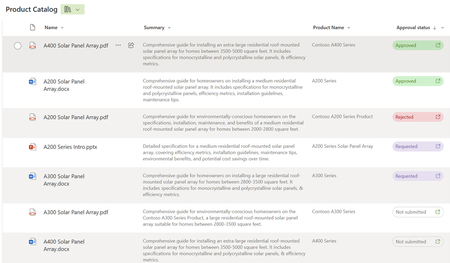
Leverage the power and simplicity of lightweight approvals on any list or library with a few simple clicks! SharePoint and Teams seamlessly integrate across files, lists, loops, and pages. And now, we’re excited to release the latest integration. SharePoint + the Teams Approvals app bringing you fast, easy approval-tracking business solutions – to any list or library. A single toggle gets you started: Create, approve, reject, and cancel – without leaving your content or the context of your conversations. Whether you need to approve a purchase order, a vacation request, project milestones, or a blog post, Approvals in lists and libraries help streamline the process and collaboration among your team members.12KViews6likes24Comments
Turn Your ECM/DMS into AI Infrastructure with SharePoint Embedded
TL;DR: SharePoint Embedded helps customers easily bring their legacy ECM/DMS apps into the modern era, delivering Microsoft 365 Copilot, Microsoft Purview security and compliance, and Microsoft 365 Office collaboration capabilities automatically, as part of the project. Across a range of industries including healthcare, manufacturing, government, financial services, and legal, organizations face a common reality: vital business operations depend on documents which are offline and isolated from crucial tools the rest of the organization enjoys with Microsoft 365. Legacy systems keep case files, records, correspondence, contracts, evidence, and institutional knowledge locked away in enterprise content management (ECM) or document management systems (DMS) systems built for a different era. In the age of AI, our customers realize that transforming ECM and DMS is no longer a background IT initiative, it’s a strategic imperative. Modernizing your ECM/DMS apps with SharePoint Embedded (SPE) delivers Microsoft 365 Copilot, Microsoft Purview, and full Microsoft 365 Office collaboration capabilities as part of your app, all secured within the trusted boundaries of your Microsoft 365 tenant. SPE is an API only version of SharePoint, provided as an Azure service. SPE data is logically partitioned from SharePoint Online and OneDrive content, and does not consume Microsoft 365 entitlements. LexisNexis Transforms Document Management with SharePoint Embedded LexisNexis, a recognized innovator in the legal industry, offers a clear example of how this approach works in practice. Through a deliberate adoption journey, the company validated SharePoint Embedded for legal document management and built a consolidated ECM architecture designed for long-term scalability. Their work progressed through three phases: Phase I: Discovery and learning validated SharePoint Embedded as a foundation for legal industry document management Phase II: Framework creation resulted in OmniDMS - LexisNexis’s purpose‑built document platform layer, designed to abstract SharePoint Embedded and Microsoft Graph into a reusable, legal‑grade document service that can power multiple products Phase III: Product integration embedded this architecture into Everyfile and Visualfiles. By delivering the same OmniDMS foundation across products serving different legal operations and customer segments, LexisNexis demonstrated that SharePoint Embedded can underpin a scalable, multi‑product legal document platform rather than a one‑off integration. This approach allows documents to remain inside their customers’ Microsoft 365 tenants while supporting differentiated product experiences. Governance, security, and identity align with existing enterprise controls, simplifying implementation and adoption. As a result, conversations around risk and compliance become clearer, governance operates through familiar controls, collaboration follows established Microsoft experiences, and documents remain within the enterprise environment organizations already trust. According to Nigel Williams, Product Director, LexisNexis, “SharePoint Embedded allowed us to rethink document management as a platform capability rather than a third party, separate system. By combining SPE with our OmniDMS architecture, we can deliver modern, AI‑ready document experiences across Everyfile and Visualfiles - while keeping customers firmly in control of their data inside Microsoft 365.” SharePoint Embedded gives LexisNexis a foundation to continuously evolve document centric capabilities, AI assisted reasoning, and collaboration across the legal lifecycle - without forcing customers into disruptive platform changes. The SharePoint Embedded Cost Advantage For mid‑to‑large enterprises, using a traditional, on-premises ECM system as the backend for another application often costs $1,500–$5,000+ per user over five years once licenses, infrastructure, storage growth, upgrades, and ongoing operations are fully accounted for. SharePoint Embedded replaces that fixed, capital‑heavy model with a simple, usage‑based approach, typically averaging $3–$5K per terabyte annually. By eliminating upfront license costs, on‑prem infrastructure, and much of the administrative overhead, organizations shift from unpredictable CAPEX and maintenance spend to transparent OPEX tied directly to real usage. The result is a materially lower total cost of ownership, fewer hidden costs over time, and a more flexible foundation for modern, AI‑ready content applications built inside Microsoft 365. Getting Started is Easy Learn more about how you can turn your ECM / DMS into AI infrastructure with SharePoint Embedded: Watch this short video Register now for our upcoming webinar March 12 Review documentation on Microsoft Learn316Views3likes0CommentsHow to Use Scoped Graph Permissions with SharePoint Lists
This article explains how to use scoped Graph permissions to restrict app access to lists and list items in SharePoint Online and OneDrive for Business sites. It's a follow-up to other articles covering how to restrict app access to SharePoint Online sites and files. Scoping app access to specific objects is important because otherwise apps can access everything in SharePoint Online, and that isn't good. https://office365itpros.com/2026/02/25/scoped-graph-permission-lists/11Views0likes0Comments