Security
5334 TopicsTrusted Signing Public Preview Update
Nearly a year ago we announced the Public Preview of Trusted Signing with availability for organizations with 3 years or more of verifiable history to onboard to the service to get a fully managed code signing experience to simplify the efforts for Windows app developers. Over the past year, we’ve announced new features including the Preview support for Individual Developers, and we highlighted how the service contributes to the Windows Security story at Microsoft BUILD 2024 in the Unleash Windows App Security & Reputation with Trusted Signing session. During the Public Preview, we have obtained valuable insights on the service features from our customers, and insights into the developer experience as well as experience for Windows users. As we incorporate this feedback and learning into our General Availability (GA) release, we are limiting new customer subscriptions as part of the public preview. This approach will allow us to focus on refining the service based on the feedback and data collected during the preview phase. The limit in new customer subscriptions for Trusted Signing will take effect Wednesday, April 2, 2025, and make the service only available to US and Canada-based organizations with 3 years or more of verifiable history. Onboarding for individual developers and all other organizations will not be directly available for the remainder of the preview, and we look forward to expanding the service availability as we approach GA. Note that this announcement does not impact any existing subscribers of Trusted Signing, and the service will continue to be available for these subscribers as it has been throughout the Public Preview. For additional information about Trusted Signing please refer to Trusted Signing documentation | Microsoft Learn and Trusted Signing FAQ | Microsoft Learn.6.1KViews7likes32Comments
Windows 11 Home - Update - Bitlocker
Lenovo laptop Windows 11 Home Around November 15 my Lenovo laptop installed a update. When the laptop rebooted it asked for a Bitlocker key. Logging onto the Windows recovery website it wanted to send a validation code to a phone I no longer have. I did the 30 day wait for a Bitlocker recovery key to be emailed. When it arrived I entered the Bitlocker key. On restart it now states 'The application or operating system couldn't be loaded... File: \windows\system32\winload.efi. Error code: 0xc0000225'. Have I lost all the data on the hard drive? Should I disable anything in BIOS - Secure Boot? Windows Boot Manager? Intel Platform Trust Technology? Clear Intel PTT Key? Thanks for the help. DH77Views0likes2CommentsAnnouncing AI Entity Analyzer in Microsoft Sentinel MCP Server - Public Preview
What is the Entity Analyzer? Assessing the risk of entities is a core task for SOC teams - whether triaging incidents, investigating threats, or automating response workflows. Traditionally, this has required building complex playbooks or custom logic to gather and analyze fragmented security data from multiple sources. With Entity Analyzer, this complexity starts to fade away. The tool leverages your organization’s security data in Sentinel to deliver comprehensive, reasoned risk assessments for any entity you encounter - starting with users and urls. By providing this unified, out-of-the-box solution for entity analysis, Entity Analyzer also enables the AI agents you build to make smarter decisions and automate more tasks - without the need to manually engineer risk evaluation logic for each entity type. And for those building SOAR workflows, Entity Analyzer is natively integrated with Logic Apps, making it easy to enrich incidents and automate verdicts within your playbooks. *Entity Analyzer is rolling out in Public Preview to Sentinel MCP server and within Logic Apps starting today. Learn more here. **Leave feedback on the Entity Analyzer here. Deep Dive: How the User Analyzer is already solving problems for security teams Problem: Drowning in identity alerts Security operations centers (SOCs) are inundated with identity-based threats and alert noise. Triaging these alerts requires analyzing numerous data sources across sign-in logs, cloud app events, identity info, behavior analytics, threat intel, and more, all in tandem with each other to reach a verdict - something very challenging to do without a human in the loop today. So, we introduced the User Analyzer, a specialized analyzer that unifies, correlates, and analyzes user activity across all these security data sources. Government of Nunavut: solving identity alert overload with User Analyzer Hear the below from Arshad Sheikh, Security Expert at Government of Nunavut, on how they're using the User Analyzer today: How it's making a difference "Before the User Analyzer, when we received identity alerts we had to check a large amount of data related to users’ activity (user agents, anomalies, IP reputation, etc.). We had to write queries, wait for them to run, and then manually reason over the results. We attempted to automate some of this, but maintaining and updating that retrieval, parsing, and reasoning automation was difficult and we didn’t have the resources to support it. With the User Analyzer, we now have a plug-and-play solution that represents a step toward the AI-driven automation of the future. It gathers all the context such as what the anomalies are and presents it to our analysts so they can make quick, confident decisions, eliminating the time previously spent manually gathering this data from portals." Solving a real problem "For example, every 24 hours we create a low severity incident of our users who successfully sign-in to our network non interactively from outside of our GEO fence. This type of activity is not high-enough fidelity to auto-disable, requiring us to manually analyze the flagged users each time. But with User Analyzer, this analysis is performed automatically. The User Analyzer has also significantly reduced the time required to determine whether identity-based incidents like these are false positives or true positives. Instead of spending around 20 minutes investigating each incident, our analysts can now reach a conclusion in about 5 minutes using the automatically generated summary." Looking ahead "Looking ahead, we see even more potential. In the future, the User Analyzer could be integrated directly with Microsoft Sentinel playbooks to take automated, definitive action such as blocking user or device access based on the analyzer’s results. This would further streamline our incident response and move us closer to fully automated security operations." Want similar benefits in your SOC? Get started with our Entity Analyzer Logic Apps template here. User Analyzer architecture: how does it work? Let’s take a look at how the User Analyzer works. The User Analyzer aggregates and correlates signals from multiple data sources to deliver a comprehensive analysis, enabling informed actions based on user activity. The diagram below gives an overview of this architecture: Step 1: Retrieve Data The analyzer starts by retrieving relevant data from the following sources: Sign-In Logs (Interactive & Non-Interactive): Tracks authentication and login activity. Security Alerts: Alerts from Microsoft Defender solutions. Behavior Analytics: Surfaces behavioral anomalies through advanced analytics. Cloud App Events: Captures activity from Microsoft Defender for Cloud Apps. Identity Information: Enriches user context with identity records. Microsoft Threat Intelligence: Enriches IP addresses with Microsoft Threat Intelligence. Steps 2: Correlate signals Signals are correlated using identifiers such as user IDs, IP addresses, and threat intelligence. Rather than treating each alert or behavior in isolation, the User Analyzer fuses signals to build a holistic risk profile. Step 3: AI-based reasoning In the User Analyzer, multiple AI-powered agents collaborate to evaluate the evidence and reach consensus. This architecture not only improves accuracy and reduces bias in verdicts, but also provides transparent, justifiable decisions. Leveraging AI within the User Analyzer introduces a new dimension of intelligence to threat detection. Instead of relying on static signatures or rigid regex rules, AI-based reasoning can uncover subtle anomalies that traditional detection methods and automation playbooks often miss. For example, an attacker might try to evade detection by slightly altering a user-agent string or by targeting and exfiltrating only a few files of specific types. While these changes could bypass conventional pattern matching, an AI-powered analyzer understands the semantic context and behavioral patterns behind these artifacts, allowing it to flag suspicious deviations even when the syntax looks benign. Step 4: Verdict & analysis Each user is given a verdict. The analyzer outputs any of the following verdicts based on the analysis: Compromised Suspicious activity found No evidence of compromise Based on the verdict, a corresponding recommendation is given. This helps teams make an informed decision whether action should be taken against the user. *AI-generated content from the User Analyzer may be incorrect - check it for accuracy. User Analyzer Example Output See the following example output from the user analyzer within an incident comment: *IP addresses have been redacted for this blog* &CK techniques, a list of malicious IP addresses the user signed in from (redacted for this blog), and a few suspicious user agents the user's activity originated from. typically have to query and analyze these themselves, feel more comfortable trusting its classification. The analyzer also gives recommendations to remediate the account compromise, and a list of data sources it used during analysis. Conclusion Entity Analyzer in Microsoft Sentinel MCP server represents a leap forward in alert triage & analysis. By correlating signals and harnessing AI-based reasoning, it empowers SOC teams to act on investigations with greater speed, precision, and confidence. *Leave feedback on the Entity Analyzer hereMicrosoft explains how Windows 11 will become an agentic OS whether you like it or not
I believe that Microsoft is steering Windows 11 toward becoming an agentic operating system, intentionally or not. The way the system is designed seems to push users into increasingly controlling and monitored environments, limiting personal privacy and autonomy. This shift raises concerns about user freedom and the potential for the OS to influence or restrict user choices, making it feel less like a neutral platform and more like a managed agent working behind the scenes. Many users feel that these changes are not transparent and are pushed without clear consent, which could have long-term implications for personal privacy and digital independence. I want to understand if others see this trend and how they interpret Microsoft's direction with Windows 11, especially regarding user control and privacy issues.59Views0likes1Comment
People whose hardware is too old to update to Windows 11, What's your plan come October?
I'm currently running an i7-4770 paired with a GTX 970. As much as I would love to, replacing it with modern hardware would be financially irresponsible. Luckily I love to make life difficult for myself so I'm planning to remove windows and switch to Ubuntu (or mint). What is everyone else planning to do come October?22Views0likes0CommentsFirefox deleted everything for me because of the profiles
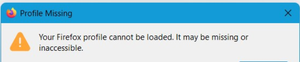
A profile tab appeared. so I lost everything! I've tried lots of things since waking up and Google nothing works. Basically he deleted my profile from last night and asked me to create a new profile there are no others even about: profiles there are none so I have a very old bookmark file but there are no mdps with it what to do?19Views0likes0Comments
Configure guest account in Windows 11
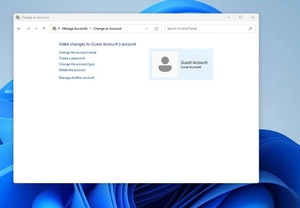
I have a personal administrator account that I use on a daily basis on Windows 11. I just created a guest account which is a standard account on my machine. As the name suggests, I will have guests at my house who will use my PC and I would like to configure what they can do with this account. I don't know what can be done. I wish : 1) that they can only access a specific folder in which they can put whatever they want. And so I would like them not to be able to access any other folder including C: 2) that they can only use a few programs that I have defined 3)Also, I wanted to change some visuals on the desktop and taskbar, but I can't access the guest account settings.29Views0likes2Comments