excel
44715 Topics
File always corrupt
Anyone have the same problem with me? I use microsoft excel 365 on my mac. At the beginning everything alright, until i use formula and then save the file. When i want to re-open the file, the messagebox showed up "we found something wrong in your content...". It gives 2 option, yes and no. If i click no, the file wont open. If i click yes, the file open, the excel do the recovery, the file open but end up with all the formulas is gone, deleted by excel and just left the value. What should i do? Do the file can still be fixed?41Views0likes2Comments
Excel Macros Issues
Hi all, A few years ago, a friend wrote a Macros for an excel sheet we use to populate an action plan. The concept is very simple. The Macros goes through the tab and pulls relevent cells through to an another tab creating an action plan. Each item goes under a heading and creates a new line. This has worked like a dream for the last 5 years. Just recently, the macros has started throwing up errors when i run it. Its having issues with Row Height, and doesn't finish running the script, and Excel just hangs. I've replicated this issue on a number of computers, new and old, and tried to swap between Mac and PC. This issue remains the same. The only commonality is the latest version of Excel. Unfortunately rolling back a version is not an option. Have MS updated something that would affect the way this Macros works? Can anyone suggest a solution? Any assistance is appreciated. Many thanks D.39KViews0likes2CommentsXLOOKUP search w/multiple output
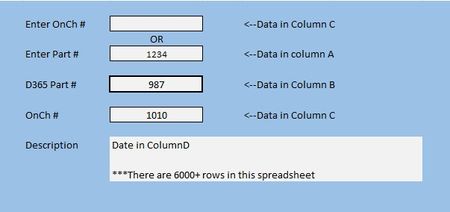
I've been working on a project and I am completely stumped. I cannot wrap my brain around how to get this to work. In the example below, I want to Enter a number in either of the top two field and have the last three fields populate. Now, I can get this to work for one, but not the other and for some reason when I switch from bottom search to the top search the old data doesn't clear and the search doesn't work. This is the formula I have so far //=XLOOKUP(H8,A2:A10606,B2:B10606) Anything I have done after has been a disasterSolved149Views0likes8Comments
EXCEL 360 COMPATABLE WITH 2010 XLSM FILES? THE MACROS IN VBA?
EXCEL 360 COMPATABLE WITH 2010 XLSM FILES? THE MACROS IN VBA? I developed a complete workbook the excel 2010 for my business and was wondering if I can use the new version of excel? Hoping that all the macros will work... Thanks for any help !! DaveSolved53Views0likes2Comments