best practices
1669 Topics
Unifying Scattered Observability Data from Dynatrace + Azure for Self-Healing with SRE Agent
What if your deployments could fix themselves? The Deployment Remediation Challenge Modern operations teams face a recurring nightmare: A deployment ships at 9 AM Errors spike at 9:15 AM By the time you correlate logs, identify the bad revision, and execute a rollback—it's 10:30 AM Your users felt 75 minutes of degraded experience The data to detect and fix this existed the entire time—but it was scattered across clouds and platforms: Error logs and traces → Dynatrace (third-party observability cloud) Deployment history and revisions → Azure Container Apps API Resource health and metrics → Azure Monitor Rollback commands → Azure CLI Your observability data lives in one cloud. Your deployment data lives in another. Stitching together log analysis from Dynatrace with deployment correlation from Azure—and then executing remediation—required a human to manually bridge these silos. What if an AI agent could unify data from third-party observability platforms with Azure deployment history and act on it automatically—every week, before users even notice? Enter SRE Agent + Model Context Protocol (MCP) + Subagents Azure SRE Agent doesn't just work with Azure. Using the Model Context Protocol (MCP), you can connect external observability platforms like Dynatrace directly to your agent. Combined with subagents for specialized expertise and scheduled tasks for automation, you can build an automated deployment remediation system. Here's what I built/configured for my Azure Container Apps environment inside SRE Agent: Component Purpose Dynatrace MCP Connector Connect to Dynatrace's MCP gateway for log queries via DQL 'Dynatrace' Subagent Log analysis specialist that executes DQL queries and identifies root causes 'Remediation' Subagent Deployment remediation specialist that correlates errors with deployments and executes rollbacks Scheduled Task Weekly Monday 9 AM health check for the 'octopets-prod-api' Container App Subagent workflow: The subagent workflow in SRE Agent Builder: 'OctopetsScheduledTask' triggers 'RemediationSubagent' (12 tools), which hands off to 'DynatraceSubagent' (3 MCP tools) for log analysis. How I Set It Up: Step by Step Step 1: Connect Dynatrace via MCP SRE Agent supports the Model Context Protocol (MCP) for connecting external data sources. Dynatrace exposes an MCP gateway that provides access to its APIs as first-class tools. Connection configuration: { "name": "dynatrace-mcp-connector", "dataConnectorType": "Mcp", "dataSource": "Endpoint=https://<your-tenant>.live.dynatrace.com/platform-reserved/mcp-gateway/v0.1/servers/dynatrace-mcp/mcp;AuthType=BearerToken;BearerToken=<your-api-token>" } Once connected, SRE Agent automatically discovers Dynatrace tools. 💡 Tip: When creating your Dynatrace API token, grant the `entities.read`, `events.read`, and `metrics.read` scopes for comprehensive access. Step 2: Build Specialized Subagents Generic agents are good. Specialized agents are better. I created two subagents that work together in a coordinated workflow—one for Dynatrace log analysis, the other for deployment remediation. DynatraceSubagent This subagent is the log analysis specialist. It uses the Dynatrace MCP tools to execute DQL queries and identify root causes. Key capabilities: Executes DQL queries via MCP tools (`create-dql`, `execute-dql`, `explain-dql`) Fetches 5xx error counts, request volumes, and spike detection Returns consolidated analysis with root cause, affected services, and error patterns 👉 View full DynatraceSubagent configuration here RemediationSubagent This is the deployment remediation specialist. It correlates Dynatrace log analysis with Azure Container Apps deployment history, generates correlation charts, and executes rollbacks when confidence is high. Key capabilities: Retrieves Container Apps revision history (`GetDeploymentTimes`, `ListRevisions`) Generates correlation charts (`PlotTimeSeriesData`, `PlotBarChart`, `PlotAreaChartWithCorrelation`) Computes confidence score (0-100%) for deployment causation Executes rollback and traffic shift when confidence > 70% 👉 View full RemediationSubagent configuration here The power of specialization: Each agent focuses on its domain—DynatraceSubagent handles log analysis, RemediationSubagent handles deployment correlation and rollback. When the workflow runs, RemediationSubagent hands off to DynatraceSubagent (bi-directional handoff) for analysis, gets the findings back, and continues with remediation. Simple delegation, not a single monolithic agent trying to do everything. Step 3: Create the Weekly Scheduled Task Now the automation. I configured a scheduled task that runs every Monday at 9:30 AM to check whether deployments in the last 4 hours caused any issues—and automatically remediate if needed. Scheduled task configuration: Setting Value Task Name OctopetsScheduledTask Frequency Weekly Day of Week Monday Time 9:30 AM Response Subagent RemediationSubagent Scheduled Task Configuration Configuring the OctopetsScheduledTask in the SRE Agent portal The key insight: the scheduled task is just a coordinator. It immediately hands off to the RemediationSubagent, which orchestrates the entire workflow including handoffs to DynatraceSubagent. Step 4: See It In Action Here's what happens when the scheduled task runs: The scheduled task triggering and initiating Dynatrace analysis for octopets-prod-api The DynatraceSubagent analyzes the logs and identifies the root cause: executing DQL queries and returning consolidated log analysis The RemediationSubagent then generates correlation charts: Finally, with a 95% confidence score, SRE agent executes the rollback autonomously: executing rollback and traffic shift autonomously. The agent detected the bad deployment, generated visual evidence, and automatically shifted 100% traffic to the last known working revision—all without human intervention. Why This Matters Before After Manually check Dynatrace after incidents Automated DQL queries via MCP Stitch together logs + deployments manually Subagents correlate data automatically Rollback requires human decision + execution Confidence-based auto-remediation 75+ minutes from deployment to rollback Under 5 Minutes with autonomous workflow Reactive incident response Proactive weekly health checks Try It Yourself Connect your observability tool via MCP (Dynatrace, Datadog, New Relic, Prometheus—any tool with an MCP gateway) Build a log analysis subagent that knows how to query your observability data Build a remediation subagent that can correlate logs with deployments and execute fixes Wire them together with handoffs so the subagents can delegate log analysis Create a scheduled task to trigger the workflow automatically Learn More Azure SRE Agent documentation Model Context Protocol (MCP) integration guide Building subagents for specialized workflows Scheduled tasks and automation SRE Agent Community Azure SRE Agent pricing SRE Agent Blogs528Views0likes0Comments
Using Azure API Management with Azure Front Door for Global, Multi‑Region Architectures
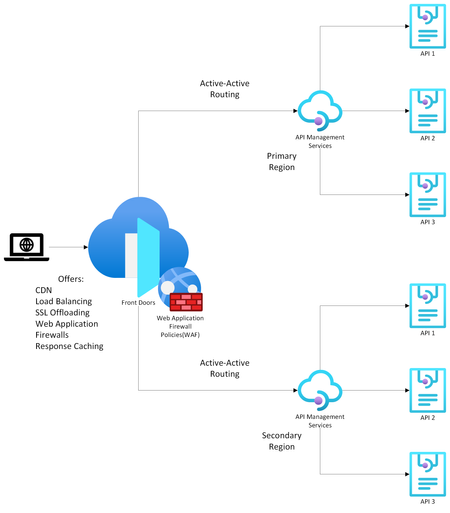
Modern API‑driven applications demand global reach, high availability, and predictable latency. Azure provides two complementary services that help achieve this: Azure API Management (APIM) as the API gateway and Azure Front Door (AFD) as the global entry point and load balancer. Going over the available documentation available, my team and I found this article on how to front a single-region APIM with an Azure Front Door , but we wanted to extend this to a multi-region APIM as well. That led us to design the solution detailed in this article which explains how to configure multi‑regional, active‑active APIM behind Azure Front Door using Custom origins and regional gateway endpoints. (I have also covered topics like why organizations commonly pair APIM with Front Door, when to use internal vs. external APIM modes, etc. but main topic first! Scroll down to the bottom for more info). Configuring Multi‑Regional APIM with Azure Front Door WHAT TO KNOW: If using APIM Premium with multi‑region gateways, each region exposes its own regional gateway endpoint, formatted as: https://<service-name>-<region>-01.regional.azure-api.net Examples: https://mydemo-apim-westeurope-01.regional.azure-api.net https://mydemo-apim-eastus-01.regional.azure-api.net where 'mydemo' is the name of the APIM instance. You will use these regional endpoints and configure them as a separate origin in Azure Front Door—using the Custom origin type. Solution Architecture Azure Front Door Configuration Steps 1. Create an Origin Group Inside your Front Door profile, define a group (Settings -> Origin Groups - > Add -> Add an origin) that will contain all APIM regional gateways. See images below: 2. Add Each APIM Region as a Custom Origin Use the Custom origin type: Origin type: Custom Host name: Use the APIM regional endpoint Example: mydemo-apim-westeurope-01.regional.azure-api.net Origin host header: Same as the host name. Enable certificate subject name validation (Recommended when private link or TLS integrity is required.) Priority: Lower value = higher priority (for failover). Weight: Controls how traffic is distributed across equally prioritized origins. Status: Enable origin. And repeat the same steps for additional APIM regions giving them priority and weightage as you feel appropriate. How to Know Which Region is being Invoked To test this setup, create 2 Virtual Machines (VMs) in Azure - one for each region. For this guide, we chose to create the VMs in West Europe and East US. Open up a Command Prompt from the VM and do a curl on the sample Echo API that comes with every new APIM deployment: Example: curl -v "afd-blah.b01.azurefd.net/echo/resource?param1=sample" Your results should show the region being hit as shown below: How AFD Routes Traffic Across Multiple APIM Regions AFD evaluates origins in this order: Available instances — the Health Probe removes unhealthy origins Priority — selects highest‑priority available origins Latency — optionally selects lowest‑latency pool Weight — round‑robin distribution across selected origins Example When origins are configured as below: West Europe (priority 1, weight 1000) East US (priority 1, weight 500) Central US (priority 2, weight 1000) AFD will: Use West Europe + East US in a 1000:500 ratio. Only use Central US if both West Europe & East US become unavailable. For more information on this nice algorithm, see here: Traffic routing methods to origin - Azure Front Door | Microsoft Learn More Info (as promised) Why Use Azure API Management? Azure API Management is a fully managed service providing: 1. Centralized API Gateway Enforces policies such as authentication, rate limiting, transformations, and caching. Acts as a single façade for backend services, enabling modernization without breaking existing clients. 2. Security & Governance Integrates with Azure AD, OAuth2, and mTLS (mutual TLS). Provides threat protection and schema validation. 3. Developer Ecosystem Developer portal, API documentation, testing console, versioning, and releases. 4. Multi‑Region Gateways (Premium Tier) Allows deployment of additional regional gateways for active‑active, low‑latency global experiences. APIM Deployment Modes: Internal vs. External External Mode The APIM gateway is reachable publicly over the internet. Common when: Exposing APIs to partners, mobile apps, or public clients. You can easily front this with an Azure Front Door for reasons listed in the next section. Internal Mode APIM gateway is deployed inside a VNet, accessible only privately. Used when: APIs must stay private to an enterprise network. Only internal consumers/VPN/VNet peered systems need access. To make your APIM publicly accessible, you need to front it with both an Application Gateway and an Azure Front Door because: Azure Front Door (AFD) cannot directly reach an internal‑mode APIM because AFD requires a publicly routable origin. Application Gateway is a Layer‑7 reverse proxy that can expose a public frontend while still reaching internal private backends (like APIM gateway). [Ref] But Why Put Azure Front Door in Front of API Management? Azure Front Door provides capabilities that APIM alone does not offer: 1. Global Load Balancing As discussed above. 2. Edge Security Web Application Firewall, TLS termination at the edge, DDoS absorption. Reduces load on API gateways. 3. Faster Global Performance Anycast network and global POPs reduce round‑trip latency before requests hit APIM. A POP (Point of Presence) is an Azure Front Door edge location—a physical site in Microsoft’s global network where incoming user traffic first lands. Azure Front Door uses numerous global and local POPs strategically placed close to end‑users (both enterprise and consumer) to improve performance. Anycast is a networking protocol Azure Front Door uses to improve global connectivity. Ref: Traffic acceleration - Azure Front Door | Microsoft Learn 4. Unified Global Endpoint A single public endpoint (e.g., https://api.contoso.com) that intelligently distributes traffic across multiple APIM regions. With all of the above features, it is best to pair API Management with a Front Door, especially when dealing with multi-region architectures. Credits: Junee Singh, Senior Solution Engineer at Microsoft Isiah Hudson, Senior Solution Engineer at MicrosoftUpcoming webinar: Maximize the Cost Efficiency of AI Agents on Azure
AI agents are quickly becoming central to how organizations automate work, engage customers, and unlock new insights. But as adoption accelerates, so do questions about cost, ROI, and long-term sustainability. That’s exactly what the Maximize the Cost Efficiency of AI Agents on Azure webinar is designed to address. The webinar will provide practical guidance on building and scaling AI agents on Azure with financial discipline in mind. Rather than focusing only on technology, the session helps learners connect AI design decisions to real business outcomes—covering everything from identifying high-impact use cases and understanding cost drivers to forecasting ROI. Whether you’re just starting your AI journey or expanding AI agents across the enterprise, the session will equip you with strategies to make informed, cost-conscious decisions at every stage—from architecture and model selection to ongoing optimization and governance. Who should attend? If you are in one of these roles and are a decision maker or can influence decision makers in AI decisions or need to show ROI metrics on AI, this session is for you. Developer Administrator Solution Architect AI Engineer Business Analyst Business User Technology Manager Why attending the webinar? In the webinar, you’ll hear how to translate theory into real-world scenarios, walk through common cost pitfalls, and show how organizations are applying these principles in practice. Most importantly, the webinar helps you connect the dots faster, turning what you’ve learned into actionable insights you can apply immediately, ask questions live, and gain clarity on how to maximize ROI while scaling AI responsibly. If you care about building AI agents that are not only innovative but also efficient, governable, and financially sustainable, this training—and this webinar that complements it—are well worth your time. Register for the free webinar today for the event on March 5, 2026, 8:00 AM - 9:00 AM (UTC-08:00) Pacific Time (US & Canada). Who will speak at the webinar? Your speakers will be: Carlotta Castelluccio: Carlotta is a Senior AI Advocate with the mission of helping every developer to succeed with AI, by building innovative solutions responsibly. To achieve this goal, she develops technical content, and she hosts skilling sessions, enabling her audience to take the most out of AI technologies and to have an impact on Microsoft AI products’ roadmap. Nitya Narasimhan: Nitya is a PhD and Polyglot with 25+ years of software research & development experience spanning mobile, web, cloud and AI. She is an innovator (12+ patents), a visual storyteller (@sketchtedocs), and an experienced community builder in the Greater New York area. As a senior AI Advocate on the Core AI Developer Relations team, she acts as "developer 0" for the Microsoft Foundry platform, providing product feedback and empowering AI developers to build trustworthy AI solutions with code samples, open-source curricula and content-initiatives like Model Mondays. Prior to joining Microsoft, she spent a decade in Motorola Labs working on ubiquitous & mobile computing research, founded Google Developer Groups in New York, and consulted for startups building real-time experiences for enterprise. Her current interests span Model understanding & customization, E2E Observability & Safety, and agentic AI workflows for maintainable software. Moderator Lee Stott is a Principal Cloud Advocate at Microsoft, working in the Core AI Developer Relations Team. He helps developers and organizations build responsibly with AI and cloud technologies through open-source projects, technical guidance, and global developer programs. Based in the UK, Lee brings deep hands-on experience across AI, Azure, and developer tooling. .
Autofilter Channel Posts
We manage a variety of digital products for a large user base across many different countries and want to curate our comms to limit irrelevant posts reaching users unnecessarily. For example a post about "Product A affecting Country X" should not reach "Country Y". What is the best practice here? Currently we've opted for a central channel with tags to assist users in managing their notifications, but they will still see all posts when visiting the channel and will need to self-filter. Is there a way for us to configure the channel so they only see posts they are tagged in? I know we could set up individual channels for each Product+Country combination but then any common posts we make would need to be duplicated into each channel separately. Thinking out loud, I suppose if we automate our posts with a workflow/AI then discrete channels is a good solution to keep things organised. Any ideas or feedback please?37Views0likes1CommentIndustry-Wide Certificate Changes Impacting Azure App Service Certificates
Executive Summary In early 2026, industry-wide changes mandated by browser applications and the CA/B Forum will affect both how TLS certificates are issued as well as their validity period. The CA/B Forum is a vendor body that establishes standards for securing websites and online communications through SSL/TLS certificates. Azure App Service is aligning with these standards for both App Service Managed Certificates (ASMC, free, DigiCert-issued) and App Service Certificates (ASC, paid, GoDaddy-issued). Most customers will experience no disruption. Action is required only if you pin certificates or use them for client authentication (mTLS). Update: February 17, 2026 We’ve published new Microsoft Learn documentation, Industry-wide certificate changes impacting Azure App Service , which provides more detailed guidance on these compliance-driven changes. The documentation also includes additional information not previously covered in this blog, such as updates to domain validation reuse, along with an expanding FAQ section. The Microsoft Learn documentation now represents the most complete and up-to-date overview of these changes. Going forward, any new details or clarifications will be published there, and we recommend bookmarking the documentation for the latest guidance. Who Should Read This? App Service administrators Security and compliance teams Anyone responsible for certificate management or application security Quick Reference: What’s Changing & What To Do Topic ASMC (Managed, free) ASC (GoDaddy, paid) Required Action New Cert Chain New chain (no action unless pinned) New chain (no action unless pinned) Remove certificate pinning Client Auth EKU Not supported (no action unless cert is used for mTLS) Not supported (no action unless cert is used for mTLS) Transition from mTLS Validity No change (already compliant) Two overlapping certs issued for the full year None (automated) If you do not pin certificates or use them for mTLS, no action is required. Timeline of Key Dates Date Change Action Required Mid-Jan 2026 and after ASMC migrates to new chain ASMC stops supporting client auth EKU Remove certificate pinning if used Transition to alternative authentication if the certificate is used for mTLS Mar 2026 and after ASC validity shortened ASC migrates to new chain ASC stops supporting client auth EKU Remove certificate pinning if used Transition to alternative authentication if the certificate is used for mTLS Actions Checklist For All Users Review your use of App Service certificates. If you do not pin these certificates and do not use them for mTLS, no action is required. If You Pin Certificates (ASMC or ASC) Remove all certificate or chain pinning before their respective key change dates to avoid service disruption. See Best Practices: Certificate Pinning. If You Use Certificates for Client Authentication (mTLS) Switch to an alternative authentication method before their respective key change dates to avoid service disruption, as client authentication EKU will no longer be supported for these certificates. See Sunsetting the client authentication EKU from DigiCert public TLS certificates. See Set Up TLS Mutual Authentication - Azure App Service Details & Rationale Why Are These Changes Happening? These updates are required by major browser programs (e.g., Chrome) and apply to all public CAs. They are designed to enhance security and compliance across the industry. Azure App Service is automating updates to minimize customer impact. What’s Changing? New Certificate Chain Certificates will be issued from a new chain to maintain browser trust. Impact: Remove any certificate pinning to avoid disruption. Removal of Client Authentication EKU Newly issued certificates will not support client authentication EKU. This change aligns with Google Chrome’s root program requirements to enhance security. Impact: If you use these certificates for mTLS, transition to an alternate authentication method. Shortening of Certificate Validity Certificate validity is now limited to a maximum of 200 days. Impact: ASMC is already compliant; ASC will automatically issue two overlapping certificates to cover one year. No billing impact. Frequently Asked Questions (FAQs) Will I lose coverage due to shorter validity? No. For App Service Certificate, App Service will issue two certificates to span the full year you purchased. Is this unique to DigiCert and GoDaddy? No. This is an industry-wide change. Do these changes impact certificates from other CAs? Yes. These changes are an industry-wide change. We recommend you reach out to your certificates’ CA for more information. Do I need to act today? If you do not pin or use these certs for mTLS, no action is required. Glossary ASMC: App Service Managed Certificate (free, DigiCert-issued) ASC: App Service Certificate (paid, GoDaddy-issued) EKU: Extended Key Usage mTLS: Mutual TLS (client certificate authentication) CA/B Forum: Certification Authority/Browser Forum Additional Resources Changes to the Managed TLS Feature Set Up TLS Mutual Authentication Azure App Service Best Practices – Certificate pinning DigiCert Root and Intermediate CA Certificate Updates 2023 Sunsetting the client authentication EKU from DigiCert public TLS certificates Feedback & Support If you have questions or need help, please visit our official support channels or the Microsoft Q&A, where our team and the community can assist you.2.2KViews1like0CommentsIs it possible to open up Teams for a dynamic group?
When I set up an intranet for our companies in SharePoint alone, I always create them as a Team site (we have over 200 companies in one tenant). In SharePoint I use dynamic groups "All-Users-Company" so users in each company have access by default. BUT... when they open Teams, they can't see their company's team unless they're added as a member of the site. I would love if Teams would "see/add" users from a dynamic group in SharePoint so they automatically have access to their own Teams site as well - is this possible? 💫🤗💫💫💫610Views0likes4CommentsAzure Default Outbound Access Changes: Guidance for Windows 365 ANC Customers
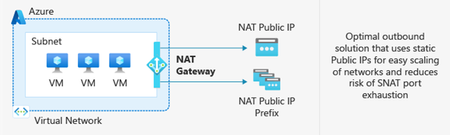
After March 31, 2026, newly created Azure Virtual Networks (VNets) will no longer have default outbound internet access enabled by default. Windows 365 customers choosing Azure Network Connection as a deployment option must configure outbound connectivity explicitly when setting up new VNets. This post explains what’s changing, who’s impacted, and the recommended actions, including Azure Private Subnets and Microsoft Hosted Network. What is Default Outbound Access (DOA)? Default Outbound Access is Azure’s legacy behavior that allowed all resources in a virtual network to reach the public internet without configuring a specific internet egress path. This allowed telemetry, Windows activation, and other service dependencies to reach external endpoints even when no explicit outbound connectivity method was configured. What’s changing? After March 31, 2026, as detailed in Azure’s communications, Azure will no longer enable DOA by default for new virtual networks, instead the VNet will be configured for Private Subnet option, allowing you to designate subnets without internet access for improved isolation and compliance. These changes encourage more intentional, secure network configurations while offering flexibility for different workload needs. Disabling Private Subnet option will allow administrators to restore DOA capabilities to the VNet, although Microsoft strongly recommends using Azure NAT Gateway. Impact on Windows 365 Azure Network Connection Customers For Windows 365 Azure Network Connection (ANC) deployments using virtual networks created after March 31, 2026, new VNets will default to private subnets. Outbound internet access must be explicitly configured for the VNet; otherwise, Cloud PC provisioning will fail. Existing virtual networks are not affected and will continue using their current internet access configuration. Note on Microsoft-hosted network: For Microsoft-hosted network deployments, which is the Microsoft recommended deployment model for Windows 365, Microsoft fully provides and manages the underlying connectivity in Azure on your behalf. There is no impact or change needed for those deployments. What You Should Do To prepare for Azure’s Default Outbound Access changes and ensure your Windows 365 ANC deployments remain secure and functional: Recommendations Transition to Microsoft-hosted network (MHN) if possible. MHN provides secure, cost-effective connectivity with outbound internet access by default, reducing operational overhead and ensuring compliance with Azure’s updated standards. Update deployment plans to ensure either an explicit NAT, such as a NAT Gateway or Default Outbound access (not recommended) is enabled by disabling the Private Subnet option. Test connectivity to ensure all services dependent on outbound access continue to function as expected, and that the ANC does not enter a failed state. Supported Outbound Access Methods To maintain connectivity, choose one of these supported methods: NAT Gateway (recommended) Note: Direct RDP Shortpath (UDP over STUN) cannot be established through a NAT Gateway because its symmetric NAT policy prevents direct UDP connectivity over public networks. Azure Standard Load Balancer Azure Firewall or third-party Network Virtual Appliance (NVA). Note, it is not recommended to route RDP or other long-lived connections through Azure Firewall or any other network virtual appliance which allows for automatic scale-in. A direct method such as NAT Gateway should be used. More information about the pros and cons for each method can be found at Default Outbound Access. Resources: Azure updates | Microsoft Azure Default Outbound Access in Azure Transition to an explicit method of public connectivity | Microsoft Learn Deploy Microsoft Hosted Network (MHN) QuickStart: Create a NAT Gateway Optimizing RDP Connectivity for Windows 365 | Microsoft Community Hub Quick FAQ Does this affect existing VNets? No. Only new VNets created after March 31, 2026, are affected. Existing VNets will continue to operate as normal. Do Microsoft Hosted Network deployments require changes? No. MHN already includes managed egress. What if I do nothing on a new VNet? ANC checks will fail because the VNet does not have internet access. Configure NAT Gateway or another supported method. What are the required endpoints? Please see here for a list of the endpoints required. Why might peer-to-peer connectivity using STUN-based UDP hole punching not work when using NAT Gateway? NAT Gateway uses a type of network address translation that does not support STUN (Simple Traversal Underneath NAT) based connections. This will prevent STUN-based UDP hole punching, commonly used for establishing peer-to-peer connections, from working as expected. If your application relies on reliable UDP connectivity between peers, STUN may revert to TURN (Traversal Using Relays around NAT) in some instances. TURN relays traffic between endpoints, ensuring consistent connectivity even when direct peer-to-peer paths are blocked. This helps maintain smooth real-time experiences for your users. What explicit outbound options support STUN? Azure Standard Load Balancer supports UDP over STUN. How do I configure Azure Firewall? For additional security you can configure Azure Firewall using these instructions https://learn.microsoft.com/en-us/azure/firewall/protect-azure-virtual-desktop?context=/azure/virtual-desktop/context/context . It is strongly recommended that a direct method of access is used for RDP and other long-lived connections such as VPN or Secure Web Gateway tunnels. This is due to devices such as Azure firewall scaling in when load is low which can disrupt connectivity. Wrap-up Azure’s change reinforces intentional networking for better security. By planning explicit egress (or choosing MHN), Windows 365 ANC customers can stay compliant and keep Cloud PCs reliably connected.1.2KViews0likes1CommentMCP-Driven Azure SRE for Databricks
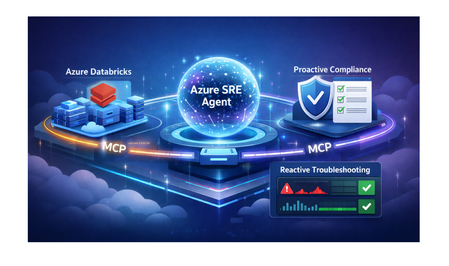
Azure SRE Agent is an AI-powered operations assistant built for incident response and governance. MCP (Model Context Protocol) is the standard interface it uses to connect to external systems and tools. Azure SRE Agent integrates with Azure Databricks through the Model Context Protocol (MCP) to provide: Proactive Compliance - Automated best practice validation Reactive Troubleshooting - Root cause analysis and remediation for job failures This post demonstrates both capabilities with real examples. Architecture The Azure SRE Agent orchestrates Ops Skills and Knowledge Base prompts, then calls the Databricks MCP server over HTTPS. The MCP server translates those requests into Databricks REST API calls, returns structured results, and the agent composes findings, evidence, and remediation. End-to-end, this yields a single loop: intent -> MCP tool calls -> Databricks state -> grounded response. Deployment The MCP server runs as a containerized FastMCP application on Azure Container Apps, fronted by HTTPS and configured with Databricks workspace connection settings. It exposes a tool catalog that the agent invokes through MCP, while the container handles authentication and REST API calls to Databricks. 👉 For deployment instructions, see the GitHub repository. Getting Started Deploy the MCP Server: Follow the quickstart guide to deploy to Azure Container Apps (~30 min) Configure Azure SRE Agent: Create MCP connector with streamable-http transport Upload Knowledge Base from Builder > Knowledge Base using the Best Practices doc: AZURE_DATABRICKS_BEST_PRACTICES.md Benefit: Gives the agent authoritative compliance criteria and remediation commands. Create Ops Skill from Builder > Subagent Builder > Create skill and drop the Ops Skill doc: DATABRICKS_OPS_RUNBOOK_SKILL.md Benefit: Adds incident timelines, runbooks, and escalation triggers to responses. Deploy the subagent YAML: Databricks_MCP_Agent.yaml Benefit: Wires the MCP connector, Knowledge Base, and Ops Skill into one agent for proactive and reactive workflows. Integrate with Alerting: Connect PagerDuty/ServiceNow webhooks Enable auto-remediation for common issues Part 1: Proactive Compliance Use Case: Best Practice Validation Prompt: @Databricks_MCP_Agent: Validate the Databricks workspace for best practices compliance and provide a summary, detailed findings, and concrete remediation steps. What the Agent Does: Calls MCP tools to gather current state: list_clusters() - Audit compute configurations list_catalogs() - Check Unity Catalog setup list_jobs() - Review job configurations execute_sql() - Query governance policies Cross-references findings with Knowledge Base (best practices document) Generates prioritized compliance report Expected Output: Benefits: Time Savings: 5 minutes vs. 2-3 hours manual review Consistency: Same validation criteria across all workspaces Actionable: Specific remediation steps with code examples Part 2: Reactive Incident Response Example 1: Job Failure - Non-Zero Exit Code Scenario: Job job_exceptioning_out fails repeatedly due to notebook code errors. Prompt: Agent Investigation - Calls MCP Tools: get_job() - Retrieves job definition list_job_runs() - Gets recent run history (4 failed runs) get_run_output() - Analyzes error logs Root Cause Analysis: Expected Outcome: Root Cause Identified: sys.exit(1) in notebook code Evidence Provided: Job ID, run history, code excerpt, settings Confidence: HIGH (explicit failing code present) Remediation: Fix code + add retry policy Resolution Time: 3-5 minutes (vs. 30-45 minutes manual investigation) Example 2: Job Failure - Task Notebook Exception Scenario: Job hourly-data-sync fails repeatedly due to exception in task notebook. Prompt: Agent Investigation - Calls MCP Tools: get_job() - Job definition and task configuration list_job_runs() - Recent runs show "TERMINATED with TIMEOUT" execute_sql() - Queries notebook metadata Root Cause Analysis: Expected Outcome: Root Cause Identified: Exception at line 7 - null partition detected Evidence: Notebook path, code excerpt (lines 5-7), run history (7 consecutive failures) Confidence: HIGH (explicit failing code + TIMEOUT/queue issues) Remediation: Fix exception handling + add retry policy Resolution Time: 5-8 minutes (vs. 45+ minutes manual log analysis) Key Benefits Proactive Governance ✅ Continuous compliance monitoring ✅ Automated best practice validation ✅ 95% reduction in manual review time Reactive Incident Response 🚨 Automated root cause analysis ⚡ 80-95% reduction in MTTR 🧠 Context-aware remediation recommendations 📊 Evidence-based troubleshooting Operational Impact Metric Before After Improvement Compliance review time 2-3 hours 5 minutes 95% Job failure investigation 30-45 min 3-8 min 85% On-call alerts requiring intervention 4-6 per shift 1-2 per shift 70% Conclusion Azure SRE Agent transforms Databricks operations by combining proactive governance with reactive troubleshooting. The MCP integration provides: Comprehensive visibility into workspace health Automated compliance monitoring and validation Intelligent incident response with root cause analysis Self-healing capabilities for common failures Result: Teams spend less time firefighting and more time building. Resources 📘 Deployment Guide 🤖 Subagent Configuration 📋 Best Practices Document 🧰 Ops Skill Runbook 🔧 Validation Script 📖 Azure SRE Agent Documentation 📰 Azure SRE Agent Blogs 📜 MCP Specification Questions? Open an issue on GitHub or reach out to the Azure SRE team.479Views0likes0Comments