Forum Discussion

AnatolyD
Oct 13, 2020Copper Contributor
Conditional Formatting SharePoint List
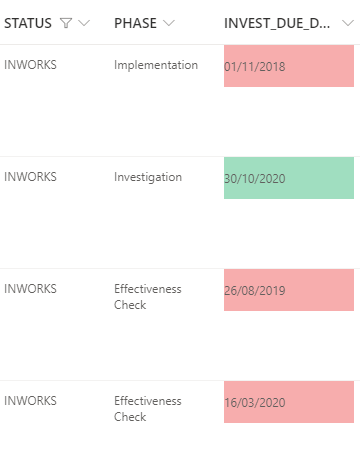
Hello team, I need your support with conditional JSON formatting of SharePoint list. I would like to format column INVEST_DUE_DATE based on current date (date cell) and based on value in colu...

AnatolyD
Oct 13, 2020Copper Contributor
Hello! thanks.
I tried this one
{
"$schema": "https://developer.microsoft.com/json-schemas/sp/v2/column-formatting.schema.json",
"elmType": "div",
"txtContent": "@currentField",
"style": {
"background-color": "=if((@currentField < @now) && [PHASE]='Investigation', '#f7adad', if((@currentField <= @now + 864000000) && [PHASE]='Investigation', '#f2d596', if((@currentField >= @now + 864000000) && [PHASE]='Investigation' , '#a0dec0', '')))"
}
}
But something is wrong....
Column values disappear, like with a wrong condition.
You proposed an option for 2 colors, but I m using 3 colors.
Sorry, I m not familiar with this syntax....
Column name is "PHASE"

RobElliott
Oct 13, 2020Silver Contributor
AnatolyD when you're referencing a SharePoint column in JSON the column name must always have a $ symbol before the column name, so you need to change [PHASE] to [$PHASE].
Rob
Los Gallardos
Microsoft Power Automate Community Super User