Forum Discussion

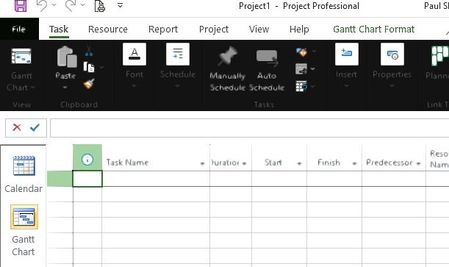
Project - Blurry and Inverted Black/Blocky Areas
 Sep 18, 2022
Stripester
Resolution: Integrated Graphics card settings
I had the same issue w/ JUST Project, and it was not easy searching for others with same issue & finding a solution. Your screenshots were very helpful !
See the setting I changed to resolve - I had an Intel HD Graphics controller.
When I turned OFF the CONSERVATIVE MORPHOLOGICAL ANTI-ALIASING, It fixed the issue with MS Project.
SEE PICS BELOW
In case image does not come through...
-type in at start search bar "Graphics Settings" - if the Project does not appear browse for the loation of Project: "C:\Program Files\Microsoft Office\root\Office16\WINPROJ.EXE" and set it to appear.
-Now set to high performance
For me to get to the setting:
-Next Task is to find your graphics controller setting and turn anti-aliasing off.
Goto SETTINGS - > DISPLAY on left side -> scroll down and click on DISPLAY ADAPTER PROPERTIES FOR DISPLAY 1 - > on pop-up screen it lists your Adapter type, here it was my Intel HD Graphics card CLICK TAB Intel HD Graphics Control Panel -> Click GRAPHIC PROPERTIES.... goto 3D settings -> turn off ANTI_ALIASING
all other settings can still be High Performance.Also you may be able to see the Display Controller if you right click on task manager and see its icon there.
http://prntscr.com/LFS_-x8XtfUH
http://prntscr.com/iUjZv45MVO8m
http://prntscr.com/ElrGVyJWzFOm
Hope this helps.
JD

Thanks John,
Yes I have tried the Graphics Card VRAM change and uninstalling and reinstalling.
Its odd, because all my other Office Apps work fine (in fact everything does) and the graphics card is what I consider to be good for what I need it to do is a 2Gb Graphics Memory on the Intel(R) HD Graphics Family card.
Frustrating to say the least...

So you're saying this only effects Project. What version of Project are you using?
You say you tried changing the Theme and Background settings and it "still performs the same". What exactly does that mean? Are you saying you always get the black background regardless of the theme and background setting?
John
- StripesterNov 30, 2021Copper Contributor
Hi John,
The effect is random to where it happens, but always black/blocky/blurry menus and same with the backstage page....It only effect project, I have Project 16.0.14527.20276.A couple more examples attached...Notice the blurred text also...
- John-projectNov 30, 2021Silver Contributor
Stripester,
I ask again, if you switch the Office Theme to a different setting, say "white", will the change take effect but then periodically present the black/blocky/blurry issue, or does the new setting stay?
Is it possible you only see the issue with Project because you use Project more than other Office apps or do you use other apps just as often?
In Project does the issue only occur with a particular view (e.g. Gantt Chart)?Just curious, do you have speech recognition turned on? If so, try turning it off.
I also notice that in your first posted screen shots you have the default Calibri 11 font but then I notice in your latest screen shots you show an Arial 8 font. I suggest you stick with the Calibri font as I have seen/heard of graphic issues with other fonts.
John- StripesterDec 01, 2021Copper Contributor
Responses below -
I ask again, if you switch the Office Theme to a different setting, say "white", will the change take effect but then periodically present the black/blocky/blurry issue, or does the new setting stay? Change takes effect and then the black/blocky/burry issues happens almost immediately, but not as much if using "White"
Is it possible you only see the issue with Project because you use Project more than other Office apps or do you use other apps just as often? I used all office apps every day, only effects Project
In Project does the issue only occur with a particular view (e.g. Gantt Chart)? Happens in all ViewsJust curious, do you have speech recognition turned on? If so, try turning it off. Turned off
I also notice that in your first posted screen shots you have the default Calibri 11 font but then I notice in your latest screen shots you show an Arial 8 font. I suggest you stick with the Calibri font as I have seen/heard of graphic issues with other fonts. Its defaults as Calibri 11, I had opened someone's else Programme open, the font doesnt seem to have an effect on the issue