Forum Discussion

Planner with Flow - issues with Group Id and Plan Id
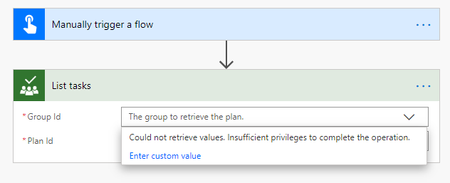

Ethan_Zhang the GroupID can be seen as the 'owner' field if you make a graph call to get the Planner plan with the PlanID - so a call to Graph like https://graph.microsoft.com/v1.0/planner/plans/<plan id here> will return:

Brian-Smith Thanks for your kindly help! Although, I don't know how to make a graph call, could you share some useful reference link so that I can do some research for it? Very appreciate it!
- Brian-SmithAug 21, 2020Former Employee
Ethan_Zhang no problem, and plenty of resources at https://developer.microsoft.com/en-us/graph and an easy way to see how the calls work at https://developer.microsoft.com/en-us/graph/graph-explorer. To make the call from Power Automate does need some setup, as it is protected by needing to pass in a ClientID - this article does a walk through explaining this part https://www.c-sharpcorner.com/article/calling-graph-api-from-power-automate-flow/. Hopefully that will help you get what you need from your Flow.
Best regards,
Brian
- Ethan_ZhangAug 21, 2020Copper Contributor
Brian-Smith Cool~ Thanks your guidance! I will take a look later.